Re @euguuu !! I just tested your PR, it’s still great for me in terms of connection. However, I have a small issue, I have set the language of Gladys to French, but on the dashboard when I display the elements of my scale (via Room Devices), the labels are in English
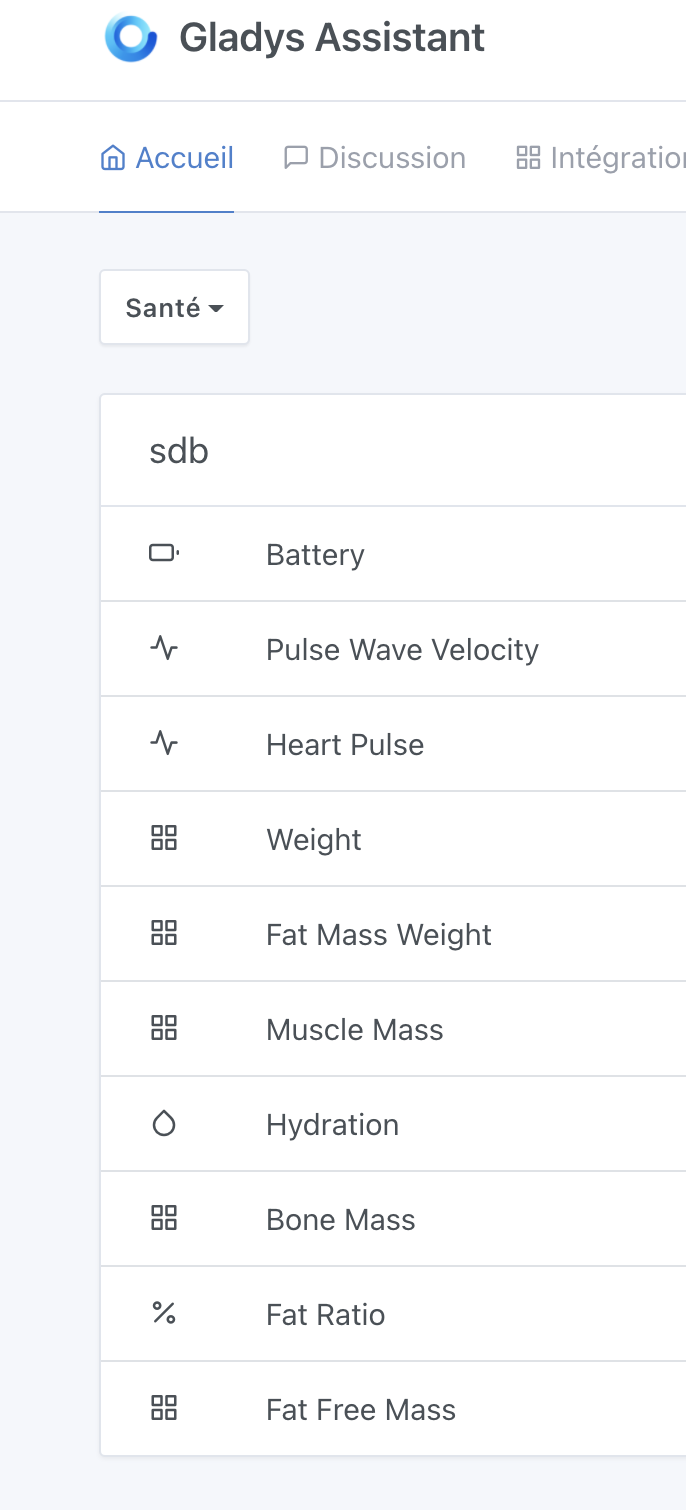
It appears to be the default name of the device features.
Theoretically, you should be able to modify these labels from the device configuration page of the service.
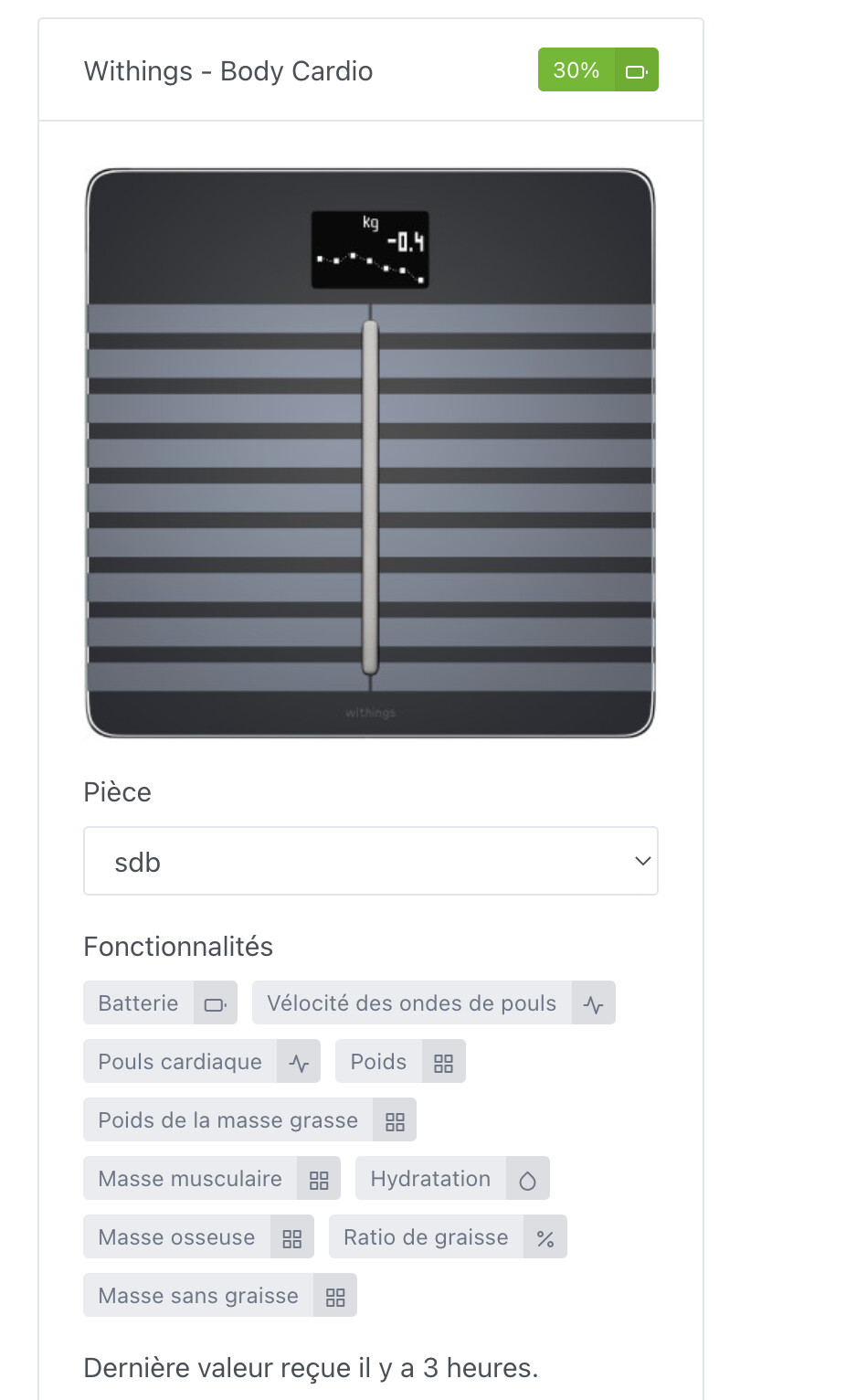
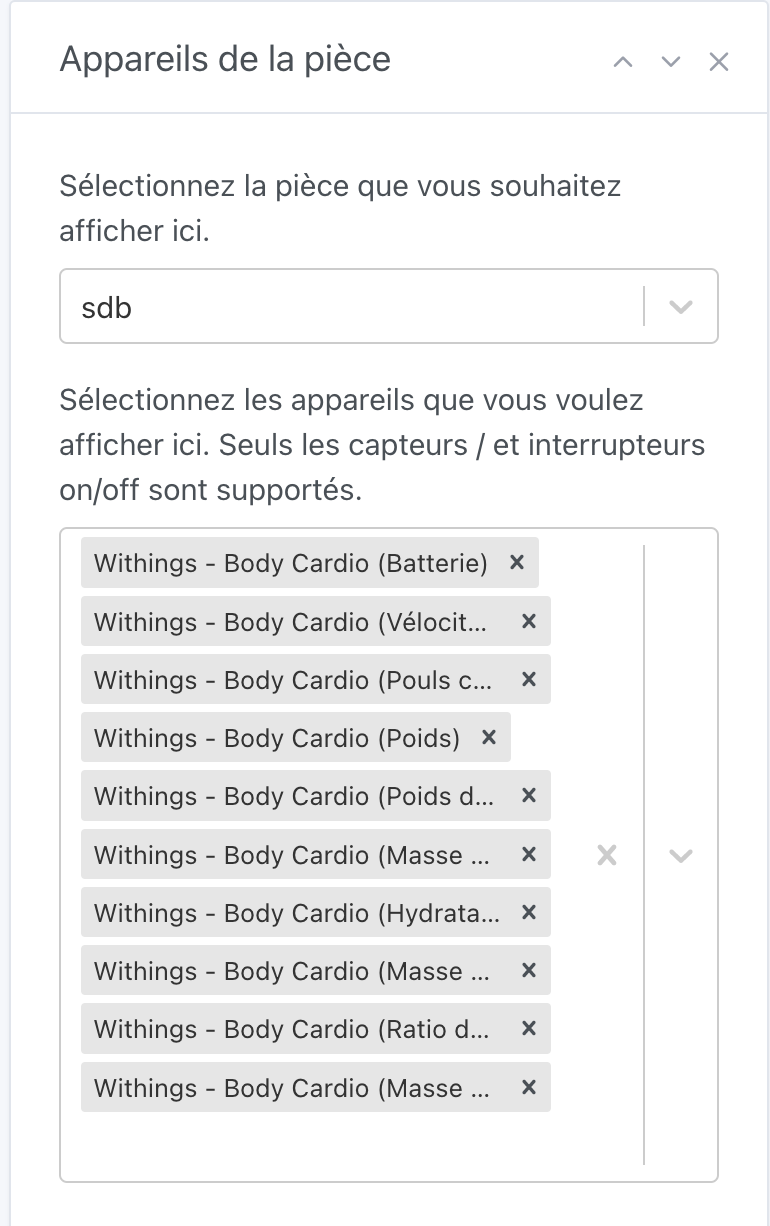
On the first screenshot, don’t you have an « Edit » button?
I just re-did the test entirely! And at no point can I modify the displayed label.
@AlexTrovato the first screenshot you’re talking about is normally my dashboard so I do have an Edit button, but I can only add the features to display, not customize them.
I just looked at the code, and indeed, if I look at what has been done, I think it’s the name of the device features that is hardcoded and therefore not translated in this case!
I was talking about the screenshot with the image of the scale, the 1st of the 2nd post, or the 2nd screenshot 
In any case, it should be possible to edit the names of the features.
thanks @Legw4nn for your feedback
I will look into the translation issue on the dashboard display
and I will make sure we can edit the feature names, that’s not planned yet
Hello, I have a scale if you need an additional tester.
Hello @euguuu !
I wanted to test the latest changes you made but unfortunately I can no longer start the gladys server locally (it must come from the config I installed on my machine) but I don’t understand why it suddenly doesn’t work anymore! I tested different versions of node but nothing works.
@pierre-gilles any idea??
Extract from the stacktrace of my npm install in node version 14.2.0 npm 6.14.4
/Users/erwannlegeay/Projets/Perso/GladysWithings/server/cli/install_service_dependencies.js:31
      throw e;
      ^

Error: Command failed: cd /Users/erwannlegeay/Projets/Perso/GladysWithings/server/services/bluetooth && npm install --unsafe-perm
env: python: No such file or directory
make: *** [Release/nothing.a] Error 127
gyp ERR! build error
gyp ERR! stack Error: `make` failed with exit code: 2
gyp ERR! stack     at ChildProcess.onExit (/Users/erwannlegeay/.nvm/versions/node/v14.2.0/lib/node_modules/npm/node_modules/node-gyp/lib/build.js:194:23)
gyp ERR! stack     at ChildProcess.emit (events.js:315:20)
gyp ERR! stack     at Process.ChildProcess._handle.onexit (internal/child_process.js:276:12)
gyp ERR! System Darwin 21.4.0
gyp ERR! command "/Users/erwannlegeay/.nvm/versions/node/v14.2.0/bin/node" "/Users/erwannlegeay/.nvm/versions/node/v14.2.0/lib/node_modules/npm/node_modules/node-gyp/bin/node-gyp.js" "rebuild"
gyp ERR! cwd /Users/erwannlegeay/Projets/Perso/GladysWithings/server/services/bluetooth/node_modules/@abandonware/noble
gyp ERR! node -v v14.2.0
gyp ERR! node-gyp -v v5.1.0
gyp ERR! not ok
npm WARN gladys-bluetooth@1.0.0 No repository field.
npm WARN gladys-bluetooth@1.0.0 No license field.
npm WARN optional SKIPPING OPTIONAL DEPENDENCY: @abandonware/bluetooth-hci-socket@0.5.3-5 (node_modules/@abandonware/bluetooth-hci-socket):
npm WARN notsup SKIPPING OPTIONAL DEPENDENCY: Unsupported platform for @abandonware/bluetooth-hci-socket@0.5.3-5: wanted {"os":"linux,android,freebsd,win32","arch":"any"} (current: {"os":"darwin","arch":"x64"})

npm ERR! code ELIFECYCLE
npm ERR! errno 1
npm ERR! @abandonware/noble@1.9.2-10 install: `node-gyp rebuild`
npm ERR! Exit status 1
npm ERR!
npm ERR! Failed at the @abandonware/noble@1.9.2-10 install script.
npm ERR! This is probably not a problem with npm. There is likely additional logging output above.

npm ERR! A complete log of this run can be found in:
npm ERR!     /Users/erwannlegeay/.npm/_logs/2022-03-21T22_43_48_177Z-debug.log

    at checkExecSyncError (child_process.js:611:11)
    at execSync (child_process.js:647:15)
    at /Users/erwannlegeay/Projets/Perso/GladysWithings/server/cli/install_service_dependencies.js:23:5
    at Array.forEach (<anonymous>)
    at Object.<anonymous> (/Users/erwannlegeay/Projets/Perso/GladysWithings/server/cli/install_service_dependencies.js:20:13)
    at Module._compile (internal/modules/cjs/loader.js:1176:30)
    at Object.Module._extensions..js (internal/modules/cjs/loader.js:1196:10)
    at Module.load (internal/modules/cjs/loader.js:1040:32)
    at Function.Module._load (internal/modules/cjs/loader.js:929:14)
    at Function.executeUserEntryPoint [as runMain] (internal/modules/run_main.js:71:12) {
  status: 1,
  signal: null,
  output: [
    null,
    <Buffer 0a 3e 20 40 61 62 61 6e 64 6f 6e 77 61 72 65 2f 6e 6f 62 6c 65 40 31 2e 39 2e 32 2d 31 30 20 69 6e 73 74 61 6c 6c 20 2f 55 73 65 72 73 2f 65 72 77 61 ... 226 more bytes>,
    <Buffer 65 6e 76 3a 20 70 79 74 68 6f 6e 3a 20 4e 6f 20 73 75 63 68 20 66 69 6c 65 20 6f 72 20 64 69 72 65 63 74 6f 72 79 0a 6d 61 6b 65 3a 20 2a 2a 2a 20 5b ... 1718 more bytes>
  ],
  pid: 58857,
  stdout: <Buffer 0a 3e 20 40 61 62 61 6e 64 6f 6e 77 61 72 65 2f 6e 6f 62 6c 65 40 31 2e 39 2e 32 2d 31 30 20 69 6e 73 74 61 6c 6c 20 2f 55 73 65 72 73 2f 65 72 77 61 ... 226 more bytes>,
  stderr: <Buffer 65 6e 76 3a 20 70 79 74 68 6f 6e 3a 20 4e 6f 20 73 75 63 68 20 66 69 6c 65 20 6f 72 20 64 69 72 65 63 74 6f 72 79 0a 6d 61 6b 65 3a 20 2a 2a 2a 20 5b ... 1718 more bytes>
}
npm ERR! code ELIFECYCLE
npm ERR! errno 1
npm ERR! gladys-server@ postinstall: `node ./cli/install_service_dependencies.js`
npm ERR! Exit status 1
npm ERR!
npm ERR! Failed at the gladys-server@ postinstall script.
npm ERR! This is probably not a problem with npm. There is likely additional logging output above.

npm ERR! A complete log of this run can be found in:
npm ERR!     /Users/erwannlegeay/.npm/_logs/2022-03-21T22_43_48_258Z-debug.log
Extract from my npm start after npm install:
> gladys-server@ start /Users/erwannlegeay/Projets/Perso/GladysWithings/server
> cross-env NODE_ENV=development nodemon index.js

[nodemon] 2.0.15
[nodemon] to restart at any time, enter `rs`
[nodemon] watching path(s): *.*
[nodemon] watching extensions: js,mjs,json
[nodemon] starting `node index.js`
internal/modules/cjs/loader.js:1023
  throw err;
  ^
Error: Cannot find module 'bottleneck/es5'
Require stack:
- /Users/erwannlegeay/Projets/Perso/GladysWithings/server/services/philips-hue/lib/light/index.js
- /Users/erwannlegeay/Projets/Perso/GladysWithings/server/services/philips-hue/index.js
- /Users/erwannlegeay/Projets/Perso/GladysWithings/server/services/index.js
- /Users/erwannlegeay/Projets/Perso/GladysWithings/server/lib/index.js
- /Users/erwannlegeay/Projets/Perso/GladysWithings/server/index.js
    at Function.Module._resolveFilename (internal/modules/cjs/loader.js:1020:15)
    at Function.Module._load (internal/modules/cjs/loader.js:890:27)
    at Module.require (internal/modules/cjs/loader.js:1080:19)
    at require (internal/modules/cjs/helpers.js:72:18)
    at Object.<anonymous> (/Users/erwannlegeay/Projets/Perso/GladysWithings/server/services/philips-hue/lib/light/index.js:1:20)
    at Module._compile (internal/modules/cjs/loader.js:1176:30)
    at Object.Module._extensions..js (internal/modules/cjs/loader.js:1196:10)
    at Module.load (internal/modules/cjs/loader.js:1040:32)
    at Function.Module._load (internal/modules/cjs/loader.js:929:14)
    at Module.require (internal/modules/cjs/loader.js:1080:19)
    at require (internal/modules/cjs/helpers.js:72:18)
    at Object.<anonymous> (/Users/erwannlegeay/Projets/Perso/GladysWithings/server/services/philips-hue/index.js:2:32)
    at Module._compile (internal/modules/cjs/loader.js:1176:30)
    at Object.Module._extensions..js (internal/modules/cjs/loader.js:1196:10)
    at Module.load (internal/modules/cjs/loader.js:1040:32)
    at Function.Module._load (internal/modules/cjs/loader.js:929:14) {
  code: 'MODULE_NOT_FOUND',
  requireStack: [
    '/Users/erwannlegeay/Projets/Perso/GladysWithings/server/services/philips-hue/lib/light/index.js',
    '/Users/erwannlegeay/Projets/Perso/GladysWithings/server/services/philips-hue/index.js',
    '/Users/erwannlegeay/Projets/Perso/GladysWithings/server/services/index.js',
    '/Users/erwannlegeay/Projets/Perso/GladysWithings/server/lib/index.js',
    '/Users/erwannlegeay/Projets/Perso/GladysWithings/server/index.js'
  ]
}
[nodemon] app crashed - waiting for file changes before starting...
There is an issue with the Python installation on your machine, perhaps you have Python3 installed and not Python:
https://www.edureka.co/community/85643/usr-bin-env-python-no-such-file-or-directory
Thanks @pierre-gilles I had to do a clean / update that unfortunately removed python 2 :o
I finally tested it!!! It’s great on my end, the labels are translated and editing them is functional  ! Great job
@Legw4nn While you’re at it, if it’s not too much trouble, could you share some screenshots of your integration at home?
I’m working on it, I’ll just wait a bit to have some data to show the charts
@Legw4nn thanks for this feedback,
Normally you shouldn’t have to wait too long, when connecting a device to gladys the service retrieves all past data, from what I understand about the display of the graphs, you just have to wait for the data sampling task to pass for the graphs to display
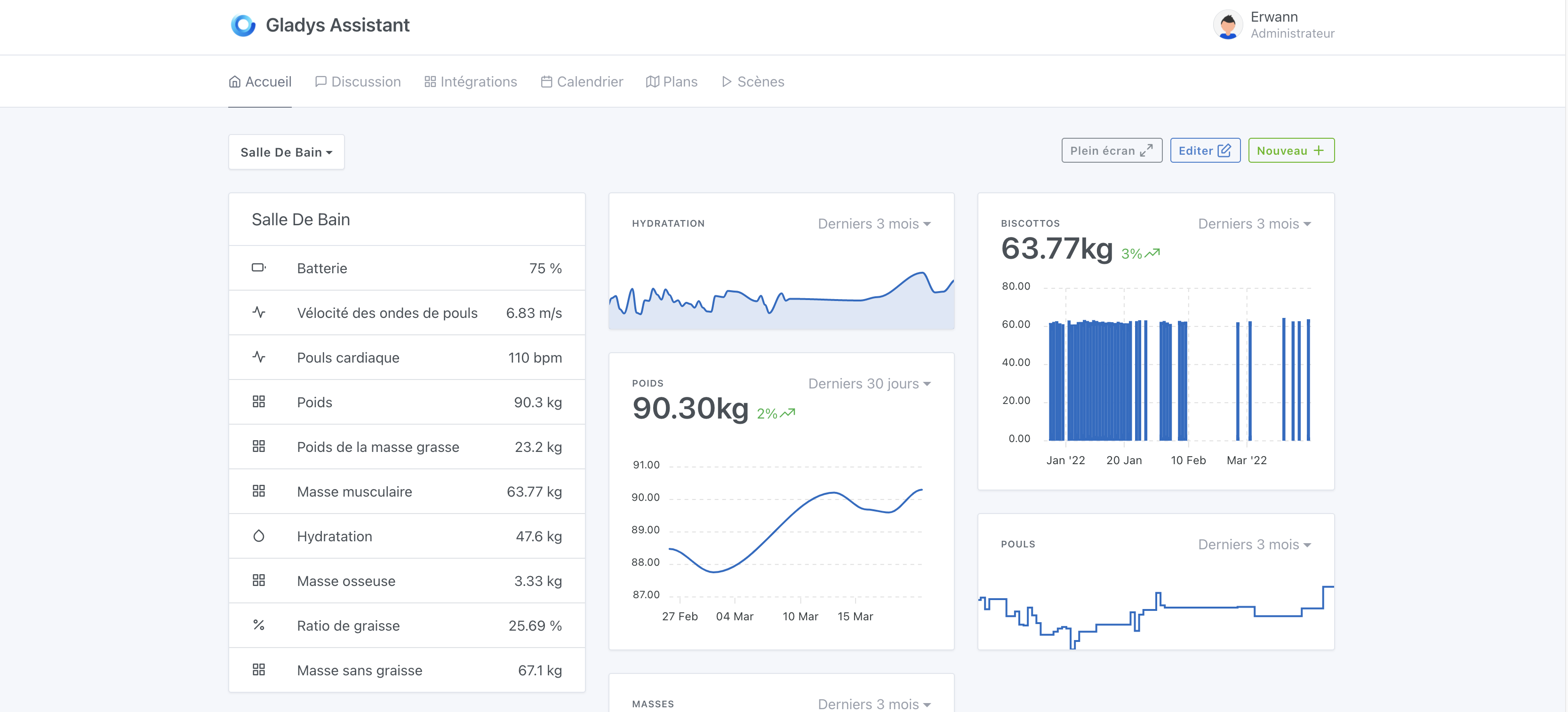
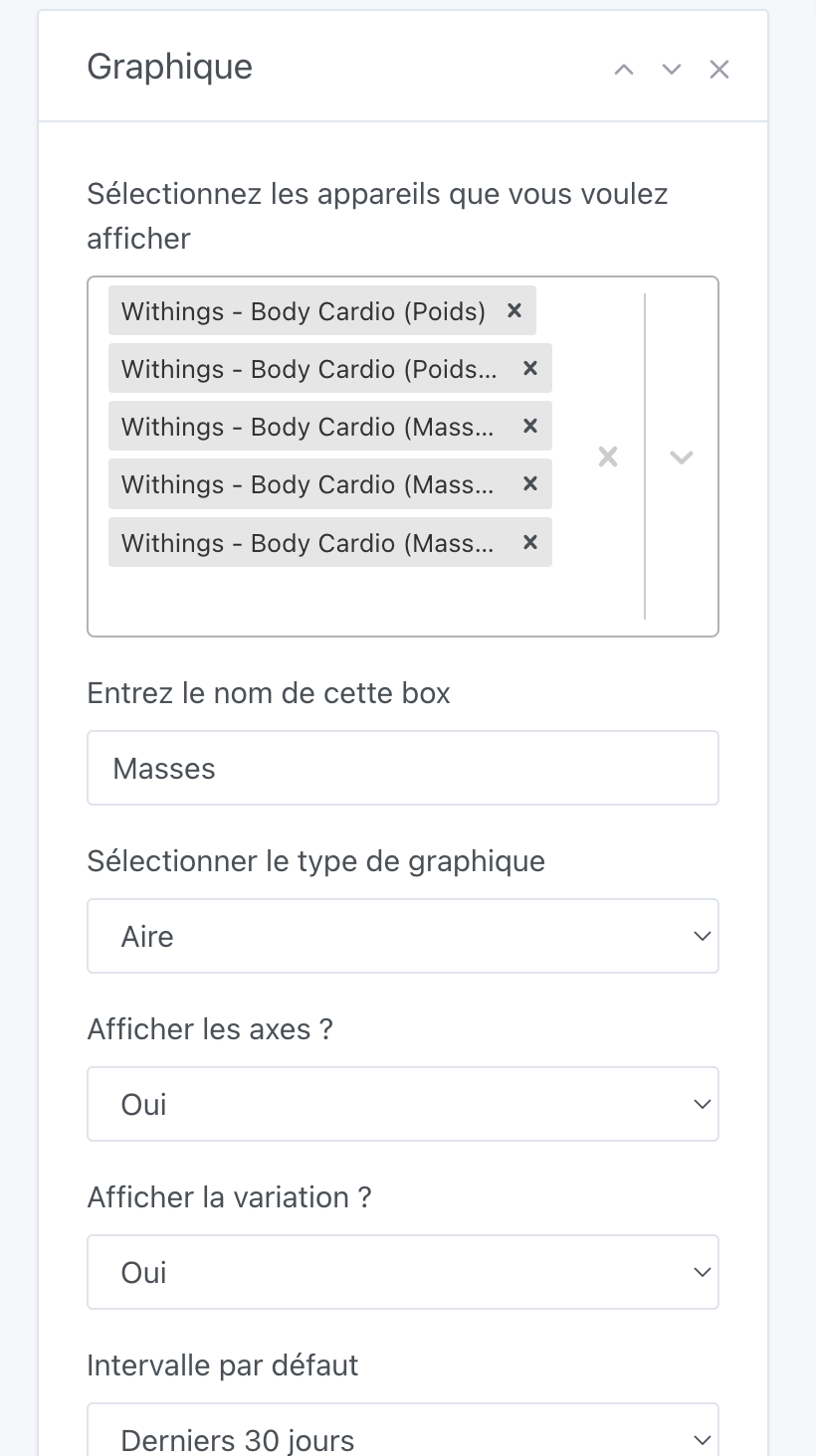
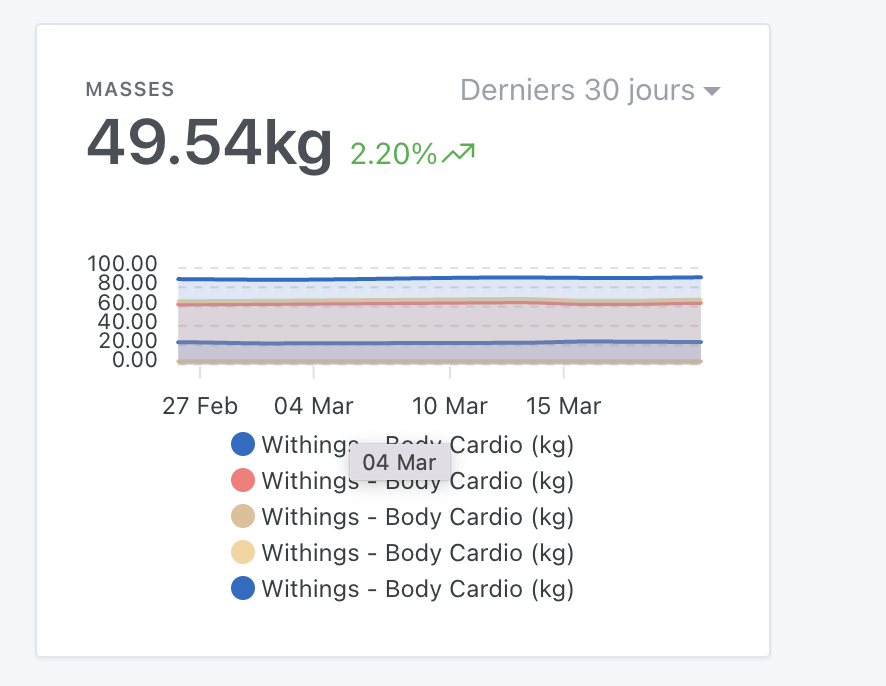
I admit I’m not sure what to do here,
From what I understand, the legend display just shows the device name with the unit.
In the case you’re displaying, the device has multiple features that return measurements with the same units, I suppose it does the same for all devices regardless of this integration
Mmm indeed, in this case to differentiate, we should display the translated name of the feature type, I think I hadn’t done it before because it was often too long to display…
(And we don’t display the feature name here either, it’s an old debate we’ve resolved: the feature name is doomed to disappear and will be used less and less in the future)