While at Lidl last week I found their Zigbee smart home hub for €12… So I put together a Zigbee gateway following this tutorial: Lidl SilverCrest Zigbee Gateway TYGWZ-01 Zigbee compatibility Now the problem of integration with Gladys arises, because only USB dongles are offered in the Zigbee2MQTT section of Gladys. Is it possible to have a « socket » configuration allowing the addition of a network-connected gateway?
Let’s say this seems like a vicious circle: to access Zigbee2MQTT you have to plug in a USB stick, but I want to access it via a socket. So I’m not able to start the containers…
Did I miss a step?
Thanks in advance for your always-valuable help!
Jean
The Gladys interface is just a convenience to start the software without thinking about it, but Zigbee2mqtt is a standalone application that can run on its own
Besides, if it’s just to save 8€, it’s better to get a Sonoff USB dongle for 20€ that’s properly supported especially since with the Lidl box you don’t know what it sends to the cloud, with a dongle you know it does nothing
I already have such a USB dongle (which works very well, by the way). However, the problem is that the location of the box it’s connected to and which hosts Gladys is far from the Zigbee devices that need to connect to it, which drains the batteries very quickly…
The firmware of the LIDL box has been modified so that it only runs the (open-source) programs necessary to drive the Zigbee chip it contains: no communication to the Cloud this way
I’m going to tinker with the Zigbee2MQTT container over the weekend given the weather, and I’ll get back to you to report on progress next week
Due to a chronic lack of time, my feedback on the Zigbee2MQTT integration is only arriving now. Once the LidlBox has been modified and a container deployed, it’s very easy to set up a fully functional gateway. Pairing of the Zigbee modules is done from the Zigbee2MQTT WEB interface, then the MQTT topics are integrated into Gladys to report the information. I use ZTH05 temperature/humidity sensors with a display in each room of the house, simple TH02Z sensors outdoors, and a sensor to check the level of a water tank (TS0207). We’ll now let all that run and see how the sensors with displays behave: they are powered by CR2032 batteries, which I replaced with rechargeable LR2032 batteries.
Well, as far as Zigbee2MQTT, MQTT and Zigbee go, they work really well, and the battery levels haven’t dropped!
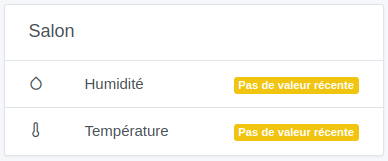
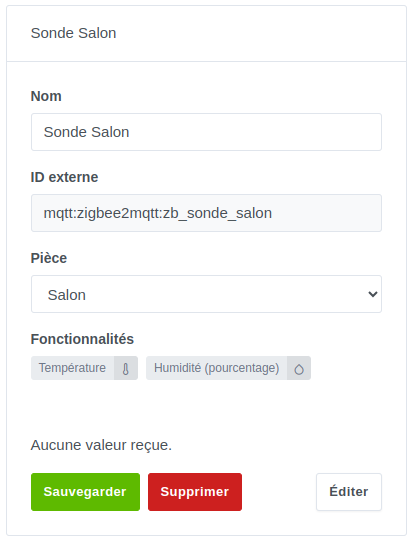
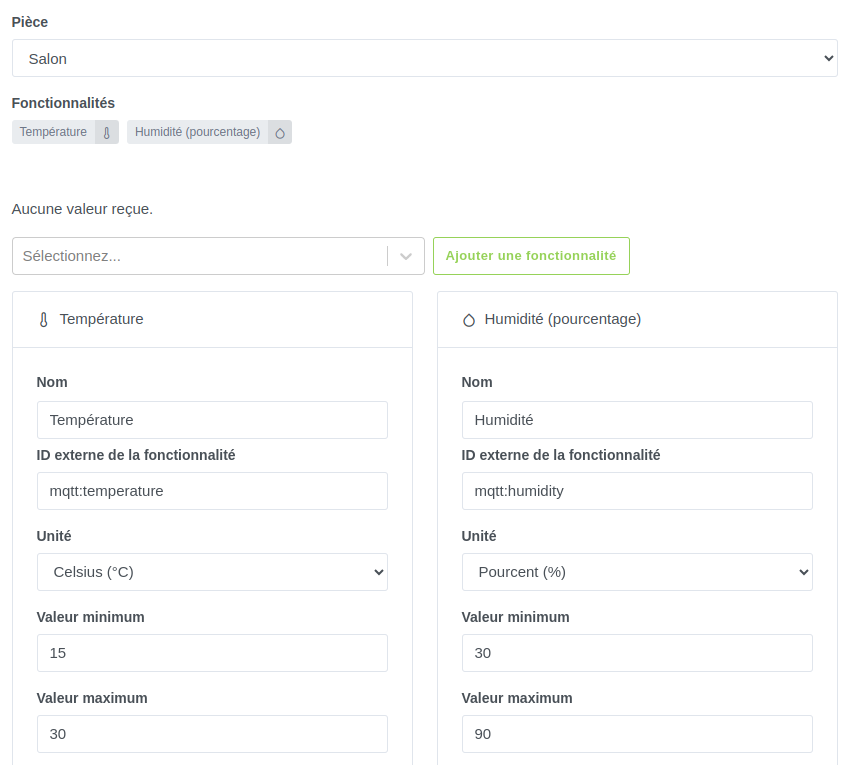
However, what a pain to integrate a sensor into Gladys. So, a little help would be welcome
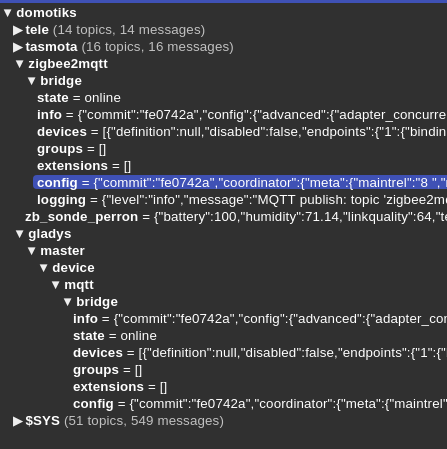
Here’s an example of what’s coming up on the MQTT side:
Thanks for the link, but I must admit I’m starting to somewhat lose the initial interest I had in Glays, which was supposed to present itself as a simple, turnkey solution to allow a beginner to integrate their home automation … Zigbee2MQTT, Node-RED, etc …
@pierre-gilles,
Thanks as well for the video, I’ll go over all that calmly.
On one hand it’s a simple solution for a beginner, on the other hand you have to understand that there is a plethora of devices (from different, sometimes exotic brands) and that it’s difficult to integrate them all for an open-source solution, so it’s normal to have the most common solutions first. The exotic ones depend on the demand that may exist, but I find the forum responsive on this point — you just need to make a request that is submitted to votes and developments are done according to those votes!
The proposed solution of going through Node-RED allows integrating exotic devices while waiting for an integration to be made and it’s not very complicated if you follow the tutorial! If you don’t know Node-RED there are links on the forum that point to YouTube tutorials
The same applies to other solutions like HA (Home Assistant) or Jeedom, I believe!
@cce66 Thank you for these clarifications, which have been understood. I can only thank all the forum members for their precise and relevant answers, and above all for the responsiveness. That’s not the issue. It’s rather the resort to yet another container for Node-RED, whereas all the Zigbee (Zb) devices are functional under Gladys. Indeed, I had connected a USB stick to the box running Gladys, and all the Zigbee devices were discovered when they were within a close range. However, once deployed throughout the house, either they become unfindable, or the battery is drained in one day… So, after researching, I chose a modified LidlBox which is actually a Zigbee gateway (Zb) allowing Z2M (Zigbee2MQTT) to access the devices via the network. Gladys not supporting this mode (this could, by the way, be the subject of an interesting enhancement; not limiting Gladys to USB and allowing native addition of IP gateways), I replaced the Z2M and MQTT containers (on TCP/1884) with a simple Z2M container configured to access the LidlBox and forwarding the data to the already used MQTT container (TCP/1883 which Gladys recognizes for other devices).
My question is therefore: why does Z2M configured in the same way no longer allow adding devices that are visible and functional in Gladys?
First, you should install either smart plugs or bulbs that act as Zigbee signal repeaters because apparently your devices are too far from your box. Also a Lidl box at €12 versus a Sonoff dongle with an antenna at nearly €20 — I think the signal range is not the same, so since Zigbee is a mesh network you can compensate for range with repeaters!
Also, zigbee2mqtt is open source with many more contributors so devices are integrated with all their functionality much faster into their interface and you can manage the peripherals from the zigbee2mqtt interface Comment activer l'interface web frontend de Zigbee2MQTT ?
Gladys is an interface that manages Zigbee devices via the zigbee2mqtt interface using the MQTT protocol but with more possibilities (scenes, management of other protocols, etc.), however even if many of the Zigbee device features are implemented some may be missing.
in your mqtt msg: zigbee2MQTT:info 2024-02-20 20:32:56: MQTT publish: topic 'zigbee2mqtt/zb_sonde_salon', payload '{"battery_state":"high","humidity":42,"linkquality":136,"temperature":23.2,"temperature_unit":"celsius"}'
there is the topic ‹ zigbee2mqtt/zb_sonde_salon › and the payload that has several values « battery_state » « humidity » « linkquality » « temperature » « temperature_unit »
so to access these values Gladys must subscribe to the mqtt messages sent by the zigbee2mqtt dongle to the following topics (if the sub-topics battery_state etc. are implemented)
zigbee2mqtt/zb_sonde_salon/battery_state
zigbee2mqtt/zb_sonde_salon/humidity
zigbee2mqtt/zb_sonde_salon/linkquality
zigbee2mqtt/zb_sonde_salon/temperature
zigbee2mqtt/zb_sonde_salon/temperature_unit
The problem is that Gladys has its own way of working (initially it was planned to have a master Gladys and slave Gladys), it translates between its MQTT topic in Gladys format and the zigbee2mqtt MQTT topic (zigbee2mqtt/zb_sonde_salon) in its internal engine; it’s transparent when you use a Sonoff-type dongle and Gladys’s zigbee2mqtt container and when the device features have been implemented (but here you want to use an external gateway and Gladys doesn’t handle that — it would be necessary to be able in the interface to set the gateway’s IP address and the username/password credentials to access the gateway).
The simplest might be to stick to the recommended setup: a mini-PC for example with a Sonoff dongle and Gladys on it!
I understand your frustration — that said, you’re setting up a case that isn’t handled by Gladys: a Lidl box connected externally that we don’t currently support, and you’re trying to tinker so it works. Of course it’s not simple, but that’s normal since we don’t support it…
Why didn’t you just buy the recommended compatible hardware directly? It’s not more expensive either ^^
I personally just installed Gladys in my new place (this week!), and honestly it’s so easy to set up it’s crazy — the Zigbee part is just clicks, no lines of code to run, I’m loving it
Reluctant to accept defeat, I questioned my setup that used a dedicated Z2M container and used the containers created by Gladys (MQTT on TCP/1884 and Z2M), after reconnecting my ZB dongle. Expected result achieved: two working containers, but no devices detected.
So I simply stopped then reconfigured the ZB container so it would recognize my LidlBox. I took the opportunity to disconnect the now-unnecessary ZB dongle. Expected result achieved: all the ZB devices appear in Gladys without any issues
I can only encourage the developers to add support for an IP gateway, since it has been demonstrated to work well under Gladys
PS: Thanks to @Terdious for our exchange today
Have a great weekend everyone
Jean
@pierre-gilles I don’t think the dongle is the problem, it’s my ZB devices that are too far away …But I’ll keep in mind the excellent idea suggested by @cce66 to add powered ZB devices so they become repeaters, in order to create a mesh network
As usual, thanks to you for this exchange
Have a good weekend,
Jean

 especially since with the Lidl box you don’t know what it sends to the cloud, with a dongle you know it does nothing