Good evening,
Same problem with the ConBee II dongle: you need to set « adapter: deconz »
Good evening,
Same problem with the ConBee II dongle: you need to set « adapter: deconz »
Hello,
I finished the dev on the feature that allows setting the adapter configuration specific to certain dongles.
Thus, depending on the selected dongle, the correct configuration is added to the zigbee2mqtt container.
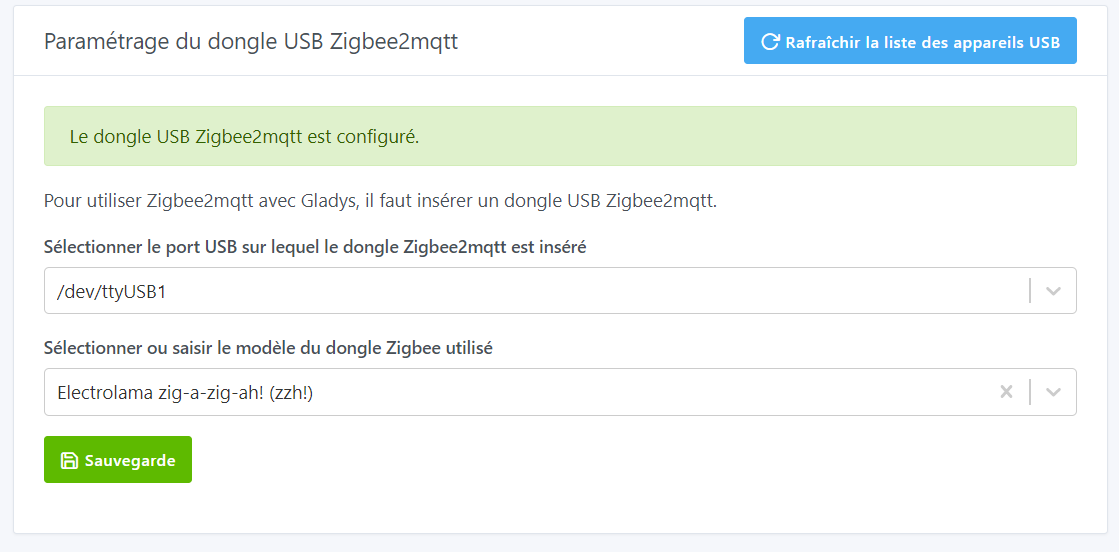
A new line therefore appears on the USB port configuration page, where you will need to specify the dongle used (this step remains optional, and the list of dongles is not dynamic, and comes from Supported Adapters | Zigbee2MQTT).
There is a Docker image available that includes this integration:
atrovato/gladys:zigbee2mqtt
With the same precautions as usual, prefer testing on an environment different from your production Gladys, make a database backup… Everything is explained here → Tutorial: Run a test Docker image
@pierre-gilles the PR is ready here  → Z2m dongle configuration by atrovato · Pull Request #1769 · GladysAssistant/Gladys · GitHub
It includes a few changes that helped simplify the development of the enhancement:
Thanks everyone.
Great job @AlexTrovato!!
I think this could unblock A LOT of people who’ve run into this problem and weren’t able to go any further
A big thank you for the development @AlexTrovato 
Indeed, since Domadoo now only sells the Sonoff-E, 100% of new users are faced with the problem and it’s a real barrier to adoption 
I’ll test it in real life and I’ll give you some feedback
@AlexTrovato I tested your PR live, it does the job  I have a few comments about the UI and found a small bug: Z2m dongle configuration by atrovato · Pull Request #1769 · GladysAssistant/Gladys · GitHub
I’ve taken your comments into account @pierre-gilles:
I’ve rebased the branch onto master.
Ready for re-review
Quick! Did you rebuild the Docker image? I was testing on a real Pi.
The image is being built… roughly speaking, expect it to take about an hour…
@pierre-gilles the new image is ready!
@AlexTrovato I tested it, it’s much better! I just have one question and a bit of UX feedback that can be fixed in 5 seconds: Z2m dongle configuration by atrovato · Pull Request #1769 · GladysAssistant/Gladys · GitHub
I’ve answered your questions and fixed that UX issue (which we too often forget).
A new image (up to date with master) is available
Hello, quick question: my z2Mqttt services are started and are working, at least for the temperature and leak sensors, but I have a plug that no longer responds. Also, I can no longer access port 8080 — connection refused? Do you have any idea?
Is the plug maybe too far from a « router »?
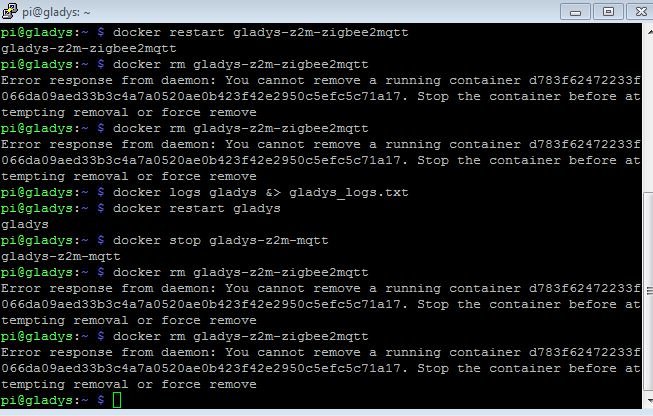
For the access issue, are you on the same local network? Have you tried, via SSH, restarting the service? →
docker restart gladys-z2m-zigbee2mqtt
No, 3 months, and it had been working for quite a while.
Two Zigbee plugs have stopped responding, and I can no longer access the Zigbee interface via port 8080. I don’t understand—everything seems OK on the Gladys side, but I get a message saying it doesn’t allow connections.
Could you provide more precise information if possible: where do you see this “connection refused” message? Can you send us a screenshot?
Do you know how to check the Gladys / Zigbee2mqtt logs? If so, please show them to us.
No, I don’t know how to view the logs, I know how to connect with PuTTY, but I don’t know the command for the logs ^^
We need to see the output of the command docker logs gladys-z2m-zigbee2mqtt
 _definition: {
      zigbeeModel: [Array],
      model: 'WSDCGQ11LM',
      vendor: 'Xiaomi',
      description: 'Aqara temperature, humidity and pressure sensor',
      meta: [Object],
      fromZigbee: [Array],
      toZigbee: [Array],
      exposes: [Array],
      configure: [AsyncFunction: configure],
      options: [Array]
    },
    _definitionModelID: 'lumi.weather'
  },
  from: {
    temperature: 20.33,
    humidity: 53.24,
    pressure: 964.5,
    voltage: 2985,
    battery: 90,
    power_outage_count: 6,
    linkquality: 7
  },
  to: {
    temperature: 20.33,
    humidity: 53.24,
    pressure: 964.5,
    voltage: 2985,
    battery: 90,
    power_outage_count: 6,
    linkquality: 7
  },
  reason: 'publishCached',
  update: {
    temperature: 20.33,
    humidity: 53.24,
    pressure: 964.5,
    voltage: 2985,
    battery: 90,
    power_outage_count: 6,
    linkquality: 7
  }
}
Zigbee2MQTT:info  2023-05-07 10:24:46: MQTT publish: topic 'zigbee2mqtt/Thermometre salon', payload '{"battery":90,"humidity":53.24,"linkquality":7,"power_outage_count":6,"pressure":964.5,"temperature":20.33,"voltage":2985}'
State changed {
  entity: Device {
    zh: Device {
      _events: [Object: null prototype] {},
      _eventsCount: 0,
      _maxListeners: undefined,
      ID: 8,
      _type: 'Router',
      _ieeeAddr: '0x50325ffffe4a2a97',
      _networkAddress: 23205,
      _manufacturerID: 4098,
      _endpoints: [Array],
      _manufacturerName: '_TZ3000_wamqdr3f',
      _powerSource: 'Mains (single phase)',
      _modelID: 'TS011F',
      _applicationVersion: 66,
      _stackVersion: 0,
      _zclVersion: 3,
      _hardwareVersion: 1,
      _dateCode: '',
      _softwareBuildID: undefined,
      _interviewCompleted: true,
      _interviewing: false,
      _skipDefaultResponse: false,
      _skipTimeResponse: false,
      meta: [Object],
      _lastSeen: 1683233428749,
      _defaultSendRequestWhen: 'immediate',
      _checkinInterval: undefined,
      _pendingRequestTimeout: 0,
      [Symbol(kCapture)]: true
    },
    _definition: {
      exposes: [Array],
      fromZigbee: [Array],
      toZigbee: [Array],
      fingerprint: [Array],
      model: 'HG06337',
      vendor: 'Lidl',
      description: 'Silvercrest smart plug (EU, CH, FR, BS, DK)',
      configure: [AsyncFunction: configure],
      meta: undefined,
      options: [Array]
    },
    _definitionModelID: 'TS011F'
  },
  from: { state: 'OFF', linkquality: 163 },
  to: { state: 'OFF', linkquality: 163 },
  reason: 'publishCached',
  update: { state: 'OFF', linkquality: 163 }
}
Zigbee2MQTT:info  2023-05-07 10:24:46: MQTT publish: topic 'zigbee2mqtt/Prise salon', payload '{"linkquality":163,"state":"OFF"}'
State changed {
  entity: Device {
    zh: Device {
      _events: [Object: null prototype] {},
      _eventsCount: 0,
      _maxListeners: undefined,
      ID: 9,
      _type: 'EndDevice',
      _ieeeAddr: '0x94deb8fffe0f39e4',
      _networkAddress: 45853,
      _manufacturerID: 4476,
      _endpoints: [Array],
      _manufacturerName: 'IKEA of Sweden',
      _powerSource: 'Battery',
      _modelID: 'TRADFRI on/off switch',
      _applicationVersion: 33,
      _stackVersion: 98,
      _zclVersion: 3,
      _hardwareVersion: 1,
      _dateCode: '20190723',
      _softwareBuildID: '2.2.010',
      _interviewCompleted: true,
      _interviewing: false,
      _skipDefaultResponse: false,
      _skipTimeResponse: false,
      meta: [Object],
      _lastSeen: 1683213611363,
      _defaultSendRequestWhen: 'active',
      _checkinInterval: 43200,
      _pendingRequestTimeout: 43200000,
      [Symbol(kCapture)]: true
    },
    _definition: {
      zigbeeModel: [Array],
      model: 'E1743',
      vendor: 'IKEA',
      description: 'TRADFRI ON/OFF switch',
      fromZigbee: [Array],
      exposes: [Array],
      toZigbee: [Array],
      ota: [Object],
      meta: [Object],
      configure: [AsyncFunction: configureRemote],
      options: [Array]
    },
    _definitionModelID: 'TRADFRI on/off switch'
  },
  from: {
    battery: 47,
    update: {
      state: 'available',
      installed_version: 570492465,
      latest_version: 587699761
    },
    update_available: true,
    linkquality: 65
  },
  to: {
    battery: 47,
    update: {
      state: 'available',
      installed_version: 570492465,
      latest_version: 587699761
    },
    update_available: true,
    linkquality: 65
  },
  reason: 'publishCached',
  update: {
    battery: 47,
    update: {
      state: 'available',
      installed_version: 570492465,
      latest_version: 587699761
    },
    update_available: true,
    linkquality: 65
  }
}
Zigbee2MQTT:info  2023-05-07 10:24:46: MQTT publish: topic 'zigbee2mqtt/bonton on off', payload '{"battery":47,"linkquality":65,"update":{"installed_version":570492465,"latest_version":587699761,"state":"available"},"update_available":true}'
Zigbee2MQTT:info  2023-05-07 10:24:46: Zigbee2MQTT started!
Error: connect ECONNREFUSED XX.000.000.000:9007
    at TCPConnectWrap.afterConnect [as oncomplete] (node:net:1494:16)
Using '/app/data' as data directory