Gladys Assistant 4.2 is available with Zigbee2mqtt compatibility! 🚀

Hello everyone!

Big day today, Gladys Assistant 4.2 is available, and adds Zigbee2mqtt compatibility (but not only!).

I wrote an article on the blog to summarize all the new features of this version:

Congratulations to everyone who contributed to this update.

I’m thinking of @cicoub13, @Reno, @lmilcent, @VonOx, @Lokkye, @AlexTrovato and @bertrandda :clap:

Great teamwork!

Nice, will need to update the doc for the dev (Node 14)

Hop done:

https://github.com/GladysAssistant/v4-website/pull/66

Review done :smiley:

Hello,

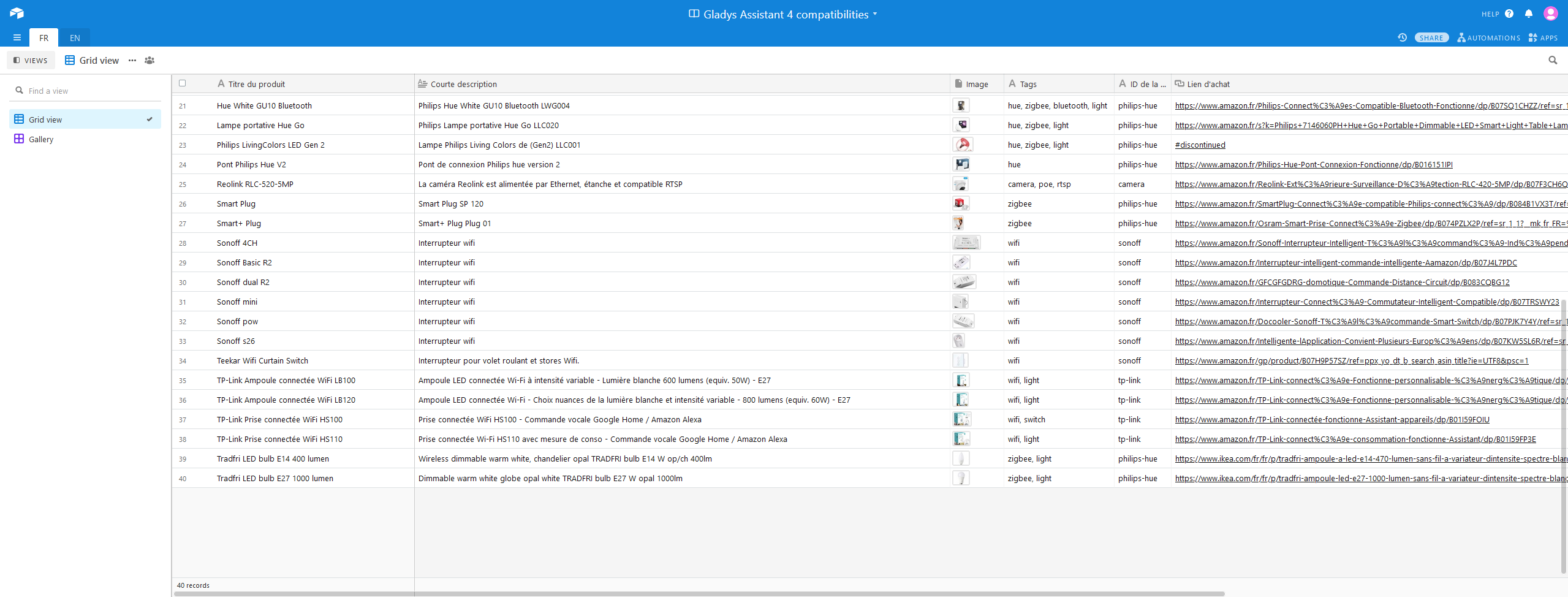
I wanted to add the list of my equipment as indicated in Intégrations | Gladys Assistant.
But the AirTable list does not offer me a button to add an item, is this normal?

Regarding the purchase links, I see a lot of Amazon links. Can I still add the links where I bought my equipment (Aliexpress, 10-day delivery), as it’s cheaper?

Thank you :slight_smile:

@lmilcent The share link on the main site is an unmodified share link, the modified share link is available here:

No problem :slight_smile:

The indicated link: Sign up - Airtable asks me to log in (OK) and then choose « Gladys Assistant 4 Compatibilities Â».

And then: nothing, I can’t add anything.

As you had already joined the sheet in « read-only Â» mode, you didn’t have access. I changed that manually :slight_smile: Is it good now?

Perfect!

Thank you :slight_smile:

The table contains both French and English (in the descriptions).

Wouldn’t it be better to add columns for descriptions in both languages and then adapt it on the site based on the selected language?

@lmilcent There is a « FR Â» tab and an « EN Â» tab at the top. Normally, it’s in French on the FR tab and in English on the EN tab :slight_smile:

After all, nothing is perfect, there is a bit of English in the French view

Oops, I hadn’t seen that, it’s perfect :slight_smile:
I’ll see if I can at least standardize in FR first.

Don’t hesitate at all!

Actually, we didn’t have these two tabs initially, and @cicoub13 developed the « EN Â» view, but there’s still some legacy in the French view. It would be great if it were fully in French :slight_smile:

@Mastho This update should fix your problem with Gladys Plus :slight_smile: I’ve significantly changed the algorithm that allows the local instance to send value changes to a remote browser via Gladys Plus, which should greatly reduce the load on your instance, and in the long term should eliminate the disconnection issues you were experiencing (hopefully!)

Keep me updated!

Great news, for my part I was on a Gladys V4 image that integrated Z2M.

I was quite frustrated not to be able to have the updates of the main version, let’s say « official Â».
(And not enough time to help with the development and integration of the zigbee2mqtt module)
And @cicoub13 @Reno and the others really handled it masterfully :clap:

I will therefore finally be able to switch to the master :grimacing:. In my humble opinion, I think many were waiting for this integration in the main branch.

A good Thursday to start!!

It’s been updated (FR + EN), but it seems some lines (x3) are missing in the EN part.
How to update the integration page afterwards?

Top !! :slight_smile: It’s great to read, indeed I think many were waiting for this to switch.

You need to manually run the import script on the v4-website repo and then create a PR :slight_smile:

If you want to do it, you need to clone the v4-website repo, then create a .env file at the root of the project with the following content:

AIRTABLE_API_KEY=YOUR_AIRTABLE_API_KEY

(You can find the API key in your Airtable account settings)

Then you run:

npm run load-integrations

You then test that everything is fine by launching the EN and FR sites.

Finally, you commit and create a PR :slight_smile:

I thought it was just an API consumed by the Gladys website, what a shame it would have been faster :sweat_smile:

Well, since I’m on my work computer, we’ll see later for the PR :slight_smile:

That’s not what we want, we want:

  • versioning (what Git gives us)
  • the site is completely static and duplicated on CDNs all over the world to be fast from anywhere in the world :slight_smile:
  • and most importantly, anyone should not be able to modify the site :sweat_smile:

So happy to see the Zigbee2mqtt integration arrive!
However… It doesn’t recognize my dongle (whereas it didn’t cause any issues back when Reno was in development)..
I don’t remember the exact reference, it’s a dongle bought on eBay that is sold pre-flashed.

When I go to the dongle configuration, the dropdown doesn’t offer anything. I’ve restarted my RPi, unplugged/replugged the dongle, frantically clicked on refresh USB devices… Nothing more :frowning: