Zigbee2mqtt: Docker test image based on Gladys v4

EDIT: Zigbee2mqtt is now natively integrated to Gladys!

Hello everyone,

After months of waiting, here is a new test image of Gladys including the Zigbee2mqtt service.

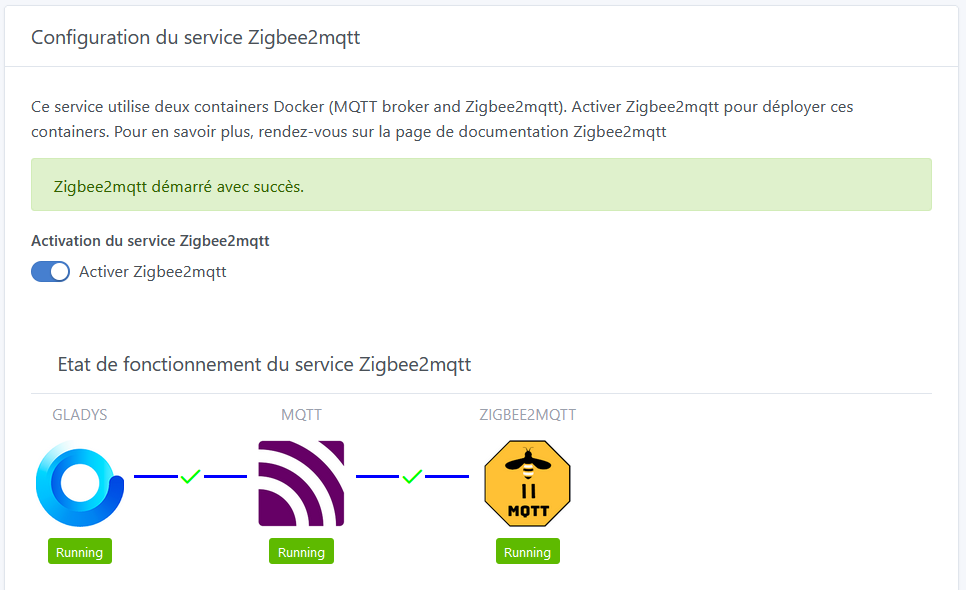
On this version, everything is automatic: there is no longer any need to use commands to launch the Docker containers manually.
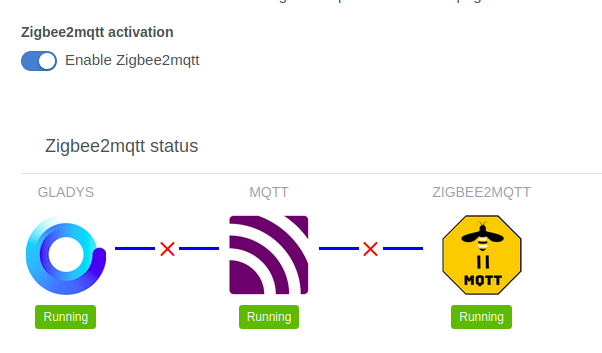
So, I added a view to monitor the service’s operating status at the time of its activation:

I also left the table with the container status, just in case, to troubleshoot a user if necessary, but I think I will remove it in the version that will be integrated to Gladys.

  • You can download the image on dockerhub:

For information, I tagged it with the Gladys version it is based on, and to which I added a -n where n represents the evolutions of the Zigbee2mqtt service.
Thus, this version is named v4.0.0-1.
If you install it with the latest tag and watchtower is running on your machine, it will be automatically updated with each evolution.

  • Or install it and run it directly with the command indicated in the Gladys documentation:
docker run -d \
--log-opt max-size=10m \
--restart=always \
--privileged \
--network=host \
--name gladys-zigbee2mqtt \
-e NODE_ENV=production \
-e SERVER_PORT=80 \
-e TZ=Europe/Paris \
-e SQLITE_FILE_PATH=/var/lib/gladysassistant/gladys-production.db \
-v /var/run/docker.sock:/var/run/docker.sock \
-v /var/lib/gladysassistant:/var/lib/gladysassistant \
-v /dev:/dev \
-v /run/udev:/run/udev:ro \
r6n0/gladys-zigbee2mqtt:latest

Compared to the Gladys documentation, I added the option -v /run/udev:/run/udev:ro which allows to obtain more information about USB devices (especially the manufacturer). This makes it possible to differentiate the dongles if you insert, for example, a Zigbee2mqtt dongle and a Z-wave dongle.

Do not hesitate to comment on your feelings in this topic and even to file issues on my github to identify bugs and devices that are not supported. However, please detail your installation as much as possible and how you produced the bug.

Thank you all for your patience, hoping that it will work as best as possible.

4 Likes

Great job! I think this is the most anticipated feature

A quick update @Reno

2020-11-15T13:23:59+0100 <info> index.js:63 (Server.<anonymous>) Server listening on port 1080
2020-11-15T13:25:26+0100 <info> init.js:49 () Zigbee2mqtt USB dongle attached to /dev/ttyACM2
2020-11-15T13:25:37+0100 <info> init.js:49 () Zigbee2mqtt USB dongle attached to /dev/ttyACM2
2020-11-15T13:25:37+0100 <info> installMqttContainer.js:30 (Zigbee2mqttManager.installMqttContainer) MQTT broker is being installed as Docker container...
2020-11-15T13:25:37+0100 <info> installMqttContainer.js:31 (Zigbee2mqttManager.installMqttContainer) Pulling eclipse-mosquitto:latest image...
2020-11-15T13:25:38+0100 <info> installMqttContainer.js:34 (Zigbee2mqttManager.installMqttContainer) Preparing broker environment...
2020-11-15T13:25:38+0100 <info> installMqttContainer.js:38 (Zigbee2mqttManager.installMqttContainer) Creating container...
2020-11-15T13:25:39+0100 <info> installMqttContainer.js:52 (Zigbee2mqttManager.installMqttContainer) Zigbee2MQTT MQTT broker is starting...
2020-11-15T13:25:45+0100 <info> installMqttContainer.js:58 (Zigbee2mqttManager.installMqttContainer) Creating user/pass...
2020-11-15T13:25:45+0100 <info> installMqttContainer.js:69 (Zigbee2mqttManager.installMqttContainer) MQTT broker container successfully started
2020-11-15T13:25:45+0100 <info> installZ2mContainer.js:59 (Zigbee2mqttManager.installZ2mContainer) Zigbee2mqtt is starting...
2020-11-15T13:25:45+0100 <info> installZ2mContainer.js:71 (Zigbee2mqttManager.installZ2mContainer) Zigbee2mqtt successfully started
2020-11-15T13:25:45+0100 <warn> connect.js:32 (MqttClient.<anonymous>) Error while connecting to MQTT - Error: Connection refused: Not authorized
2020-11-15T13:25:45+0100 <warn> connect.js:41 (MqttClient.<anonymous>) Disconnected from MQTT server
2020-11-15T13:25:50+0100 <warn> connect.js:32 (MqttClient.<anonymous>) Error while connecting to MQTT - Error: Connection refused: Not authorized
2020-11-15T13:25:55+0100 <warn> connect.js:32 (MqttClient.<anonymous>) Error while connecting to MQTT - Error: Connection refused: Not authorized
2020-11-15T13:26:00+0100 <warn> connect.js:32 (MqttClient.<anonymous>) Error while connecting to MQTT - Error: Connection refused: Not authorized

For info, I already have an MQTT container on the host and a Zigbee2mqtt container. Can we have the possibility to just specify an MQTT address in this case?

Edit: My Zigbee2mqtt container already existed under this name, so it doesn’t work. I think we need to add a prefix.

1 Like

Based on what I see in your logs, there are no errors in the installation and startup of the containers.
This is surprising since you mentioned already having a container with that name.

The MQTT broker is launched on port 1884 to avoid conflict with the MQTT service.
If I understand correctly, @pierre-gilles preferred a separate broker.

So, for your connection issue, could you check the logs of the 2 containers of the service?

I forgot to mention that you can physically check if the service configuration worked: the LED on the dongle should turn off at startup.

Another thing, there’s a hidden bonus in one of the tabs. A good point to whoever finds it… :wink:

Hello, first I would like to thank you for your work, it will be great to be able to do without a Xiaomi gateway :slight_smile:

I have a permission issue on my installation, the MQTT container starts but restarts in a loop because it cannot open its config file (mqtt container log: 1605448659: Error: Unable to open config file /mosquitto/config/mosquitto.conf).

I do have the mapping $DATA_PATH/gladys_zigbee:/var/lib/gladysassistant in my volumes and I also forced Gladys to use the root user (user: « 0:0 ») in my docker-compose file but nothing works…

Any idea?

You said you’re using a docker-compose. Could you share it?

Given the problem, the broker configuration file was not generated.
Could you also provide your Gladys log, as Vonox did?

OK, I’ll check it out tonight, but the issue is that since the container already exists, it’s not configured for the MQTT container created by the service.

I’ll keep you posted.

The config file seems to be correctly generated on my host (in this case HypriotOS) with the following content:

port 1884
allow_anonymous false
# connection_messages false
allow_duplicate_messages true
password_file /mosquitto/config/mosquitto.passwd

Gladys logs indicate the following:

2020-11-15T14:52:29+0100 <info> index.js:63 (Server.<anonymous>) Server listening on port 7124
2020-11-15T14:54:34+0100 <info> init.js:49 () Zigbee2mqtt USB dongle attached to /dev/ttyACM0
2020-11-15T14:54:41+0100 <info> init.js:49 () Zigbee2mqtt USB dongle attached to /dev/ttyACM0
2020-11-15T14:54:41+0100 <info> installMqttContainer.js:30 (Zigbee2mqttManager.installMqttContainer) MQTT broker is being installed as Docker container...
2020-11-15T14:54:41+0100 <info> installMqttContainer.js:31 (Zigbee2mqttManager.installMqttContainer) Pulling eclipse-mosquitto:latest image...
2020-11-15T14:54:43+0100 <info> installMqttContainer.js:34 (Zigbee2mqttManager.installMqttContainer) Preparing broker environment...
2020-11-15T14:54:43+0100 <info> installMqttContainer.js:38 (Zigbee2mqttManager.installMqttContainer) Creating container...
2020-11-15T14:54:43+0100 <info> installMqttContainer.js:52 (Zigbee2mqttManager.installMqttContainer) Zigbee2MQTT MQTT broker is starting...
2020-11-15T14:54:49+0100 <info> installMqttContainer.js:58 (Zigbee2mqttManager.installMqttContainer) Creating user/pass...
2020-11-15T14:54:49+0100 <error> installMqttContainer.js:73 (Zigbee2mqttManager.installMqttContainer) MQTT broker container failed to start: Error: (HTTP code 409) unexpected - Container 759eade851c945c48f396ace17a720ae1494882d4fbce9deeee5f6284b1c38de is restarting, wait until the container is running
    at /src/server/node_modules/docker-modem/lib/modem.js:257:17
    at getCause (/src/server/node_modules/docker-modem/lib/modem.js:287:7)
    at Modem.buildPayload (/src/server/node_modules/docker-modem/lib/modem.js:256:5)
    at IncomingMessage.<anonymous> (/src/server/node_modules/docker-modem/lib/modem.js:232:14)
    at IncomingMessage.emit (events.js:326:22)
    at endReadableNT (_stream_readable.js:1223:12)
    at processTicksAndRejections (internal/process/task_queues.js:84:21) {
  reason: undefined,
  statusCode: 409,
{
    message: 'Container 759eade851c945c48f396ace17a720ae1494882d4fbce9deeee5f6284b1c38de is restarting, wait until the container is running'
  }
}
2020-11-15T14:54:49+0100 <error> index.js:14 (process.<anonymous>) unhandledRejection catched: Promise {
  <rejected> Error: (HTTP code 409) unexpected - Container 759eade851c945c48f396ace17a720ae1494882d4fbce9deeee5f6284b1c38de is restarting, wait until the container is running
      at /src/server/node_modules/docker-modem/lib/modem.js:257:17
      at getCause (/src/server/node_modules/docker-modem/lib/modem.js:287:7)
      at Modem.buildPayload (/src/server/node_modules/docker-modem/lib/modem.js:256:5)
      at IncomingMessage.<anonymous> (/src/server/node_modules/docker-modem/lib/modem.js:232:14)
      at IncomingMessage.emit (events.js:326:22)
      at endReadableNT (_stream_readable.js:1223:12)
      at processTicksAndRejections (internal/process/task_queues.js:84:21) {
    reason: undefined,
    statusCode: 409,
    json: {
      message: 'Container 759eade851c945c48f396ace17a720ae1494882d4fbce9deeee5f6284b1c38de is restarting, wait until the container is running'
    }
  }
}
2020-11-15T14:54:49+0100 <error> index.js:15 (process.<anonymous>) Error: (HTTP code 409) unexpected - Container 759eade851c945c48f396ace17a720ae1494882d4fbce9deeee5f6284b1c38de is restarting, wait until the container is running
    at /src/server/node_modules/docker-modem/lib/modem.js:257:17
    at getCause (/src/server/node_modules/docker-modem/lib/modem.js:287:7)
    at Modem.buildPayload (/src/server/node_modules/docker-modem/lib/modem.js:256:5)
    at IncomingMessage.<anonymous> (/src/server/node_modules/docker-modem/lib/modem.js:232:14)
    at IncomingMessage.emit (events.js:326:22)
    at endReadableNT (_stream_readable.js:1223:12)
    at processTicksAndRejections (internal/process/task_queues.js:84:21) {
  reason: undefined,
  statusCode: 409,
{
    message: 'Container 759eade851c945c48f396ace17a720ae1494882d4fbce9deeee5f6284b1c38de is restarting, wait until the container is running'
  }
}
2020-11-15T14:56:41+0100 <info> init.js:49 () Zigbee2mqtt USB dongle attached to /dev/ttyACM0
2020-11-15T14:56:41+0100 <info> installMqttContainer.js:83 (Zigbee2mqttManager.installMqttContainer) Zigbee2MQTT MQTT broker is starting...
2020-11-15T14:56:46+0100 <info> installMqttContainer.js:95 (Zigbee2mqttManager.installMqttContainer) MQTT broker container successfully started
2020-11-15T14:56:47+0100 <info> installZ2mContainer.js:29 (Zigbee2mqttManager.installZ2mContainer) Zigbee2mqtt is being installed as Docker container...
2020-11-15T14:56:47+0100 <info> installZ2mContainer.js:30 (Zigbee2mqttManager.installZ2mContainer) Pulling koenkk/zigbee2mqtt:latest image...
2020-11-15T14:56:49+0100 <info> installZ2mContainer.js:33 (Zigbee2mqttManager.installZ2mContainer) Preparing Zigbee2mqtt environment...
2020-11-15T14:56:49+0100 <info> installZ2mContainer.js:39 (Zigbee2mqttManager.installZ2mContainer) Creating container...
2020-11-15T14:56:49+0100 <info> installZ2mContainer.js:47 (Zigbee2mqttManager.installZ2mContainer) Zigbee2mqtt successfully installed as Docker container
2020-11-15T14:56:49+0100 <info> installZ2mContainer.js:59 (Zigbee2mqttManager.installZ2mContainer) Zigbee2mqtt is starting...
2020-11-15T14:56:54+0100 <info> installZ2mContainer.js:71 (Zigbee2mqttManager.installZ2mContainer) Zigbee2mqtt successfully started
2020-11-15T14:56:55+0100 <warn> connect.js:41 (MqttClient.<anonymous>) Disconnected from MQTT server

My docker-compose.yml looks like this:

version: "2.4"

services:
    gladys:
        image: r6n0/gladys-zigbee2mqtt:latest
        container_name: Gladys_Zigbee2Mqtt
        restart: always
        user: "0:0"
        privileged: true
        # depends_on:
        #   - zigbee2mqttAssistant
        #   - rhasspy
        logging:
          options:
            max-size: "10m"
        network_mode: host
        dns:
          - 1.1.1.1
          - 1.0.0.1
        # ports:
        #   - $GLADYS_PORT:$GLADYS_PORT
        environment:
          - "TZ=${TZ}"
          - "NODE_ENV=production"
          - "SERVER_PORT=$GLADYS_PORT"
          - "SQLITE_FILE_PATH=/var/lib/gladysassistant/gladys-production.db"
        volumes:
          - "/etc/timezone:/etc/timezone:ro"
          - "/etc/localtime:/etc/localtime:ro"
          - "/var/run/docker.sock:/var/run/docker.sock"
          - "/run/udev:/run/udev:ro"
          - "/dev:/dev"
          - "$DATA_PATH/gladys_zigbee:/var/lib/gladysassistant"
        labels:
          - "hidden_${COMPOSE_PROJECT_NAME}"
          - "com.centurylinklabs.watchtower.enable=true"
          - "traefik.enable=false"

With the following environment variables:

COMPOSE_PROJECT_NAME=Gladys

#-----------------------------------------------------
## GLOBAL
#-----------------------------------------------------
PUID=0
PGID=0

TZ=Europe/Paris

CONFIG_PATH=./.config
LOG_PATH=/var/data/logs/gladys
DATA_PATH=/var/data/docker/gladys
#-----------------------------------------------------

#-----------------------------------------------------
## Gladys
#-----------------------------------------------------
GLADYS_PORT=7124
#-----------------------------------------------------

I think this is also where it comes from.
However, Gladys should have connected to the broker…

This must be a rights issue.
Check the rights on the file /var/lib/gladysassistant/zigbee2mqtt/mqtt/mosquitto.conf.
In the mqtt container, the user is not root but mosquitto. This could be the problem.

The file permissions are correctly set to root/root with the value 644, whether I add or not in my docker-compose the value user: "0:0".

So, would there be a way to specify the user to use for the MQTT container? (If it’s the same as Gladys’s, it would make things easier, I think, and avoid this kind of trouble in the future).

EDIT: or to use an alternative image?
In my case, in previous tests, I was using the eclipse-mosquitto image, which, if my memory serves me right, runs as root by default (even if it’s not necessarily great in terms of security…).

From a security standpoint, it is absolutely not recommended to run containers as root!

Why are you running Gladys this way?
The documentation example does not do this. However, the privileged option is used.

It is indeed the eclipse-mosquitto image that is launched and it does not use the root user. No well-made image, by the way…

For root usage, it was just a test (this is not how I usually launch it) to see if adding a user changed the permissions on the Mosquitto config file, but it made no difference.

It must therefore come from HypriotOS, since all of Gladys’s files are created by root…


Too bad, I liked this lightweight distro with a simple Docker on it…

Can we try anyway, I’m interested.
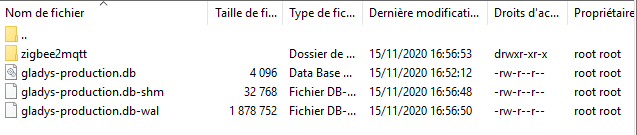
Could you list the permissions in the Zigbee2mqtt directory?

Yes here they are:

$ ls -al /var/data/docker/gladys/gladys_zigbee/zigbee2mqtt/
total 12
drwxr-xr-x 3 root root 4096 Nov.  15 17:04 .
drwxr-xr-x 3 root root 4096 Nov.  15 17:04 ..
drwxr-xr-x 2 root root 4096 Nov.  15 17:04 mqtt
HypriotOS/armv7: pirate@black-pearl in ~/Docker/Gladys_Rhasspy_Zigbee
$ ls -al /var/data/docker/gladys/gladys_zigbee/zigbee2mqtt/mqtt/
total 12
drwxr-xr-x 2 root root 4096 Nov.  15 17:04 .
drwxr-xr-x 3 root root 4096 Nov.  15 17:04 ..
-rw-r--r-- 1 root root  139 Nov.  15 17:04 mosquitto.conf
-rw-r--r-- 1 root root    0 Nov.  15 17:04 mosquitto.passwd

Normally, the owner of the mqtt directory should be 1883:1883 on the host and mosquitto:mosquitto in the container.

You need to restart the container without the root user, but first, you need to clean up what was generated by the previous installation:

  • Delete the files and directories:

rm -r /var/lib/gladysassistant/zigbee2mqtt

  • Delete the containers z2m-mqtt and zigbee2mqtt.

This is indeed the container without the root user and with prior cleaning, I think that by default on HypriotOS, the user who has rights on Docker is root, no matter which container I launch, the persistent data is always root…

I’m back

I couldn’t test more because we need to handle this error (send the info in the UI)

2020-11-15T18:05:02+0100 <error> installMqttContainer.js:43 (Zigbee2mqttManager.installMqttContainer) MQTT broker failed to install as Docker container: Error: (HTTP code 500) server error - toomanyrequests: You have reached your pull rate limit. You may increase the limit by authenticating and upgrading: https://www.docker.com/increase-rate-limit
    at /src/server/node_modules/docker-modem/lib/modem.js:257:17
    at IncomingMessage.<anonymous> (/src/server/node_modules/docker-modem/lib/modem.js:284:9)
    at IncomingMessage.emit (events.js:326:22)
    at endReadableNT (_stream_readable.js:1223:12)
    at processTicksAndRejections (internal/process/task_queues.js:84:21) {
  reason: 'server error',
  statusCode: 500,
  json: null
}

This never happened to me before, anyway I didn’t have the info that something went wrong :wink:

You can do a « docker login » on your Docker host, which allows you to connect to Docker Hub, which now requires authentication due to a limit on the number of pulls from this Docker Hub…