Gladys and existing mqtt+zigbee2mqtt docker

Hello everyone,

I have an existing Mosquitto (Docker) server as well as a zigbee2mqtt Docker container — is it possible to connect Gladys to these two Docker containers to make use of Zigbee sensors? Or is it necessary to go through Gladys’ two internal Docker containers (mqtt and zigbee2mqtt)?

I would like to keep my two Docker containers :slight_smile:
Thanks!

Z.

I’m trying to give an answer without being an expert at all, but I think it’s possible as long as access to the MQTT and z2m containers is configured correctly: username/password and IP:port

When in doubt, before modifying any config file… let’s wait for confirmation! :wink:

The problem is that you’ll have port conflicts if you deploy Gladys’s services in addition to yours when they are on the same machine,
ton docker mqtt = IP + port (1883 certainly) + username + password
ton docker zigbee2mqtt = IP + port (1884 certainly) + username + password

docker Gladys mqtt = IP + port (1883) + username (Gladys by default) + password defined in Gladys
docker Gladys zigbee2mqtt = IP + port (1884) + (Gladys by default) + password in the file « configuration.yaml » which is located in the « var/lib/gladysassistant/zigbee2mqtt/z2m » directory in the « mqtt: » section
So you need to change the ports on your containers, and I think wanting to use other dockers than Gladys’s is not necessarily a good idea unless you tinker with that file but inside your docker so they communicate with Gladys correctly. Gladys needs zigbee2mqtt to integrate the devices but its parameters are not accessible from Gladys, unlike the MQTT part

If they’re on another machine, no problem!

What are you currently running that requires these dockers before installing Gladys?

I was using these two containers with Jeedom, which I had been using previously.
I would have liked to keep them because I know them well, I know how to handle their config files, they are backed up and have been working together correctly for a long time. If it’s a bad idea to keep them, I’ll have to take the plunge and use only Gladys’s containers and

If you want to keep them, can you change the ports on the ones that already exist?
That way there won’t be a problem, right?

Like I said, put other ports in your config files besides 1883 and 1884 and there’s no problem working with your containers and Gladys’s, and at least you’ve got a stable config for Gladys! :wink:

Hello :wave:

For MQTT, it’s possible (see the [documentation](https://gladys

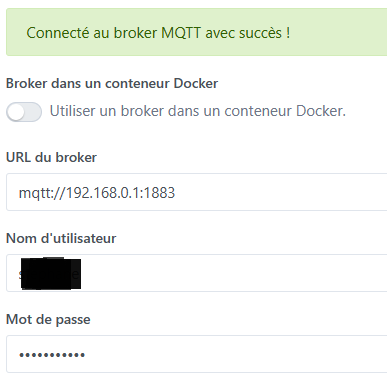
In fact I’m already using my Mosquitto with Gladys :

It works very well and I’m already getting all my topics.
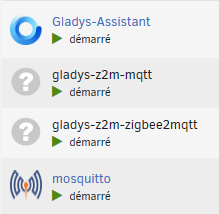
However, the zigbee2mqtt install creates a second Docker container for me; it doesn’t use my existing Mosquitto server.

I feel like you’d be more likely to create a backup in your personal ZigBee2MQTT and restore it to the one managed by Gladys…

That’s exactly what @cicoub13 replied to you
At the moment z2m doesn’t do it

Ok, I’m giving up on my existing Docker containers. I’m using Gladys

No, it’s all good :ok_hand:
Each of these two integrations needs an MQTT broker to communicate with.

Ok thanks for all the info, I’ve tidied things up while keeping my MQTT broker Mosquitto, I just need to take care of my Zigbee config:

Thanks everyone for the quick info :wink:

2 Likes

Hello @zedyxer,
On my side, I use Gladys with K8S, so I don’t have access to automatic Docker mounts.

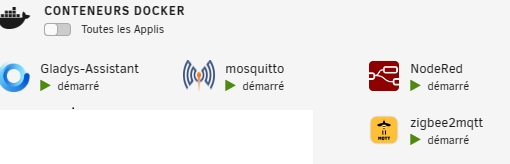
For Zigbee, like you I use a separate container that is connected to Gladys. To get the two to communicate, I modify the connection values directly inside the Docker container.

Here are the files:

/src/server/services/zigbee2mqtt/lib/init.js
/src/server/services/zigbee2mqtt/lib/getConfiguration.js

It’s not the best technique, but I’ve been using it for a long time and I’ve never had a problem. However, you should check the Zigbee code updates from time to time in case there are major changes (once so far)
Here are the files in question:

init.js

Summary
const logger = require('../../../utils/logger');
const { CONFIGURATION } = require('./constants');
const { generate } = require('../../../utils/password');
const { PlatformNotCompatible } = require('../../../utils/coreErrors');

/**
* @description Prepares service and starts connection with broker if needed.
* @example
* await z2m.init();
*/
async function init() {
    // Load stored configuration
    const configuration = await this.getConfiguration();

    this.mqttRunning = true

    await this.connect(configuration);

    await this.saveConfiguration(configuration);

    return null;
}

module.exports = {
    init,
};

getConfiguration.js

Summary
const logger = require('../../../utils/logger');
const { CONFIGURATION } = require('./constants');

/**
* @description Get MQTT configuration.
* @returns {Promise} Current MQTT network configuration.
* @example
* getConfiguration();
*/
async function getConfiguration() {
    logger.debug('Zigbee2mqtt: loading stored configuration...');

    // Load z2m parameters
    const z2mDriverPath = await this.gladys.variable.getValue(CONFIGURATION.Z2M_DRIVER_PATH, this.serviceId);
    //const z2mMqttUsername = await this.gladys.variable.getValue(CONFIGURATION.Z2M_MQTT_USERNAME_KEY, this.serviceId);
    //const z2mMqttPassword = await this.gladys.variable.getValue(CONFIGURATION.Z2M_MQTT_PASSWORD_KEY, this.serviceId);
    const z2mMqttUsername = '<username>';
    const z2mMqttPassword = '<password>';

    // Load MQTT parameters
    // const mqttUrl = await this.gladys.variable.getValue(CONFIGURATION.MQTT_URL_KEY, this.serviceId);
    const mqttUrl = 'mqtt://<IP>:1883';
    const mqttUsername = '<username>';
    const mqttPassword = '<password>';
    // const mqttUsername = await this.gladys.variable.getValue(CONFIGURATION.GLADYS_MQTT_USERNAME_KEY, this.serviceId);
    // const mqttPassword = await this.gladys.variable.getValue(CONFIGURATION.GLADYS_MQTT_PASSWORD_KEY, this.serviceId);

    return {
        z2mDriverPath,
        z2mMqttUsername,
        z2mMqttPassword,
        mqttUrl,
        mqttUsername,
        mqttPassword,
    };
}

module.exports = {
    getConfiguration,
}

thanks for the feedback, I modified my setup yesterday by removing my Docker MQTT and my Docker Zigbee2MQTT

I’ll still test your solution for my own info as soon as I have the time and a bit of courage ^^

ciao