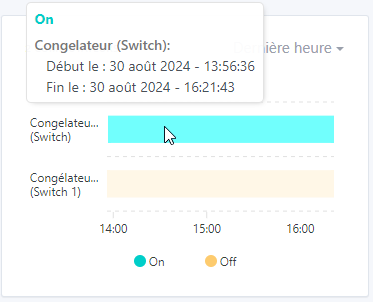
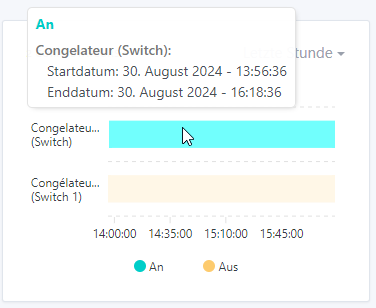
For me there are necessarily two points in time: the « historical » point and the current time
Since we’re talking about a state, you have to draw the last bar between the last point and now, right?
I made the change accordingly.
I added (only for binaries) :

- [x] Is the linter passing? (`npm run eslint` on both front)
- [x] Did you run prettier? (`npm run prettier` on both front)
- [x] If you are adding a new features/services, did you run integration comparator? (`npm run compare-translations` on front)
- [x] Did you test this pull request in real life? With real devices? If this development is a big feature or a new service, we recommend that you provide a Docker image to the community ([french forum](https://community.gladysassistant.com/)/[english forum](https://en-community.gladysassistant.com/)) for testing before merging.
- [ ] If you are adding a new features/services which needs explanation, did you modify the user documentation? See [the GitHub repo](https://github.com/GladysAssistant/v4-website) and the [website](https://gladysassistant.com).
- [ ] Did you add fake requests data for the demo mode (`front/src/config/demo.js`) so that the demo website is working without a backend? (if needed) See [https://demo.gladysassistant.com](https://demo.gladysassistant.com).
NOTE: these things are not required to open a PR and can be done afterwards / while the PR is open.
### Description of change
Taken from the original PR: #Binary graph #1948
Thanks to @callemand for all the work done
No technical review yet until it’s functionally correct!
Hey @pierre-gilles ,
I have applied and checked the remarks except:
I tried to reproduce it but, despite zooming in/out, changing resolution, etc., I never managed to get your result. However, before my previous change I had the same issue, but I fixed it before your review. So I still reduced it to only 10 characters max just in case… ^^
And for the power plug, I replied to you on GitHub, but I can’t reproduce it. I added a log on the units to see more.
Thanks for the fixes !
Terdious:
I tried to reproduce it but, despite zooming/dezooming, resolution changes, etc., I never managed to get your result. However, before my previous change I had the same issue, but I had fixed it before your review. So I still reduced it to 10 characters max just in case… ^^
Ok, I can’t reproduce it either !
I’ve left you a comment for the rest :
master ← Terdious:add-binary-chart
@Terdious Thanks for the fixes!
Here is the payload that causes the freeze: …
```
{"id":"e499dd5e-6482-4cbd-a73e-159d53c9b402","name":"Graph","selector":"graph","type":"main","visibility":"private","user_id":"275faa00-8a9c-4747-8fbe-417ddb966b16","created_at":"2024-06-10T08:20:20.784Z","updated_at":"2024-06-17T11:30:17.089Z","boxes":[[{"type":"chart","device_features":["mqtt-priseonoff"],"units":[null],"title":"Binaire","chart_type":"","interval":"last-day","display_axes":true}],[],[]]}
```
The response is 422 :
```
{
"status": 422,
"code": "UNPROCESSABLE_ENTITY",
"properties": [
{
"message": "\"[0][0].chart_type\" is not allowed to be empty",
"attribute": "boxes",
"value": [
[
{
"type": "chart",
"device_features": [
"mqtt-priseonoff"
],
"units": [
null
],
"title": "Binaire",
"chart_type": "",
"interval": "last-day",
"display_axes": true
}
],
[],
[]
],
"type": "Validation error"
}
]
}
```
It's just because I didn't select the "chart type" ^^ It's maybe not related to this PR, but I wonder if we could make a fix to avoid freezing in this situation...
I have another feedback, now the date in english is not correct:

Hello @pierre-gilles ,
For your last comment on this PR, does this work for you:
It seems to me that was the last point to address.
Really cool
I gave you 2 pieces of feedback.
I think we can then do a Cloudflare Pages build so Gladys Plus users can test with their instance, since it’s only the frontend it should work (if users properly delete their « binary » graph after the test)
Ok good for me (I replied to you there as well)
However, for WebSockets, no issues on my side, I stayed on the page for 2 minutes and I did get updates every 22s/30s without refreshing the page … However indeed on the popup it doesn’t update automatically, you have to move the mouse.
Oh yes that would be great indeed!!^^
Thanks for the quick change! I replied to you over there, it’s fine with me for both.
I made a PR for Cloudflare Pages builds only (keep your PR):
master ← Terdious-add-binary-chart
ouvert 02:36PM - 30 Aug 24 UTC
### Pull Request check-list
To ensure your Pull Request can be accepted as fa… st as possible, make sure to review and check all of these items:
- [ ] If your changes affects code, did your write the tests?
- [ ] Are tests passing? (`npm test` on both front/server)
- [ ] Is the linter passing? (`npm run eslint` on both front/server)
- [ ] Did you run prettier? (`npm run prettier` on both front/server)
- [ ] If you are adding a new features/services, did you run integration comparator? (`npm run compare-translations` on front)
- [ ] Did you test this pull request in real life? With real devices? If this development is a big feature or a new service, we recommend that you provide a Docker image to the community ([french forum](https://community.gladysassistant.com/)/[english forum](https://en-community.gladysassistant.com/)) for testing before merging.
- [ ] If your changes modify the API (REST or Node.js), did you modify the API documentation? (Documentation is based on comments in code)
- [ ] If you are adding a new features/services which needs explanation, did you modify the user documentation? See [the GitHub repo](https://github.com/GladysAssistant/v4-website) and the [website](https://gladysassistant.com).
- [ ] Did you add fake requests data for the demo mode (`front/src/config/demo.js`) so that the demo website is working without a backend? (if needed) See [https://demo.gladysassistant.com](https://demo.gladysassistant.com).
NOTE: these things are not required to open a PR and can be done afterwards / while the PR is open.
### Description of change
Please provide a description of the change here. It's always best with screenshots, so don't hesitate to add some!
The URL should be ready in a few minutes
Great!!
@guim31 , if you’re reading this… ^^
It’s available here:
https://terdious-add-binary-chart.gladys-plus.pages.dev
I recommend testing on a separate dashboard and deleting the dashboard after the test (to avoid polluting production).
guim31
August 30, 2024, 3:07pm
75
Here’s what it looks like on my end:
I would have liked to be able to rename my feature (like in Room Device) because right now it’s way too long ^^
Otherwise it’s all good on my side!!
Thanks for the test Guim31 !!
In the end, it doesn’t surprise me.
@Terdious I don’t know if you’ve played with the yaxis options?
Typically you can specify a minWidth
That will take up space on the chart though, no secret — this kind of chart would benefit a lot from the ability to have 2 or 1 columns ^^
Otherwise, you need to give the user the ability to rename the device like for the « Devices » widget
pierre-gilles:
Typically you can specify a minWidth
After that, well it’ll eat into the chart, so no secret — this kind of chart will benefit a lot from the ability to have 2 or 1 columns ^^
Yes, and that was exactly it, it reduced the chart so much that I gave up. But indeed a mix of that and renaming can handle the abusive cases.
So I’ll go with that then? ‹ minWidth › + ability to rename (the edit box is going to be huge
[quote=« Terdious, post:78, topic:6599 »]
I’ve found a first compromise I think is interesting with ‹ minWidth › and a few changes. I fully loaded one of the boxes to really test.
I’ve just pushed, @pierre-gilles does Cloudflare restart automatically or is that a manual action on your part?
I’m continuing with the renaming option now, so if that’s an action on your part, it


 )
)