Ok thanks, I’ll test it and I’ll let you know.
@pierre-gilles, bad news because I’m still experiencing the issue
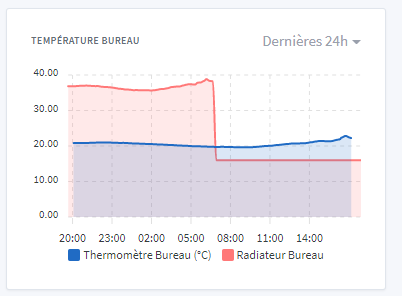
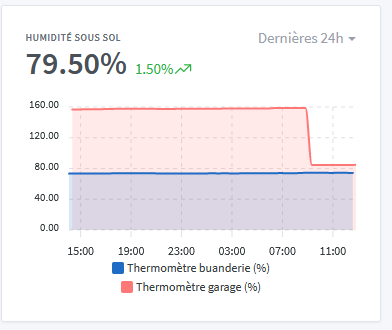
The first part of the red curve is not displayed properly
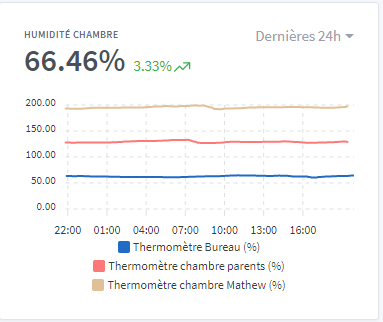
Ok, damn! that means upgrading the library doesn’t solve the problem.
And worse, it breaks other features ^^
I’m not merging!
It annoys me because that means back to square one… I can’t reproduce your bug and so it’s very hard to know where it’s coming from.
If you want to investigate a bit more, one option would be to browse the issues of the library we use:
Another option, would you mind sending me your database? So I can see if I can reproduce the bug myself. However, it’s an operation that needs to be done via the command line…
However, I should note that this phenomenon occurs only where the display is incorrect.
I’ll try to look at their issues on GitHub.
No problem sending you my DB, I wrote a script that backs up my Gladys DB every day to a personal server. Before Gladys Plus, I had to do a manual backup so as not to lose everything!
I’ll send you the latest copy by PM.
Great, thanks  We’ll find it!!
I got your DB, impressive setup — great to see!! 
However, bad news, I can’t reproduce it…
I go to your dashboard « Temperature and humidity », and I refresh like crazy dozens of times in a row; nothing helps — the « BASEMENT TEMPERATURE » display is fine
You’re not on an « exotic » browser by any chance? (we support the usual ones: Firefox, Chrome and Safari)
Thanks for my DB, yes I’ve really migrated everything from Domoticz to Gladys, only the Enedis module that’s running on Domoticz remains! It took me a little time to get all that done.
Strangely I haven’t had the issue today yet, but beware — on refresh the display is correct; it’s only when opening the page that the problem may appear
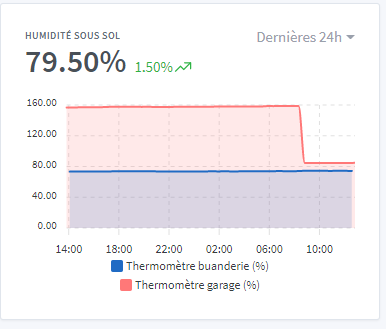
When you have a chance, could you show us your setup and how you use it?
Occasionally, yes — if you want I could write something. But otherwise there’s nothing really special in my setup. There’s Zigbee, Z-Wave, Tasmota, Netatmo, electricity consumption monitoring, heating management. With Node-RED and a few scenes!
There are also things I reused from existing installations.
Ah! When you say “opening the page”, do you mean switching from one Dashboard to another?
I haven’t tested that
And would you be interested in taking part in my YouTube interviews?
Yes, that’s right, by switching from one dashboard to another. Sorry, I may have expressed myself poorly.
A written presentation, yes, but for YouTube, sorry, not for now. Note this isn’t a firm no but for the moment I’m not very keen. Maybe later 
I was sure you’d ask me that when @lmilcent made the request.

In the presentation section, you can always share your setup, your use cases, scenes, etc. It’s really simple, but talking about my motion sensor in the mailbox gave some people ideas! It’s nothing much, but you still have to think of it.
Ok I’ll get back to it on Monday, it’s nighttime here!
[quote=« _Will_71, post:34, topic:7569 »]
A written presentation, yes,
Ok, no worries and have a good weekend.
@_Will_71 I managed to reproduce it!!
The bug occurs only in one case: when you switch from « Electricity » to « Temperature and humidity »
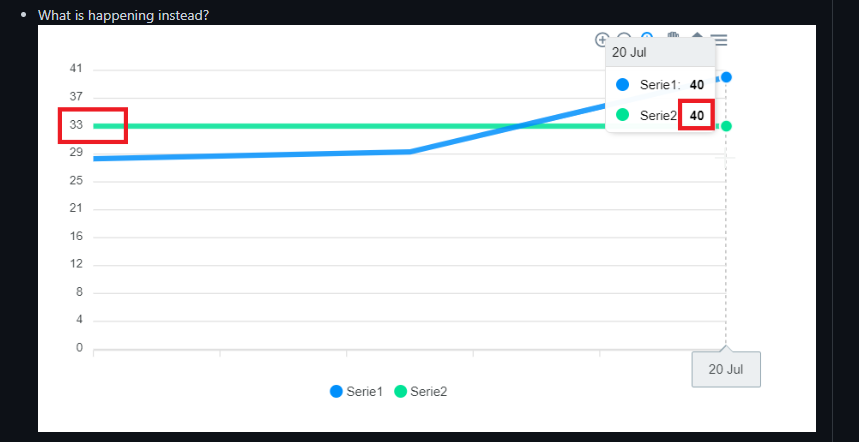
I think it’s an issue due to both dashboards having a « Chart » box in the same place (top right), and so Preact (the frontend library we use) uses the same component and re-renders that component with the other’s information, and there must be a logic/timing bug during that re-render that mixes the information from one and the other.
I’m investigating!
It was easy, a classic bug!
We just needed to reproduce it locally
Thanks for your DB 
The PR that fixes the bug:
You can tell they’re experienced at debugging! Nice find