Hamtaro
November 24, 2020, 9:00am
1
Hello
I would like to set up a scene that alerts me when the temperature drops below a certain value and above another value.
Currently, I have a simple scene with an alert < 18°C, but as a result, I am spammed with messages… I would like to have only one alert and then another one for a return within the range.
Is this possible?
Edit: It would also be great to be able to turn off a scene simply as a binary from the list of scenes, without having to delete it…
guim31
November 24, 2020, 10:30am
2
It really interests me if someone has a solution because I expect the same behavior but in reverse: an alert when my laundry room exceeds 28°. Currently, I don’t know how to set the alert interval… I’m also being spammed ^^
Hello @Hamtaro ,
Indeed, this is a great use case! For now, there is no way to do this.
I added an issue because this is a great addition:
ouvert 07:49AM - 27 Nov 20 UTC
fermé 03:10PM - 27 Nov 20 UTC
Feature
Right now, if I create a scene that trigger "When temperature is > 18°C", I'm sp… ammed by hundreds of messages because there is no threshold mode. I should be able to create a scene that trigger only when the temperature go from 17.9->18°C.
Not bad either. I created an issue
ouvert 07:50AM - 27 Nov 20 UTC
fermé 07:57AM - 10 Sep 21 UTC
Feature
I’m working on the feature, but I’m unsure about the text to make it understandable.
I describe the feature as I implemented it on the server side:
Instead of checking the trigger condition every time a value is sent, the condition is only validated the first time it is validated.
Example if the condition is « temperature > 18 »:
Temperature = 17 = invalid
Temperature = 19 = VALID
Temperature = 19 = invalid
Temperature = 25 = invalid
Temperature = 17 = invalid
Temperature = 25 = VALID
Example if the condition is « temperature = 10 »:
Temperature = 8 = invalid
Temperature = 10 = VALID
Temperature = 10 = invalid
Temperature = 10 = invalid
Temperature = 17 = invalid
Temperature = 10 = VALID
Here is the text I have put for now, but I am not convinced:
Hamtaro
November 27, 2020, 1:53pm
5
It seems fine to me, in my use case (I know you love that, @pierre-gilles
And indeed, the text could be simplified but I don’t know how.
« "Execute only when the device value toggles on either side of the threshold."? »
@cicoub13 I find this less understandable!
Reno
November 27, 2020, 2:24pm
9
I suggest:
Run once when the threshold is exceeded (and not as long as the threshold is exceeded)
What bothers me in these sentences (and in my current sentence) is that in the case where we have a condition:
When the light is on
If the switch is in the off position
This has nothing to do with a threshold! It’s about equality, so the sentence is hard to understand
Reno
November 27, 2020, 2:38pm
11
Run at the first occurrence of the condition (and not while it is true)
Would that be better?
I’ve merged with the first version I proposed.
None of the suggestions in this feed seem simpler to understand for a non-developer user, and that’s normal, we’re all tech in this topic
I would ask for feedback from non-tech users outside the Gladys bubble to see what they understand
The feature will be released in the next Gladys release, probably next week.
VonOx
November 27, 2020, 3:16pm
13
Will you be able to build a :dev anyway?
Of course! I’ll start one at the end of the day if you want
@VonOx I started a dev build, I’m done for today, what a day!
Build progress here: https://github.com/GladysAssistant/Gladys/actions/runs/387432952
I’d like to have feedback on the Caldav part if you have it at home (with Google Calendar for example)
VonOx
November 27, 2020, 4:26pm
16
VonOx
November 30, 2020, 1:37pm
17
Successful test on calendar-level development, I’m
Reno
November 30, 2020, 1:58pm
18
Wouldn’t it be better to have 2 ‹ radio buttons › like this, so the user better understands the 2 possible choices: it’s one or the other.
Execute on condition pass (once)
Execute while the condition is true
After that, I agree, you always need to find the right text…
To me, that’s the principle of a checkbox
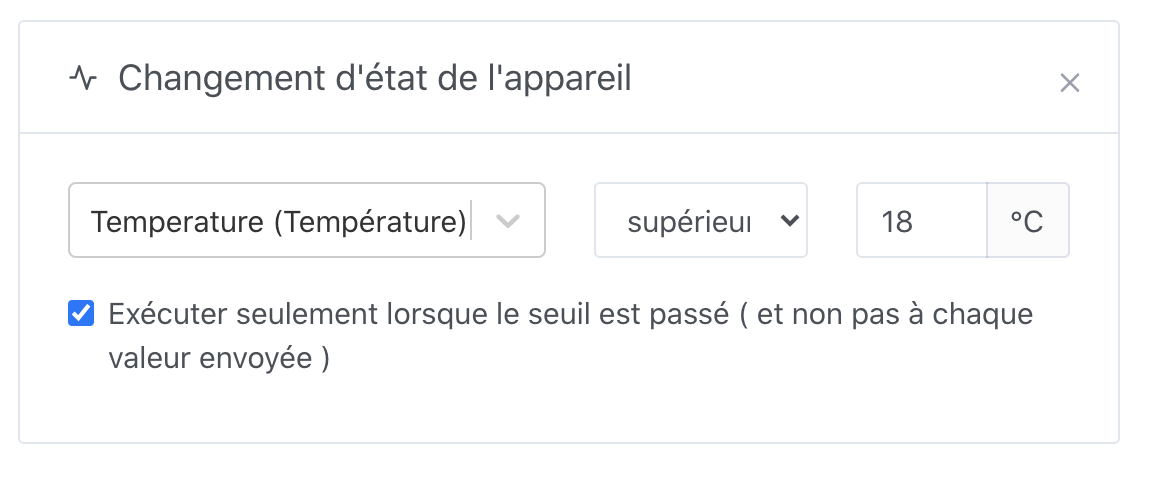
 ).
).


 Yeah, I’ll test Gmail this weekend
 the new weather box