Aqara - motion sensor

log(feature) as input to sendState (Gladys/server/services/homekit/lib/sendState.js at feat-homekit-motion-sensor-2 · cicoub13/Gladys · GitHub)

{
  id: '8594204f-1251-4f38-9eba-cfebba5c3823',
  device_id: 'ffeb673a-b765-480d-a785-6022df1411e2',
  name: 'Détection mouvement Oui/Non',
  selector: 'zigbee2mqtt-0x00158d0006f2500d-motion-sensor-binary-occupancy',
  external_id: 'zigbee2mqtt:0x00158d0006f2500d:motion-sensor:binary:occupancy',
  category: 'motion-sensor',
  type: 'binary',
  read_only: true,
  keep_history: true,
  has_feedback: false,
  unit: null,
  min: 0,
  max: 1,
  last_value: 1,
  last_value_string: null,
  last_value_changed: 2023-10-20T13:01:20.659Z,
  last_hourly_aggregate: 2023-10-20T10:00:00.000Z,
  last_daily_aggregate: 2023-10-19T22:00:00.000Z,
  last_monthly_aggregate: 2023-09-30T22:00:00.000Z,
  created_at: 2023-10-12T06:29:40.550Z,
  updated_at: 2023-10-20T10:38:57.691Z
}

log(event) as input to the Sensor case (Gladys/server/services/homekit/lib/sendState.js at feat-homekit-motion-sensor-2 · cicoub13/Gladys · GitHub)

{
  type: 'device.new-state',
  device_feature: 'zigbee2mqtt-0x00158d0006f2500d-motion-sensor-binary-occupancy',
  previous_value: 1,
  last_value: 1,
  last_value_changed: 2023-10-20T13:01:20.659Z
}

log(Service[mappings[feature.category].service) in the same place

[Function: MotionSensor] {
  UUID: '00000085-0000-1000-8000-0026BB765291'
}

log(Characteristic[mappings[feature.category].capabilities[feature.type].characteristics[0]]) in the same place

[Function: MotionDetected] {
  UUID: '00000022-0000-1000-8000-0026BB765291'
}

Are you sure that for motion sensors you don’t have to send a boolean?

On projects that do the same, they send boolean values:

That’s what I saw. I tried two ways (!!event.last_value and Boolean(event.last_value)).

I’ll try again :thinking:

The best in my opinion:

event.last_value === 1
1 Like

I don’t think that’s necessary, the library does it on its own

Besides, you can clearly see that it works for lights/switches that also require booleans

1 Like

I tried it, your code seems to work.
To minimize it as much as possible you can do it like this
https://github.com/GladysAssistant/Gladys/compare/master...bertrandda:Gladys:move-sensor

@cicoub13 let me know when you want a review!

Hello. I took into account the feedback from @bertrandda and pushed a new version of the image cicoub13/gladys:homekit-motion-sensor

But it doesn’t work on my iPad. I don’t know whether it’s my sensor, the image, …

Could someone (with real sensors) test it?

A real sensor doesn’t change anything in Gladys :slight_smile: A sensor, whether it’s MQTT or something else, it’s the same thing!

Also, if you need a Zigbee motion sensor I can send you one?

I can test the image this weekend if you want, since I have the sensors :wink:

1 Like

I have one that works very well with Gladys but no status updates in HomeKit :neutral_face:

@cicoub13 Ah :sweat_smile: That’s not a good sign

Have you tried changing the sensor’s state live?

And do the other sensors that were already compatible still work with the HomeKit integration on your new image?

A message has been split into a new topic: Zigbee motion sensor does not appear in the Gladys integration

Hello everyone, I tested the image given in the post a little further up.
The sensor is correctly detected in Gladys, but does not appear in HomeKit.
And in Gladys, the scene I set up does not work because the sensor refreshes every 30s, and not below.
For info, it is a real Aqara sensor, not a virtual one.
In fact, I want to place a sensor in a cellar, associated with a smart bulb, which turns on and stays on as long as the person is inside.
I don’t know if this information will help.

What’s not working? I have that setup with the same sensor and it works very well :slight_smile:

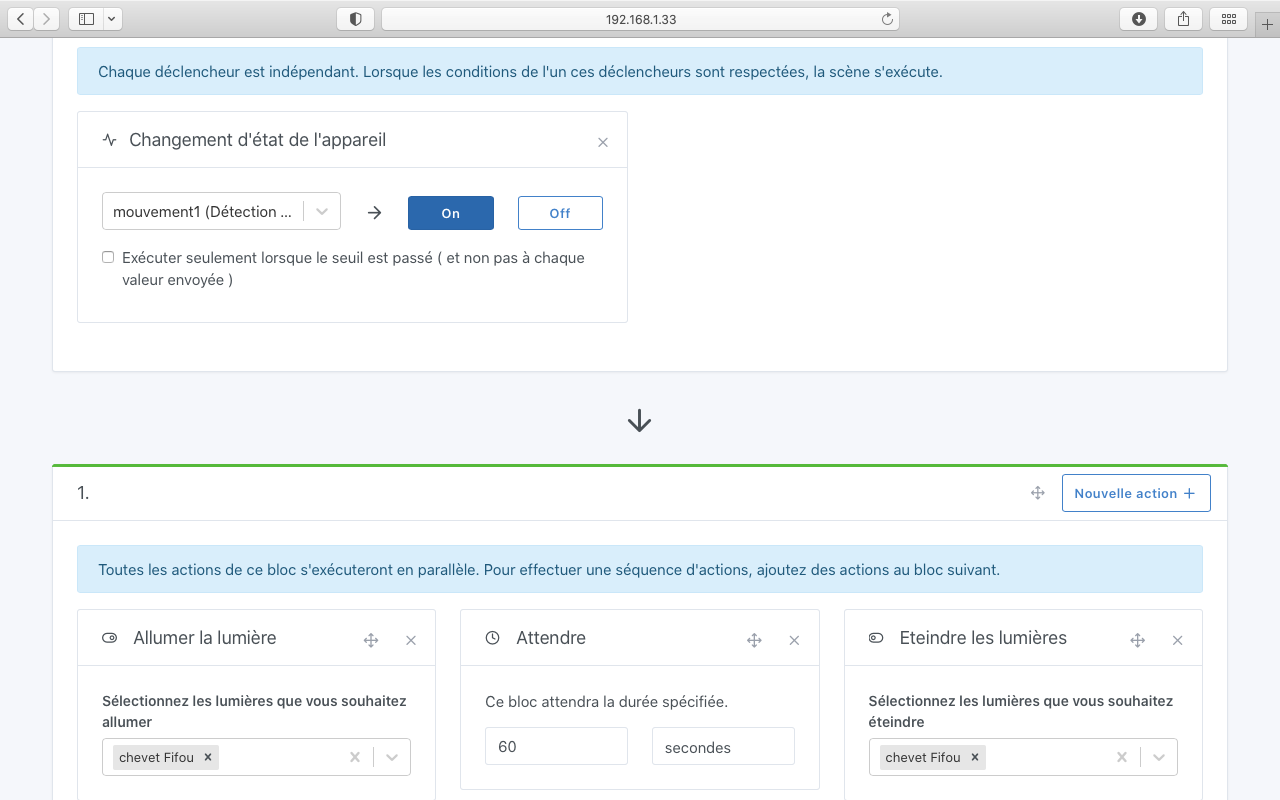
It should work. Could you send us a screenshot of your scene?

I’m probably messing up the scene configuration…

Yes the last one with the 3 actions can’t work.

Everything you put in the same block is executed at the same time.
So you turn it on, you turn it off and you wait.

You need to modify and add 2 other blocks below.
So one block to turn on
One block to wait
And one block to turn off

And will the scene restart as long as someone is in front of the detector?