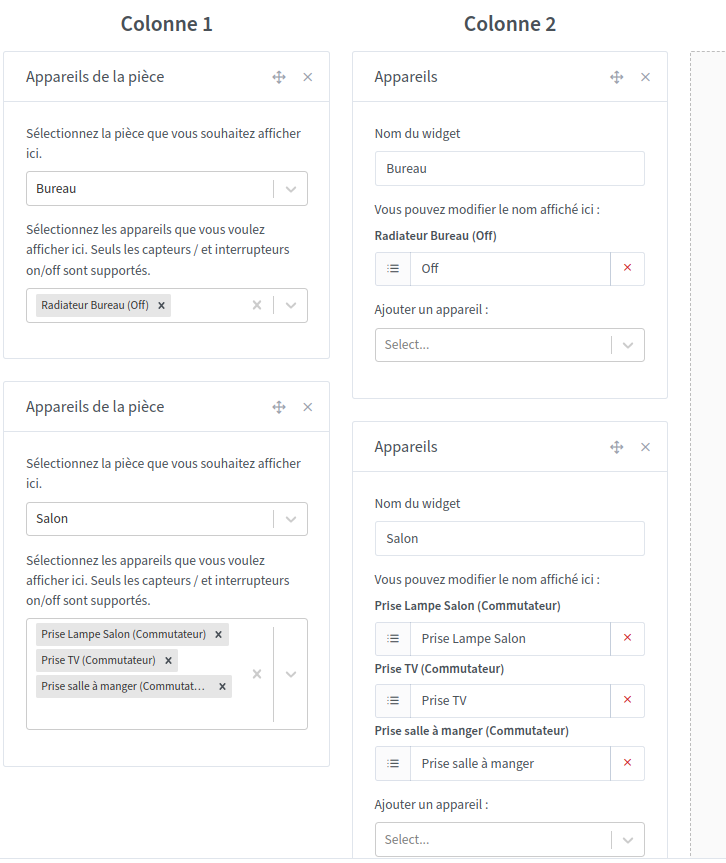
Following update 4.27 I wanted to replace my Room devices widgets with Devices widgets to benefit from renaming and to be able to change the order.
But I have a display bug with the outlet switches. On the left of the image below are Room devices widgets with a correct display and on the right the Devices widgets. The switches always stay at Off! Unless I refresh the page they are in the correct state for 1s and then switch back to Off.
After testing, the problem appears if we put both widgets on the same desktop. If I remove the Devices widget from the room, the other widget works correctly.
I found the source of the bug — actually the problem occurred when the same device was displayed multiple times on the same dashboard (no matter which widget was used)
The radio button’s « name » was the device ID, and so that created a conflict in the radio’s HTML state.
I added the widget’s x/y position to the identifier so that it wouldn’t cause problems