Bug/Improvement Setpoint temperature

Hi everyone,
Winter is coming and so there’s a slightly heavier use of the setpoint temperature; overall it works but there’s a small usability friction.

Imagine my setpoint temperature is 14, I want to turn the heating on,

So I press the plus button 9 times, the problem is that each time I press plus it requests changing the temperature on the thermostatic radiator head and so the value strangely drops back to 14.5 and then you press again because you think it didn’t register and you end up with a temperature of 25 after 5 minutes… not ideal…

I think there’s an easy way to solve the problem: there should be only a single call to set the temperature, we can consider that after 2–3 seconds we make the call to zigbee2mqtt
That way only one temperature is sent on the zigbee2mqtt network.

I think the solution isn’t perfect but it’s already a step forward compared to today…

I’d like to hear your opinions or experiences on the matter

Otherwise it’s great to be able to create scenes about this!

4 Likes

While waiting for a fix, you can enter the value directly into the input.

Thanks for your feedback! Yes, we can add a « debounce » on the thermostat.

I created a GitHub issue:

1 Like

Yes, but I admit that I’m trying to get my parents onto gladys, and those are the little details that make adoption a bit more technical.

3 Likes

Great, I hesitated to open an issue directly! Thanks

1 Like

Thanks for reporting it, you really shouldn’t hesitate when it’s small things like that :slight_smile:

I have a second problem too: when I set a temperature in my scene it doesn’t apply… :cry:

I added a message to make sure it’s applied properly:
image

But nothing helps… the value is not applied to the thermostatic valve head…

Quick question: why in your screenshot is the same action shown twice?

They’re two different radiators.

My bad, I must have had mashed potatoes in my eyes when I read the post :expressionless_face::expressionless_face:

Do you have more information? :slight_smile: It’s hard to help you like this!

When you control it from the dashboard, does it work?

Yes, sorry, I’m not really sure what information I can provide,
I have doubts about the cause; it might be my connection to these devices. I’ll run further tests and I’ll let you know in the next few days

1 Like

@pierre-gilles @jgcb00 I think I’ve spotted the same thing myself: In fact, I have some MQTT topics of type « Thermostat », and also topics of type « integer counters » and I indeed can no longer modify them from the action « control a device » in a scene. This has been the case since at least yesterday, but maybe for a few days before…

And to be more precise, it doesn’t work if I enter the value directly (for example 10) in the ‹ simple value › field. But if I enter an equivalent calculation (for example 5+5) in the ‹ calculated value › field, then it works.

@pierre-gilles @jgcb00 @StephaneB I encountered the same issue. After some tests with other MQTT features (like text), it seems to be in the « Control a device » action.

@pierre-gilles @jgcb00 @StephaneB I ran some additional tests and found unexpected behavior. The report is in the English-speaking community.

This test is not finished.

  • I haven’t checked the calculations with other devices and features
  • I haven’t checked the temperature and the thermostat temperature
  • I haven’t checked the unique values in the Calculation tab
  • The booleans are all checked on the Simple tab.

Well done for the thoroughness of this test suite :+1:

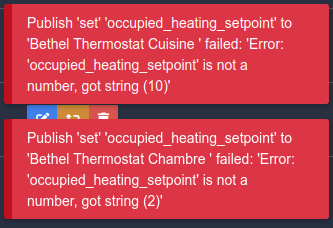
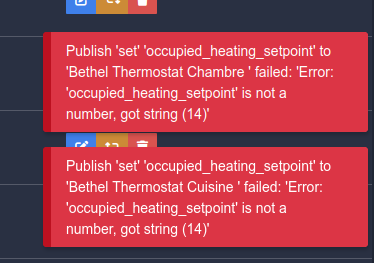
On my side I found another bug: when I enter the value manually it doesn’t work; in zigbee2mqtt I get this error message:

And the same problem occurs when I set a value in the scenes:

I think that explains why the computed values don’t have any problems.

Is there a GitHub issue for this error?

I’d like one to be created, otherwise it’ll be forgotten :grin:

I just did it:

3 Likes