Feature description
Allow having the option ‹ blink (1x,2x,3x per second) for X minutes › in the action choices within scenes.
Currently, blinking is very cumbersome because it requires a succession of turn on/wait/turn off/wait blocks in a loop.
With the new alarm mode, it makes sense to simplify creating scene types like ‹ countdown ›, ‹ sound+light › etc.
I’m experiencing the same issue so I vote !! 
Along the same idea but allowing us to go a little further, I would even suggest being able, within a scene, to call another one by repeating it N times!
I started working on this feature and kept it simple.
You can choose :
- the light or lights to blink
- the number of times
- the delay between each « blink » in ms
Here is a screenshot of the action (don’t look at the styling but rather the options  )
)
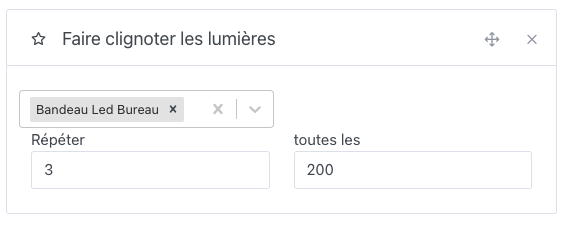
and the result
Do you think the light should return to its initial state (before blinking) or not ?
I imagine you’d like to be able to choose the color, the intensity, and lots of other parameters for each lamp, but we’ll see that in a future version 
Ideally it would be to have (for opening a garage gate, for example):
blinking interval
blinking duration + on duration + blinking duration + off
Thank you very much for this progress!
If I may make a suggestion :
- Blink for… (Time)
- Blinking speed (very slow, slow, normal etc.)
Would be more ‹ user friendly ›
But some will want something much more customizable, we’ll come back to that.
A small background calculation would allow you to count the number of times your loop will be repeated, rather than leaving it to the user to do.
And indeed, a return to the initial state or possibly, a choice (on, off or previous state - maybe later)
Colors… Like to make a Christmas garland? Random colors? That could be fun 
That’s really nice @cicoub13 
An image is available for testing (locally, do not go through Gladys Plus)
cicoub13/gladys:blinking-lights
Here is the new interface for the action
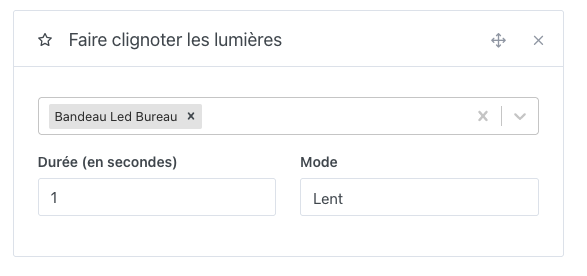
with 3 modes :
- Slow (every second)
- Normal (every 0.5 seconds)
- Fast (every 0.1 seconds)
Each light returns to its initial state after blinking.
I’ll stop there for the functional part.
If that suits you, I’ll proceed to testing
Wonderful!
I’ll test this tonight!
Thanks!
First of all, thank you!
So, after a quick test…
It’s not great with a lamp running via Tasmota HTTP.
It produces more flashes than a blink and it’s completely irregular. I’d say you should have the same on-time as off-time (example: slow=0.5s on + 0.5s off). What do you think?
Changing the speed doesn’t change anything for me.
The timing is fine.
The lamp doesn’t return to its initial state.
Do you want me to test other settings (integrations, Pi, etc.) or shall we wait for the next version?
Can you directly offer control of a plug in addition to the lamps?
Edit: Correction, changing the speed does indeed do something. I have the impression that no mode should be preselected, to avoid something random if the user hasn’t chosen one.
That makes me think… If someone chooses ‹ fast › for 1 minute, isn’t there a risk of overloading the device?
This is certainly due to the lamp’s internal electronics — you should check the lamp’s specifications; there must be an internal safety that prevents the lamp from flickering in case of a bad contact, which would greatly wear out or burn the lamp.
There is an RC circuit in the lamp that allows the progressive lighting of the LED lamp and ensures the phase alignment of voltage and current (for the power factor (cos φ)), hence the irregular flashing, certainly if the next ignition occurs before the RC circuit has discharged, not to mention the Zigbee control part! So I think tests should be carried out and you should not go below a minimum off/on threshold.
https://www.quelleenergie.fr/questions/ampoules-led-scintillement-flicker
@cicoub13, is it planned to be able to make an outlet blink? (in the case of a lamp plugged into an outlet, as I only see « Make the lights blink »)
@GBoulvin Thank you for testing. Yes, I went with flash rather than blink. I’ll try it and see how it looks as you suggest.
Not in this feature. But if it works and you’re satisfied, I’ll follow up with « socket blinking » (we’ll have to find a name).
For safety, I’m running some tests and will set threshold values.
A new image is available. The lights no longer flash, but blink.
docker pull cicoub13/gladys:blinking-lights
 Don’t forget to remove your container, restarting it will not update it.
There, it’s tested and it works as expected!
The initial state is correctly retrieved (except in ‹ fast › mode, but that mode causes more bugs than anything for me, probably too fast).
This is going to be great! Thanks!
Edit: After thinking about it, maybe adding a pause (100ms?) before sending the last state in ‹ fast › mode would solve the problem (for me). Or slow down the ‹ fast › mode? At 200ms?
I’ve done that. Tested on my side, it works well. I think we’re ready for a review.
Excellent idea !
It was when creating a manual blink that I noticed an issue with the initial state of the Philips Hue.
If I can make my house flash red when a smoke detector goes off without having to create 30 scene lines like I do today, I’m interested
Thanks for your work!
@cicoub13 Let me know when your pull request (PR) is ready to be reviewed
Hello. I’ve taken your feedback regarding the action’s blocking status into account, but I’m encountering some issues during real tests. I’ll get back to you (and here for other testers) as soon as I get back to it.
I managed to fix the problem, but I’m now stuck on the tests.
I’m using the setTimeout function from timers/promises (which is a timeout in the form of a Promise).
This gives in my for loop:
But during tests, I don’t want to deal with time and want to resolve my Promise immediately. So I use proxyquire to replace the method with a simple fake Promise.
I did this:
But it’s not taken into account, I get the following error:
scene.blink-lights
       should blink light in slow mode:
     Error: Timeout of 2000ms exceeded. For async tests and hooks, ensure \"done()\" is called; if returning a Promise, ensure it resolves. (/Users/cyril.beslay.home/workspace/Gladys/server/test/lib/scene/actions/scene.action.blinkLights.test.js)
      at listOnTimeout (node:internal/timers:569:17)
      at process.processTimers (node:internal/timers:512:7)
Any idea?