Hello everyone
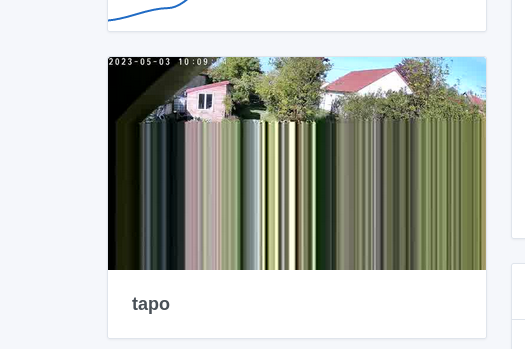
I very, very often get this kind of image on the dashboard
I thought it was because the network is carried by powerline (PLC)… but VLC handles it very well
Should I create an issue on GitHub?
Have a good day
hello , hello
I have the same thing, I think it’s a synchronization problem, Gladys takes a snap at the exact moment of a video image transition
well anyway it’s my opinion
maybe something else
I had the same thing on one of my cameras.
Even after restarting it.
When running a test in the camera integration, it kept looping.
For my second one I got the image quickly.
I had to restart the camera once more for the display to be correct.
It happens to me often but indeed, Gladys takes a snap at a given instant (t), I think, and it was taken at that moment.
You shouldn’t have the issue with the new Evo that @pierre-gilles is developing (live camera)
Hi @bong101 !
Out of curiosity:
For your information we use ffmpeg in Gladys to fetch an image from the camera, and I ask ffmpeg to take a « snapshot » of the camera.
So @pascal_sapin’s theory is plausible — it could be a timing issue, the camera returns an image « in between », but it’s also possible that it’s a bug originating from Gladys/FFmpeg.
No, the live won’t change anything — the live is complementary to the static image but Gladys does not consume the camera 24/7 by default.
Hello everyone
To answer Pierre-Gilles
1/ every minute
2/ no, no other software is consuming the stream
If I had to give a frequency, I would say that 1/3 of the snapshots are in this state, with varying degrees of malfunction
Have a good day
I also have 1-minute streams that I check regularly; I’ve never had this image bug. Maybe depending on the stream format (compression / resolution / bitrate) that could cause it?
@bong101 Ok, so a fairly basic setup.
Could you create a GitHub issue so we can keep a record of the problem?
And regarding the machine, what kind of hardware are you using? What’s the exact model of the camera?
On my end the stream is set to 2 seconds, and I only experienced the problem that one time.
@bong101 I’d be interested in seeing your live test of the « camera live streaming » feature with this camera to see how it performs (Streaming de caméra live dans Gladys Assistant 4.23 | Gladys Assistant) 
Hello Pierre-Gilles
First of all, Gladys is hosted on a Raspberry Pi 3. (and that’s the only thing on that host)
I’ll therefore put it aside as soon as I can order a Pi 4. I regularly monitor https://rpilocator.com/
Also, I still have the image capture freezing.
And during a live stream, I get the « hourglass »
Ok, have you considered a mini PC? It’s talked about a lot on the forum, and in the end it’s far more powerful than a Raspberry Pi 4!
I can’t guarantee that it will improve the image freezing (which may be due to your camera), however for live streaming it’s clear that it will improve performance
Yes, I thought about it, since it’s talked about quite a bit here…
I have a small Raspberry Pi rack and that would be additional hardware.
then the price…« affordable » you end up with a 2-core Celeron…I think I prefer hardware with more cores..and it’s therefore more expensive