Come on, given the enthusiasm of some people (@StephaneB for example ), I propose an enhancement to the dashboard blocks!
I’m currently displaying the following block and I can turn the watering on/off, but that should only be possible if the device that controls it is online and the well’s water level is sufficient and the temperature is summery and … etc, etc …
Would it therefore be possible to add display conditions to a block, with the content disabled if the conditions are not met, and displaying the unmet condition(s)?
So, making a block’s display conditional — I can kind of imagine how that might work. But before mocking anything up, I’d like @pierre-gilles to first confirm that this is a direction he’d be willing to take, and that it doesn’t worry him in terms of the dashboard’s display responsiveness if one or more conditions need to be checked for each block.
However, I don’t really see how to envision displaying which conditions prevented a block from being shown. And honestly, that seems like a strange request to me: it’s a bit like you want the dashboard to serve as a technical « log »…
Thanks already for taking the time to respond to my request
The idea of the proposed display is to be able to have the reason why an action is not possible. Example: I cannot operate the device because it is offline. Another example: I will not run a pump when there is no water in my well. Or: I will not water if the area is already sufficiently wet…
Let’s imagine that we don’t put conditions on the block, but instead move the conditions into a scene executed by an action on a block element (a switch that starts a scene, for example), how should we proceed?
Personally I don’t see much point in adding display conditions on the dashboard.
The dashboard represents manual controls. So if you press the dashboard button you can immediately see whether it works or not. Like with a physical switch in your house.
However, it would be more relevant to add a control in a scene, yes.
Currently you can’t do that directly in Gladys; you’d have to create virtual MQTT devices and make a small command flow with Node-RED.
I tend to anticipate as much as possible: if Gladys is informed that what I want to turn on is not available, why leave available something that won’t turn on? The switch is dumb, Gladys isn’t (well, that’s ultimately what I’m trying to do at home!).
And we systematically end up with what I want to avoid: Gladys’ tight coupling with Node-RED I dare imagine that, given the number of really talented people developing Gladys, we’ll be able to do without it?
In any case, thank you for these exchanges, which therefore make me lean more toward scene-based control… Now we need to see how
 ), I propose an enhancement to the dashboard blocks!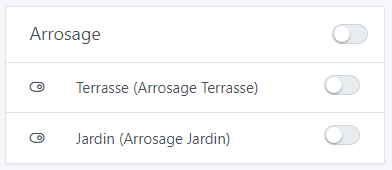


 I dare imagine that, given the number of really talented people developing Gladys, we’ll be able to do without it?