Nothing complicated, and it’s me who customized it according to my needs - All the gates work the same way  At the base you have:
- Command to open 1 leaf (or partial for gates on rail),
- Command to open 2 leaves (or complete for gates on rail),
- Close,
- Possible « timeout » to close after x seconds.
Then on the electronic board you have available contacts for the same functions with in addition:
- Stop.
I therefore connected all these contacts to an Arduino for the following need:
- I must receive a package in the morning or afternoon, I make a blocked opening, the Arduino sends the opening command then after x seconds (gate opening time) I activate the « Stop » relay to block it in position. Once the delivery person has passed or after a while, I deactivate the blocked opening or I make a close command to cut the stop and start closing,
- Same when I receive guests, it avoids having to reopen each time ^^
- When my partner works, a scenario « Start Speech Therapy » or « Start Hippotherapy » linked to the modes « Work Speech Therapy » or « Work Hippotherapy » starts the lighting of the rooms used as needed for the brightness as well as the blocked opening of the gate for the arrival of the patients. When she leaves these 2 modes or switches to the « Return home » mode, the gate is unlocked and closed.
- Same for our tenant with the « Work Psychomotor Therapy » mode which in addition allows to raise the separation of the charges for the common rooms.
- For the blocked closing, as I said, it’s an extra « safety » in case of prolonged absence.
- For the rest I use the normal functions Open / Open 1 leaf / Close depending on the case:
- I have an NFC tag on the dashboard + Tasker. When I leave or come back, I put my phone on the dashboard and the command passes,
- I receive a surprise guest, I take the first thing I have at hand, either the remote control, or the phone and I open.
- The gate has remained open following a bug or other, I use either the remote control, or the phone and I close.
I do not manage the gate automatically
That’s about it. So as you can see nothing complex in the end, I just detailed the possibilities of use which are counted in this number. After clearly, I use all these points permanently.
On this point I do not understand. Just as we take the example of Philips Hue, on the dashboard for the moment only the lamp lighting is taken up. But we are well agreed that later we will also have the possibility to manage the color, the brightness and the temperature. Will this be directly in the same box as the lighting? If so, we will indeed take its feature name and not the device name.
Another example: currently I have a device to save the « Average Voltage and Total Intensity of the house » with 1 feature « Average House Voltage » and another « Total House Intensity ». Also 1 device for each phase (Three-phase) of the power/energy data with each 3 features: « Power Phase 2 House », « Energy Phase 2 House », « Total Energy Phase 2 House »
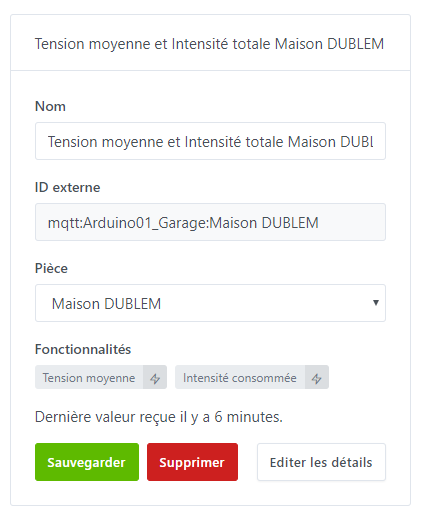
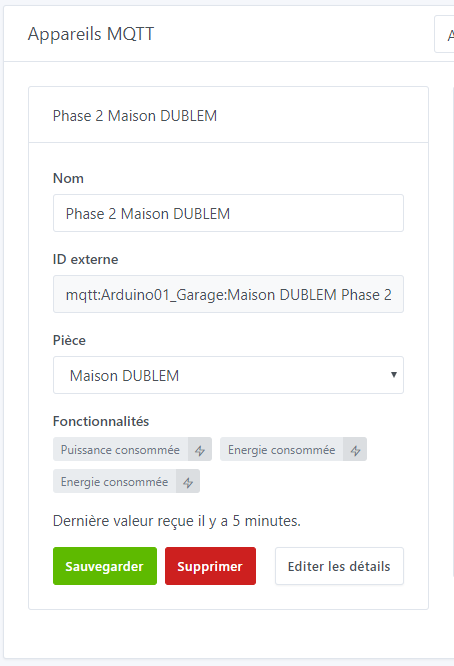
And on the Dashboard we indeed retrieve the names of the features and not the device.
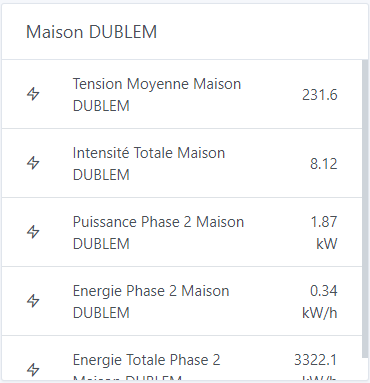
It is the same for a socket or for 1 device that would contain several actions and therefore several features. For example a socket with consumption measurement. Whatever happens, if a device is configured with 1 single switch, it will not change the fact that we retrieve its device name, or that the feature name is the same as its device name. After I may have a truncated vision because I only use mainly the Arduino for my home automation. But I try to equip myself with all types of devices currently to have a more global vision.
Indeed ^^ Maybe the simplest thing for everyone to find their way around and to have the most openness would be to add a button on the device card to choose whether you want to use the device name or the feature name for the disturbing cases?