Indeed, when I try to connect via TightViewer or PuTTY, it doesn’t connect
That’s why I had to reinstall the SD card twice
You’re probably right, I have a stability issue with my Pi, my network seems stable on its side
But couldn’t it just be the SD card?
Probably, you likely have too many sectors that are fried and therefore the system becomes corrupted too easily! This is common with SD cards, I advise you to change it 
Hello everyone,
I think there is a bug on the on/off sensors, sometimes it displays in a few seconds and sometimes it displays in a few seconds (at the beginning of the state change)
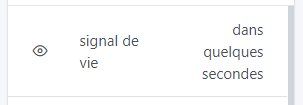
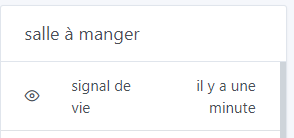
Second point, the box is resized with each duration change, is it planned to fix a dimension to these parameters to avoid the scroll bar from appearing when the duration changes?
There must be a few seconds delay between the time of your Raspberry Pi and the time of your computer on which you display Gladys. Thus, in the UI, it thinks that the value was created in the future, and consequently, displays « in a few seconds ».
After that, I agree, it’s not great. We can add a check on the date returned by the Raspberry Pi.
I add a github issue:
I hadn’t used Gladys on a tablet before, only on a PC and on my phone, and I realize that the dashboard display is the same as on mobile.
I lose the 3 columns which are on a single one.
However, the display is large enough, much larger than on mobile.
Isn’t there a parameter to modify to choose the display?
The issue comes from the BoxColumn component which has the class: col-lg-4, you would need to add the different cases, or see if a col-md-4 would be sufficient for the display.
So if you’re not in the lg media query, you will have everything in a single column (the lg should be around 1160px if it’s the standard styles, if your tablet is at 1024 it’s a no-go ^^)
Thanks for your feedback, I changed my screen resolution and it’s good, I have the 3 columns.
Good evening everyone,
I just noticed a small bug on the dashboard. I created two dashboards, one with the display and the other with commands. The first has 3 columns and 2 rows, the second also has 3 columns and 2 rows. When I switch from one to the other, the window that is in the second row left column is not refreshed and displays the second row left column window of the other dashboard, to put it back in order I refresh the web page via the browser command (I hope I’m clear). This happens to me on Firefox and also on Chrome. Does anyone have this problem?
You have a screenshot of the bug? (or even better, a short video?)
Thanks for your feedback
Hello everyone,
Quick update following the latest 4.5 update. Sometimes I would still end up with boxes in error on the Dashboard when my home network was saturated. Since this version and the performance improvements by @pierre-gilles, no more errors. When the network is busy, the box just takes a bit longer to load but always ends up displaying. Great job once again! 
Awesome! Don’t hesitate if you ever have trouble again, as you could see last time I fought until the end of the bug aha 
Finally, I was able to make a video, but the quality isn’t great, but you should see the problem. But I still have an issue, how do I send it to you?
Thanks 
You perform a drag-and-drop reply on the forum
I don’t think the forum accepts videos, however you can upload the video to a service like Streamable (no login required), and paste the link here, the forum will still open the video
Thank you Pierre Gilles
Here is the video link, https://streamable.com/h179lr.
I am doing more tests, deleting the windows of the 2 dashboards, and recreating them, the defect persists, but adding a third line and the defect also affects the third one, but the bug only acts on the left column. If you want more tests, I am at your disposal 
Okay, thanks @Psoy, that’s very clear with a video!
I’ve created a GitHub issue to keep track of the bug:
https://github.com/GladysAssistant/Gladys/issues/1280
We’ll fix that
Oh yes, cool bug 
 thanks and good luck