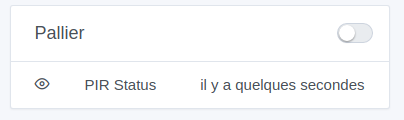
I have displayed a motion sensor on the dashboard, which is of type BINARY, so I have set the value to 1 for motion and 0 for no motion on the enocean integration side.
On the HMI side, I have the estimated time since the last value, but not really the state:
The approach taken with this display was that the motion detectors were in « push » mode; they only send « 1 » when a movement is detected.
Thus, the display shows when the last movement was detected
However, if you send "0"s, it doesn’t work.
Two possibilities:
Either you modify your integration to only send "1"s
Or you need to develop a different display for this type of motion sensor that sends both, and handle the case. Then, we’ll see what makes sense to display: The date of the last movement? The current state?
Ok, I understand, that seems logical in this case, I’m happy to change to only send 1.
But how do I handle it in a scene if, in my case, I want to turn off a light when there is no more movement?
I think this relates to this request:
But by the way, on the Device State Change trigger, this would never change?