I just installed my first instance of Gladys today.
I come from Domoticz (which does what I want but my SD card just crashed yesterday)
Instead of rebuilding my instance on Domoticz, I wanted to test Gladys (which has been tempting me for a while). It was the perfect opportunity to try it out
After this installation, I have a few questions
First question:
In a scene, I need to perform an action every minute as long as an actuator returns an active status (a Zigbee2MQTT flood detector)
When this sensor goes active, (it means a flood has been detected), I want to be notified in a loop (I am someone who is not constantly on my phone and notifications, I look at them when I have time but when it beeps several times in a row, I do look anyway.)
In Domoticz, there is the option on state change like in Gladys but also on minute change which allows to perform an action with an if … then … every minute.
I haven’t found how to do the equivalent in Gladys. I can only get a notification at the moment of the state change but not every minute. How can I do this?
Second question:
I have devices in Tasmota
Overall, everything works fine.
But I have some undesirable effects with devices that have 4 actuators.
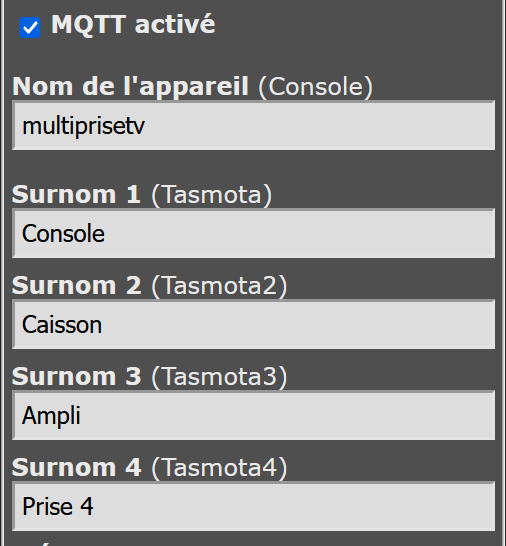
On the url: http://192.168.X.X/co? (in Tasmota), I have entered the name of my power strip and then the 4 nicknames with the names of the 4 devices connected to it.
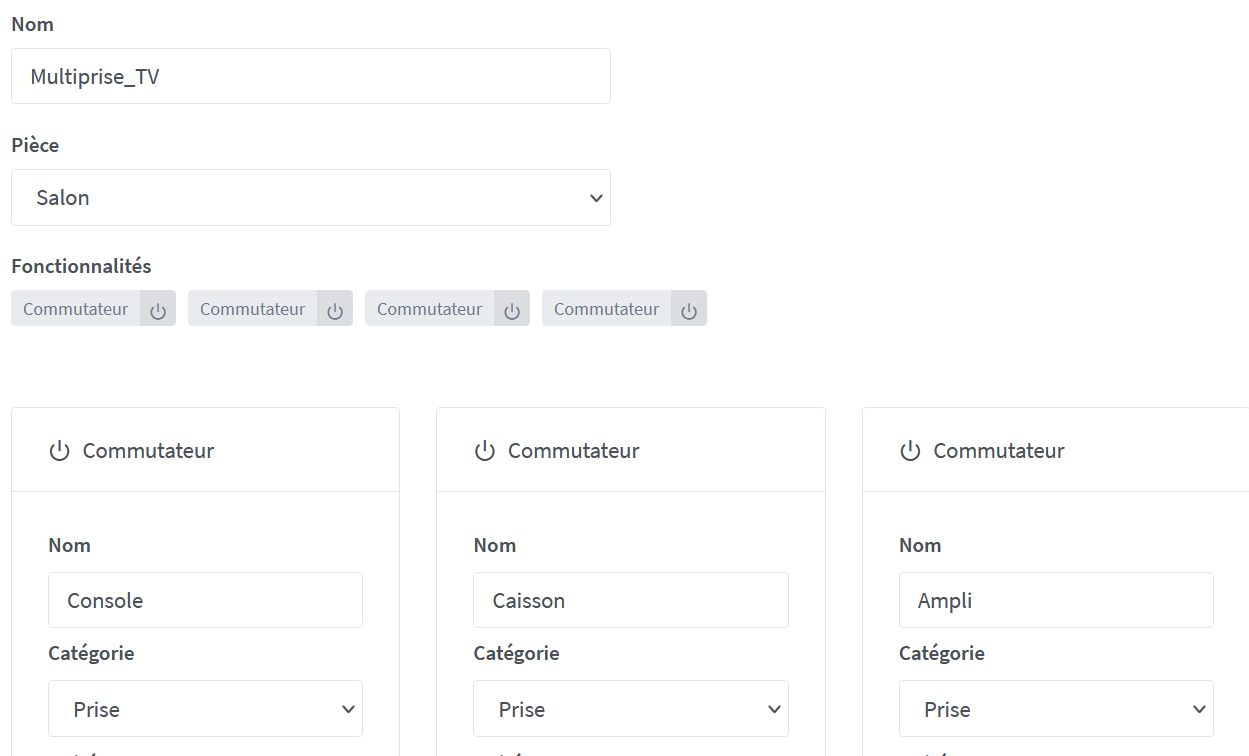
In Gladys, when I added it in MQTT search, it retrieved the name of the first nickname as the device name instead of the device name directly.
So far, nothing serious, but it’s still a shame and I updated it
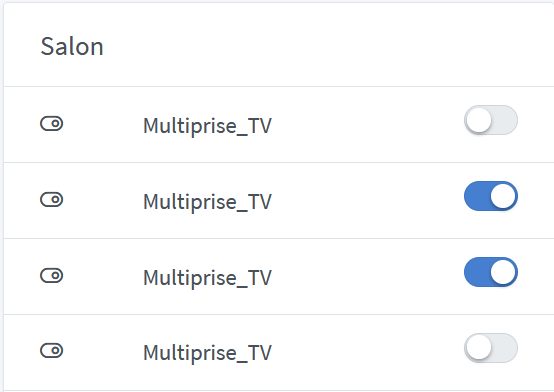
However, when I added it to the dashboard, the 4 actuators have the name of the device and not the name of each nickname of the switches.
Is it possible to correct this point in order to know which device I am activating because at the moment, it is not modifiable?
You won’t be able to do exactly the same as it is, however you can create a scheduled scene every minute for example, you retrieve the value of your flood sensor in the scene, then you do « continue only if », and then you send a message
With this, you will receive a message every XX minutes if there is a problem
You can couple this scene with a trigger that sends an alert when a flood value is received, and you have an « immediate alert » + « recurring as long as it’s flooded » combo!
For now, we don’t manage multi-sockets very well, what we have chosen to do in the future is to separate these devices into X devices (1 per socket), after that it’s a development to be done in each integration. It’s a long debate we’ve had, because there is also an issue with voice assistants (Google Home / Alexa) which do not support devices that have multiple features of the same type. These voice assistants separate these devices into X devices of the same type, and that’s what we’ll do here
Hello
Thank you Pierre Gilles for your feedback,
I will test your method for my flood sensors
For the second part, do you have an idea of the time required for this evolution?
Are we talking about the name displayed on the dashboard?
This is a small setting on the dashboard side. By default, we always display the device name, but for some services, we display the feature name.
I don’t think it’s sustainable in the long run to have this dual operation.
I’ll see if I can easily provide both names without overloading the homepage too much.
No, actually, that’s soon over (I don’t know if you followed the debate on this, it was a very, very long debate we had)
The goal is always to display the device name.
For some devices that have multiple features of the same type, the idea is to split the device into several devices, that’s how Google Home/Alexa do it.
Then it’s a matter of debate whether this is something to do in the core (in the interface), or in each service to manage the splitting.
Yes, I remember that point… ok it’s not thin to do, and you have to make the right choice.
If it’s up to the service to do it, we can easily have misses.
If it’s in the core, same, it’s complex…
Do you want us to create a topic to discuss it? List the specifications (because it’s not easy, there is notably the Google Home compatibility that must be taken into account) + make the pros and cons of each approach?
Ah, that’s the problem with debates, after that it has to be a spec and not a debate. We’re just here to talk about development. Do you create the topic or should I create it?
Thank you for considering my feedback.
Regarding sending the message every minute, it’s even better than in my old system. Here, I can choose the delay between each send (down to the second ).
Regarding the other topic, I’m sorry to bring up issues you’ve already mentioned. In any case, thank you for taking our feedback into account and responding so quickly.
You’re the best
Thanks
I confirm that on my side, there is a need because it is complicated to remember in which order the plugs were plugged into the power strip to turn on the right equipment (especially when it’s in manual mode with the dashboard)
If you can give me the link to the topic that will be created so I can see where and how it goes.




 (I don’t know if you followed the debate on this, it was a very, very long debate we had)
