Hello everyone,
I’m looking for my future home automation software and I must say I’m interested in Gladys for various reasons.
I’m a developer, so I’m looking for an open-source solution so that I can, if necessary, add the improvements I need 
I had long considered going with Jeedom, but the Jeedom code is so old and messy that I was sweating, so seeing a Node.js project excites me 
The French side also helps, I’m comfortable with English but it’s more fun with our native language 
I’m currently undergoing renovations, so I don’t really have time for anything. If all goes well, I should be moving in by the end of December, after which I can finally set up my home automation (very basic to start with, some Qubino micro modules and motion detectors for the lights, that’s all)
Well, the introduction is over, it’s not really the place for it but there’s no presentation forum 
I set up Gladys locally to see the interface and I’ve come up with a few ideas for improvements.
I’m going to talk about the dashboard, as it’s the part that’s visible most of the time:
- The first and biggest point, in my opinion, is the configuration of the dashboard. Gladys aims to be at the top level in terms of interface (it’s one of your arguments against your competitors, the recent interface), I put the test data to see what it offers, verdict: not much

I was expecting something really customizable, but in the end, apart from selecting predefined elements in predefined boxes, you can’t do much :/. I must admit that I would have loved a system like example where you replace the blocks with devices/rooms. Today, with flexbox/gridbox, it’s quite simple to implement. I don’t know what you think about it, I’m not sure I’m clear so here’s an example:
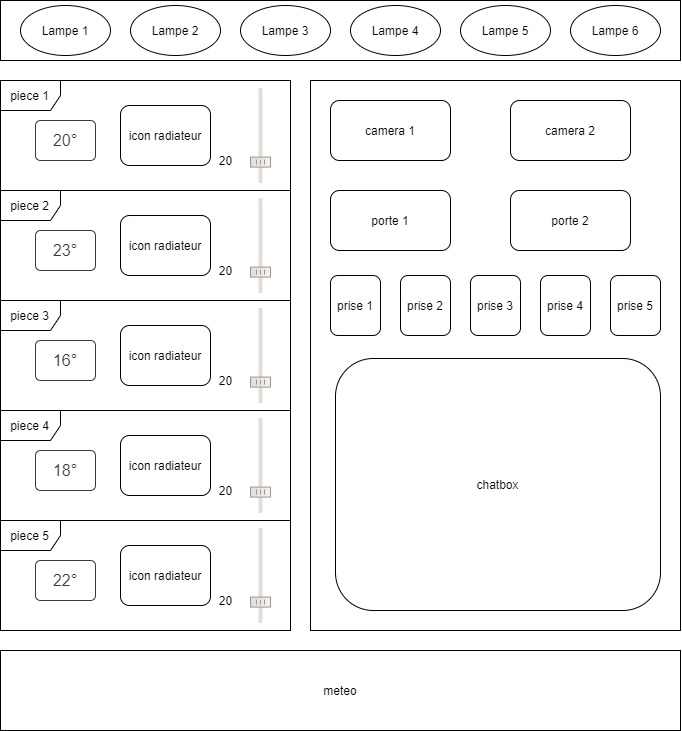
Currently, it is not possible to achieve this result (or I haven’t found it?), we are stuck in a 3-column design.
This is undoubtedly a big project, I could probably help in a few months after finishing my renovations (I’ll still have a lot to do once I’ve moved in  )
)
- In the perspective of a clear dashboard, I think the current solution is not advanced enough on the side of the components. At my place, a lamp is a lamp, whether it is RGB, dimmable or simple on/off, they are all lamps, they should therefore have an identical representation on my dashboard, in short that a lamp type device is represented in the same way whether it is z-wave/zigbee/etc… and on-off/dimmable/rgb, but that it does not look like a radiator either.
In my opinion, the visible and usable interface for the user must be uniform and self-descriptive, which implies having widgets by common device type regardless of where the device comes from.
Here is an example for lights for example:
not sure if this will work, new user embed file limit 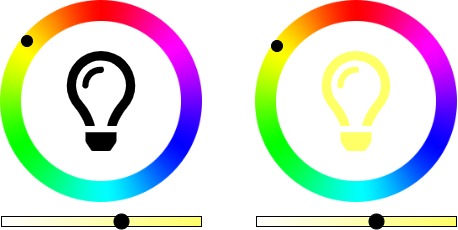
It’s the same widget for all cases, the on/off is managed by clicking on the light bulb icon, the color by the hue ring and the intensity by the bar at the bottom, each option being disableable according to the options of the said lamp.
As you can see in the example, a light bulb icon on the dashboard speaks much more at first glance than a switch button to determine the type of equipment.
With the system described above, we could place this widget wherever we want on the page, in a room (which would in fact be a simple widget container), or independently.
Concretely, the Gladys front-end core should implement different basic widgets that correspond to the different possible types of devices, and this with descriptive icons, in this respect Jeedom or others are much clearer on their dashboard on this point, you can immediately see when it’s a lamp or a shutter or other.
Of course, it is also necessary to offer the possibility to modules to create their own widgets when necessary (a remote control widget for the TV for example), once again the use of a recent js framework normally allows the use of dynamic components so no problem on this point (I haven’t touched react in almost 4 years, but vue or svelte allow it so I think react too ^^)
- A small improvement on the back end this time, it would be cool if the seeder was easily extendable, the core should only create the basic elements (user, house, room, etc..) and then each module should be able to add elements to the seeder without modifying an external file to its module (you can imagine a js file per table to seed located in a seed folder of the said module and which would be retrieved at each launch of the seed command, which would only return an array of elements to be imported in the bulk import), you can imagine putting an option to filter by module instead of taking everything).
Because I take back my example, I currently have no home automation devices at home, after putting the seeder I only see one lamp, 1 radiator and a camera as devices, no presence detector, smoke detector, alarm, etc…
If each module puts its own seeder, it would perhaps more easily add the types of devices it can manage, and above all the person concerned knows the database fields it uses with its devices, this would give more visibility during development. (for a person who would only do development on the front end for example, this would allow them to have devices they may not have at home)
Well, that’s a lot of text  If you have any questions about specific points or others, don’t hesitate.
As mentioned earlier, I’m currently undergoing renovations for many more months, so I won’t be able to help as my free time goes into the renovations. But once settled, I will motivate myself to try to help with the development according to my abilities (and needs )
Thanks for the work already done, it looks promising, and good luck for the future
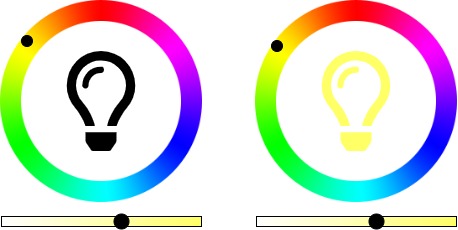

 (and it must be able to help with front-end development for those who don’t necessarily have all possible devices)