Normally it’s not a few minutes, the timeout is between 10–20 seconds  A live stays « warm » even if you leave it (so you don’t have to stop/restart a live every time), and if there are no viewers on that live for 10–20 seconds, then the live stops!
However, in your case, I don’t really know what ffmpeg’s behavior was, but in the event of an ffmpeg crash (which should be the case), we stop the live immediately. Hard to know what happened in your case — maybe ffmpeg stayed running and in that case there’s not much we can do except wait 10 seconds for the live to close
Hello everyone,
I’d like to make sure I’m using the calculations correctly, because I can’t get what I want to work.
Goal
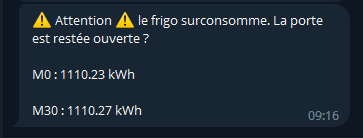
Alert when my fridge consumes more than 0.11 kWh in 30 minutes. That means the freezer or fridge door stayed open and it’s overconsuming to try to compensate for that loss of cold.
Means
A smart plug sends the instantaneous consumption value as well as a total consumption value that increments slowly, in kWh.
My scene
Description : Every 5 minutes, the scene runs:
- Retrieves at T0 the total consumption value, for example « 1100.05 kWh »
- Waits 30 minutes
- Retrieves at T30 another value, for example « 1100.10 kWh »
Then I need to calculate the difference to check that I haven’t consumed more than 0.10 kWh in 30 minutes.
But, this is not a calculation possible to do as is (if my calculation > value), you have to start with a variable. So I found an alternative that allows the same detection: if my T30 value is less than the T0 value + 0.10 kWh, then the fridge consumed more than 0.10 kWh in 30 minutes and I send an alert.
T30 < T0 + 0.10
To take a concrete example, if T0 = 1100.05 kWh, I expect T30 to be below 1100.15 kWh. With the current calculation capabilities, I have to phrase it: continue if T30 < T0 + 0.10.
Except it doesn’t work, I get alerts every 5 minutes.
It’s not « less than or equal to », but « greater than or equal to » that should be used 
Yes, actually that’s it  Thanks
Beyond my mistake here, we don’t have a way to add the variables and test that value.
For example, does the sum of instantaneous consumption of a group of outlets exceed a given value?
You can possibly do it with a virtual device as a « buffer » variable
Luckily I’m an « advanced » user 
I’ll test that, thanks!
It works perfectly 
Now I can finally check if, within the last 5 minutes, there has been any movement at my place. And thus deduce whether the house is empty or not!
It’s that simple:
- Every 5 minutes I set a variable (a fake MQTT device) to 0
- As soon as movement is detected by one of the motion or door/window sensors, I add
1 to that variable
That way, when the variable is 1 or more, I can understand there has been movement, even quite a lot of movement when the variable is 2, 3, or 4!
I think I had the idea for this scene last year Which just goes to show, you only need to wait and propose good ideas