Gladys Assistant 4.46: Dashboards! đŸ–„ïž

Hello everyone!

Today, Gladys Assistant 4.46 was released, a new version that focuses on dashboards, thanks to several PRs proposed by @Terdious :slight_smile:

It’s really very solid so congratulations to him for all that work :clap:

Choice of number of columns

It is now possible to choose how many columns are displayed on a dashboard, which allows you to have a 1-, 2- or 3-column dashboard:

This improvement allows you, for example, to display a chart or a camera image at 100% of your screen width!

Binary sensors history

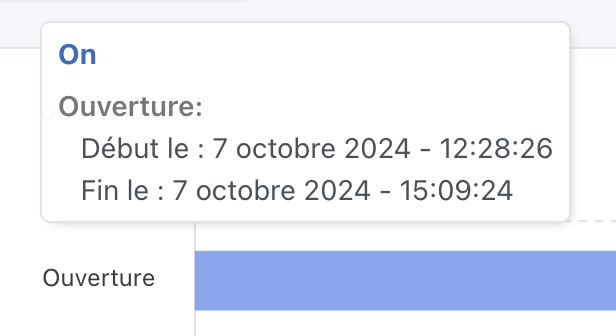
From now on, for all binary sensors (motion sensor, door open sensor), it is possible to display their history on the dashboard:

A small tooltip displays the on/off periods:
Rename a sensor on a chart

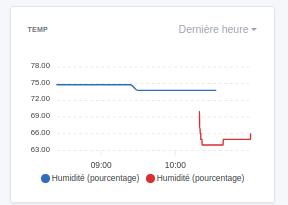
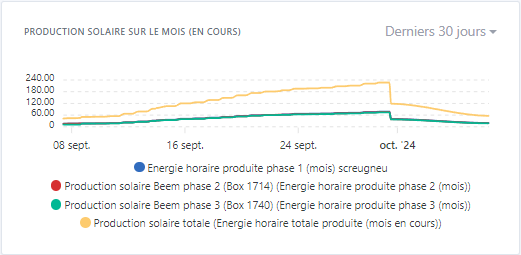
It is now possible to edit the name of a device on a chart:

This will make some charts more readable when devices are all of the same type :slight_smile:

Calendar: Saving the last display choice

The « calendar Â» view in Gladys now saves the last filter choice:

If you had selected « Week Â», then the calendar will open directly on the week view.

This preference is local to the device and thus each browser will remember your last preference.

Thanks @bertrandda for this development :folded_hands:

Improved Gladys Plus reconnection process

I updated the library we use on Gladys Plus for websockets, and implemented new reconnection procedures.

I also added new logs for when Gladys disconnects/reconnects to Gladys Plus.

The idea behind this development is to help @guim31 who is currently having issues on his local network, and often loses the connection between his local Gladys and the Gladys Plus server.

The full CHANGELOG is available here .

How to update?

If you installed Gladys with the official Raspberry Pi OS image, your instances will update automatically in the coming hours. This can take up to 24h, don’t panic.

If you installed Gladys with Docker, check that you are using Watchtower ( See the documentation )

Getting started with Gladys?

Take advantage of the official starter kit!

  • €259.97 instead of €439.97
  • A futuristic mini-PC (16 GB RAM, 512 GB NVMe SSD, low-power Intel N100 processor)
  • The official training to get started with a bundle of video tutorials and exclusive articles
  • 1 year of access to Gladys Plus
12 Likes

And above all, a big thank you to you for your analysis during coding, your advice, and your patience.

4 Likes

Thanks for all these

1 Like

[quote="Prof_Techno, post:3, topic:

So here is my test configuration in a new three-column dashboard in case it’s due to the change in the number of columns

and the result

I tried varying the chart types; it doesn’t cause any change

in my profile I’m indeed on the new version

I’m checking!

Yes, you wouldn’t have access to the name changes otherwise ^^

1 Like

I’m so used to troubleshooting PCs where you just had to plug in the power

I wanted to mention it just in case

Otherwise I tried rebooting the PC just in case

I tried variations in the name, nothing worked

So I’m on Firefox version 131 and Ubuntu, one of the latest

I don’t know if any other info would be relevant

@Terdious, I ran a test and the renaming only works with the binary charts, not with the other charts

But since the PR for the other charts hasn’t been merged, that’s probably normal.

2 Likes

Yep, indeed, I implemented the name change for everyone but did not implement the logic for the other types of curves (didn’t think about it since it wasn’t part of the purpose of this PR strictly speaking).

It’s 2 lines to change to take it into account.

I’ll open the PR right away; I’ll take the opportunity to look at the other issue you mentioned @Prof_Techno — as @pierre-gilles said this isn’t related to this update, but since I reused the system of the box « Devices Â», we end up with the same issue indeed


Edit:
@pierre-gilles:

3 Likes

@pierre-gilles,

I’m looking into the bug:

To create the DeviceListWithDragAndDrop, I simply copy/pasted the one from the â€č device-in-room â€ș box with the corresponding style into the â€č chart â€ș folder. But since it’s used several times, I was thinking of moving it into a separate folder.
If you agree with that, in terms of the tree, where would you advise me to put it? in front/src/components/drag-and-drop/? Or elsewhere?

Otherwise, I just fixed the bug: if the field is empty, it will display a placeholder (the feature name) and will no longer auto-fill:
image
image
image

I’ll set it up for the other box « Devices Â». Tell me if I should make them shared.

EDIT:
I also took the opportunity to fix another bug. When deleting a device before another one, the following device would take the previous name and the unit of the deleted one.

PR:

Sorry for the inconvenience.

2 Likes

Great update!
Excellent work by @bertrandda on calendar management! Being able to retain a preferred recurrence from one view to another is great!
Thanks

3 Likes

Thank you @Terdious and @pierre-gilles, I can’t wait to use these new dashboards for my motion and door-opening sensors!

2 Likes

Huge update, thank you so much @pierre-gilles and @Terdious for your great work!!! :slight_smile:

2 Likes

Thanks for your quick response @Terdious, I’ll take a quick look and get back to you!

1 Like

Gladys Assistant 4.46.1 is available :partying_face:

What’s new:

  • Custom names now appear on all chart types, not just binary charts. A big thanks to @Terdious for this fix!
  • Chart height now automatically adjusts based on the number of selected sensors.
  • Gladys Plus: Increased the WebSocket request timeout from 10 seconds to 60 seconds to fix disconnection issues experienced by some users (@Jluc and @spenceur)

The full changelog is available here.

1 Like

Hi everyone !

Several of you reported disconnection issues between Gladys and Gladys Plus after the update to version 4.46.0.

At first, I thought it was caused by a too-short timeout, which I fixed in version 4.46.1, but it seems that wasn’t the cause of the problem.

There is actually an issue with the latest version of the library (socket.io) that I use for the WebSocket connection to Gladys Plus.

After some testing, I was able to reproduce the bug. Simply reverting to the previous version of socket.io makes the reconnection problem disappear.

So I created a pull request on GitHub and I’m preparing Gladys version 4.46.2, which reverts to the previous version of socket.io to fix this issue.

Sorry to those who were affected by this bug. I hope the update will be available soon !

The build is running here :

I’ll keep you updated :slight_smile:

3 Likes

Now that’s responsiveness! (I don’t dare ask what time it is where you are :sweat_smile:)

2 Likes

It’s not that late but I have busy weekends — we have all of Tokyo to visit :grin: Fuji tomorrow!

But this was still pretty urgent; it’s not convenient if some people can’t connect to their instance remotely :slightly_smiling_face: I hope this release will properly fix the issue.

2 Likes

Gladys Assistant 4.46.2 is available :partying_face:

On the agenda:

  • Fix for the Gladys Plus disconnection bug: the socket.io library was rolled back to the last working version. I hope this will fix the issue for everyone! Keep me posted :slight_smile:
  • On the dashboard, when renaming a sensor in the « graph Â» or « devices Â» view, if you deleted the entire name of a graph it would reset the title to the original, which resulted in a subpar experience. @Terdious worked on this to give you a top-notch UX — I tested it all on Friday and honestly it’s 100 times better than before!

How to update faster?

For those who have issues reconnecting to Gladys Plus and who would like to update Gladys now and not in the next 24 hours, it’s possible via a command to run over SSH on the machine running Gladys:

I think I’ll end up adding a button in the interface so it’s a one-click action — it’s much more convenient for a critical update like this :smiley:

Thanks again for your understanding, I really hope this bug didn’t cause you too much trouble, sorry again for the inconvenience :folded_hands:

Have a great weekend everyone!

7 Likes

@pierre-gilles You’ll be able to complete your smart home setup in Akihabara !!! :grin:Enjoy your stay in Japan


1 Like