Gladys RAM usage

A good test to do if you want to see whether it’s Gladys is simply to stop the Gladys container and see if the RAM usage is still the same

Then, when restarting Gladys, check whether Gladys’s usage has reset or if it immediately goes back up to 12GB.

If it comes back to 100MB, then gradually increases again, it’s probably a memory leak and you’ll need to investigate for longer…

If it’s directly 12GB, we’ll need to understand your setup :slight_smile:

1 Like

After restarting the container I’m at 2 GB, cruising speed

Ok, now let’s wait and see over the next hours/next days/next weeks if it comes back up.

We’re not immune to a memory leak, it happens :slight_smile:

Is Alzheimer’s lurking for Gladys? :upside_down_face:

1 Like

I confirm I’m cruising at 280 MB.

1 Like

13 hours after Gladys is at 742 MB
Less than 48 h : 1 GB
48 h : 6.81 GB
I think there’s definitely an issue

1 Like

I’m not seeing the same behavior, 280MB :eyes:

The main difference I made was updating my packages (Docker was updated)

Do you have cameras? If so, what is the refresh rate?

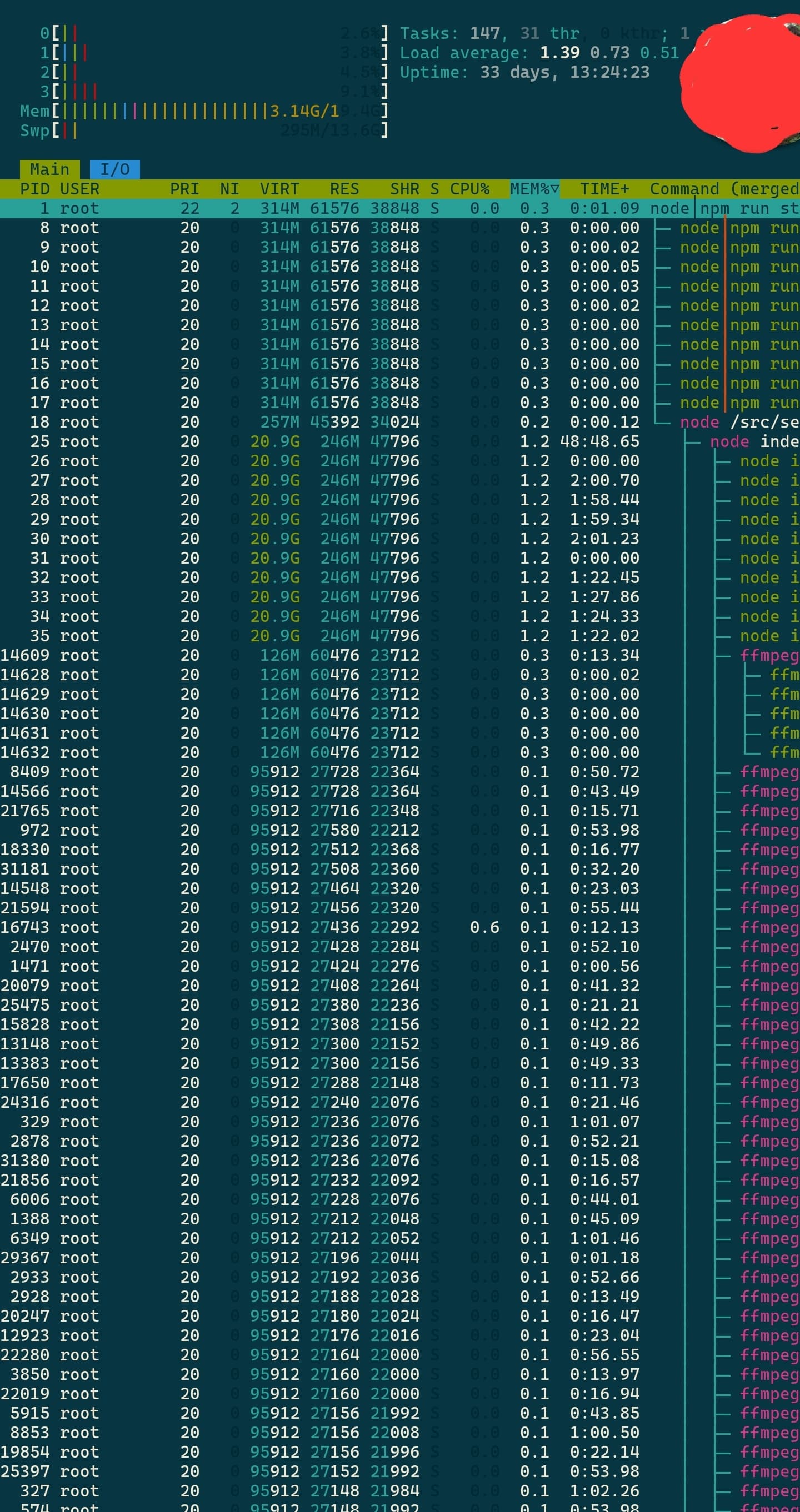
I have 1 million ffmpeg lines at 26.5MB each in the processes with only a single camera that refreshes every 10 seconds

yeah I have 2 cams ( refresh 60s )

Not sure it’s normal to have that many streams.

I also have the impression that your Synology is showing you the cache memory as well (if you want to install htop in your container apk add htop)

On my side I’m at 300MB real and 2.34GB with the cache.

EDIT: I waited a bit, I see the ffmpeg process spawn (for the refresh) then disappear once the operation is finished, so it’s not normal on your side. I’ll check if my container is increasing in memory.

1 Like

Thanks for your help

Here’s my htop, same — quite a few ffmpeg lines

I didn’t say anything I do have 6 GB of physical memory :frowning:

Yeah, the RAM is really being eaten up.

You should try increasing the refresh time and restarting your container.

What does that mean? :slight_smile:

I think @VonOx means changing the camera’s refresh rate (for example, from 10 sec to 1 min).

Okay, I’ll do it

I’ll let you know in about two days
Currently 206 MB

Exactly, I was talking about the cameras, sorry :folded_hands:

No problem, thanks for your time ^^’

Indeed, there seems to be an issue — clearly all those lingering ffmpeg processes are not normal

Is there anything in the logs that could explain why ffmpeg isn’t shutting down?

Normally, on each camera refresh an ffmpeg process is started and then stops once it has the image.

I’ll take a look as soon as I have 10 minutes, thanks P-G

@VonOx, @pierre-gilles, FYI, since changing the refresh from 10s to 1min I have over 1 million processes running.
I’ll keep monitoring but could the problem be coming from that?

1 Like

I don’t think so — you’ve just reduced the problem sixfold, so of course it takes longer to occur :slight_smile: but the problem is probably still there

I confirm I have the same problem (I mention it here: RSTP Caméra : bug "envoyer par message").

Restarting the Gladys container temporarily « fixes » the RAM issue, but there’s clearly a problem.
I noticed that the image on the dashboard is updated in all cases in the background, even when it isn’t displayed on any device.

→ Maybe we should request the latest image when loading a dashboard rather than all the time in the background?

The other error is that the ffmpeg thread never stops.