Hello everyone,
Indeed, my Gladys home automation is not exactly « plain sailing ». Fortunately, thanks to your good advice I’m gradually managing to set up a working home automation system, except that at the end of last week, when returning from grocery shopping, nothing was working:
Appareil en zigbee2mqtt → no command worked: Patiently, I re-paired everything and now it works, except for some Philips and Nous plugs, which refuse to pair (no visibility on the network).
The Lixee → At first, impossible to get information on one of the phases, then no information at all, except for the connection link intensity: I removed it from the circuit; I’ll see later if it will be useful.
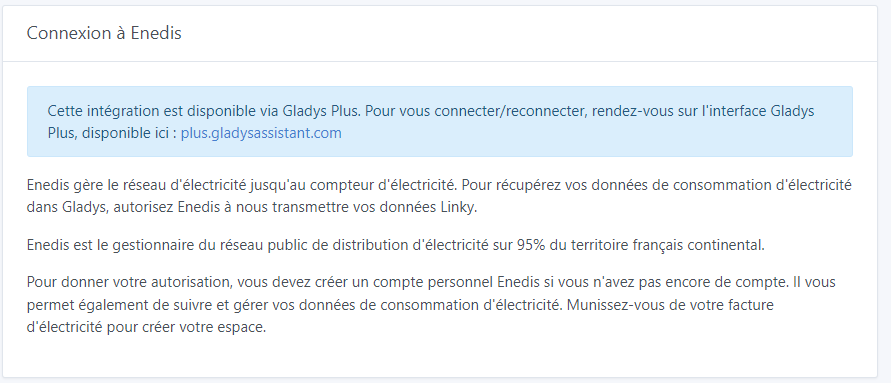
Enedis link → After the troubles getting Enedis data reports (troubles « resolved » by Pierre-Gilles, whom I thank again). Currently, no reports since July 16 despite my resynchronizations and it’s impossible to restart the « Enedis subscription » (button « j’accède à mon espace client Enedis » invisible).
Cameras: Integrating my Tapo camera (similar to Pierre-Gilles’s in his tutorial) took me more than 15 minutes to be recognized, even though the information provided was correct. Why this latency? But it’s impossible to get my other cameras (Reolink) recognized.
To be complete (I hope I haven’t forgotten anything), I had a power outage 1 day before my troubles with my Zigbee2Mqtt devices.
I’m hanging on, because I sincerely think Gladys has potential.
Forgive my question, probably stupid: is there one or more commands to test the Gladys installation and maybe anticipate future problems?
Thanks in advance for your reply.
Daniel, who is thinking of asking for an exorcism of his home automation 
Hi @Janssens
It’s possible there are network issues on your setup given everything you describe (or some other « hardware » issue)
A few questions:
1/ Is your mini-PC connected to your box/router via Ethernet?
2/ Is your Wi-Fi network stable? The Tapo camera taking 15 minutes is not normal — on my setup it took 1 second, and I normally have the same hardware as you (Beelink mini S12 Pro + Tapo C210)
3/ On the Zigbee side, there may be interference with your Wi-Fi network; there’s an article on Zigbee2mqtt that explains how to improve that: Improve network range and stability | Zigbee2MQTT
4/ Regarding Enedis, indeed no more data on your account. Can you re-give consent from the integration page on Gladys Plus? I looked into it — their IT department pushed a botched update at the end of July and that’s what probably broke your data. Sorry, the Enedis API often has issues and I don’t have control over that 
We’ll fix all that, don’t worry!
Many thanks Pierre-Gilles, for your availability and promptness in responding.
- My Beelink is connected via Ethernet to my box (Freebox Delta) connected via fiber ;
- For the moment, the house is under renovation, it’s drafty, all the rooms are open to each other. Area 60 m² ;
- Apparently, my Wi‑Fi network is stable, I have never had a problem until now.
- I’m going to buy a shielded connector to move the Sonoff dongle away from the router, although it is more than 1 meter from the box ;
- For Enedis, I wanted to redo the consent, but the button « I access my Enedis customer area » is no longer visible on the page (see photo below). I redid the synchronization several times.
If I may bother you again, could you (I can’t find the solutions in the docs) ?
- Tell me how to force the Beelink to automatically restart after a power outage ?
- I’m testing Node-RED to send MQTT messages to a Zigbee2Mqtt device. The connection to the broker is correct and functional; I send a message to the topic: zigbee2mqtt:Device name in Gladys/set → the message is of type Json ({« state »:« ON »}). The message is sent correctly, but the command does not work. Any link to documentation ?
Thanks again.
Daniel
My pleasure, always here to help
Also check in the Zigbee2mqtt interface whether routing is working fine on your Zigbee network
Look at the blue message on the page  This page is only available on Gladys Plus, not locally, so you need to go to Gladys Plus.
At Beelink startup, enter the BIOS, there is an option (tutorial found on Google: https://www.reddit.com/r/BeelinkOfficial/comments/13lqrz4/beelink_eq12_eq12pro_how_to_set_auto_power_on/ )
Tutorial on the forum:
Thank you, Pierre-Gilles,
Re-requested connection to Enedis (with the correct page, it works better) and I have just received the missing data.
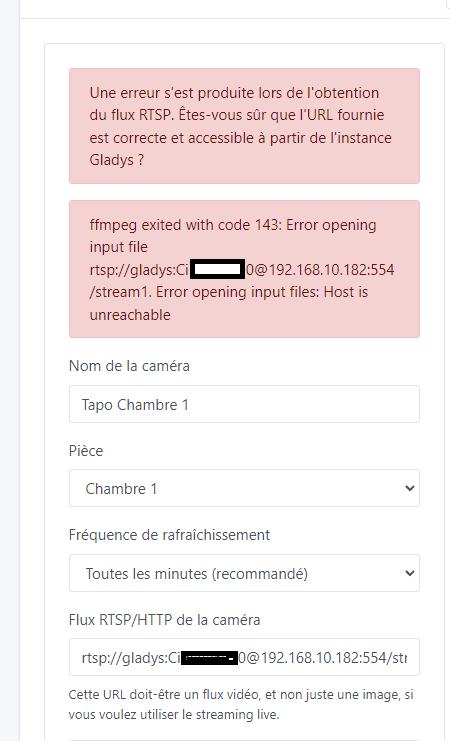
Cameras: I have just received the additional cameras for my home. Integration of the second camera into Gladys (Tapo C200) and I cannot connect it in Gladys. There is no reason this one shouldn’t work (recognized in the Tapo Android app). The RTSP link is copied and pasted from the first camera with the correct IP address modified (rechecked repeatedly) and after many attempts (save/test), still no way to install it.
Daniel
Can you try without the port (:554)?
Have you created an account on the camera from the Tapo app?
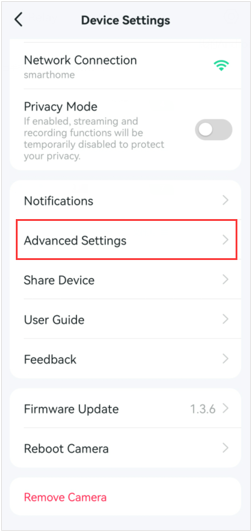
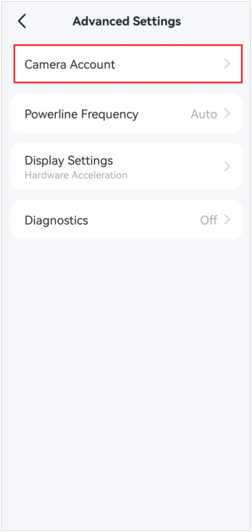
And you can test with the VLC software to be sure that the URL is correct Caméra | Gladys Assistant
Thank you Cicoub13, I’m beginning to despair, because this is becoming unmanageable and I’m seriously thinking of throwing in the towel.
Regarding the second camera, I did create an account in the Tapo app. Via VLC, I can retrieve both video streams. Unfortunately, Gladys won’t listen; I still have the same two messages as in the screenshot from my previous message. The first camera works; the second one is impossible to connect.
In addition to this camera problem, Zigbee2Mqtt just indicated that 2 devices are no longer paired correctly. This is the third time in a few days that I’ve had to redo this pairing. For information, before switching to Gladys, I used Node-Red and ZigBee2MQTT installed on the FreeBox Delta (VM with 1Gb of memory - ZigBee2Mqtt key model P). Everything worked for months without any problem. Since I switched to Gladys (installed on a dedicated Beelink with a new Sonoff Zigbee2Mqtt key (Model E, because Gladys had problems with the old key)), the Zigbee network has expanded, mostly with mains-powered modules. The locations of the old devices that are causing problems haven’t changed. Some are close to the box and no longer work; others further away present no problem.
My message is rather pessimistic, but above all don’t take it personally, nor as criticism of Gladys development; there must be a rational explanation for all these issues I’m encountering, but personally it’s beyond my abilities.
I wish you a good rest of the day
Daniel
Hi @Janssens, do you want us to call to discuss all this? One evening during the week?
There must be a rational explanation, indeed; based on what you’re saying, all your issues must necessarily have a physical cause beyond Gladys (network misconfiguration, hardware issue, etc…)
A big thank you, Pierre-Gilles, for your offer, which makes me very happy, even if I feel like I’m taking advantage of your generosity.
Except for this evening, the rest of the week is possible at your convenience in terms of dates and times. Please note, I remind you that my setup is in my second residence in France; starting next Monday we are returning to Belgium and I will only have access to Gladys via a VPN.
For my part, to give things the best chance, I will move the Beelink to the center of the house and place it 3 meters away from the Freebox.
I wish you a very good day and thank you in advance.
Daniel
I suggest tomorrow at 8 PM if that works for you?
My goal is really that everyone manages to get their Gladys installation working, so don’t worry, it doesn’t bother me at all!
Great, I will be there tomorrow at 8 p.m.
Looking forward to hearing from you
Daniel