Upcoming installation

I can try to explain it to you as we go.

In fact, you should see Node-RED as a bridge between Gladys and Zigbee2MQTT. It will retrieve data from Gladys, for example the comfort command, and send it to your module. In short, it will read the information on the MQTT broker (Gladys) and forward the info to another MQTT broker (zigbee2mqtt).

  1. First, install Node-RED and configure the MQTT broker. I put the video below directly at the broker MQTT config part.
    https://youtu.be/bpmHzR8_S5g?t=1132

  2. Then, I think your module is already paired with zigbee2mqtt? If not, do that.

  3. Configure the broker used by zigbee2mqtt in Node-RED.

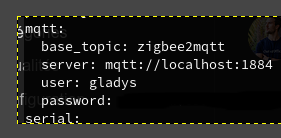
  • How to retrieve the connection info:

Connect to your Gladys machine via ssh and run the command:

cat /var/lib/gladysassistant/zigbee2mqtt/z2m/configuration.yaml

  • Create the zigbee2mqtt MQTT broker in Node-RED:

Add an mqtt in or mqtt out node in a Node-RED flow

image
image

Then double-click the node to configure it

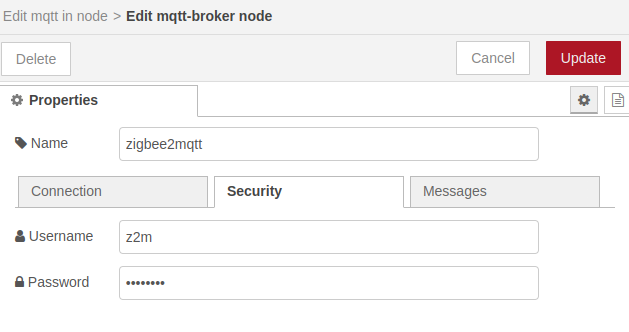
In the Server properties, click the + on the right to add the broker and give your broker a name.
To be original: zigbee2mqtt.

In the Connection tab enter the IP of your MQTT broker in server; if it’s the one created by Gladys then it’s the same IP, otherwise enter your IP.
Also enter your port if different from 1884.

In the Security tab enter the user and password you retrieved earlier.

Then click Update and select this broker in the server list of your node

The topic to set is zigbee2mqtt/device_name

For the example I used a temperature sensor from my network

I added a debug node behind it and deployed the flow

Here is the result when my sensor sends its value.

  1. Configure “virtual” MQTT devices in Gladys. On this part, you have already integrated 2 elements. I will give you an example of how to set up the exchanges once the first 3 points are configured.
1 Like

ok great thanks

so point 1 is good, everything is installed

for point 2 this is where it gets stuck: my device was recognized as two different devices, one that collects everything related to energy and the other unknown to Gladys
however in Zigbee2mqtt it is present as a single component
image

for point 3 I’ll wait this evening

Thanks in advance

For your module, don’t take into account what is reported in Gladys for now, as it isn’t yet fully integrated.

Here’s what I have on my side.
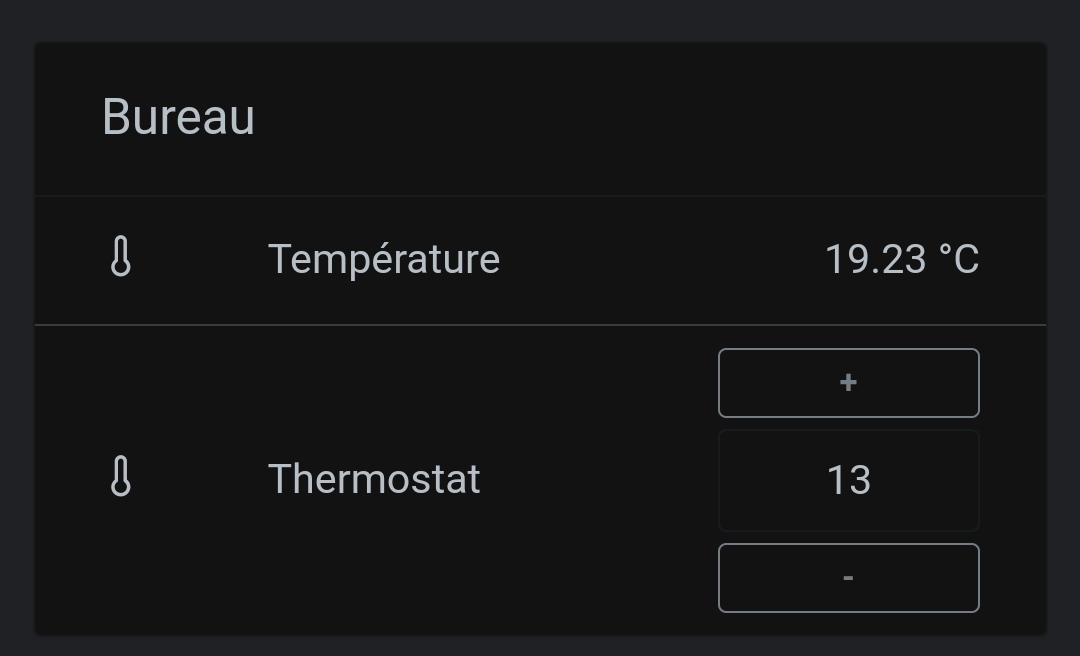
The commands: 6 controls in Gladys. Ok, there are only 4 because I don’t use the other 2

A thermostat with the room temperature.

Gladys will send the state of the buttons for the commands to Node-RED, and Node-RED will take care of forwarding the information to your module via the MQTT broker of zigbee2mqtt.

Then you’ll just need to create scenes in Gladys to control the different commands according to your needs.

I’ll also explain how to create the buttons in Gladys and I’ll give you the Node-RED flow that you’ll need to adapt for your module. Normally after my explanation you’ll be able to manage your electric radiator in Gladys.

I’ll send another message this evening with all the details.

1 Like

Great, thanks for your help

I’ve updated point 3.

Before continuing, add your broker, then add a sensor to test the connection, and once all that is operational we’ll go further.

As for tonight, I’m wiped out — I’ve caught a cold and won’t be able to do any more.

1 Like

By the way, I don’t know if you saw @Prof_Techno but there’s a tutorial on the forum that explains what you want to do:

Also, @Prof_Techno as I said in this thread :

There is already development done to have Zigbee2mqtt pilot-wire heating in Gladys natively, but we need a tester to test the development.

If you want to help us with testing, it will allow you to have this feature without needing Node-RED.

If you can’t help us, we’ll have to find someone else with a pilot wire but they aren’t exactly common :stuck_out_tongue:

So I’ll try to do that — hang in there with your cold.

I’ll run tests again with Node-RED starting Monday — I’m giving myself the weekend to test Cicoub’s solution.

But I’ll use Node-RED because I think it can do things a bit more advanced than Gladys for certain tasks, like pinging a device, for example.

Okay the feature is almost ready so I’m going to move on to the implementation stage for all my sensors

But before that, do you have a rule for naming your sensors and do you name them in gladys at discovery or in zigbee2mqtt? I would like this to be as clean as possible

Thanks for your advice

Personally, I always rename in Zigbee2mqtt.
The name change appears instantly in Gladys.

I recommend using names in Zigbe2mqtt, in lowercase with « _ » between words, for example: « interrupteur_salon_gauche », « capteur_temperature_jardin », etc.. :slight_smile:

1 Like

Initially that’s what I was going to recommend, but have you noticed any issues on your end related to accents / spaces?
For my part I chose to use standard names « Outdoor water valve » and everything works fine… And above all it saves me from renaming things in Gladys! :grin: #lazy

That should work! I prefer to use « _ » and no accents, because I think that in Zigbee2mqtt the device name is used in the MQTT topic name, and I’d be afraid it would break in case of an MQTT version change, that kind of thing :stuck_out_tongue: But really, if it works, it must not be that serious right now :slight_smile:

1 Like

Hey, so I’m getting started and getting stuck over not much, but I’d like to use a Gladys calendar — which one works best??

Thanks

What would it be used for?

For the heating, to program it accordingly

That’s the first idea; beyond that, I don’t know what’s possible.

If you ever want a pure CalDAV calendar for this kind of thing, I had already used Fruux (https://fruux.com/) for Gladys demos in the past and it works great. For setting up a heating schedule that’s an excellent idea! Plus, it gives you a calendar that’s truly dedicated to that.

If, however, it’s more for syncing your personal calendar, it depends on what you use
I just checked the Jolie site but there’s no sharing on the free plan, and since there are several of us at home, if needs evolve that’s not great.

So I’m avoiding Google as a result.

What else is available that’s free or open-source, or maybe we can install one on the machine? I don’t know.

Otherwise, do Microsoft Outlook calendars work? Because I have one I’m not using at the moment.

Some people use Nextcloud self-hosted: Nextcloud - Online collaboration platform

I’ve also seen https://framagenda.org on the forum

I think there are plenty of solutions if you look around a bit :slight_smile:

The essential thing is that the solution has CalDAV compatibility.

1 Like