Integration Mi Flora

Hello.
I am trying to integrate a Mi Flora device into Gladys via MQTT.
The MQTT of my instance is installed from Gladys.

I use this script to be able to post on the MQTT server: GitHub - ThomDietrich/miflora-mqtt-daemon: Linux service to collect and transfer Xiaomi Mi Flora plant sensor data via MQTT to your smart home system, with cluster support 🌱🌼🥀🏡🌳 · GitHub
I get this locally on my Gladys instance (RPI3):
[2021-03-13 14:50:23] Connecting to MQTT broker …
[2021-03-13 14:50:23] Connection error with result code 5 - Connection Refused: not authorised.

However, I can connect from an MQTT client from another machine via MQTT Explorer.

It is possible that the problem comes from the script, but by chance, could there be a server MQTT configuration that could block? In MQTT Explorer, I do not see the topic « Gladys », just $Sys, is this normal?

Thank you for your help. :slight_smile:

Otherwise, another question: the script offers preconfigurations of topics for SmartHome, HomeAssistant, … I would like to see to create a preconfiguration for Gladys, but what would be the topic parameters to set up?

Hello!

Out of curiosity, which version of Gladys are you using?

Actually, there was a change in Mosquitto permissions that caused this bug, and we fixed it in the latest version of Gladys :slight_smile:

You should be on Gladys v4.1.0 at least, you can check this in “Settings” => “System”!

Edit: see Gladys v4.1.0 est disponible!

Hello.
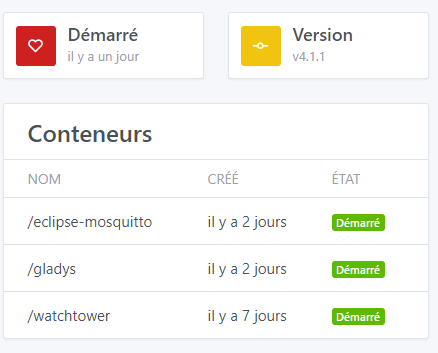
I’m on v 4.1.1

Oh, I misunderstood, actually your error comes from the script, not Gladys!

Are you sure you launched the script with the correct parameters? Can you describe exactly what you are doing?

To better understand MQTT in Gladys, I recommend reading this tutorial:

In short, in Gladys the MQTT API is very simple: each sensor has its MQTT topic and listens on that topic. As soon as a new value is sent to that topic, Gladys stores the value. Very simple :slight_smile:

As you said, in the case of this script, this script was coded for Home Assistant, and therefore it does not follow the same topic/message format conventions as Gladys.

So you will need to modify the script to change the topics and the message format to publish :slight_smile:

@AlexTrovato Small question, don’t we manage MiFlora in Gladys 4 with the Bluetooth service?

I had started trying to migrate from v3 to v4. But nothing very advanced.

I can pick up the subject again and propose its integration, or if someone wants to try, I can stay on support.

As you wish, it was mainly to know if it wasn’t already the case :slight_smile: It depends on whether it’s a big dev or not

Thanks for your feedback, I will look into all of this and try to make progress on the subject on my side.

If I can help with the migration of the integration to v4, I am available to run tests.

Is this a cheaper alternative to the Parrot Flower Power? That really interests me.

I haven’t used it much so far, I just know it works :slight_smile:
The only downside I’ve found so far is that it works over bluetooth and therefore it needs to be not too far from your gladys box. After that, you can imagine a pi zero that would serve as a relay on which you would run the script. I’ll try it when the integration with Gladys is okay.

Are you giving up on the script? Because in this case, if you use the script, it works with the current MQTT integration. You just need to modify the script to set the Gladys topics, but otherwise, it should work :slight_smile:

No, I’ll keep it, but the Mi Flora communicates via Bluetooth, I don’t know if the range is sufficient - for my part, I live in an apartment, plants on the balcony or in the living room, it might work, but someone in a house with a garden, I’m not sure it will work.

So, I was thinking of relays that would run the script every X hours (like battery-powered Pi Zeros) that would collect the information and send it via WiFi to the MQQT server. If we look further ahead, the relay could also be used to activate pumps to water the plants, etc. there are many ideas on smart farming.

Anyway, it’s an idea, all this is new to me. ^^ If I can retrieve the information and send a message on Telegram to remind me to water my basil or create a farm dashboard, that would already be huge! :slight_smile:

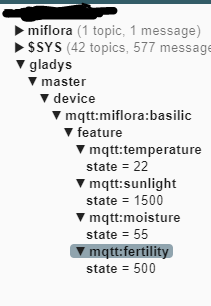
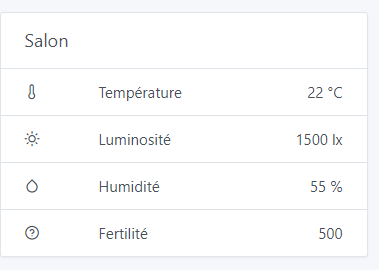
Petit up, I finally figured out how MQTT/Gladys works by reading the doc correctly :slight_smile:

Which is well displayed in the dashboard

Regarding the miflora python script, I solved the mqtt connection issue, you need to remove the spaces after the « = » for the username and password.

However, I can’t connect to the MiFloa, or at least I don’t retrieve the data, it seems to be running in vain:

pi@raspberrypi:/opt/miflora-mqtt-daemon $ sudo python3 miflora-mqtt-daemon.py

Xiaomi Mi Flora Plant Sensor MQTT Client/Daemon
Source: https://github.com/ThomDietrich/miflora-mqtt-daemon

[2021-03-16 21:12:41] Connecting to MQTT broker ...
[2021-03-16 21:12:41] MQTT connection established

Adding sensor to device list and testing connection ...
Name:          "Basilic"
[2021-03-16 21:12:42] Attempting initial connection to Mi Flora sensor "Basilic" (C4:7C:8D:6A:E1:31)
^Cpi@raspberrypi:/opt/miflora-mqtt-daemon $ ^C
pi@raspberrypi:/opt/miflora-mqtt-daemon $ sudo hcitool lescan
LE Scan ...
XX:XX:XX:XX:XX (unknown)
XX:XX:XX:XX:XX Mi Smart Band 4
C4:7C:8D:6A:E1:31 (unknown)
C4:7C:8D:6A:E1:31 Flower care
XX:XX:XX:XX:XX (unknown)

I don’t know anything about python, but I will see on the script developer side if he can give me a clue to debug.

@+

Fantastic :clap::clap: bravo, it looks great :slightly_smiling_face:

Has there been any progress on the direct integration of the MiFlora via the Bluetooth service?

Or is there a PR where I can help with this?

Here is already my log of the gladys-bluetooth-analyzer software regarding my Mi Flora (generic mode):

    ✔ Select device you want to analyse: › c4:7c:8d:63:27:12 - Flower care
     → Device:
        - Name: Flower care
        - Model: undefined
        - 0 features
        - 0 params
    ✔ Select the service you want to test › Generic
    Now executing Generic steps...
    ✔ This mode will try to scan your peripheral to get maximum information, continue? … yes
     → Peripheral:
       → Address type: public
       → Connectable: true
       → Advertisement:
         → Local name: Flower care
         → Manufacturer data: undefined
         → Services: fe95
         → Service data (1):
           [0] fe95 / undefined / 31029800031227638d7cc40d / undefined
       → Services (6):
         → 1800 (Generic Access)
           → Characteristics (4):
             → 2a00 (Device Name): read
             → 2a01 (Appearance): read
             → 2a02 (Peripheral Privacy Flag): read,write
             → 2a04 (Peripheral Preferred Connection Parameters): read
         → 1801 (Generic Attribute)
           → Characteristics (1):
             → 2a05 (Service Changed): read,indicate
         → fe95 (null)
           → Characteristics (8):
             → 1 (null): read,write,notify
             → 2 (null): read
             → 4 (null): read,notify
             → 7 (null): write
             → 10 (null): write
             → 13 (null): read,write
             → 14 (null): read
             → 1001 (null): notify
         → fef5 (null)
           → Characteristics (6):
             → 8082caa841a6402191c656f9b954cc34 (null): read,write
             → 724249f05ec34b5f880442345af08651 (null): read,write
             → 6c53db2547a145fea0227c92fb334fd4 (null): read
             → 9d84b9a3000c49d89183855b673fda31 (null): read,write
             → 457871e8d5164ca1911657d0b17b9cb2 (null): read,writeWithoutResponse,write
             → 5f78df94798c46f5990ab3eb6a065c88 (null): read,notify
         → 0000120400001000800000805f9b34fb (null)
           → Characteristics (3):
             → 00001a0000001000800000805f9b34fb (null): read,write
             → 00001a0100001000800000805f9b34fb (null): read,write,notify
             → 00001a0200001000800000805f9b34fb (null): read
         → 0000120600001000800000805f9b34fb (null)
           → Characteristics (3):
             → 00001a1100001000800000805f9b34fb (null): read
             → 00001a1000001000800000805f9b34fb (null): read,write,notify
             → 00001a1200001000800000805f9b34fb (null): read

    ✔ Select device you want to analyse: › c4:7c:8d:61:07:bc - Flower care
     → Device:
        - Name: Flower care
        - Model: undefined
        - 0 features
        - 0 params
    ✔ Select the service you want to test › Generic
    Now executing Generic steps...
    ✔ This mode will try to scan your peripheral to get maximum information, continue? … yes
     → Peripheral:
       → Address type: public
       → Connectable: true
       → Advertisement:
         → Local name: Flower care
         → Manufacturer data: undefined
         → Services: fe95
         → Service data (1):
           [0] fe95 / undefined / 7120980001bc07618d7cc40d041002a900 / undefined
       → Services (6):
         → 1800 (Generic Access)
           → Characteristics (4):
             → 2a00 (Device Name): read
             → 2a01 (Appearance): read
             → 2a02 (Peripheral Privacy Flag): read,write
             → 2a04 (Peripheral Preferred Connection Parameters): read
         → 1801 (Generic Attribute)
           → Characteristics (1):
             → 2a05 (Service Changed): read,indicate
         → fe95 (null)
           → Characteristics (8):
             → 1 (null): write,notify
             → 2 (null): read
             → 4 (null): read,notify
             → 7 (null): write
             → 10 (null): write
             → 13 (null): read,write
             → 14 (null): read
             → 1001 (null): notify
         → fef5 (null)
           → Characteristics (6):
             → 8082caa841a6402191c656f9b954cc34 (null): read,write
             → 724249f05ec34b5f880442345af08651 (null): read,write
             → 6c53db2547a145fea0227c92fb334fd4 (null): read
             → 9d84b9a3000c49d89183855b673fda31 (null): read,write
             → 457871e8d5164ca1911657d0b17b9cb2 (null): read,writeWithoutResponse,write
             → 5f78df94798c46f5990ab3eb6a065c88 (null): read,notify
         → 0000120400001000800000805f9b34fb (null)
           → Characteristics (3):
             → 00001a0000001000800000805f9b34fb (null): read,write
             → 00001a0100001000800000805f9b34fb (null): read,write,notify
             → 00001a0200001000800000805f9b34fb (null): read
         → 0000120600001000800000805f9b34fb (null)
           → Characteristics (3):
             → 00001a1100001000800000805f9b34fb (null): read
             → 00001a1000001000800000805f9b34fb (null): read,write,notify
             → 00001a1200001000800000805f9b34fb (null): read

In XIAOMI mode > MiFlora it gives me the error:

    ReferenceError: colors is not defined
        at printValues (/home/euguuu/Workspace/gladys-bluetooth-analyzer/services/xiaomi/MiFlora.js:9:15)

@euguuu I don’t think there has been any progress, so don’t hesitate :slight_smile:

ok, @AlexTrovato can you give me some hints on which function I should look at to integrate a particular peripheral?

I saw the word « parrot » go by, and I think that’s what I had worked on, to migrate the remaining parts of v3.
I’ll check and let you know what the actual situation is.

ok; I can check the parrot flower and the mi flora if you want because I have both devices to test

Oops, I forgot to get back to you.
To « facilitate » integration, at least for testing Bluetooth devices, I created a small Bluetooth « analysis » tool and implementation test tool.
I started this tool for a Xiaomi sensor, but not having the device, it’s quite complicated to validate that everything works (although the community has done everything possible to help me).
I currently use it to test my AwoX devices and improve the future service.

Here is the tool:
https://github.com/atrovato/gladys-bluetooth-analyzer

For your information, I contacted the script developer and he couldn’t give me any leads on the data retrieval issue. He retested on a freshly installed RPI Zero W and everything works.

I’ve been wanting to get one for a while, so I took the plunge, expected delivery on Tuesday. I’ll test it and keep you updated.

@euguu: You’re the best if you manage to integrate the service directly into Gladys, I’ll test it too.