Objective
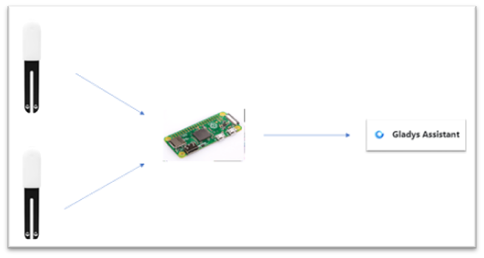
This tutorial aims to retrieve information provided by Mi Flora sensors in Gladys. For this, we need:
- A Mi Flora sensor
- A Raspberry Pi Zero W
- A Gladys instance
The Raspberry Pi Zero will serve as a gateway for the data: It will execute the Python script from Thom Dietrich as a service to retrieve the data and write it to MQTT topics accessible by Gladys.
Prerequisites
An MQTT server must be configured via Gladys (See MQTT Integration)
1- Gladys
Go to Integration > MQTT > Add a device
Name: MiFlora Sensor - Basil (example)
External ID: mqtt:miflora:basil
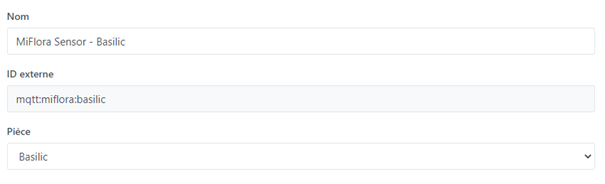
Note: The external ID must necessarily start with mqtt:miflora: followed by the name of the plant that you will use later to configure the Python script. External ID: mqtt:miflora:[Plant Name]
Then, add the different features of the sensor
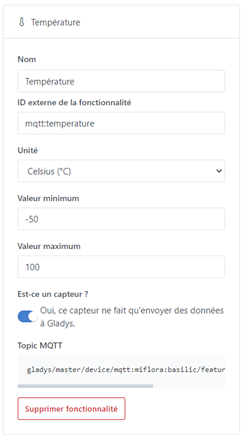
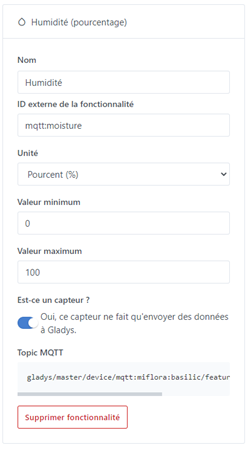
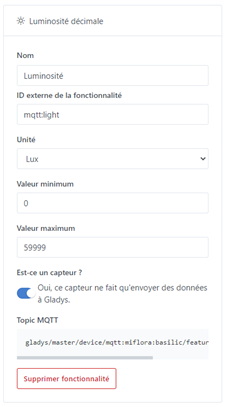
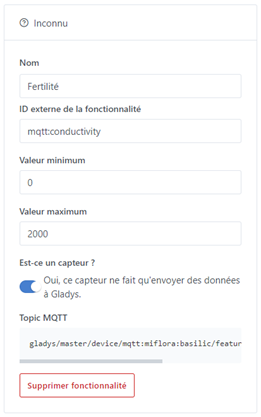
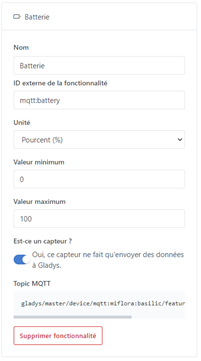
Important: The external IDs of the features must be copied as shown in the screenshots; they correspond to the IDs of the Python script.
Gladys is now able to read the information from the Basil sensor on the MQTT server.
Raspberry Pi Zero
The rest of this tutorial is a translation with adaptations from Thom Dietrich’s wiki. Since the PR has not yet been integrated by Thom, I use my Git as a reference for the script modified for Gladys.
Connect to the Raspberry Pi via SSH
sudo apt install git python3 python3-pip bluetooth bluez
git clone https://github.com/Chouille/miflora-mqtt-daemon.git /opt/miflora-mqtt-daemon
cd /opt/miflora-mqtt-daemon
sudo pip3 install -r requirement.txt
The daemon depends on GATTTool, an external tool provided by the bluez package. To ensure that GattTool is installed
gatttool --help
Then, we create the configuration file necessary for the script.
cp /opt/miflora-mqtt-daemon/config.{ini.dist,ini}
Retrieve the MAC address of your sensor like this:
sudo hcitool lescan
4B:47:E2:DE:CE:9A (UNKNOWN)
84:C0:EF:46:B2:8A (UNKNOWN)
10:0B:F1:43:59:16 (UNKNOWN)
C4:7C:8D:62:40:29 FLOWER CARE
Edit the configuration file, here is a basic configuration:
[General]
reporting_method = gladys-mqtt
adapter = hci0
[Daemon]
enabled = true
period = 3600 #1 hour
hostname = [Gladys IP]
port = 1883
keepalive = 60
base_topic = gladys/master/device
username=gladys
password=[See Gladys setup]
Basil@LivingRoom=C4:7C:8D:62:40:29
Important: The MAC address declaration is done by the name of the plant that you indicated in Gladys. The location of the sensor (@Room) is optional.
Test
sudo python3 /opt/miflora-mqtt-daemon/miflora-mqtt-daemon.py
From an MQTT client connected to Gladys’s MQTT server, you should have this:
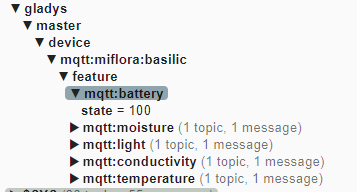
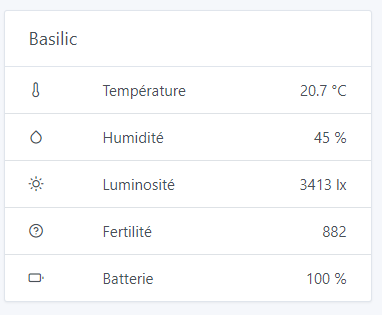
After creating a section in the Gladys dashboard, you should get this:
Save the script as a service
Important: The Daemon mode must be enabled in the configuration file!
sudo cp /opt/miflora-mqtt-daemon/template.service /etc/systemd/system/miflora.service
sudo systemctl daemon-reload
sudo systemctl start miflora.service
sudo systemctl status miflora.service
sudo systemctl enable miflora.service
Now that the plant monitoring is on Gladys, you could:
- Be notified if your plant lacks water and/or start a pump to water it.
- Be notified if the temperature is too high/low for your plant.
- Turn on a supplementary grow light if it lacks light.
- etc …


 .
.
