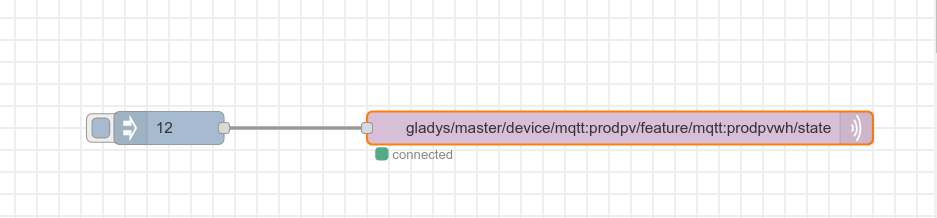
New video: Integrating Node-RED with Gladys Assistant in MQTT!

If it’s that it’s good :slight_smile: You launch the container with the option « -d » which means « detached », so the container launches in the background and not in the foreground.

If you want to see how the container is doing, you can do

docker ps

Or

docker logs 8d329

to see the container logs (the ID displayed on your screen is the container ID)

Thanks Pierre-Gilles for your response.
Here’s what it returns, it doesn’t seem to be okay :frowning_face:
15 Jan 10:52:30 - [info] Starting flows
15 Jan 10:52:31 - [info] Started flows
15 Jan 10:52:31 - [red] Uncaught Exception:
15 Jan 10:52:31 - [error] Error: bind EADDRINUSE 0.0.0.0:9898
at dgram.js:357:20
at processTicksAndRejections (internal/process/task_queues.js:83:21)
npm ERR! code ELIFECYCLE
npm ERR! errno 1
npm ERR! node-red-docker@2.1.5 start: node $NODE_OPTIONS node_modules/node-red/red.js $FLOWS "--userDir" "/data"
npm ERR! Exit status 1
npm ERR!
npm ERR! Failed at the node-red-docker@2.1.5 start script.
npm ERR! This is probably not a problem with npm. There is likely additional logging output above.

npm ERR! A complete log of this run can be found in:
npm ERR! /data/.npm/_logs/2022-01-15T10_52_31_731Z-debug.log

node-red-docker@2.1.5 start /usr/src/node-red
node $NODE_OPTIONS node_modules/node-red/red.js $FLOWS « –userDir » « /data »

You are running the container on a port that is already in use

Run:

docker ps

To check that you are not running node-red twice

No, I only have one Node-RED container apparently

CONTAINER ID IMAGE COMMAND CREATED STATUS PORTS NAMES
nodered/node-red « npm --no-update-not… » About an hour ago Up 16 seconds (health: starting) node_red
eclipse-mosquitto:2 « /docker-entrypoint.… » 41 hours ago Up 4 hours eclipse-mosquitto
gladysassistant/gladys:v4 « docker-entrypoint.s… » 41 hours ago Up 4 hours gladys
containrrr/watchtower « /watchtower --clean… » 41 hours ago Up 4 hours 8080/tcp watchtower

And on your machine, you didn’t launch anything else? You didn’t try anything before launching this container?

https://www.cyberciti.biz/faq/unix-linux-check-if-port-is-in-use-command/

The port already in use 9898, this is the port I declared in Node-RED to connect the Xiaomi gateway. Yes, I tinkered a bit :grimacing: I installed another Docker container Node-RED, which worked, but I realized that both were installed, so I uninstalled the second one to keep the one installed with your method. That’s why I wanted to start over with Node-RED.

Currently, the container is installed, I see it with docker ps, but it seems to restart continuously, and I no longer have access to the web page.

I’ll check your link

Thanks

The error message is clear: something is running on the port, so somehow you must have left a program running on the same port!

Initially, I unplugged the gateway, but that didn’t change anything (since the affected port is the gateway’s one). I must admit I’m not very knowledgeable in this area. Then, I took a more brute-force approach: using FileZilla, I tried to delete the /var/lib/node-red file, which resulted in many responses.

Command:

rm "/var/lib/node-red/node_modules/@serialport/stream/CHANGELOG.md"

````Error:``

rm /var/lib/node-red/node_modules/@serialport/stream/CHANGELOG.md: permission denied

I then ran:

docker restart node_red

Now, I can connect to the Node-RED web page. Everything is working correctly. I think this changed something on port 9898, but what? :innocent:

Thanks for your help; you’ve taught me a few things again.

Hello everyone.

I’m just starting to explore Node-red and I already have a problem…!
I followed the video tutorial carefully, but when I try to inject a value so that it is retrieved on the Gladys dashboard (to do a test as in the video), nothing is injected at all :-/

I am connected yet, when I press deploy, I have a message Successfully deployed but I do not have Successfully injected: 12 and the dashboard remains on No value recorded

How do you think I can debug the issue?

Oops… it worked. I didn’t realize I had to press the blue button on the left of the inject!

I’m back here but tell me if I should post in the topic I created about the Solaredge integration…

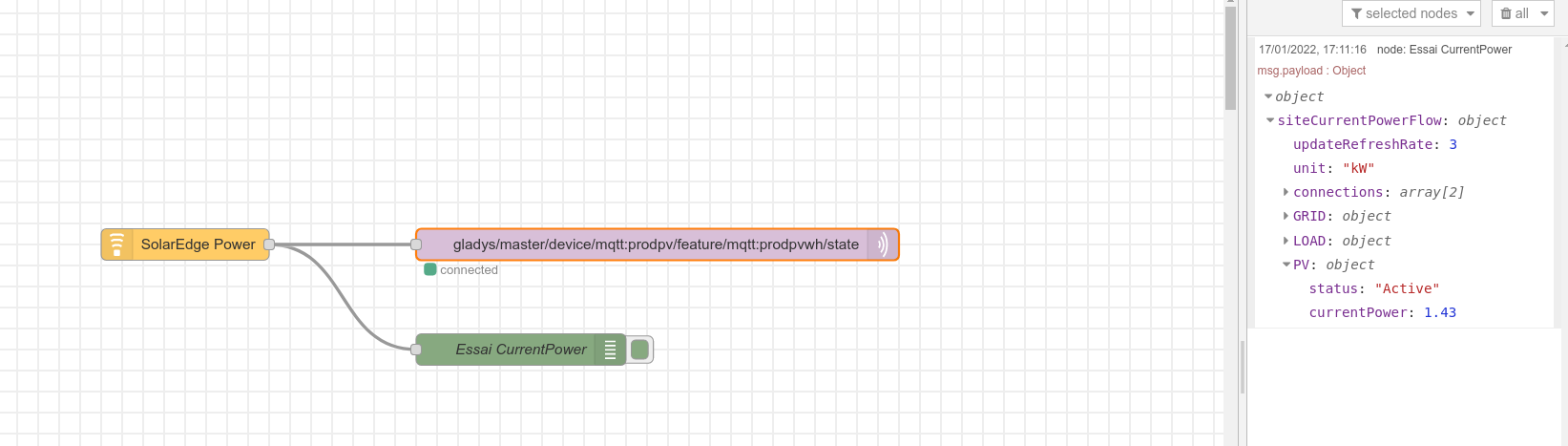
So I managed to get Node-red to communicate with Gladys.

But now I’m stuck: the information returned by the Solaredge API is in JSON format. I get all these values:

The one I’m interested in right now is currentPower.
But I don’t know how to extract it from this JSON and send it to Gladys. Do I need to « parse » something? I’m not even sure that’s the right word ^^

Hello Guim 31
To quickly progress in node red, check out this video series, it explains quite a few things that helped me with the Xiaomi Gateway tutorial: [Course 2.2 Bioautomatics] Node-RED Interface - YouTube.
Then in the tutorial: [NODE-RED]Piloter la Gateway Xiaomi chinoise - #4 par Psoy
At the bottom of the tutorial, in the « Sensor Part » section, I discuss the extraction of data from a Json. You’ll find it in the « function node ». You’ll need to adapt your data.
That should do it. :wink:
Your turn to play.

Awesome these Bioautomatique videos!!! I succeeded :wink: thanks a lot

Rather than:

docker run -d \
option 1
option n
node:red/node-red

On Raspberry Pi, wouldn’t the script launch proposed on the official Node-Red installation page be more suitable?

bash <(curl -sL https://raw.githubusercontent.com/node-red/linux-installers/master/deb/update-nodejs-and-nodered)

If there are no operational interferences!

No, I recommend running Node-RED via Docker. However, the script you listed here seems to install Node-RED directly on the host, which is less practical for several reasons:

  • No automatic updates
  • Dependencies are installed directly on the host, which « pollutes » the system and can cause interference
  • No option to specify the folder where Node-RED stores its data

At least with Docker, you have a container and everything is isolated inside it. I really recommend using Docker :slight_smile:

I’m running it on a NUC (Beelink BT3 PRO) after following the tutorials for an Ubuntu Lite installation (Debian Mini next)

  • The Gladys Docker (installed via tutorial)
  • The Node-Red Docker (installed via tutorial for now)
  • The Mosquito Docker (installed by Gladys)
    And updates with WatchTower
    And it works perfectly, it’s super smooth!
    Why the NUC? Well, ultimately the same price, same features, same power consumption! :wink:
    And as mentioned by @pierre-gilles, container updates and isolation!
    I add the basic audio in/out (voice recognition and spoken messages)!

Thanks for the clarification, no more questions to ask to make node-red work with Gladys! :grinning:

Hello @VonOx,
I’m trying Node-RED with Z-Wave.
I can use a motion sensor, but I don’t know how to use my Qubino ZMNHJD1 modules for my heating.
I would like the following functionality:
a switch, or linear dimmer, in Gladys
Either with configured names (off, frost protection, eco, comfort), or with value ranges that would correspond to the modes (0-10; 11-20; 21-30; 51-99)
I can’t provide the correct value format to control the module.
Here is my flow:

[{"id":"01fe132fef966f2d","type":"zwave-device","z":"7959e8a82acb9798","name":"Living Room Heating","filteredNodeId":"4","multicast":false,"datamode":"Send/Receive","messagesPerMS":1,"messageInterval":250,"isolated":true,"outputs":1,"inputs":1,"showStatus":true,"x":530,"y":360,"wires":[["cb0441e46d20adfc","f5c50f059ef52333"]]},{"id":"cb0441e46d20adfc","type":"debug","z":"7959e8a82acb9798","name":"Living Room Heating info","active":false,"tosidebar":true,"console":false,"tostatus":false,"complete":"payload","targetType":"msg","statusVal":"","statusType":"auto","x":960,"y":360,"wires":[]},{"id":"6ff9420543cda2e3","type":"inject","z":"7959e8a82acb9798","name":"Setpoint","props":[{"p":"payload"}],"repeat":"","crontab":"","once":false,"onceDelay":0.1,"topic":"","payload":"25","payloadType":"num","x":120,"y":360,"wires":[["5be347ca8b64c438"]]},{"id":"f5c50f059ef52333","type":"event-filter","z":"7959e8a82acb9798","name":"Current Setpoint","filters":[{"index":0,"name":"Current Setpoint","valueIds":[{"commandClassName":"Multilevel Switch","commandClass":38,"endpoint":0,"property":"currentValue","propertyName":"currentValue"}],"events":["VALUE_UPDATED"],"strict":false,"id":"546440"}],"outputs":1,"changeDate":"2022-02-09T15:36:45.225Z","showStatus":true,"x":550,"y":480,"wires":[["a01129b65ac7c238"]]},{"id":"a01129b65ac7c238","type":"debug","z":"7959e8a82acb9798","name":"Current Setpoint","active":true,"tosidebar":true,"console":false,"tostatus":false,"complete":"payload","targetType":"msg","statusVal":"","statusType":"auto","x":810,"y":420,"wires":[]},{"id":"5be347ca8b64c438","type":"cmd-factory","z":"7959e8a82acb9798","name":"ZWave CMD Factory","node":"4","endpoint":"","cc":"Multilevel Switch","method":"set","params":"async setValue(\t   valueId: currentValue,\t   value: 25,\t   ): Promise<boolean>","noEvent":false,"forceUpdate":"forceUpdate","api":"CCAPI","vapiMode":"setValue","vapiValue":"payload","vapiValueId":"valueId","vapiOptions":"options","x":320,"y":360,"wires":[["01fe132fef966f2d"]]}]

I get the error: Error: Syntax error: « setValue »

If anyone has any ideas, I’m taking them.
Thanks in advance

EDIT 02/10/2022
I managed to turn on my heating with 4 different modes :grin:
Now I just need to figure out how to do daily programming :thinking:

EDIT 02/16/2022
Daily programming done :grin:
Now I would like to do

  • an AUTO / MANU mode, or PAUSE of the programming (evening where you need to leave the heating on longer; airing out the rooms -door/window opening sensor also-)
  • an ABSENCE mode

Thanks @cce66
You can delete your 2 messages, I modified mine

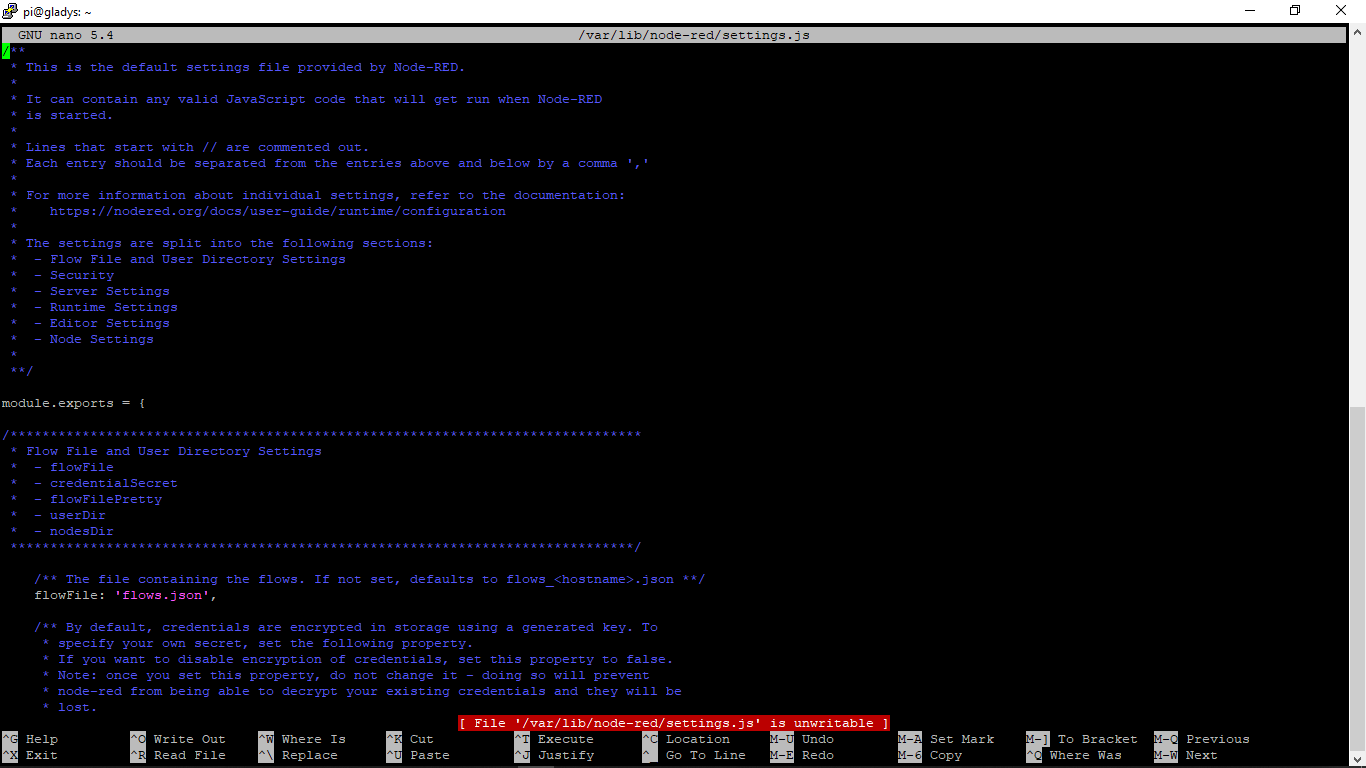
Hello, I tried to integrate Node-RED. I’m almost done, I’m stuck when I edit the settings.js file. I use the following command « nano /var/lib/node-red/settings.js »


I get this with a red alert at the bottom of the screen.
I edit the necessary part and I change the password, I press ctrl+x, yes and Enter and I get this.

And now I’m stuck, I also have a red alert at the bottom of the screen.