On the mockup, it simply looks like this on the dashboard:

And it opens the DateRangePicker when you click on the displayed period:
And I had asked myself a lot of questions earlier about what must happen when switching from calendar-based to rolling depending on the period currently applied, and also which day should be displayed if I switch from a ‹ 7 days › type period to a ‹ 1 day › type period… Well we can forget all that, because it becomes obvious with the DateRangePicker: it’s the user who draws whether they want to revert to one of the predefined periods (anchored to today), or whether they want to modify the period while staying in the past (by choosing the desired dates themselves in the two calendars).
Only the rules for the two previous/next buttons remain (I’ll repeat them here):
====== Navigation with the arrows : ======
Note: Two successive actions, left arrow then right arrow (or vice versa), are ‹ symmetric ›; this brings the x-axis back to exactly the same period
Special case: If the end date is >= now, the right navigation arrow becomes inactive (to avoid exploring the future which does not yet have data)
\======================
So, what do you think?
I’m coming back to this topic, @pierre-gilles, even though I suppose
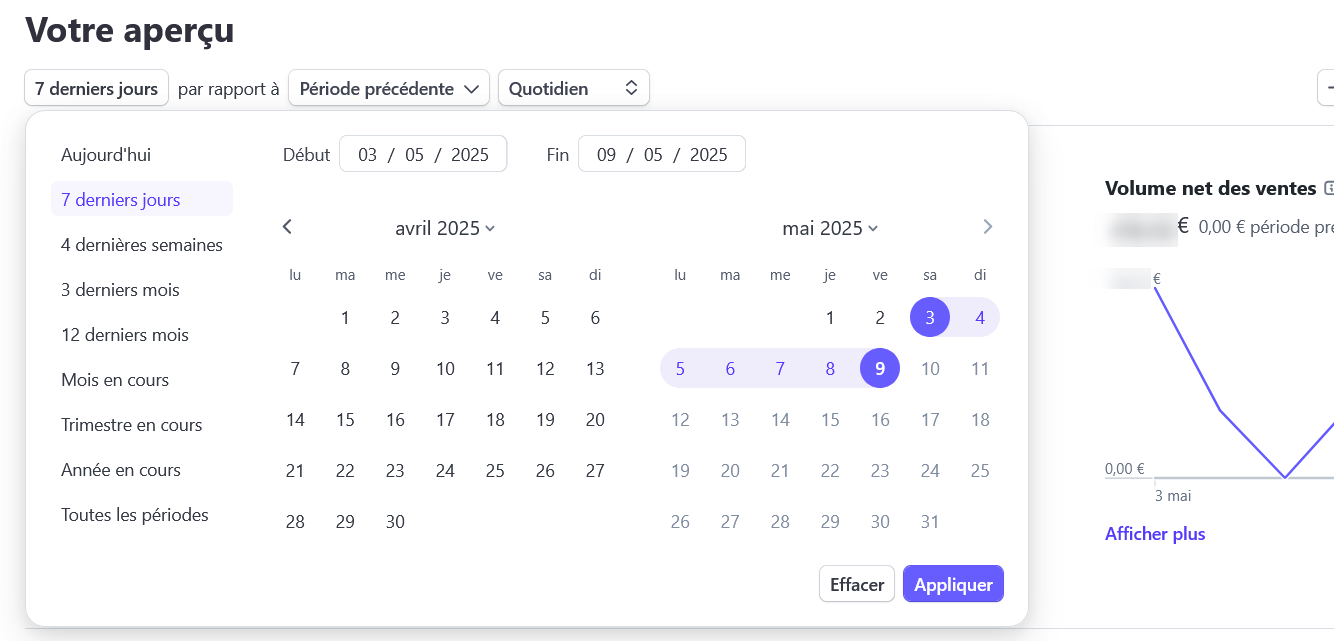
For the sites that inspired me, well I have to admit that while exploring Stripe more, I found this pretty neat :
I also came across this: Sélection de périodes [documentation]
And a few other sites, but I can’t find the references… Sorry…
Actually, it was mainly by tinkering with ApexCharts in an HTML page on my computer that I realized the possibilities…
Thanks @StephaneB for the investigation, that’s great! 
Indeed, that’ll be for a future release!
Ok.
I don’t know if this will save you any time, but I’m sharing what I used to test this component and how I configured it.
I have no idea what recommendations you give developers for Gladys, so it might not fit at all. But like I said, I might as well share it 
<!DOCTYPE html>
<html>
<head>
  <link rel="stylesheet" type="text/css" href="https://cdn.jsdelivr.net/npm/daterangepicker/daterangepicker.css" />
  <script type="text/javascript" src="https://cdn.jsdelivr.net/npm/jquery/dist/jquery.min.js"></script>
  <script type="text/javascript" src="https://cdn.jsdelivr.net/npm/moment/min/moment-with-locales.min.js"></script>
  <script type="text/javascript" src="https://cdn.jsdelivr.net/npm/daterangepicker/daterangepicker.min.js"></script>
</head>
<body>
  <center>
  <input type="text" id="daterange" size="30">
  <script>
    $('#daterange').daterangepicker({
		"showDropdowns": true,
		"timePicker": true,
		"timePicker24Hour": true,
		"timePickerIncrement": 1,
		"linkedCalendars": false,
		"alwaysShowCalendars": true,
		"opens": "center",

      locale: {
        format: 'DD/MM/YYYY HH:mm',
        applyLabel: 'Appliquer',
        cancelLabel: 'Annuler',
        daysOfWeek: ['Dim', 'Lun', 'Mar', 'Mer', 'Jeu', 'Ven', 'Sam'],
        monthNames: ['Janvier', 'Février', 'Mars', 'Avril', 'Mai', 'Juin', 'Juillet', 'Août', 'Septembre', 'Octobre', 'Novembre', 'Décembre'],
        firstDay: 1,
		customRangeLabel: 'Personnalisé',
      },
      ranges: {
		'60 dernières minutes': [moment().subtract(1, 'hours'), moment()],
		'12 dernières heures': [moment().subtract(12, 'hours'), moment()],
		'24 dernières heures': [moment().subtract(1, 'days'), moment()],
		'7 derniers jours ': [moment().subtract(7, 'days'), moment()],
		'30 dernier jours': [moment().subtract(30, 'days'), moment()],
		'90 derniers jours ': [moment().subtract(90, 'days'), moment()],
		'365 derniers jours': [moment().subtract(365, 'days'), moment()],
		'heure en cours': [moment().startOf('hour'), moment().endOf('hour')],
		'demi-journée en cours': [moment().startOf('day').add((moment().hour() >= 12 ? 12 : 0), 'hours'), moment().endOf('day').subtract((moment().hour() < 12 ? 12 : 0), 'hours')],
		'journée en cours': [moment().startOf('day'), moment().endOf('day')],
		'semaine en cours': [moment().startOf('week').add(1, 'days'), moment().endOf('week').add(1, 'days')],
		'mois en cours': [moment().startOf('month'), moment().endOf('month')],
		'trimestre en cours': [moment().startOf('quarter'), moment().endOf('quarter')],
		'année en cours': [moment().startOf('year'), moment().endOf('year')]
      }
    });
  </script>
</body>
</html>
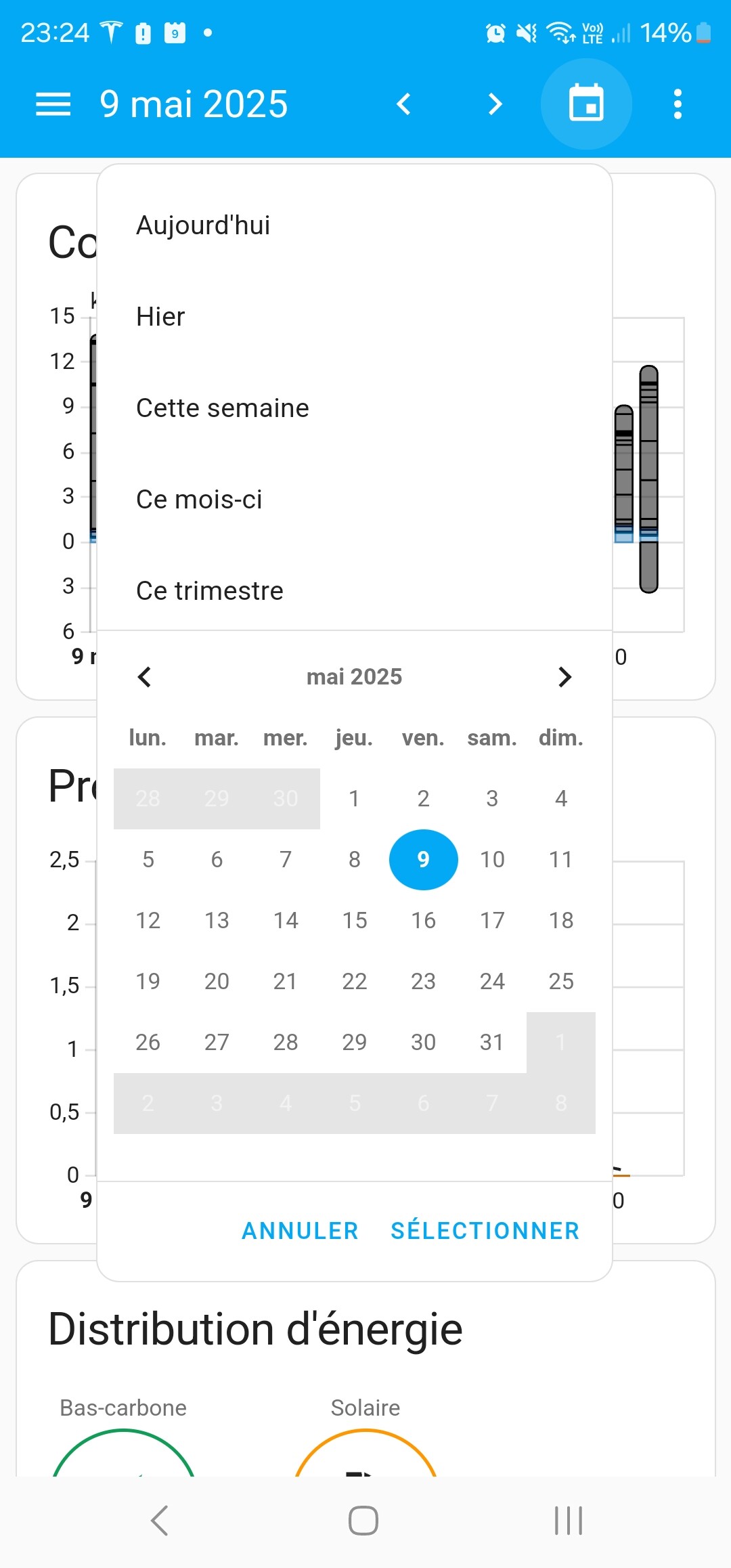
The initial feature is indeed available in 4.85:
@StephaneB I see that you had made different suggestions, if there is a need, I think we need another request  Thanks!!
I think for now what you’ve added is already very practical. If I find that something else is still missing in use, I’ll reopen a feature request, okay.