Eoras
November 17, 2023, 8:55am
1
Hello,
I tried to install Gladys on my Pi 4, however I have an issue because I cannot access the Dashboard.
I am using Traefik 2.10.5 as a reverse proxy, on a 32Bit version of Pi OS 12 (bookworm) freshly installed and here is the configuration:
compose.yml
services:
  traefik:
    image: traefik:2.10.5
    container_name: traefik
    ports:
      - "80:80"
      - "443:443"
    labels:
      - "traefik.enable=true"
      - "traefik.http.routers.traefik.rule=Host(`montraefik.dns.net`)"
      - "traefik.http.routers.traefik.entrypoints=webSecure"
      - "traefik.http.routers.traefik.service=api@internal"
      - "traefik.http.routers.traefik.tls=true"
      - "traefik.http.routers.traefik.tls.certResolver=letsencrypt"
    volumes:
      - /var/run/docker.sock:/var/run/docker.sock
      - ./config/traefik.yml:/etc/traefik/traefik.yml
      - ./config/acme.json:/acme.json
      - ./config/dynamic-conf.yml:/etc/traefik/dynamic-conf.yml
    restart: always
    networks:
      - traefik

networks:
  traefik:
    external: true
config/traefik.yml
entryPoints:
  web:
    address: ":80"
    http:
      redirections:
        entryPoint:
          to: webSecure
          scheme: https
          permanent: true
  webSecure:
    address: ":443"

providers:
  docker:
    endpoint: "unix:///var/run/docker.sock"
    network: traefik_network
    exposedbydefault: false

log:
  level: INFO

api:
  dashboard: true
  debug: true

certificatesResolvers:
  letsencrypt:
    acme:
      email: monemail@dns.net
      storage: acme.json
      tlsChallenge: {}
      httpChallenge:
        entryPoint: web
conf/dynamic-conf.yml
tls:
  options:
    default:
      minVersion: VersionTLS12
      sniStrict: true

    mintls13:
      minVersion: VersionTLS13
conf/acme.json
{}
A little chmod 600 on the acme.json file as requested by Traefik before startup…
So far everything works, I can access my Traefik dashboard etc… then I want to set up Gladys with my reverse proxy, here is my compose.yml:
services:
  gladys:
    image: gladysassistant/gladys:v4
    container_name: gladys
    restart: always
    privileged: true
    network_mode: host
    cgroup: host
    logging:
      driver: "json-file"
      options:
        max-size: 10m
    labels:
      - "traefik.enable=true"
      - "traefik.http.routers.gladys.rule=Host(`mongladys.dns.net`)"
      - "traefik.http.routers.gladys.entrypoints=webSecure"
      - "traefik.http.routers.gladys.tls=true"
      - "traefik.http.routers.gladys.tls.certResolver=letsencrypt"
      - "traefik.http.services.gladys.loadbalancer.server.port=8078"
    environment:
      NODE_ENV: production
      SQLITE_FILE_PATH: /var/lib/gladysassistant/gladys-production.db
      SERVER_PORT: 8078
      TZ: Europe/Paris
    volumes:
      - /var/run/docker.sock:/var/run/docker.sock
      - ./data/gladysassistant:/var/lib/gladysassistant
      - /dev:/dev
      - /run/udev:/run/udev:ro
  watchtower:
    image: containrrr/watchtower
    restart: always
    container_name: watchtower
    command: --cleanup --include-restarting
    volumes:
      - /var/run/docker.sock:/var/run/docker.sock

networks:
  traefik:
    external: true
Let’s Encrypt certificate generation OK, however I get a Traefik Bad Gateway, and I can’t debug it; I don’t have logs about this error in Traefik nor in Gladys…
Maybe someone has had the same issue?
Thank you.
When you access port 8078 on your machine, do you see Gladys?
Eoras
November 17, 2023, 9:09am
3
pierre-gilles:
8078
If I go to http://pi.local:8078 , yes Gladys does appear — that’s what’s very strange.
I don’t know Traefik well (I’m more team Caddy https://caddyserver.com/ ), but I don’t see anything that specifies the Gladys host/IP in your Traefik config?
Eoras
November 17, 2023, 9:13am
5
my hostname: mongladys.dns.net is a DynDNS that redirects correctly to my Raspberry Pi server; I tried this hostname on a web app on my Pi and it works fine on my Pi.
I’m still looking, but if anyone has had this issue I’d appreciate any help.
I wasn’t talking about that, there’s nothing in your config that says how your Traefik contacts your local Gladys container
Basically I imagine you want to do:
User \u003c-\u003e Traefik \u003c-\u003e Gladys
Where is the last link in your config?
Eoras
November 17, 2023, 9:19am
7
This is my Traefik label that links the service to port 8078
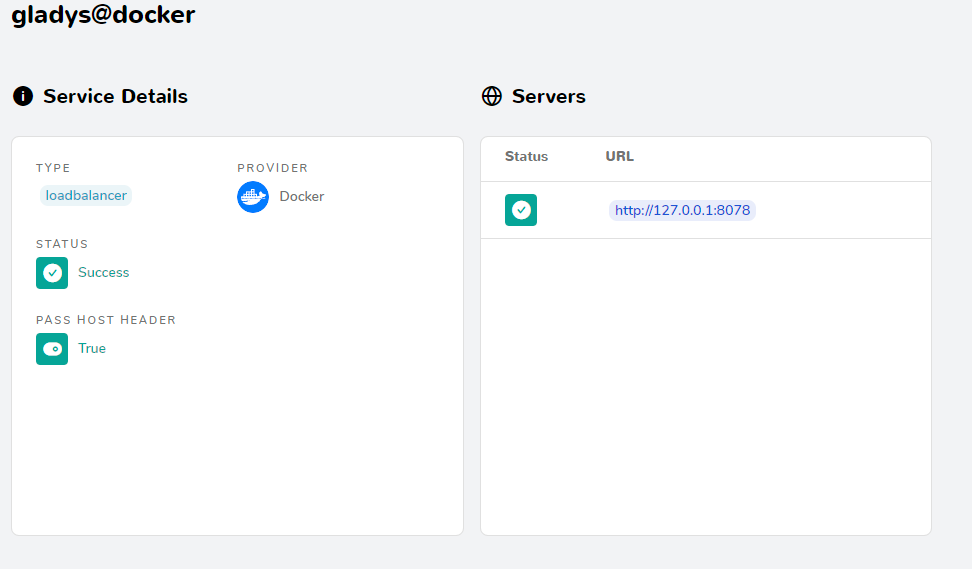
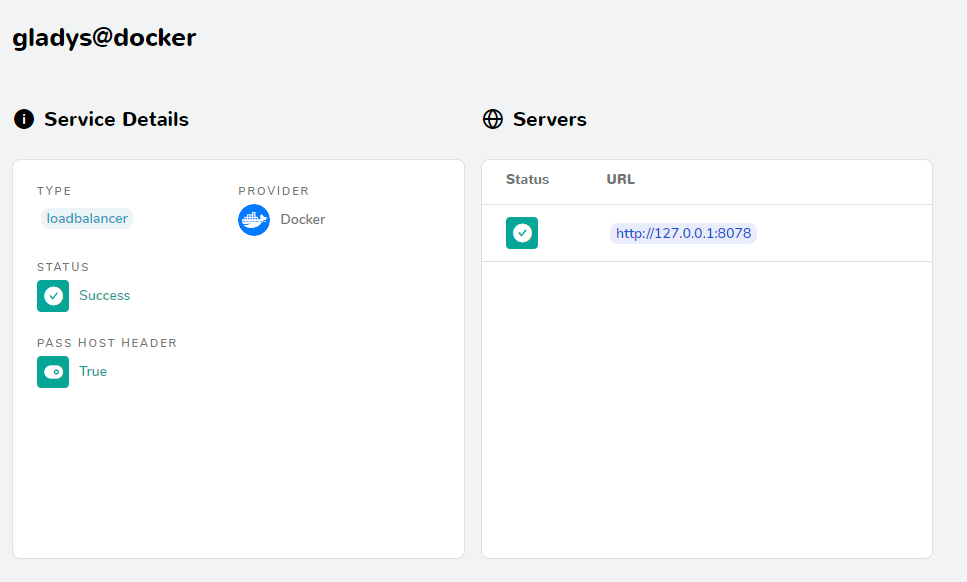
In my Traefik Dashboard, I can see my Host:
Eoras
November 17, 2023, 9:20am
9
That points to a service that is indeed on port 8078
[quote=« cicoub13, post:10, topic:8498 »]network_mode: host (but that’s
Eoras
November 17, 2023, 9:30am
12
Indeed, I forgot to add the network to the gladys service (what idiots…)
I get the following error:
service gladys declares mutually exclusive network_mode and networks: invalid compose project
So, I removed my network from the service and put what you told me:
- "traefik.http.services.gladys.loadbalancer.server.url=mongladys.dns.net"
I still have my Bad Gateway
Eoras
November 17, 2023, 9:31am
13
So I definitely have to keep my host :=) because I need to be able to use it.
Did you test it like @cicoub13 said?
- "traefik.http.services.gladys.loadbalancer.server.url=\u003cip de ta machine\u003e"
Eoras
November 17, 2023, 9:37am
15
Yes, I put:
- "traefik.http.services.gladys.loadbalancer.server.url=mongladys.dns.net"
monglaydys.dns.net is a DynDNS that redirects to my public IP
It’s not the same thing, did you try using your machine’s private IP? (on your local network)
Eoras
November 17, 2023, 9:44am
17
- "traefik.http.services.gladys.loadbalancer.server.url=192.168.86.20"
Still the same problem: Bad Gateway
However, in my Traefik dashboard, the server IP doesn’t change, I still have 127.0.0.1:8078… weird
And no significant Traefik logs?
Looking at the docs, it would rather be:
- \"traefik.http.services.gladys.loadbalancer.server.url=http://192.168.86.20:8078\"
Eoras
November 17, 2023, 9:49am
19
I tested by removing the network_mod host and adding the traefik network — it’s OK, I can access it. On the Traefik dashboard I can see my internal docket URL being updated on my service (http://172.19.0.3:8089 ) and I can access the page.
I’ll try what you told me @cicoub13
Eoras
November 17, 2023, 9:52am
20
So I removed the traefik network, switched back to host mode, and modified my label with :
- \"traefik.http.services.gladys.loadbalancer.server.url=http://192.168.86.20:8078\"
On my traefik I have the server URL: http://127.0.0.1:8078 — it still hasn’t been updated and I still have my Bad Gateway
In fact, this option traefik.http.services.service01.loadbalancer.server.url exists in the configuration via toml file , but not in the configuration via docker label
ouvert 10:42PM - 02 Feb 22 UTC
fermé 04:20PM - 09 Jan 25 UTC
kind/enhancement
priority/P3
area/provider
area/service
Hi i would love to have this possibility
Configure traefik via label providers:… allow setting the `traefik.http.services.<service-name>.loadBalancer.server.url`
for example in docker:
```yaml
version: "3.7"
services:
rp:
labels:
traefik.http.routers.proxy.entryPoints: web
traefik.http.routers.proxy.service: proxy-crt
traefik.http.routers.proxy.rule: PathPrefix(`/proxy-crt`)
traefik.http.routers.proxy.middlewares: strip-crt, cors-crt
traefik.http.services.proxy.loadBalancer.server.url: ${A_URL_AS_VARIABLE}
traefik.http.middlewares.strip.stripPrefix.prefixes: /proxy-crt
traefik.http.middlewares.cors.headers.accessControlAllowMethods: GET,OPTIONS
traefik.http.middlewares.cors.headers.accessControlAllowOriginlist: "*"
traefik.http.middlewares.cors.headers.accessControlMaxAge: 86400
```
I have seen this question:
https://community.traefik.io/t/traefik-v2-with-docker-compose-external-services-possible/5792/2
I know that setting this exact configuration is possible with the file provider but as far as i know not with a variable.
```yaml
http:
routers:
proxy:
entryPoints:
- web
middlewares:
- strip
- cors
service: proxy
rule: PathPrefix(`/proxy`)
services:
proxy:
loadBalancer:
passHostHeader: false
servers:
- url: https://example.com # NOT CONTROLLABLE VIA VARIABLE
middlewares:
strip:
stripPrefix:
prefixes:
- /proxy
cors:
headers:
accessControlAllowMethods: GET,OPTIONS
accessControlAllowOriginlist: "*"
accessControlMaxAge: 86400
```
A similar thing is possible with domain certs:
```yaml
traefik.http.routers.myrouter.tls.domains[0].main: example.org
```
could then look like this:
```yaml
traefik.http.services.proxy.loadBalancer.servers[0].url: ${A_URL_AS_VARIABLE}
```