Home Assistant (HA) doesn’t manage multiple keys but there is a workaround on the Sonoff E to use Matter with HA and Zigbee with Z2mqtt.
There are router firmwares for that, no need to manage them from Gladys — Z2MQTT manages them directly.
indeed I hadn’t thought of that possibility so indeed no need!
Hi everyone!
Good news, I’ve finished the PR 
- All translations are up to date in French, English and German

- Linting is good
- Cypress tests (frontends) are passing
I’ve built a Docker image that is available under the tag:
gladysassistant/gladys:z2m-setup-external
I’ll run tests this afternoon, and I’m also open to your feedback 
I noticed a small bug in my tests; I’ll fix it and get back to you.
Hi @pierre-gilles,
One small thing about the password: I can’t click the eye to reveal/check the password

I’m blocked because I can’t enable the service

After restarting it’s still the same.
Here are my logs:
2024-04-29T13:20:08+0200 <info> connect.js:25 (Zigbee2mqttManager.connect) Connecting Gladys to mqtt://192.168.0.40:1884 MQTT broker...
2024-04-29T13:20:08+0200 <warn> connect.js:46 (MqttClient.<anonymous>) Error while connecting to MQTT - Error: Connection refused: Not authorized
2024-04-29T13:20:08+0200 <warn> connect.js:53 (MqttClient.<anonymous>) Disconnected from MQTT server
2024-04-29T13:20:13+0200 <warn> connect.js:46 (MqttClient.<anonymous>) Error while connecting to MQTT - Error: Connection refused: Not authorized
I also saw this in the logs
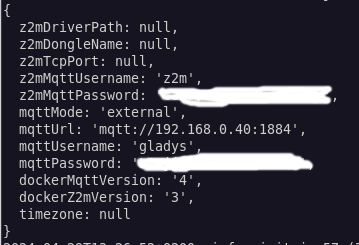
Which username and password are being used?
Because I can set the z2m parameters in the integration but it seems like it’s trying to connect with the MQTT parameters!
This instance is a Gladys test instance that I have on my PC which already had an MQTT broker with zigbee2mqtt configured and working.
For the test I removed my key and in the configuration I changed the settings to connect to an existing installation

There is a small mistake with the ‹ a › in the title
That’s it for now, I can continue other tests this evening.
@_Will_71 Indeed I ran into the same bugs while testing, we posted at the same time 
I’m working on fixing all of that
Ok, I’ll run another test tonight after fixing the bugs.
@_Will_71 I think I’ve fixed the bugs you encountered (I had the same ones), I pushed an updated image with the fixes 
Don’t forget to run:
docker pull gladysassistant/gladys:z2m-setup-external
And to recreate your gladys container
Ok, that works. I’ll let you know tonight.
I’ve just tested the cases:
- Installation of Gladys v4.39.0, Zigbee2mqtt configuration → Upgrade to the new version: Result: State preserved, the port remains 8080
- Fresh install of a Zigbee2mqtt configuration with the container launched by Gladys
- Fresh install of an external Zigbee2mqtt configuration
I still have a problem at home.
So if I try an installation via Gladys no problem, everything works. I can disable and re-enable without any issue.

But if I try with the existing broker I can’t connect


2024-04-29T19:38:43+0200 <info> init.js:56 (Zigbee2mqttManager.init) Zigbee2mqtt USB dongle not attached
2024-04-29T19:38:43+0200 <info> connect.js:17 (Zigbee2mqttManager.connect) Disconnecting existing MQTT client...
2024-04-29T19:38:43+0200 <info> connect.js:25 (Zigbee2mqttManager.connect) Connecting Gladys to mqtt://192.168.0.40:1884 MQTT broker...
2024-04-29T19:38:43+0200 <warn> connect.js:46 (MqttClient.<anonymous>) Error while connecting to MQTT - Error: Connection refused: Not authorized
2024-04-29T19:38:43+0200 <warn> connect.js:53 (MqttClient.<anonymous>) Disconnected from MQTT server
Are you sure you launched the updated version of the container?
I’ve fixed that bug.
Yes, I said that at the beginning, but I can display the password view and I have the ‹ à › correction in the title.
So I deleted everything and started again from scratch and I still can’t get it to work. For the record, I can connect using MQTT Explorer!
And still the same logs
2024-04-29T20:34:01+0200 \u003cinfo\u003e init.js:56 (Zigbee2mqttManager.init) Zigbee2mqtt USB dongle not attached
2024-04-29T20:34:01+0200 \u003cinfo\u003e connect.js:25 (Zigbee2mqttManager.connect) Connecting Gladys to mqtt://192.168.0.40:1884 MQTT broker...
2024-04-29T20:34:01+0200 \u003cwarn\u003e connect.js:46 (MqttClient.\u003canonymous\u003e) Error while connecting to MQTT - Error: Connection refused: Not authorized
2024-04-29T20:34:01+0200 \u003cwarn\u003e connect.js:53 (MqttClient.\u003canonymous\u003e) Disconnected from MQTT server
2024-04-29T20:34:06+0200 \u003cwarn\u003e connect.js:46 (MqttClient.\u003canonymous\u003e) Error while connecting to MQTT - Error: Connection refused: Not authorized
Ok, to get more info to reproduce it, you’re trying to connect to a remote broker, and you manually enter a username and a password, right?
Did you type the username « z2m » yourself?
Are you sure that from the container you can access that MQTT broker?
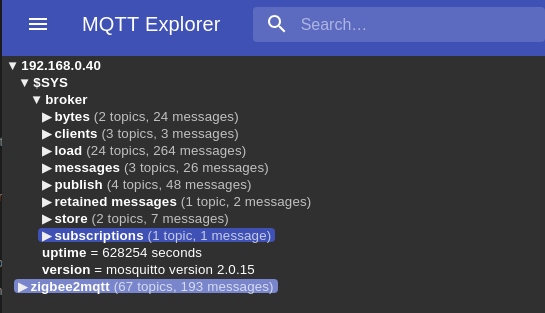
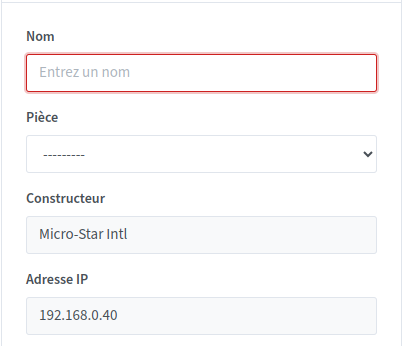
I was able to configure an existing zigbee2MQTT installation in Gladys without issues.
By the way, I think it would be better to set the broker’s default port to 1883 when it’s a separate installation.
However, after trying to add an apparently unsupported device (I suspect that only certain unsupported attributes are causing issues), it causes the Gladys instance to crash (regardless of which menu I go to, the interface shows a continuous spinner). Since I haven’t tested the Z2M integration directly in Gladys, I can’t say whether this behavior is specific to that integration or not.
Thank you for your feedback @_Will_71, the port in your screenshot is 1884, is that the correct port?
I’ll re-test tomorrow trying to reproduce under the same conditions.
That’s normally the case, if you don’t set a port 1883 is used by the library.
Ah that’s unfortunate, could you check the Gladys logs for the error?
As for me, I can only test next week due to the holidays.
I’m chiming in on the conversation with a simple question:
The default port of Gladys’s MQTT integration is 1883. What impact is there if we have an external z2m broker on that port and we want Gladys to manage that container automatically?
In other words, isn’t there a risk of a conflict if we check the ‹ automatic › box in the MQTT integration?