Zigbee2MQTT and Synology DS920+ on 7.2, problem after Synology upgrade

Good evening,

I have a problem after updating my Synology DS920+ NAS to 7.2
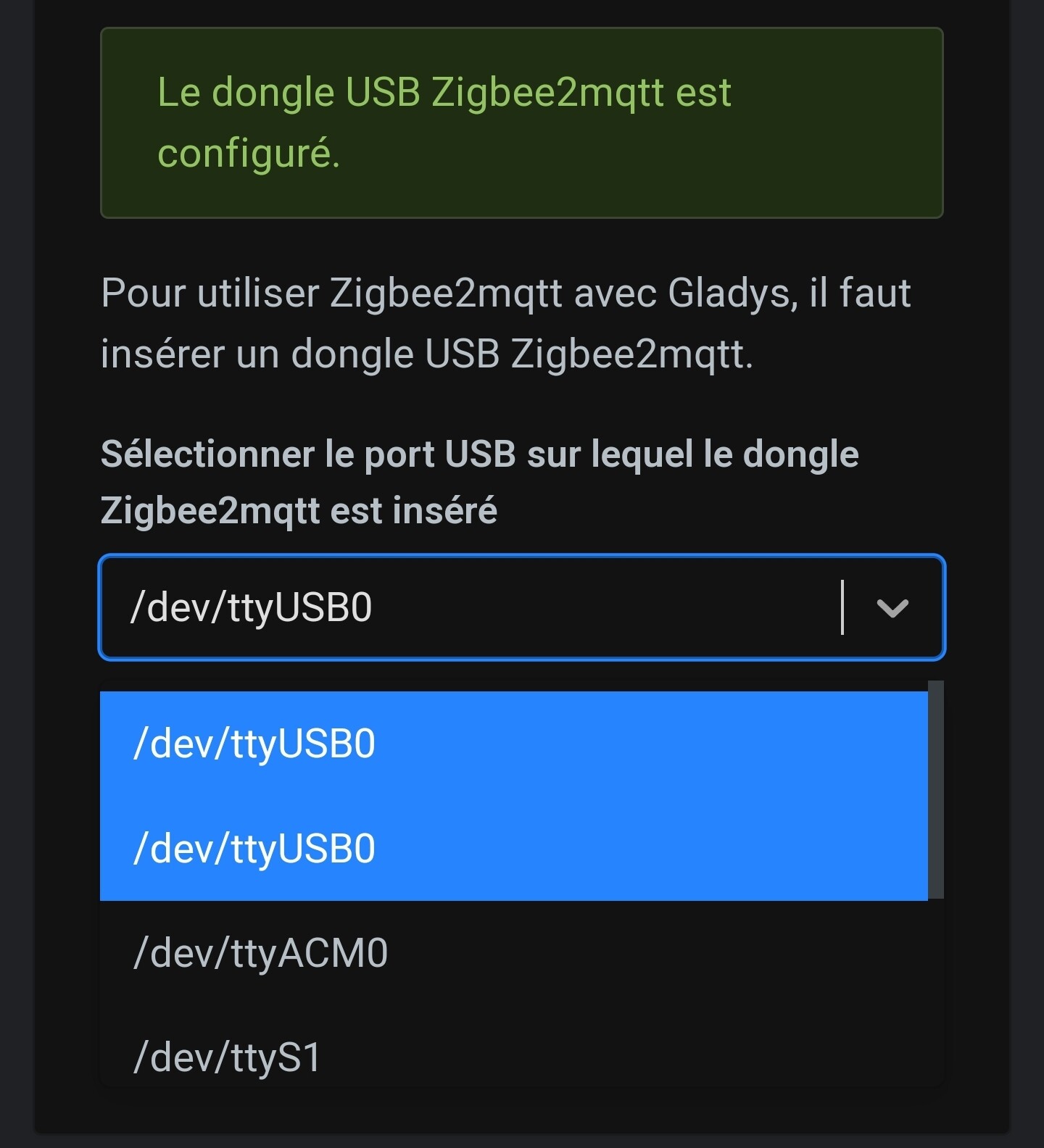
I have the impression that no matter whether I plug in or remove the dongle on the USB port, Gladys only returns this to me:
I still have this list =>

Whereas I can clearly find the dongle with an lsusb =>

What do the dev* correspond to compared to my lsusb?

Could this be related to that?

There are several proposed solutions over there, but I can’t tell you more — I don’t have a Synology anymore :wink:

Since DSM version 7, the USB ports have been restricted.
Of course I reinstalled the drivers to bypass this issue.
My Z-Wave is OK and my Sonoff is recognized, not sure the problem was on the Synology.

I restarted the Gladys container and now I can see the correct port :

Which matches my dongle :

The only issue now is that I’m still getting an SRSP - SYS error

error 2023-09-19 07:14:34: Error: Failed to connect to the adapter (Error:

Help @cicoub13 @pierre-gilles

@spenceur I saw that thread but I don’t have any more ideas than what’s already been said :confused:

Did you post a message on the Zigbee2mqtt forum? It’s more of an issue on their side in this case…

Their forum: Koenkk/zigbee2mqtt · Discussions · GitHub
Their Discord: zigbee2mqtt

Rereading the thread, you should look into Synology as well — this Synology version looks like quite a mess. Maybe check the Synology-specialized forums?

I also found this video:

No idea if it can help you ^^

By any chance, did you select the correct dongle in the Gladys list? If your dongle is the Sonoff P, did you select Sonoff P, and if it’s the Sonoff E, did you select Sonoff E?

It’s indeed the « p » and I have properly selected the dongle :slightly_smiling_face:

On the Synology side I think I’m all good because the dongle is recognized and my Z-W

From memory (warning if I’m talking nonsense) I also have a difference between the z2m dashboard and Gladys

1 Like

yep I suppose the volume must be mounted on the other container.
I’ve put everything back in order but still no luck :frowning:

edit:

@pierre-gilles how is the link made between the selected port and the mounted one?

Okay I was able to fix the issue but by fiddling with the image via portainer

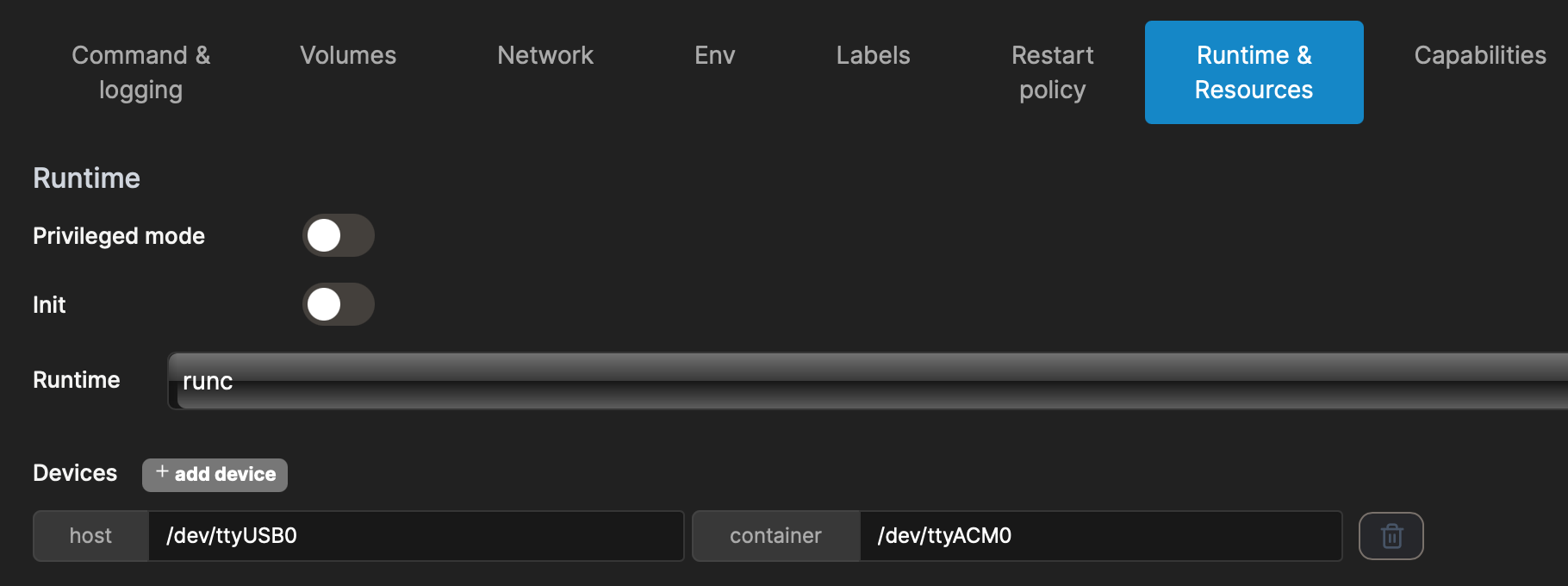
I changed the host to /dev/ttyUSB0 which is bind to /dev/ttyACM0.

I don’t know why it doesn’t change when selecting via gladys but it seems ok now.

1 Like

Great if it works! :tada:

Indeed, I went to look at the code — unless I misunderstood how this part works, the mapping between the host port and the port inside the container is only done when the container is configured for the first time:

For this change to take effect, I think the Zigbee integration would need to be stopped and then restarted..

(I’m saying this after reading the code for 10 seconds; I haven’t investigated any further)

Can you open a GitHub issue so we can verify this behavior? :slight_smile:

In the container gladys-z2m-zigbee2mqtt, the dongle’s port is always /dev/ttyACM0 (that was to make configuration easier).
You will still find in /var/lib/gladysassistant/zigbee2mqtt/z2m/configuration.yaml

serial:
  port: /dev/ttyACM0

The mapping between the host port (the real one) and the container’s is indeed done when the container is created (or on reactivation if there’s a change).

"Devices": [
    {
        "PathOnHost": "/dev/ttyUSB0",
        "PathInContainer": "/dev/ttyACM0",
        "CgroupPermissions": "rwm"
    }
],

I created an issue, I can take a look.

Is it time to revisit this behavior? I mean putting the correct port in the configuration and doing a direct mapping?

I’m afraid of the impact on existing installations

No idea — but if I understand correctly the issue was indeed on the Gladys side. I’ll post a message on Koenkk’s repo that the issue is with Glad

No, I think we should leave it as it is currently :slight_smile:

The only issue at the moment is that apparently (to be verified), the Zigbee2mqtt container is not restarted when the USB port changes

1 Like

@cicoub13 Have you worked on the topic or should I get started on it?

I started looking into it but it’s more complicated than expected.

I was thinking of adding to this line (during the configuration save) a check + deployment if necessary.

But the function checkForContainerUpdates does not verify the configuration but only the available versions.

So we need to:

  • check if the configuration has changed
  • call the function configureContainer to write the configuration
  • call the function installZ2MContainer which should restart the zigbee2mqtt container (without doing anything else)

That’s where I am. I can continue but no short-term commitment possible.

Ok, I checked on my side too — actually it’s the function installZ2MContainer that’s failing

When the user updates their configuration, the API call that’s made is /setup, which calls the function setup.

This function updates the USB configuration, then calls init which calls installZ2MContainer.

But installZ2MContainer has no code to handle the case of an existing Zigbee2mqtt container.

I think that in this installZ2MContainer function, we should:

  • At the start of the function, add if (dockerContainers.length > 0) { to handle the case where the container does exist
  • Test HostConfig.Devices[0].PathOnHost to verify that it is identical to the USB path
  • If not (the USB path has changed), then stop and rm the container. (And then let the rest of the function restart a container)

What do you think? :slight_smile:

  1. Gladys
  2. /server
  3. /services
  4. /zigbee2mqtt
  5. /docker
    /# gladys-z2m-zigbee2mqtt-container.json

{
« name »: « gladys-z2m-zigbee2mqtt »,
« Image »: « koenkk/zigbee2mqtt:latest »,

Just a small question: shouldn’t we also pin the image here since there don’t seem to be any problems with it at the moment?

I’m starting to understand how the container part is handled in Gladys’ code :slight_smile: I’m moving from plain quiche mode to quiche with bacon :rofl: