It’s strange that you don’t have any rows with that filter even though the server responds CONFLICT.
Try looking at the t_device_feature table
Hello @cicoub13
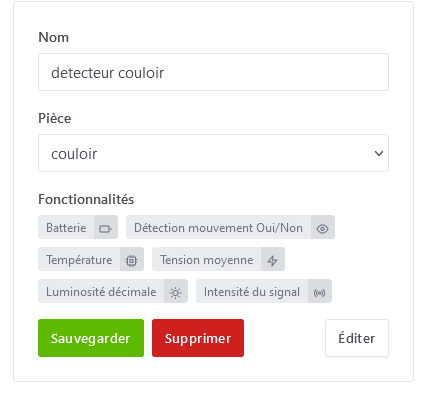
I looked in the t_device_feature table, there is no trace of my detector, so I think it was indeed deleted. However, where I have doubts is about the two brightness functions. They are named differently on Zm2Mqtt and in Gladys they have the same name — how can I see if it’s the same MQTT link?
Good evening @pierre-gilles
je viens de voir un probleme dans les « Tasks » section of Gladys’ settings
I went back through the history to the beginning, so 7 days back, and I found this error that repeats every day:
Agrégation donnée capteur horaire
il y a 5 jours

Error: Error
    at Database.<anonymous> (/src/server/node_modules/sequelize/lib/dialects/sqlite/query.js:179:27)
    at /src/server/node_modules/sequelize/lib/dialects/sqlite/query.js:177:50
    at new Promise (<anonymous>)
    at Query.run (/src/server/node_modules/sequelize/lib/dialects/sqlite/query.js:177:12)
    at /src/server/node_modules/sequelize/lib/sequelize.js:314:28
    at async SQLiteQueryInterface.bulkUpdate (/src/server/node_modules/sequelize/lib/dialects/abstract/query-interface.js:366:12)
    at async t_device_feature.update (/src/server/node_modules/sequelize/lib/model.js:1958:28)
    at async /src/server/lib/device/device.calculcateAggregateChildProcess.js:153:5 {
  name: 'SequelizeTimeoutError',
  parent: [Error: SQLITE_BUSY: database is locked] {
    errno: 5,
    code: 'SQLITE_BUSY',
    sql: 'UPDATE `t_device_feature` SET `last_hourly_aggregate`=$1,`updated_at`=$2 WHERE `id` = $3'
  },
  original: [Error: SQLITE_BUSY: database is locked] {
    errno: 5,
    code: 'SQLITE_BUSY',
    sql: 'UPDATE `t_device_feature` SET `last_hourly_aggregate`=$1,`updated_at`=$2 WHERE `id` = $3'
  },
  sql: 'UPDATE `t_device_feature` SET `last_hourly_aggregate`=$1,`updated_at`=$2 WHERE `id` = $3',
  parameters: {}
}
Could my problem be related?
Thank you for your reply
so even with V4.37 I have the same problem
This is a pretty common error when your drive isn’t fast enough to handle the read/write volume  No relation to your issue.
To install Gladys, if you plan to have a nice setup with quite a few sensors, I really recommend using a good SSD in a mini-PC, otherwise you’ll be quickly limited. Are you on micro-SD right now?
What I recommend is the Beelink which comes with a
Hello @pierre
Yes, we
[quote=« _Will_71, post:27, topic:8724 »]
There is surely a link to
Indeed ^^ My bad !! And your Gladys output confirms it since you do have one feature with the unit and the other without:
| name | Illuminance |
|---|---|
| read_only | true |
| has_feedback | false |
| min | 0 |
| max | 100000 |
| category | light-sensor |
| type | decimal |
| unit | lux |
| external_id | zigbee2mqtt:detecteur_couloir:light-sensor:decimal:illuminance |
| selector | zigbee2mqtt-detecteur-couloir-light-sensor-decimal-illuminance |
and
| 5 | Object { name: Illuminance, read_only: true, has_feedback: false, … } |
|---|---|
| name | Illuminance |
| read_only | true |
| has_feedback | false |
| min | 0 |
| max | 100000 |
| category | light-sensor |
| type | decimal |
| unit | null |
| external_id | zigbee2mqtt:detecteur_couloir:light-sensor:decimal:illuminance |
| selector | zigbee2mqtt-detecteur-couloir-light-sensor-decimal-illuminance |
So, I have this device here, which did the same to me, but at one point, I don’t know why, it integrated properly.
 and therefore confirm what I said at the start:
So I was able to find an expose of this sensor here : Aqara human body movement and illuminance sensor RTCGQ11LM not reporting battery level · Issue #11616 · Koenkk/zigbee2mqtt · GitHub
We can see in the latter:
[
  {
    "definition": null,
    "endpoints": {
      [...]
    },
    "friendly_name": "Coordinator",
    "ieee_address": "0x00124b0024cae636",
    "interview_completed": true,
    "interviewing": false,
    "network_address": 0,
    "supported": false,
    "type": "Coordinator"
  },
  {
    "definition": {
      "description": "Aqara human body movement and illuminance sensor",
      "exposes": [
        {
          "access": 1,
          "description": "Remaining battery in %",
          "name": "battery",
          "property": "battery",
          "type": "numeric",
          "unit": "%",
          "value_max": 100,
          "value_min": 0
        },
        {
          "access": 1,
          "description": "Indicates whether the device detected occupancy",
          "name": "occupancy",
          "property": "occupancy",
          "type": "binary",
          "value_off": false,
          "value_on": true
        },
        {
          "access": 1,
          "description": "Measured temperature value",
          "name": "temperature",
          "property": "temperature",
          "type": "numeric",
          "unit": "°C"
        },
        {
          "access": 1,
          "description": "Voltage of the battery in millivolts",
          "name": "voltage",
          "property": "voltage",
          "type": "numeric",
          "unit": "mV"
        },
        {
          "access": 1,
          "description": "Measured illuminance in lux",
          "name": "illuminance_lux",
          "property": "illuminance",
          "type": "numeric",
          "unit": "lx"
        },
        {
          "access": 1,
          "description": "Measured illuminance in lux",
          "name": "illuminance",
          "property": "illuminance",
          "type": "numeric",
          "unit": "lx"
        },
        {
          "access": 1,
          "description": "Link quality (signal strength)",
          "name": "linkquality",
          "property": "linkquality",
          "type": "numeric",
          "unit": "lqi",
          "value_max": 255,
          "value_min": 0
        }
      ],
      "model": "RTCGQ11LM",
      "options": [
        {
          "access": 2,
          "description": "Time in seconds after which occupancy is cleared after detecting it (default 90 seconds).",
          "name": "occupancy_timeout",
          "property": "occupancy_timeout",
          "type": "numeric",
          "value_min": 0
        },
        {
          "access": 2,
          "description": "Sends a message the last time occupancy was detected. When setting this for example to [10, 60] a {\"no_occupancy_since\": 10} will be send after 10 seconds and a {\"no_occupancy_since\": 60} after 60 seconds.",
          "item_type": "number",
          "name": "no_occupancy_since",
          "property": "no_occupancy_since",
          "type": "list"
        },
        {
          "access": 2,
          "description": "Number of digits after decimal point for illuminance, takes into effect on next report of device.",
          "name": "illuminance_precision",
          "property": "illuminance_precision",
          "type": "numeric",
          "value_max": 3,
          "value_min": 0
        },
        {
          "access": 2,
          "description": "Calibrates the illuminance value (percentual offset), takes into effect on next report of device.",
          "name": "illuminance_calibration",
          "property": "illuminance_calibration",
          "type": "numeric"
        },
        {
          "access": 2,
          "description": "Number of digits after decimal point for illuminance_lux, takes into effect on next report of device.",
          "name": "illuminance_lux_precision",
          "property": "illuminance_lux_precision",
          "type": "numeric",
          "value_max": 3,
          "value_min": 0
        },
        {
          "access": 2,
          "description": "Calibrates the illuminance_lux value (percentual offset), takes into effect on next report of device.",
          "name": "illuminance_lux_calibration",
          "property": "illuminance_lux_calibration",
          "type": "numeric"
        },
        {
          "access": 2,
          "description": "Number of digits after decimal point for temperature, takes into effect on next report of device.",
          "name": "temperature_precision",
          "property": "temperature_precision",
          "type": "numeric",
          "value_max": 3,
          "value_min": 0
        },
        {
          "access": 2,
          "description": "Calibrates the temperature value (absolute offset), takes into effect on next report of device.",
          "name": "temperature_calibration",
          "property": "temperature_calibration",
          "type": "numeric"
        }
      ],
      "supports_ota": false,
      "vendor": "Xiaomi"
    },
    "endpoints": {
      "1": {
        "bindings": [],
        "clusters": {
          "input": [
            "genBasic",
            "65535",
            "msOccupancySensing",
            "msIlluminanceMeasurement",
            "ssIasZone",
            "genPowerCfg",
            "genIdentify"
          ],
          "output": [
            "genBasic",
            "genOta"
          ]
        },
        "configured_reportings": [],
        "scenes": []
      }
    },
    "friendly_name": "motion_sensor_office",
    "ieee_address": "0x00158d0007755b21",
    "interview_completed": true,
    "interviewing": false,
    "manufacturer": "LUMI",
    "model_id": "lumi.sensor_motion.aq2",
    "network_address": 52233,
    "power_source": "Battery",
    "supported": true,
    "type": "EndDevice"
  }
]
that the sensor « RTCGQ11LM » exposes the following properties:
        {
          "access": 1,
          "description": "Measured illuminance in lux",
          "name": "illuminance_lux",
          "property": "illuminance",
          "type": "numeric",
          "unit": "lx"
        },
        {
          "access": 1,
          "description": "Measured illuminance in lux",
          "name": "illuminance",
          "property": "illuminance",
          "type": "numeric",
          "unit": "lx"
        },
unlike the model « ZSS-ZK-THL » for example which does expose:
        {
          "access": 1,
          "description": "Raw measured illuminance",
          "label": "Illuminance",
          "name": "illuminance",
          "property": "illuminance",
          "type": "numeric"
        },
        {
          "access": 1,
          "description": "Measured illuminance in lux",
          "label": "Illuminance (lux)",
          "name": "illuminance_lux",
          "property": "illuminance_lux",
          "type": "numeric",
          "unit": "lx"
        },
So there is an issue on the Zigbee2mqtt side because we do have different ‹ name › and ‹ label › but the ‹ property › and ‹ description › are identical. And unless I’m mistaken, we use the ‹ property › to build the ‹ external_id › and ‹ selector ›. And I don’t quite see how to handle this case (except to make an exception in our code).
Our code with the line that causes the problem when Zigbee2mqtt makes an error at this level (I think) is in the file server/services/zigbee2mqtt/utils/features/completeFeature.js :
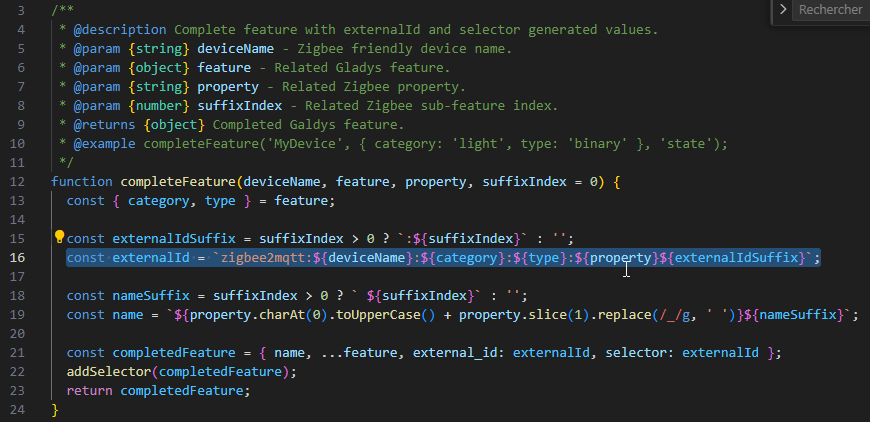
And we can see below that the « name » is also taken from the exposes ‹ property ›, hence why we have a feature named « Illuminance » twice.
Unfortunately @Psoy we should open an issue on the Zigbee2mqtt side for this device. In the meantime there may be a way to add it for you as a hack if you want. But I don’t know what future data updates will do.
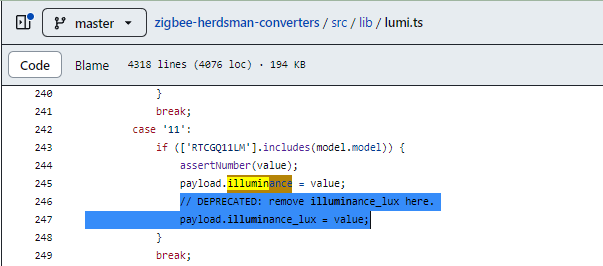
But I’ve had this sensor for several months and it always worked, but as someone else said « that was before ». 
Yes, the impact must surely come from adding illuminance_lux or illuminance to Gladys. Before the expose wasn’t processed so no problem (well I’m still just guessing though)!! So it would be (conditional ^^) the addition of a feature for other sensors that caused you trouble 


Thanks @Terdious for finding that one, it wasn’t obvious It seems we can’t do anything simple on the Gladys side but I’ll propose something on the Zigbee2mqtt side
Thanks @cicoub13 
If it doesn’t work out with Zigbee2mqtt, we can always add a special-case on the Gladys side. It’s not sexy but sometimes in cases like that it’s better to have an unsexy solution that works 