Conflict when adding a Z2M device

Hello,

I need a bit of help, I’m facing a refusal to add a device registered in Z2M on Gladys. For information, I am using a raspios buster image with docker installed and on a Pi4 via an SSD.

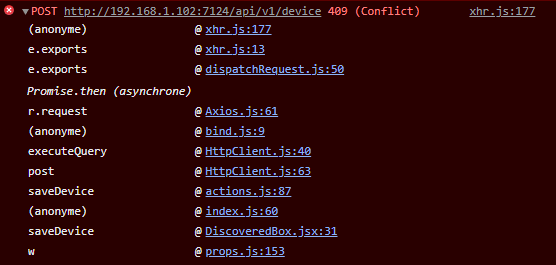
When adding it, an error indicates «  », no message in the Gladys logs and in my browser console I have this:

Following this message, I went to delete all my devices in each integration (just to be sure) and I tried to add it again, still the same issue.

I then went through the API to check all the devices present and nothing that could have the same name.

I also went through a DBeaver to interact with the SQLite database and nothing unusual either.

Would you have any other idea? (the device is a Xiaomi presence sensor that is well integrated with Z2M)

Hey, I’m willing to bet that it’s the « decimal brightness » feature that’s causing a conflict…
You should retrieve the JSON content of this device, you can do this from the browser console, network tab, when you access the discovery page.

Here is the JSON associated with the device when I press « Add to Gladys »:

{
  "name": "Bureau Capteur_presence",
  "model": "RTCGQ11LM",
  "external_id": "zigbee2mqtt:Bureau Capteur_presence",
  "features": [
    {
      "name": "Battery",
      "read_only": true,
      "has_feedback": false,
      "min": 0,
      "max": 100,
      "category": "battery",
      "type": "integer",
      "unit": "percent",
      "external_id": "zigbee2mqtt:Bureau Capteur_presence:battery:integer:battery",
      "selector": "zigbee2mqtt-bureau-capteur-presence-battery-integer-battery"
    },
    {
      "name": "Motion Detection Yes/No",
      "read_only": true,
      "has_feedback": false,
      "category": "motion-sensor",
      "type": "binary",
      "min": 0,
      "max": 1,
      "unit": null,
      "external_id": "zigbee2mqtt:Bureau Capteur_presence:motion-sensor:binary:occupancy",
      "selector": "zigbee2mqtt-bureau-capteur-presence-motion-sensor-binary-occupancy"
    },
    {
      "name": "Temperature",
      "read_only": true,
      "has_feedback": false,
      "min": -100,
      "max": 150,
      "category": "temperature-sensor",
      "type": "decimal",
      "unit": "celsius",
      "external_id": "zigbee2mqtt:Bureau Capteur_presence:temperature-sensor:decimal:temperature",
      "selector": "zigbee2mqtt-bureau-capteur-presence-temperature-sensor-decimal-temperature"
    },
    {
      "name": "Average Voltage",
      "read_only": true,
      "has_feedback": false,
      "min": 0,
      "max": 10000,
      "category": "switch",
      "type": "voltage",
      "unit": "millivolt",
      "external_id": "zigbee2mqtt:Bureau Capteur_presence:switch:voltage:voltage",
      "selector": "zigbee2mqtt-bureau-capteur-presence-switch-voltage-voltage"
    },
    {
      "name": "Decimal Brightness",
      "read_only": true,
      "has_feedback": false,
      "min": 0,
      "max": 100000,
      "category": "light-sensor",
      "type": "decimal",
      "unit": "lux",
      "external_id": "zigbee2mqtt:Bureau Capteur_presence:light-sensor:decimal:illuminance",
      "selector": "zigbee2mqtt-bureau-capteur-presence-light-sensor-decimal-illuminance"
    },
    {
      "name": "Decimal Brightness",
      "read_only": true,
      "has_feedback": false,
      "min": 0,
      "max": 100000,
      "category": "light-sensor",
      "type": "decimal",
      "unit": null,
      "external_id": "zigbee2mqtt:Bureau Capteur_presence:light-sensor:decimal:illuminance",
      "selector": "zigbee2mqtt-bureau-capteur-presence-light-sensor-decimal-illuminance"
    }
  ],
  "should_poll": false,
  "service_id": "515a15a0-d9e5-4d2b-89bf-80aca56106f7",
  "room_id": "c571780a-4da5-4801-8731-8735a8e2c5a2"
}

Is it because the same feature is present in duplicate, or because the unit is null for one of them?

your device would not be the RTCGQ11LM. I have the same issue.

edit:

here is what I found by inspecting the console

{
    "status": 409,
    "code": "CONFLICT",
    "error": {
        "message": "external_id must be unique",
        "attribute": "external_id",
        "value": "zigbee2mqtt:Detecteur Alban:light-sensor:decimal:illuminance",
        "type": "unique violation"
    }
}

Yes, if it is the same device, then it’s fine because in this case the luminance is doubled :smiley:

@AlexTrovato It seems to me that before, it was the Zigbee ID that was used in the external ID (0x00583685937). Is this something that has changed?

Just as it’s not, it has always been the friendly name…
But for the conflict issue, it’s due to the identical double feature. Is it normal for this device to have 2 light sensors?

There is only one light sensor.

However, be aware that there are variables:
illuminance_precision and illuminance_lux_precision, two decimal variables. Could the problem come from there?

[edit] I tried to test by preventing one of the two variables from being sent but without success. In fact, we have the same property twice for this device.

It would be helpful to have the ability to remove a feature when adding a device in Gladys, which could fix this duplicate issue, as well as the ability to remove the internal temperature of devices that are taken into account in the calculation of the average temperature of a room, thus distorting the value for the room. (I’m talking about this topic here)

You can prevent the « temperature » function from being transmitted by going to Gladys on port 8080, on the device, under the « Parameters » tab, « Filtered Attributes » section, and entering « temperature ».

Perhaps the « precision » feature isn’t necessary, if I understand correctly, it’s more of a setting than anything.

Ok, I just checked in the zigbee2mqtt GitHub.
Often 2 features « illuminance » and « illuminance_lux » are exposed for the same device with a light sensor.
However, « illuminance » is simply a calibration/sensitivity indicator, while « illuminace_lux » is the true sensor value.
I will make a fix to handle ONLY « illuminance_lux ».

Thanks, I’ll try that!

Hello and happy new year to everyone!

I’m back from vacation, I just saw your PR @AlexTrovato :slight_smile:

I’ll check all that tomorrow :slight_smile:

I just merged the PR into master, thanks @AlexTrovato for the fix! :pray:

Fix deployed in Gladys Assistant v4.7.2!

I confirm the problem has been fixed!

Hello,

Sorry to reopen an old thread, but it seems this issue has come back. On the same AQARA
RTCGQ11LM
.

I’m trying to add it to my setup and I run into the same errors, same analysis. Duplicate property, external_id error, all that.

I think he wasn’t supposed to remember it but the feature was added again with this PR following a request on the EN forum

@Sescandell @_Will_71 I can’t find the thread anymore but it seems to me