Device discovery problem in Zigbee2mqtt

Good evening everyone
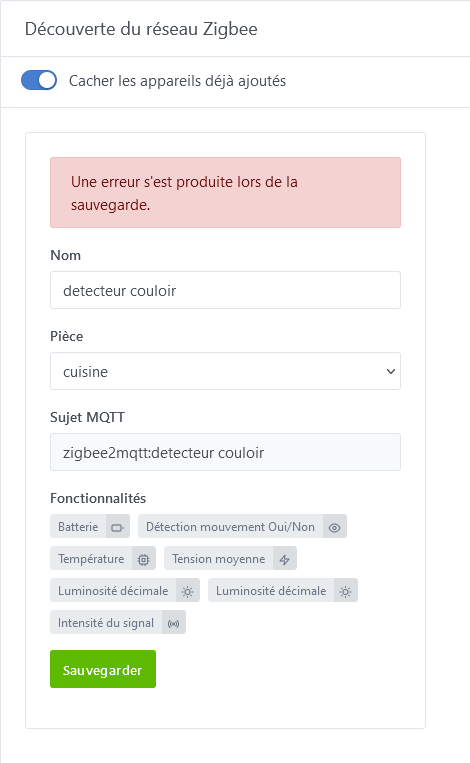
I’m reaching out to ask for help resolving my problem. After several attempts to restart Zigbee2mqtt, then Gladys, then deleting the sensor and reinstalling it, I still get this message when I confirm saving this sensor

An error occurred while saving.

This sensor is Xiaomi like the one in @pierre-gilles’s tutorial, which was properly integrated into Gladys.
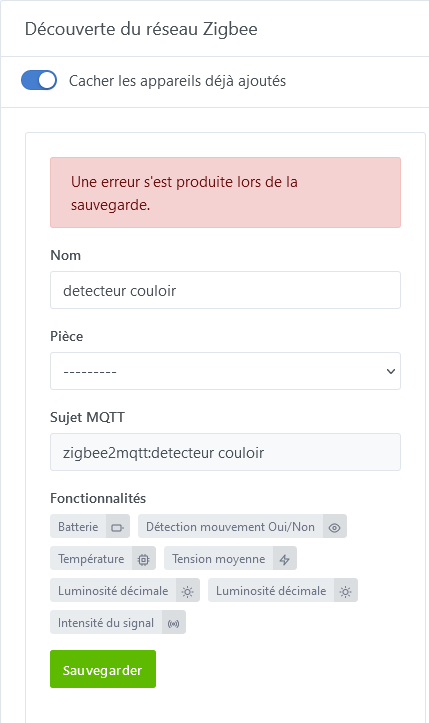
In the Zigbee discovery window, this sensor requested an update, but when I confirmed it I got this message:

An error occurred while saving.

I removed the sensor in Zigbee2mqtt and in Gladys, I re-paired it, it appears correctly in Zigbee2mqtt and in Gladys Zigbee network discovery

, but when I try to save it, I still get this message:

An error occurred while saving.

However, it no longer appears in the Zigbee2mqtt logs (I think that’s normal).
I had another device that did this to me, so I removed it from Gladys’s Zigbee devices, and when I saved it, it worked and I no longer had this message.
Could it be that this Xiaomi sensor is still in a database that refuses to update it? I don’t know how to check that.
So now I can’t integrate it into Gladys anymore.
Does anyone have any idea to help me
Thanks in advance

Hi @Psoy, which version of Gladys are you on? Check that you’re on v4.36.0!

hello @pierre-gilles
Yes I’m on v4.36
Apparemment it’s related to the Xiaomi detector, because I have a Zigbee relay that I removed from Gladys’s devices and that I reinstalled directly. I tested it with the Xiaomi app — it connects fine. I put it back on Zigbee2mqtt

Possible. Can you open the developer tools window (F12 in your browser) and go to the Network tab? At the moment you click Save, you should see a red line. It’s the response body we’re interested in.

Good evening @cicoub13
Here is what corresponds to the red line.

XHRPOST
http://192.168.1.134/api/v1/device
[HTTP/1.1 409 Conflict 112ms]

	
POST
	
http://192.168.1.134/api/v1/device
État
409
Conflict
VersionHTTP/1.1
Transfert653 o (taille 206 o)
Politique de référentstrict-origin-when-cross-origin
Priorité de la requêteHighest
Résolution DNSSystème

	
Access-Control-Allow-Headers
	Origin, X-Requested-With, Content-Type, Accept, Authorization
Access-Control-Allow-Methods
	GET,PUT,PATCH,POST,DELETE
Access-Control-Allow-Origin
	*
Connection
	keep-alive
Content-Length
	206
Content-Type
	application/json; charset=utf-8
Date
	Sat, 17 Feb 2024 19:17:19 GMT
ETag
	W/"ce-TsLI0wKKmlWByipVYxMOxBl3daQ"
Keep-Alive
	timeout=5
Vary
	Accept-Encoding
X-Powered-By
	Express
		
Accept
	application/json, text/plain, */*
Accept-Encoding
	gzip, deflate
Accept-Language
	fr,fr-FR;q=0.8,en-US;q=0.5,en;q=0.3
authorization
	Bearer eyJhbGciOiJIUzI1NiIsInR5cCI6IkpXVCJ9.eyJ1c2VyX2lkIjoiOTJlZTQ2NjctOTQ1MC00YjU5LWE3NGEtZThlZmExNTc1MTJjIiwic2NvcGUiOlsiZGFzaGJvYXJkOndyaXRlIiwiZGFzaGJvYXJkOnJlYWQiXSwic2Vzc2lvbl9pZCI6IjU2ZmMzMWYzLTI5ZjYtNGI1ZC04MjQ1LWEwM2Q0ZTc5MTc0ZSIsImlhdCI6MTcwODE5MDk3OCwiZXhwIjoxNzA4Mjc3Mzc4LCJhdWQiOiJ1c2VyIiwiaXNzIjoiZ2xhZHlzIn0.4d2tzir56mkN3AlDo0KNGjpCDBC2aiy9wVrjQemFHg8
Connection
	keep-alive
Content-Length
	2306
Content-Type
	application/json;charset=utf-8
Host
	192.168.1.134
Origin
	http://192.168.1.134
Referer
	http://192.168.1.134/dashboard/integration/device/zigbee2mqtt/discover
User-Agent
	Mozilla/5.0 (Windows NT 10.0; Win64; x64; rv:122.0) Gecko/20100101 Firefox/122.0

I found this in the response tab:

status	409
code	"CONFLICT"
error	
message	"external_id must be unique"
attribute	"external_id"
value	"zigbee2mqtt:detecteur couloir:light-sensor:decimal:illuminance"
type	"unique violation"

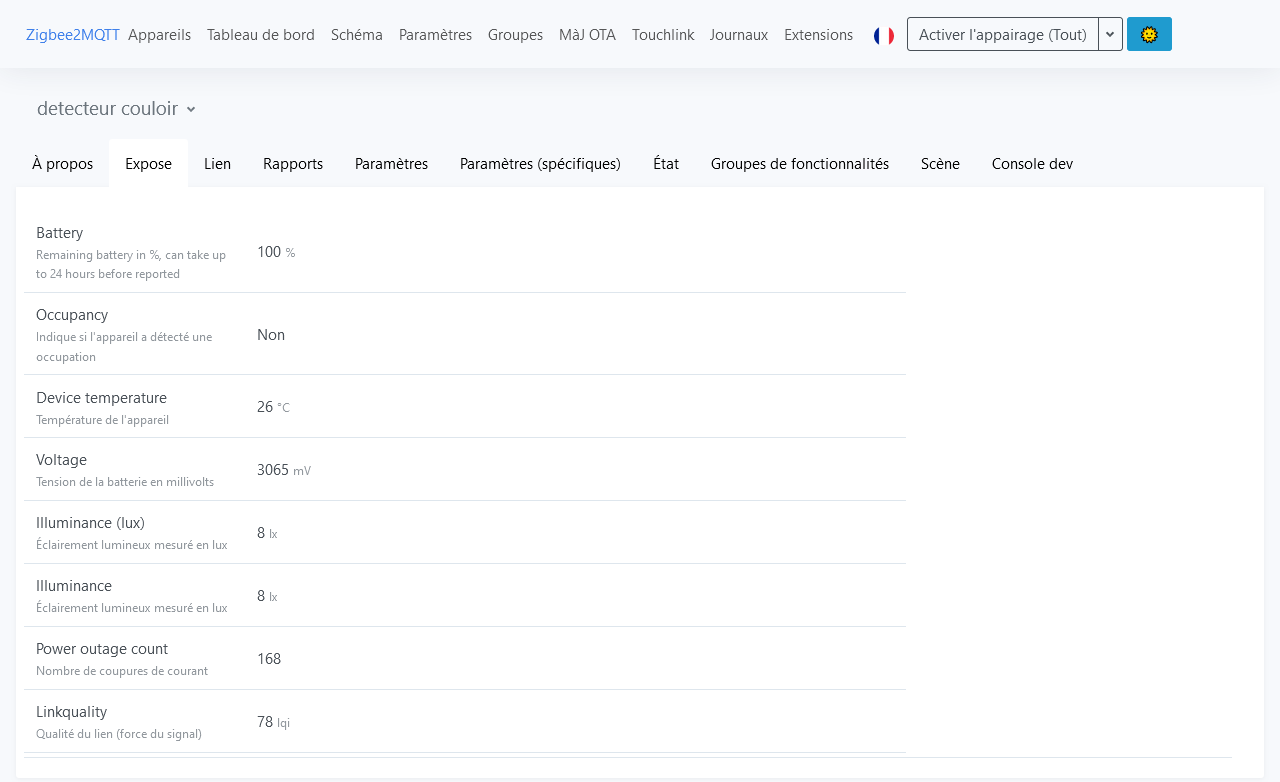
screenshot of the detector’s exposed features :


screenshot of Zigbee discovery in Gladys

is it because there

Apparently, a feature already exists. Hard to say whether a deletion went wrong or if it’s coming from this device.

Here are the commands to remove it from the database :broom:

:warning: Make a backup of your database before (stop the Docker container gladys, copy the file /var/lib/gladysassistant/gladys-production.db)


docker exec -it gladys /bin/sh

sqlite3 /var/lib/gladysassistant/gladys-production.db

.mode column

.headers on

SELECT id, name, selector, external_id FROM t_device_feature WHERE external_id = 'zigbee2mqtt:detecteur couloir:light-sensor:decimal:illuminance';

This gives you the id of the feature to delete (as a uuid b0c63f91-3bcd-4989-b740-1850807ecb0d)

Delete states
DELETE FROM t_device_feature_state WHERE device_feature_id = '\u003cuuid\u003e';

Delete aggregated states
DELETE FROM t_device_feature_state_aggregate WHERE device_feature_id = '\u003cuuid\u003e';

Delete the feature
DELETE FROM t_device_feature WHERE id = '\u003cuuid\u003e';

.exit

Hello @cicoub13
I’ll try to do that

Good evening @cicoub13
Well, the questions are starting, I copied/pasted the first command, but I don’t get any uuid returned

pi@gladys:// $ docker exec -it gladys /bin/sh
sqlite3 /var/lib/gladysassistant/gladys-production.db
.mode column
.headers on
SELECT id, name, selector, external_id FROM t_device_feature WHERE external_id = 'zigbee2mqtt:detecteur couloir:light-sensor:decimal:illuminance'
/src/server #

I don’t have a feature id returned to delete, I’m stuck at /src/server #

Each line is a command (you need to press Enter). Have you made a backup?

Yes, with FileZilla I copied the file to my hard drive

this is what it shows when entering the lines one by one and confirming after each line :

pi@gladys:// $ docker exec -it gladys /bin/sh
/src/server # sqlite3 /var/lib/gladysassistant/gladys-production.db
SQLite version 3.44.2 2023-11-24 11:41:44
Enter ".help" for usage hints.
sqlite\u003e .mode column
sqlite\u003e .headers on
sqlite\u003e SELECT id, name, selector, external_id FROM t_device_feature WHERE external_id = 'zigbee2mqtt:detecteur couloir:light-sensor:decimal:illuminance'
   ...\u003e


Semicolons were missing at the end of the SQL statements (added in my original post)

still no ID

pi@gladys:// $ docker exec -it gladys /bin/sh
/src/server # sqlite3 /var/lib/gladysassistant/gladys-production.db
SQLite version 3.44.2 2023-11-24 11:41:44
Enter « .help » for usage hints.
sqlite> .mode column
sqlite> .headers on
sqlite> SELECT id, name, selector, external_id FROM t_device_feature WHERE external_id = ‹ zigbee2mqtt:detecteur couloir:light-sensor:decimal:illuminance ›;
sqlite>

Hello @cicoub13
Should I have the uuid displayed? because I’m stuck at the prompt: sqlite\u003e and I don’t know how to get out of it. .exit doesn’t make me exit
And for deletions I am supposed to replace:

id = '\u003cuuid\u003e';

with:
id = 'my uuid'; ; removing this: \u003c\u003e
Actually I don’t know SQL at all
Thanks for your help

Wouldn’t you be more comfortable using an external tool by exporting your database to at least get the uuid?

You can check Pierre-Gilles’ post:

For my part I almost only use that!!

Turn off Gladys, download the database to your PC/Mac and view it.
If you made a backup beforehand, you can delete it in TablePlus then re-import your database (be careful with permissions — I have to open permissions to everyone then put them back afterward)
Hello @Terdious
I’ll look into that, thank you for your reply :wink:

1 Like

Hello @Terdious ,@pierre-gilles
Where does this link lead to? because for the moment, it doesn’t work anymore

Hello @Psoy,

Never mind, it was the early stages of Gladys V4 at its conception, I think ^^

My bad, I should have been more precise, I was talking about this link in the post :

No worries,
For Tabplus it’s fine, I just have to learn how it works, I’ve already opened the database on Tabplus, it’s a first step :grinning:
thanks again

1 Like