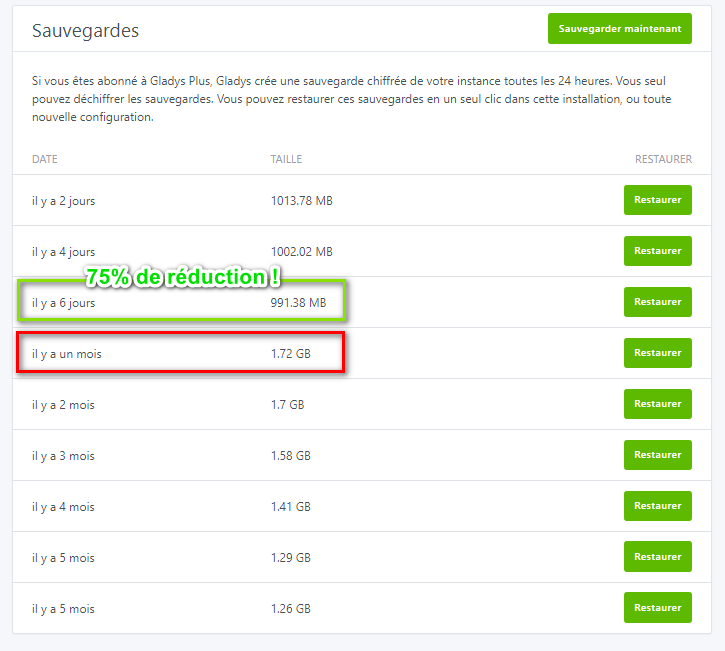
After running a VACUUM at night, you have to think about the least penalizing option because, for example, I manage my electric heating and pellet stove with Gladys and NodeRed, so every night between 2 a.m. and 4 a.m. my heating would be stuck in its position for 20 minutes?
In that case I would rather have a manual mode for the VACUUM.
Another example: if you add an Alarm function to Gladys, burglars would have 20 minutes of peace every night.
Can’t we imagine splitting the whole into several pieces which would then be deleted in the same way?
That’s one of the solutions @pierre-gilles also proposes.
Ah thanks.
I read it too quickly then. 
@pierre-gilles it shouldn’t do that when adding a feature. I just ran the test and like the others it takes time ( 4 minutes on amd64 )
I’m at 14GB of RAM for the container, I’ll need to limit its usage a bit
 How is it possible to need that much RAM for Gladys? What are you doing with it?
Otherwise, perform database cleanup only if a feature is removed from the history.
Nothing in particular
For your information I’m working on this topic today, I made good progress this morning and I created a PR 
My approach:
From now on, when saving a device where several features have the « Yes, keep states » box unchecked, I launch background jobs that will clean past states, in a somewhat smarter way than what was done up until now.
The job will count in the DB how many states / aggregated states there are for each feature, then will clean the states in small batches of 1000, in order to avoid overloading the DB. Between each batch, Gladys waits 100ms to give Gladys some breathing room.
To clean 5 million states, you therefore need 5 million / 1000 = 5,000 batches.
5,000 * 0.1 = 500 seconds = 8.3 minutes minimum waiting between the batches; if we add 100ms per clean, that makes 16 minutes to clean 5 million states in the background, in a way that is non-blocking for Gladys and gentle
On the Gladys side, any background job can be monitored live in the « Background tasks » tab:

This allows keeping a record of these tasks, and to monitor their execution.
Normally, saving a device should be instantaneous, and Gladys should no longer block!
I’ll continue my tests on larger DBs, and see how I handle VACUUM 
The PR:
Great, I can’t wait to test.
[quote=« pierre-gilles, post:49, topic:7522 »]
I made good progress this
Yes, I’m in Bangkok +5h ahead of France!
Regarding VACUUM, I chose a « manual » approach for now, given the impact it has on Gladys availability on large DBs.
I removed the VACUUM during device registration, and I added a manual button in the system settings with text that clearly states Gladys will be unavailable for a certain time due to VACUUM.
The idea is first to see how long VACUUM takes on different instances, and let the user choose whether to run it or not.
Then, we could possibly add a monthly night-time job, for example, but it should be clearly communicated and made disableable for those who want maximum Gladys availability.
The button:

The PR: