Ok to do it in 2 PRs, that’s better, except that for my part it only solves 1% of my problems and I may be wrong but I understood the other people’s arguments in the same way.
I want to keep almost all of the histories. What makes the database grow visibly is keeping duplicates that are very often useless…
So the keep_history alone doesn’t solve 99% of the problem in my case. Is it the same for you @lmilcent and @VonOx? Or did I misunderstand your use case?
Simple example:
I have a Sonoff POWR2 outlet running Tasmota powering a pump + consumed power + one contact soldered to pin IO4 for a level that cuts the pump and opens and closes valves via a scene.
The power history interests me almost all the time,
The pump history doesn’t interest me,
The low-level history interests me but only when it changes state (once a week sometimes / once a month other times) yet at the moment it keeps it every minute…
Yes, the need is similar on my side — we understood each other well.
From a design/logic point of view it’s extremely complicated for the aggregation because it will consider that there were no values over a period of time.
So if there’s a state/value change you must first insert the previous state just before (to have a correct chronology). It’s a bit tricky but it can work.
This can be tested quite easily (to see the behavior of the aggregation and the result on graphs)
Example: temperature of a room
At 8:00 => 19deg
At 9:00 => 19deg (I don’t do anything in the db)
At 9:30 => 19.5 (there I write to the db the old value then the new one)
Yes that’s what I suggested in my other post. And that’s what I did on Netatmo in this case
I could even show you what it looks like on the aggregator in this case
Well, states per feature are fine, so it’s the same logic then.
For a Philips Hue lamp, for example, it might be interesting to keep the ON/OFF, but as for the colors… personally I don’t care… right?
@pierre-gilles, @AlexTrovato, @VonOx,
I’m following up on this topic as I consider it potentially critical on some rather heavy instances.
As a reminder, the discussion topics:
If we can define the complete roadmap as well as validate a specification, I’m willing to take care of it as much as possible and produce a first draft quickly.
Also as a reminder, the proposal I made (modified according to Pierre-Gilles’s suggestion in order) to start the discussion:
1st PR :
Front-end side :
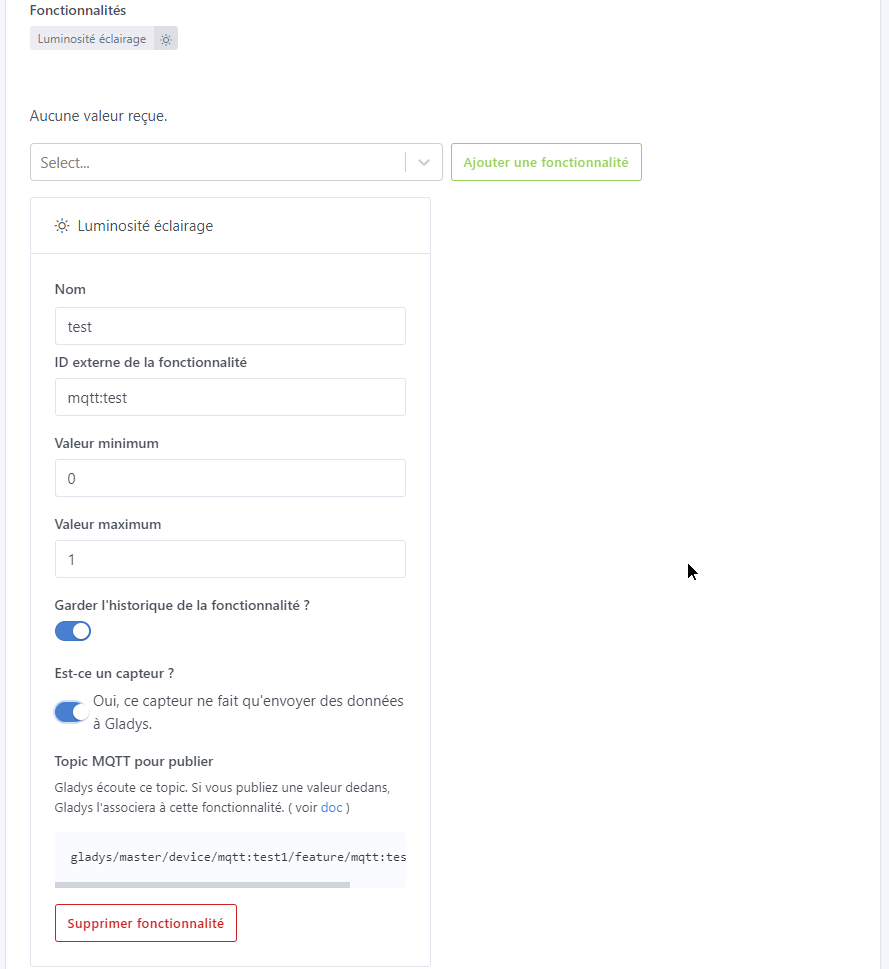
a selection field on each feature “Conserver l’historique des états de la feature” offering the same choices as in the Settings/System tab,
The field is selected by default on Gladys’s general configuration (except for cameras
Server side :
The column « keep_history » is already present so nothing to do on that side
Either :
we add a “delay_keep_history” column to the t_device_feature table defaulting to Gladys’s general config ?
or we modify the “keep_history” column to be able to put the value directly ?
or we use a device parameter for example:
{
  "name": "[FEATURE_SELECTOR]_HISTORY_IN_DAYS",
  "value": [Delay en jours]
}
if present then we take this parameter into account for the feature values, otherwise we take Gladys’s general parameter as today.
review destroy_states according to this parameter.
2nd PR :
Front-end side :
a checkbox on each feature “Enregistrer uniquement les changements d’états”,
this checkbox is unchecked by default to remain as it is now,
Server side :
if the checkbox “Enregistrer uniquement les changements d’états” is checked, either :
we add an “only_keep_value_changes” column in the t_device_feature table, this is 0 by default,
or when checked we add a parameter in device_param :
if the value of this parameter is true and the new value is the same as the previous one, we go through a new file server/lib/device/device.saveLastStateChanged.js to record in the table t_device_feature the saveLastStateChanged as you asked me at the time of the Netatmo development :
Code Proposal
const db = require('../../models');
const logger = require('../../utils/logger');
const { EVENTS, WEBSOCKET_MESSAGE_TYPES } = require('../../utils/constants');

/**
 * @description Save new device feature state in DB.
 * @param {Object} deviceFeature - A DeviceFeature object.
 * @example
 * saveLastValueChanged({
 *   id: 'fc235c88-b10d-4706-8b59-fef92a7119b2',
 *   selector: 'my-light'
 * });
 */
async function saveLastStateChanged(deviceFeature) {
  // logger.debug(`device.saveLastStateChanged of deviceFeature ${deviceFeature.selector}`);
  const now = new Date();
  // save local state in RAM
  this.stateManager.setState('deviceFeature', deviceFeature.selector, {
    last_value_changed: now,
  });
  await db.sequelize.transaction(async (t) => {
    // update deviceFeature lastValue in DB
    await db.DeviceFeature.update(
      {
        last_value_changed: now,
      },
      {
        where: {
          id: deviceFeature.id,
        },
      },
      {
        transaction: t,
      },
    );
  });

  // send websocket event
  this.eventManager.emit(EVENTS.WEBSOCKET.SEND_ALL, {
    type: WEBSOCKET_MESSAGE_TYPES.DEVICE.NEW_STATE_NO_CHANGED,
    payload: {
      device_feature_selector: deviceFeature.selector,
      last_value_changed: now,
    },
  });
}

module.exports = {
  saveLastStateChanged,
};
When the value changes again, we go back through the function in server/lib/device/device.saveState.js which we must modify to re-save, before the new value, the previous value already in the database, to have an adjusted curve :
Code Proposal
const db = require('../../models');
const logger = require('../../utils/logger');
const { EVENTS, WEBSOCKET_MESSAGE_TYPES } = require('../../utils/constants');
const { BadParameters } = require('../../utils/coreErrors');

const DEFAULT_OPTIONS = {
  skip: 0,
  order_dir: 'DESC',
  order_by: 'created_at',
};

/**
 * @description Save new device feature state in DB.
 * @param {Object} deviceFeature - A DeviceFeature object.
 * @param {number} newValue - The new value of the deviceFeature to save.
 * @example
 * saveState({
 *   id: 'fc235c88-b10d-4706-8b59-fef92a7119b2',
 *   selector: 'my-light'
 * }, 12);
 */
async function saveState(deviceFeature, newValue) {
  if (Number.isNaN(newValue)) {
    throw new BadParameters(`device.saveState of NaN value on ${deviceFeature.selector}`);
  }
  const optionsWithDefault = Object.assign({}, DEFAULT_OPTIONS);

  // logger.debug(`device.saveState of deviceFeature ${deviceFeature.selector}`);
  const now = new Date();
  const previousDeviceFeature = this.stateManager.get('deviceFeature', deviceFeature.selector);
  const previousDeviceFeatureValue = previousDeviceFeature ? previousDeviceFeature.last_value : null;

  const previousDeviceFeatureLastValueChanged = previousDeviceFeature ? previousDeviceFeature.last_value_changed : null;

  const deviceFeaturesState = await db.DeviceFeatureState.findOne({
    attributes: ['device_feature_id', 'value', 'created_at'],
    order: [[optionsWithDefault.order_by, optionsWithDefault.order_dir]],
    where: {
      device_feature_id: deviceFeature.id,
    },
  });
  const previousDeviceFeatureStateLastValueChanged = deviceFeaturesState ? deviceFeaturesState.created_at : 0;

  // save local state in RAM
  this.stateManager.setState('deviceFeature', deviceFeature.selector, {
    last_value: newValue,
    last_value_changed: now,
  });
  // update deviceFeature lastValue in DB
  await db.DeviceFeature.update(
    {
      last_value: newValue,
      last_value_changed: now,
    },
    {
      where: {
        id: deviceFeature.id,
      },
    },
  );
  // if the deviceFeature should keep history, we save a new deviceFeatureState
  if (deviceFeature.keep_history) {
    // if the previous created deviceFeatureState is different of deviceFeature
    // last value changed, we save a new deviceFeatureState of old state
    if (previousDeviceFeatureLastValueChanged - previousDeviceFeatureStateLastValueChanged > 0) {
      await db.DeviceFeatureState.create({
        device_feature_id: deviceFeature.id,
        value: previousDeviceFeatureValue,
        created_at: previousDeviceFeatureLastValueChanged,
      });
    }
    await db.DeviceFeatureState.create({
      device_feature_id: deviceFeature.id,
      value: newValue,
    });
  }
  // });

  // send websocket event
  this.eventManager.emit(EVENTS.WEBSOCKET.SEND_ALL, {
    type: WEBSOCKET_MESSAGE_TYPES.DEVICE.NEW_STATE,
    payload: {
      device_feature_selector: deviceFeature.selector,
      last_value: newValue,
      last_value_changed: now,
    },
  });

  // check if there is a trigger matching
  this.eventManager.emit(EVENTS.TRIGGERS.CHECK, {
    type: EVENTS.DEVICE.NEW_STATE,
    device_feature: deviceFeature.selector,
    previous_value: previousDeviceFeatureValue,
    last_value: newValue,
    last_value_changed: now,
  });
}

module.exports = {
  saveState,
};
{
  value: 1014.7,
  created_at: 2022-04-19 04:20:13.277 +00:00
},
{
  value: 1014.9,
  created_at: 2022-04-19 04:30:13.277 +00:00
},
// here we did not save the identical values
{
  value: 1014.9,
  created_at: 2022-04-19 05:10:13.277 +00:00
},
// After writing the value below, we sent again
{
  value: 78.0,
  created_at: 2022-04-19 05:20:13.277 +00:00
}
Question: Is it useful or necessary to see anything for aggregated data? Let me explain: following lmilcent’s post (previously cited regarding retention), during the 1st PR we must take this into account so as not to break data aggregation if the feature’s keep_history is set to 1 day. The 1-year aggregation should still keep all its data unless keep_history is set to « OFF », right??
Additionally, would it be possible to offer an alternative to « keep_history » which corresponds to the full sensor history since the Gladys instance was started, for example « keep aggregated history », which corresponds to data aggregated daily, so max 100 values / day.
In my setup, with a plug that sends me info every 3 seconds, this allows going from 480 28800 messages per day to 100, which is quite a significant reduction in data!
Let’s see whether the multitude of options is really a solution. But @lmilcent, we agree that being able to choose on these devices to record only state changes would solve this problem well beyond this reduction, right?
Hmm, I think working and replying to a forum post isn’t the best idea
So one message every 3 seconds, that’s 20 messages / minute, or 1,200 messages / hour, or 28,800 / day.
So clearly, if I want to keep the history of values, without exploding storage, aggregation seems like more than a good alternative.
Yes absolutely, for some devices, I don’t care about identical values (atmospheric pressure, temperature, etc.) and that’s a real lever here to save storage as well.
Be careful though, it’s important to know that my plug still detects a 200W instantaneous usage, and I want to keep identical values in memory in some cases. So you need to provide a way to enable the option « do not record identical values » for each device (or even feature).
Well, the first PR for Keep History is almost ready according to what we discussed yesterday. Simple… or almost ^^
One point to check though, I made the change for integrations where editing devices is supported as well as for mqtt which is independent. However some integrations (like Philips Hue) are not editable. Should I take the opportunity to add this edit page for the missing integrations?
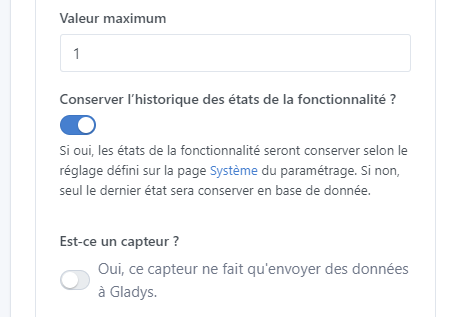
Very well. It’s done — just to see if the description suits you? I used the same phrase as in the system settings (I used « Conserver » rather than « Garder » and « fonctionnalité » instead of « appareil ».)
Ah sorry! I don’t think that’s necessary for these integrations for now, I think for these integrations we could just set sensible default values. Philips Hue isn’t very verbose anyway..
Indeed I hadn’t looked closely, it’s already the case for Philips Hue in particular, temperatures, color, brightness and others are not in keep_history ^^
Well I made something for that, tell me what you think!! It works very well, but not sure about the cleanliness of the code…