Hello
I installed Gladys Assistant OS rpi64 on a Pi 3 + SONOFF Zigbee 3.0 USB Dongle Plus
and I’m encountering problems:
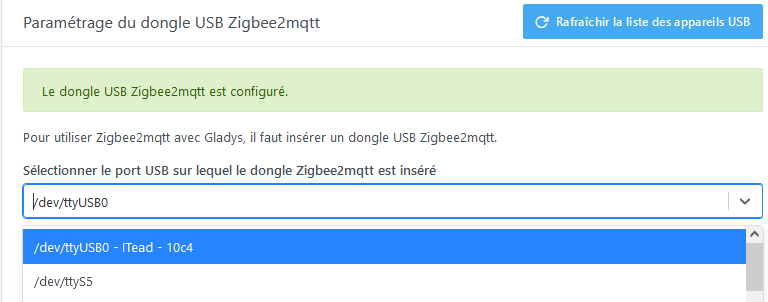
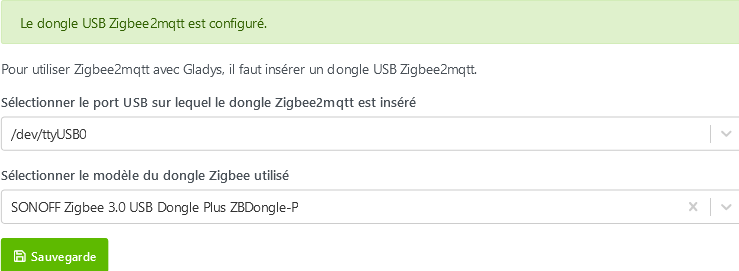
in settings I have
2 USB ports detected
1 : /dev/ttyAMA0
2 : /dev/ttyACM0
2 SONOFF dongles
A : SONOFFZigbee 3.0 USB Dongle Plus ZBDongle-P
B : IteaD SonoffZigbee 3.0 USB Dongle Plus V2 model ¨ZBDongle-E¨
I tested the 4 possible configurations (in all 4 cases the 3 services GLADYS – MQTT - ZIGBEE2MQTT are running)
usb 1-dongle A : GLADYS down MQTT down ZIGBEE2MQTT
usb 1-dongle B : GLADYS ok MQTT down ZIGBEE2MQTT
usb 2-dongle A : GLADYS down MQTT down ZIGBEE2MQTT
usb 2-dongle B : GLADYS ok MQTT down ZIGBEE2MQTT
I also modified:
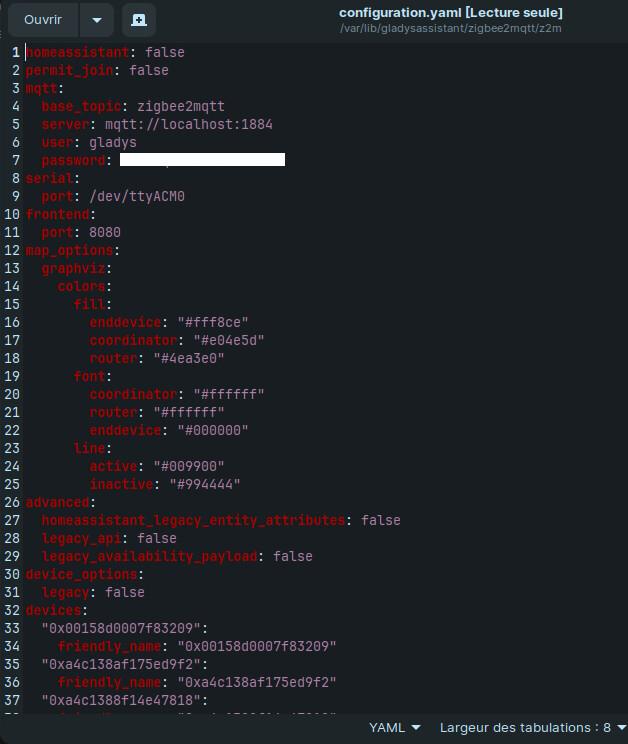
in /var/lib/gladysassistant/zigbee2mqtt/z2m/configuration.yaml`
I replaced adapter ezsp with adapter: deconz
If that can help you I have one: SONOFFZigbee 3.0 USB Dongle Plus ZBDongle-P
It works for me with these settings in the yaml
I don’t have an adapter line (deconz is for the deconz key)
Actually there aren’t that many errors, it’s that one that causes the others.
Your Zigbee2mqtt container can’t connect to your dongle.
It’s true that usually choosing the correct dongle from the list is enough to fix this problem…
Could you show us the contents of your configuration.yaml file?
Also, how is your setup powered? Specifically regarding the power supply.
Are you powering the Pi with a sufficient power supply? Is Gladys on an SSD or on an SD card?
Hello everyone and thank you
I finally managed it.
The error was caused by repeatedly changing, in the settings, the USB port as well as the dongle selection
I performed a complete installation again with the correct settings