Problem with Zigbee2mqtt

Hello,
I am having difficulties with Zigbee2mqtt; after extensive searches on blogs, forums, etc., I am asking for help to resolve this problem.
Thank you in advance…

Configuration :

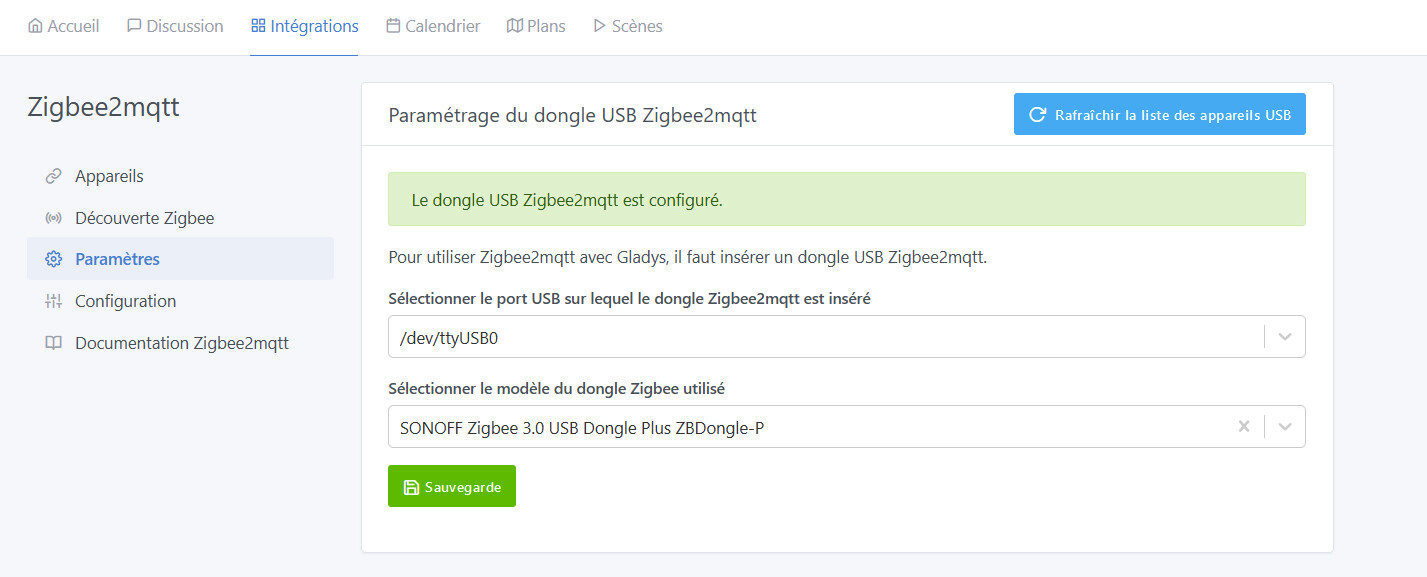
What model is your Zigbee dongle?
Have you correctly entered it in the Gladys config?

SONOFF Zigbee 3 USB Dongle Plus ZBDongle-P

Given that it is well selected… My expertise ends there, unfortunately!
Maybe @AlexTrovato would know more?

Hi @JBern, you wouldn’t have modified the zigbee2mqtt configuration file by hand, would you?

I checked the zigbee2mqtt website, but this error isn’t among the « usual » ones.

Good evening Alex,
Well no, I haven’t changed anything, I just followed the suggested tutorial and the Zigbee integration.
I believe this is a permissions issue (…?)

Hi @JBern and welcome to Gladys :slight_smile:

I searched a bit on Google — I find this error on quite a few forums but no single solution :stuck_out_tongue:

One of the issues that seems to come up often is that it’s a USB port problem

Have you tried simple things like: changing the USB port for the dongle, refreshing the USB port list, and registering/saving the new port ?

Did you start Gladys with the official docker run from the docs without changing anything or with modifications ?

Hello Pierre Gilles,
I tried all the USB ports (even with a USB extension cable to move the dongle away from the ACER Veriton N2120G mini PC), refreshed the USB port list, I still get /dev/ttyUSB0
I installed Gladys with the official docker run without changing or modifying anything…

Maybe the dongle is defective, I don’t know…

I have exactly the same dongle as you @JBern (a Sonoff P), and it works perfectly for me (I reconfigured it from scratch as recently as Monday with no

Thank you for your reply…
Questions :

  • How can I remove everything related to Zigbee and start the installation over..?
  • Is there a tutorial to re-flash the dongle..?

Thanks again…

For that I imagine you need to stop then remove the containers gladys-z2m-mqtt and gladys-z2m-zigbee2mqtt

Then delete this folder: `/var/lib/gl

Thank you… Being very new to Gladys, how do you stop Gladys and restart Gladys…?

Honestly, I’m really not sure that’s necessary! The only thing Gladys does is launch a Zigbee2mqtt container (https://www.zigbee2mqtt.io/). Given the error you’re getting, trying

Once connected via SSH, to:
Stop a container: docker stop nomducontainer
Remove a container: docker rm nomducontainer
Restart a container: docker restart nomducontainer

Hello,

Following my difficulties with Zigbee2MQTT I thought it would be a good idea to verify the proper functioning of the dongle « SONOFF Zigbee 3 USB ZBDongle-P », I took another machine on which I installed XUBUNTU + Gladys + Sonoff dongle + ZigBee integration, both connections are established in 10 seconds.
I redid my setup as follows :

  • Mini PC ACER Veriton N2120G 8GB
  • SSD 240GB
  • XUBUNTU 23.04

Installed Gladys V4.23.4, configured ZigBee, paired with

3 Likes

Great :smiling_face_with_sunglasses: Glad you resolved your problem!

I’m closing this thread, don’t hesitate to create another one if you have other questions/issues :slight_smile: