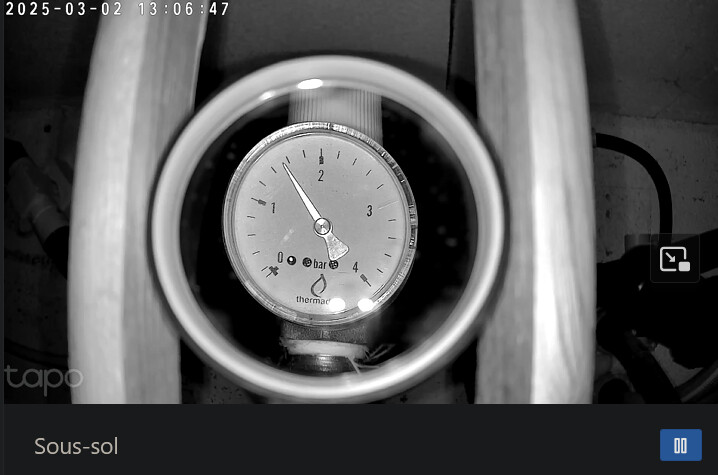
I’m trying to have the AI analyze an image (the one of my underfloor heating pressure gauge, if you followed this discussion ), but I realize the AI’s response is quite random, and I think this may come from the quality of the image provided to it in the « Ask the AI » action.
I hypothesize (to be confirmed by @pierre-gilles) that the image provided to the AI is the same as the one obtained with the « Send a camera image » action.
With that « Send a camera image… » action, I receive for example this image:
However, when I’m on my dashboard which displays the same image, I get the same image quality, but a much better image if I click on the icon to display the live stream.
Is there anything specific I should do to improve the quality of the image sent to the AI in a scene?
To clarify, it’s a Tapo C200 camera, and the stream configured in the Camera integration is in the format rtsp://identifiant:mdp@IP:port/stream1, stream1 corresponding on Tapo to the HD image
I just tested your different photo qualities with Perplexity and every response is identical (and wrong): about 1.4 bar.
By coaxing it I managed to get 1.55 bar, but I had to adjust it with several questions telling it that it was between 1.4 and 1.6 bar and that it should interpolate.
In short, these AIs aren’t great …
with a bit more work (and above all I asked Perplexity what exactly to ask), it would produce a prompt like this :
Analyze the image of the pressure gauge. The gauge has a scale from 0 to 4 bar. Between each number (0, 1, 2, 3, 4 bar), there are 4 tick marks. Each tick mark represents 0.2 bar.

: Determine between which main numbers (0, 1, 2, 3, 4) the needle is located.

: Count the number of full tick marks (0.2 bar each) after the last main number the needle has passed. If the needle is between two tick marks, estimate its relative position between those two tick marks (for example, "slightly after", "halfway", "just before", etc.).

: Calculate the pressure by adding the value of the last main number passed and the value of the counted tick marks. If the needle is between two tick marks, add an estimate of the fraction of the tick mark.

    : Indicate the estimated pressure in bar (for example, "The pressure is estimated at X.XX bar").

Be precise in your analysis and justify each step of your reasoning.
Thanks @mutmut for doing those tests. I hadn’t actually thought to test directly in the AI tool to see if image quality made any difference. I just ran a similar test to yours in ChatGPT (since it’s the AI Gladys uses) with the following prompt:
Analyze the image of the pressure gauge that has a scale from 0 to 4 bars. Between each main graduation labeled with a number (0, 1, 2, 3, 4 bar), there are intermediate markings representing 0.2 bar. Determine where the needle is, and deduce the pressure. Finally, tell me the estimated pressure in bar, with a sentence in the following format: « The pressure is estimated at X.X bar ».
With the low-quality image, I got a first great answer: « The gauge needle appears to be positioned slightly below the 2 bar mark, more precisely on the tick corresponding to about 1.8 bar. The pressure is estimated at 1.8 bar. »
Then I repeated the same request, and there I got the answer « The gauge needle points between 1.0 and 1.2 bar, slightly before the 1.2 bar tick. The pressure is estimated at 1.1 bar. »
Finally in a third request but with the high-quality image, I got the answer « From the image, the gauge needle points slightly below the 1.0 bar mark, around about 0.9 bar. The pressure is estimated at 0.9 bar. »
Basically, no reliability . I think I should stick to having Gladys send me the image, and my intelligence, which isn’t artificial, do the work of reading the pressure
That said, I’d still like Gladys to send the high-quality image rather than a degraded one… I don’t know if I need to do something, or if it’s more of a dev task to adjust in Gladys…
[quote=« StephaneB, post:4, topic:9410 »]
Basically, no reliability . I think I should stick to the fact that Gladys sends me the image, and that my own intelligence, which is
The image displayed on the dashboard and sent to users via Telegram is limited to a maximum width of 640px.
That’s odd, the image you’re sharing looks larger, but that could be processing applied by Telegram. If you download the image directly from your dashboard, it should be 640px wide max!
The video stream, however, is in 1080p, so it’s larger.
It’s not fixed; we could increase the quality, but we’d need to test the impact on the app’s smoothness and ensure it fits well in the WebSocket message broadcast to the frontends.
Regarding the AI
Gladys uses the ChatGPT-4o mini model, with an image quality set to “low” (512px wide max). The larger the image, the longer and more costly the processing by ChatGPT.
But here, the problem doesn’t seem to be the image quality. As you observed in your tests, the AI tends to “hallucinate” rather than fail to see the needle. As long as the needle is clearly visible, the AI should be able to analyze it correctly.
I think you should refine your prompt instead—be more concise and precise. Testing directly on ChatGPT outside of Gladys is an excellent idea
Thanks for those clarifications. I’ll run more tests in ChatGPT before returning to Gladys if I get something satisfactory.
While I’m at it: ideally, if I manage to get a good interpretation from the AI, I’d like the AI to push the value to an MQTT device, so I can then use it later in the rest of the scene or to keep a history of the values.
Is that already doable, and if so how should that be written in the prompt to the AI? From what I understand, for now we can ask the AI to launch a scene, or to turn a light on/off, or to turn a plug on/off, but I’d appreciate confirmation
 ), but I realize the AI’s response is quite random, and I think this may come from the quality of the image provided to it in the « Ask the AI » action.
 to display the live stream.