Reflection on the MQTT API

Hello,

As mentioned here https://community.gladysassistant.com/t/mqtt-comment-fonctionne-le-module-mqtt/5000/47

I am opening a topic to discuss the implementation of the MQTT API of Gladys.
I think we should focus here on discussing only the interface we want to offer to users/devices rather than modules or compatibility. This should make it clearer.

For reference, the current implementation is documented here: A privacy-first, open-source home assistant | Gladys Assistant

I will try to reference the ideas/questions/choices made through this discussion below so that a newcomer can have an idea of the things mentioned without having to go through all the messages :wink:


Why define an API?

An API allows defining communication rules between Gladys and third-party clients.

It allows defining a set of possible actions through the MQTT protocol, as well as how the data should be formatted.

What do we want?

  • Allow most interactions between Gladys and any type of device that could be connected to it:
    • Change the state of an object with a message sent from Gladys
    • Report the state of an object to Gladys from an object
  • Be as agnostic of brands/models as possible
  • Allow communication between Objects / PODS / Main Instance
  • Respect « IoT standards Â» (if they exist :slight_smile: )

Validated Ideas

Empty for now

Refuted Ideas

Empty for now


Disclaimer: I obviously do not have the authority to define all of this, so the ideas mentioned in the Why define an API? and What do we want? are bound to be modified. We had to start somewhere :wink:

My first impression after reading the API documentation is about the topics related to device features.
I’m not a big fan of the current implementation on two points:

  • There is no differentiation between « incoming Â» and « outgoing Â» topics. We know that a device must publish its new state on gladys/master/device/state/update but which one should it listen to to retrieve its state? These topics should be standard.
  • The IDs of the objects pass in the payload and not the URL. So, if I want to subscribe to the update of a single device
 well I can’t :confused: All devices should subscribe to a topic of the type « device/update Â» and look inside the payload if the message concerns them. This seems like an anti-pattern.
A proposal that could respect these two remarks:
If I have an object of this type:

{
  "name": "Living room connected object",
  "external_id": "custom:12",
  "should_poll": false,
  "features": [
    {
      "external_id": "custom:12:temperature:1",
      "name": "temperature",
      "category": "temperature-sensor",
      "type": "decimal",
      "read_only": false,
      "has_feedback": true,
      "min": -50,
      "max": 80
    },
    {
      "external_id": "custom:12:onOff:1",
      "name": "On/Off",
      "category": "light",
      "type": "binary",
      "read_only": false,
      "has_feedback": true,
      "min": 0,
      "max": 1
    }
  ]
}

Proposed topics and payloads:

  • The device publishes its state
payload: 19.8

topic: gladys/master/device/custom:12/feature/custom:12:onoff:1
payload: 1
  • Gladys publishes changes for the device to react

topic: gladys/device/custom:12/feature/custom:12:onoff:1
payload: 0

Thus, my device can subscribe to one or more topics depending on what it can handle:

gladys/device/custom:12/feature/custom:12:onoff:1
gladys/device/custom:12/feature/#

And Gladys only needs one for all devices:

I think it is necessary to take into account the wildcards offered by the protocol.
You will say, yeah, but that’s a lot of topics in the end!
Yes, and so what? We have a choice
 more topics or more listeners on the same topic.
I believe that the « standard Â» in IoT is to differentiate topics by device. An argument in this direction is that it is not up to the object to know how to differentiate the content of the messages it receives. We also save the load of a JSON.encode / JSON.decode on the connected object side.
We could also imagine, on the security side, differentiating access by topic, and thus not allowing an unauthorized object to publish on a topic that does not concern it.

What do you think about it?

Hi @Boimb! Great to see you taking the initiative to create this topic :slight_smile:

The topics presented in the documentation are only incoming topics! We do not manage outgoing MQTT streams for now :slight_smile:

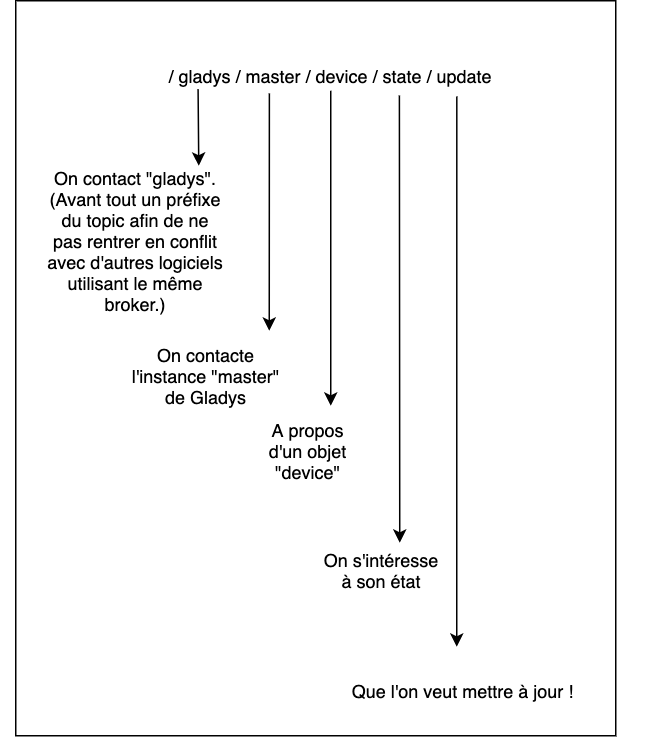
There is a logic in the current API.

An example on the topic you mentioned:

After that, I agree with you, passing the external_id in the topic makes sense and is cleaner.

I like the implementation you propose! The idea of removing the json.encode/decode on the device side is smart.

I think you reversed it with the device. Gladys listens to what is intended for it, that is to say « gladys/master Â» :slight_smile:

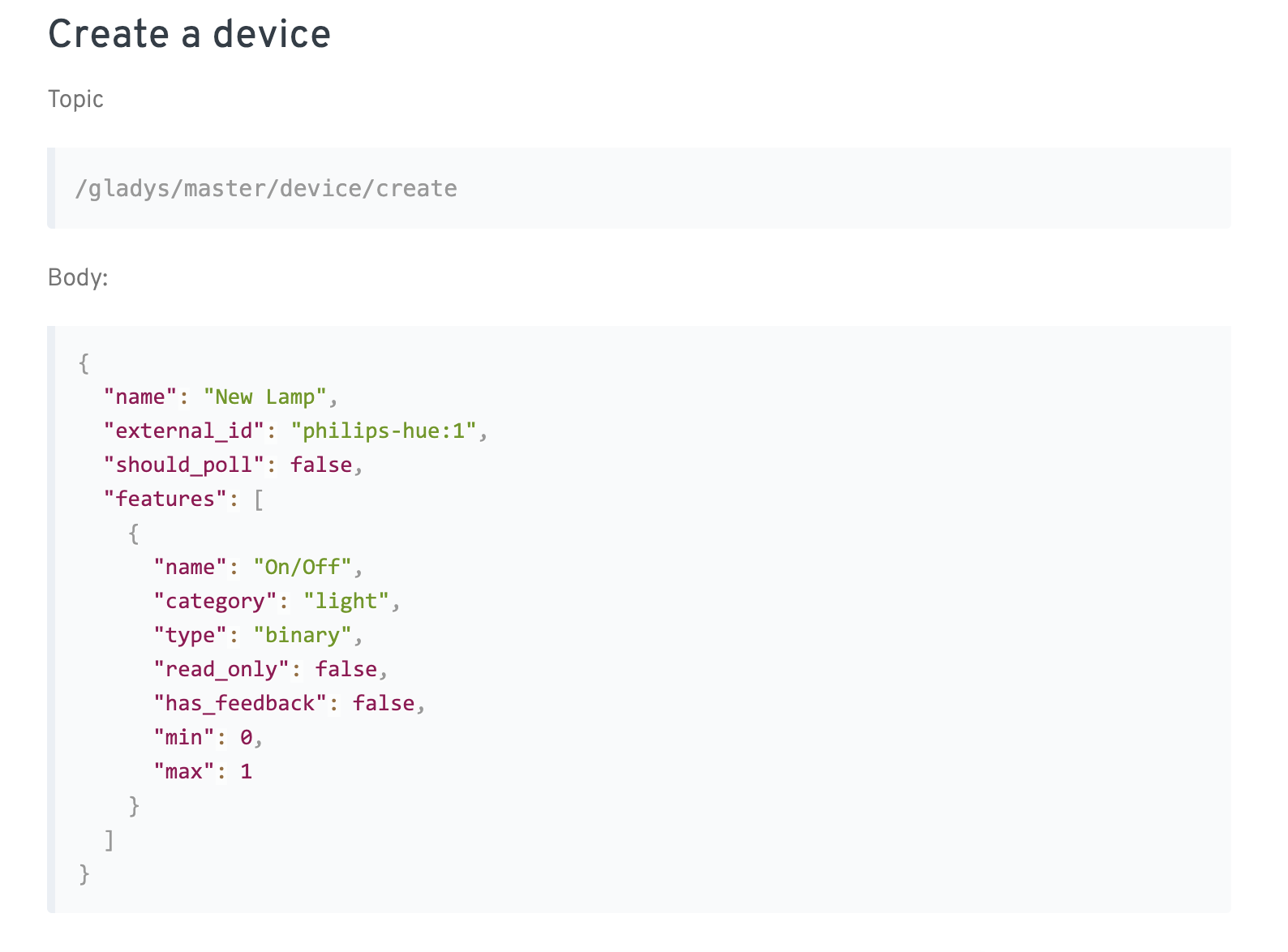
After that, there will be topics where we will be forced to keep JSON encoded, I’m thinking of device.create for example:

If you are available to start writing a somewhat formal documentation, or even propose an implementation, it will be with pleasure :smiley:

Sorry for the multiple responses, I’m thinking about it and noting down the ideas that come to mind here :smiley:

In your proposal gladys/master/device/custom:12/feature/custom:12:temperature:1 for example, there is no mention in the topic of what we are creating/updating.

If I publish 19.8 in the subject, what is 19.8? It’s a new state! However, from the name of the topic, we don’t know which attribute is concerned by this update. (Ok, we know because it’s us who code the topic, but nothing is stated in the name of the topic)

If we follow the logic taken here, we would need to add a last suffix to the topic type « state Â», or « last_value Â» if we take the exact attribute in DB to have something like:

gladys/master/device/custom:12/feature/custom:12:temperature:1/last_value

What do you think?

I’m thinking that in the future, on other types of topics, we might want to have a topic that takes the entire JSON object and updates the entire object in the DB (for example in the case where the remote device has been updated, and now manages more features, it can update its « device Â» with a new device)

Hello,

I am joining the conversation, as MQTT is at the heart of my management at 99%.
Here I share my working configuration on Gladys v3 for 2 years:
Arduino (device) → Gladys = sensor updates:
Topic = gladys/master/device/state/update/Arduino01_garage/Garage Electricity
Payload = {« Average Voltage Â»: 231, « Total Current Â»: 11.6, « Power Â»: 2691.2}
Topic Breakdown:

  • gladys/master/device/state/update = topic followed by Gladys for value updates
  • Arduino01_garage = name of the Arduino in its program to avoid cluttering messages sent to other Arduinos in the command topic (below). It is part of the device identifier.
  • Garage Electricity = Name of the device, also included in its identifier: name = Garage Electricity identifier = Arduino01_garage/Garage Electricity
  • Average Voltage = identifier of the DeviceType (Feature in V4).

Thanks @Terdious for your feedback!

Super interesting remark :slight_smile: One doesn’t prevent the other, we could have a topic per device that would allow updating multiple features (in addition to the other topic per feature)

topic: gladys/master/device/:external_id/last_values

body:

{
  "feature_1_external_id": 1,
  "feature_2_external_id": 1,
}

For last_values I’m not sure, we can choose to stay in the singular in the API, then we’ll see if it’s clear to the developer that it’s a send of multiple data.

@Boimb What do you think?

Salut @pierre-gilles @Terdious, cool, feedback :smiley:
I’ll try to share my thoughts on the points raised.

Yep. We agree that this is all the interest of MQTT, to be able to do push as well. We therefore need to define the ad-hoc topics.

Yes, yes, of course! I imagine that this thread is there to validate/improve it.

My bad. Of course, the idea would be that Glady listens to everything that concerns it
gladys/master/device/# or even just gladys/master/# but I don’t see a use case (maybe for the pods later)

Indeed, this seems mandatory for that. However, I think we should allow, as is the case today, to create devices and add features via the Gladys UI (this topic should not be the only way to add an MQTT device, but it must be a solution)

Yes, and this is intentional. Will the device pass anything other than an update of the state of the feature concerned through this topic? That said, it’s not blocking to add the state mention, so why not.

I’m not a big fan of the topic nomenclature but I share PG’s opinion:

Based on these first exchanges, and from what I’ve read about the different types of protocol applications from different manufacturers, we probably won’t be able to define an API compatible with all manufacturers or open-source firmware providers (Tasmota, ESPEasy).

A solution we could explore would be forwarding, i.e. the possibility for the Gladys MQTT client to forward messages to topics it also listens to. Let me explain:

We define a single and unique Gladys MQTT API based on our first reflections (which we refine and validate). For example, to update a feature:

payload: stateValue

// Or even
topic: gladys/master/device/external_id
payload: { features: [
  {
    "external_id": feature_external_id,
    "state": stateValue
  }
]

This allows us to have a clear and precise API, without ambiguity, and which does not require rocket science to implement.

For cases where we don’t have control, like the MQTT service of unflashed Shelly devices. here the doc The integration takes the form of forwarding « proprietary Â» topics. For example:

payload: "off"
// Forwarded to
gladys/master/device/shelly:deviceid/feature/deviceid:onOff:1
payload: 0

Thus, we do not multiply the « public Â» routes of the API, and yet, we are able to manage « non-compliant Â» devices. Not to mention that the integration is nothing more than the addition of a forward. We can even imagine that the MQTT module, faced with a message on a proprietary topic, is able to create the associated device if it does not exist in the DB before forwarding it.

Of course! I hadn’t defined the outgoing routes simply due to lack of time. In v4, as you’ve seen, I take the time to properly define things and do it right. I prefer not to develop something rather than develop it quickly and poorly :slight_smile:

I agree, in my opinion it’s better to recommend that MQTT code developers ask the user to create the devices in the UI (as is the case for other services). Otherwise, as soon as it runs in the background, the user has no feedback if it succeeds or fails. And if it fails, apart from looking at the logs (which we don’t want in v4), there’s nothing they can do.

For this topic, no, but for other topics yes. And since we want to keep the same naming conventions everywhere to stay consistent, if we put it elsewhere, we need to put it here too.

I suggest using the exact attributes to stay consistent.

The

gladys/master/device/custom:12/feature/custom:12:temperature:1/last_value

Looked good to me! :slight_smile:

Yes! Call it forwarding if you want, but in the end it will just be the implementation of a few « custom Â» routes that will indeed call the same methods in Gladys :stuck_out_tongue:

So what’s the next step for this? @Boimb can you make a proposal for documentation that summarizes what we’ve discussed? (Or wherever you want: Here, in a GitHub issue, as you see fit)

Hello everyone!

Given that I’m going to Normandy to visit @Terdious next week (who is fully MQTT), and today is my last day of Gladys development before then, I’ve written the spec and started implementing what we discussed in this topic.

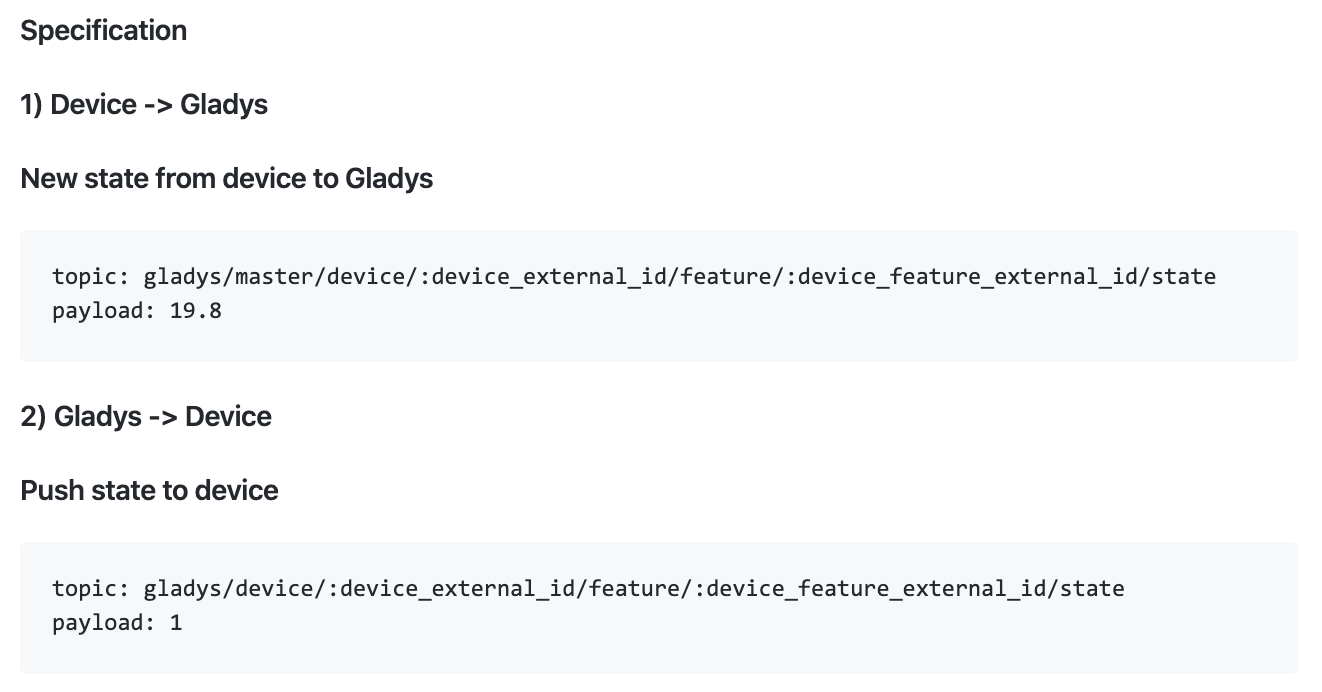
The specification:

The PR:

A video demo:

https://streamable.com/jbnu4

Not yet implemented @CamilleB
A little patience :wink:

Hello everyone!

I’ve almost finished the MQTT developments, the new API where MQTT device control is now coded. For now, it’s in a branch and I’d like your feedback :slight_smile:

Here is the specification of the new API:

A small demo video of a Device → Gladys value send:

https://streamable.com/audph

But it is also possible to send data from Gladys → Device, by setting the feature as not « read-only Â». Gladys will send a message on the specified topic.

The PR is available here:

Feel free if you have any feedback :slight_smile:

Small question that might seem silly, but why gladys/master/device?
Is the master used to differentiate the possible pods/instances of gladys to come?

Otherwise, great job :wink:

The « gladys/master Â» indeed allows you to indicate that you are addressing the « master Â» instance of Gladys. When addressing a device, the prefix becomes « gladys/device Â», and indeed in the future when there will be the notion of « pod Â», there will probably be a « gladys/pod Â» prefix :slight_smile:

@pierre-gilles, following our exchanges on Slack, I am copying/pasting my message here:
Well, here are some feedback points:

  • 1 - the create function works well again.
  • 2 - after modifying the Arduino program, the command via the web page works perfectly.
  • 3 - the command via Gladys Plus sends 4 orders - after 4 hours of testing, sends 6 orders - the Arduino doesn’t like that much

  • 4 - after modifying the Arduino program, the states are sent to the correct topic. Gladys displays no logs in docker logs gladys - For information, when they are sent to the wrong topic, Gladys logs display an error - and the feature states do not update. I therefore assume, following what we saw yesterday, that my database is corrupted.
  • 5 - Following point 4, is there a way to reset the t_device_feature state table without reinstalling everything? That is, stopping Gladys via Docker, deleting the table, and then restarting Gladys? Will it be restored?

I will then need to test the case by listening to the topics of each device; I have started the program.

Thanks in advance for your feedback regarding the database!

Salut @pierre-gilles,

Sorry for the REX time, I’ve been quite busy over the last 2 weeks.
I see that you haven’t inserted the answer you made to me on Slack, so I’ll quote you to reply:

1 & 2: Top!
3: Ah, that’s happened to me too, it’s a bug, I think there can be situations where your Gladys instance connects multiple times to Gladys Plus and thus receives multiple messages
 I created an issue → https://github.com/GladysAssistant/Gladys/issues/744. Do you have more information about your setup? Was it in local development, or on your production Raspberry Pi? Had you restarted Gladys frequently, or on the contrary never? I’d like to know the circumstances of the bug
4. Ah! Damn, it’s bad that at this level your DB is so messed up
 Keep a good backup so we can analyze what’s wrong with your DB. It’s not normal actually, normally SQLite supports up to terabytes in DB
 you can try a docker restart gladys to see if it fixes the problem?
5. What can be done is a DELETE FROM t_device_feature_state; this will delete all entries in the table t_device_feature_state. Before that, do a SELECT COUNT(id) FROM t_device_feature_state; so we know how many rows are in your table

Pierre-Gilles](Pierre-Gilles (Pierre-Gilles Leymarie) · GitHub)Pierre-Gilles
#744 Gladys sometimes connect multiple time to the Gladys Gateway and receive multiple time new messages
Gladys 4 RC
https://github.com/GladysAssistant/Gladys|GladysAssistant/GladysGladysAssistant/Gladys | 15 avr. | Added by GitHub

  1. It was through my Gladys Prod on Raspberry 4. No, I never restart Gladys. But following that, I tried to do it and it didn’t change anything. So I modified the Arduino program to add a 500ms pause after a command and it no longer causes any issues.

  2. Yes, I suspect the problem is elsewhere and fortunately ^^ For info, I’m running on a 64GB Sandisk V30 SD card, so I don’t think that’s the issue either. I did the reboot test, it doesn’t solve the problem but I have a nice error. I’ll post it if needed.

  3. Apparently my DB is locked. None of the manipulations work. So today I reinstalled everything and it still didn’t work for the states. But the problem is resolved. I first tried, as we discussed in the conv-call, to replace the original topic mqtt:Arduino01_Batiment:Energie Totale Phase 2:Centre EquithĂ©rapie with mqtt:Arduino01_Batiment/Energie Totale Phase 2:Centre EquithĂ©rapie (i.e., replacing the « : Â» after the Arduino name with « / Â»). It didn’t work (I’m only talking about the states, the command worked fine)
    So I went to the second attempt, i.e., subscribe the Arduino to all topics of each device keeping the topic in the form mqtt:Arduino01_Batiment:Energie Totale Phase 2:Centre Equithérapie. I added micro delays before the subscriptions, and listen, it works for now with 15 subscribed topics. Commands and states work perfectly.