Hello,
I was previously using a Raspberry Pi + Sonoff Zigbee USB dongle + zigbee2mqtt, which worked well
I’m trying to deploy Gladys
I’m not reusing the Raspberry Pi, only the dongle
In Gladys, « Allow pairing » is greyed out, so I can’t enable the feature
So I don’t have any devices
When I look at the logs of gladys-z2m-zigbee2mqtt, I find the following:
Zigbee2MQTT:error 2024-02-07 10:04:47: Check https://www.zigbee2mqtt.io/guide/installation/20_zigbee2mqtt-fails-to-start.html for possible solutions
Zigbee2MQTT:error 2024-02-07 10:04:47: Exiting…
Zigbee2MQTT:error 2024-02-07 10:04:48: Error: network commissioning timed out - most likely network with the same panId or extendedPanId already exists nearby
at ZnpAdapterManager.beginCommissioning (/app/node_modules/zigbee-herdsman/src/adapter/z-stack/adapter/manager.ts:347:23)
at ZnpAdapterManager.start (/app/node_modules/zigbee-herdsman/src/adapter/z-stack/adapter/manager.ts:92:17)
at Controller.start (/app/node_modules/zigbee-herdsman/src/controller/controller.ts:132:29)
at Zigbee.start (/app/lib/zigbee.ts:60:27)
at Controller.start (/app/lib/controller.ts:109:27)
at start (/app/index.js:107:5)
So yes, indeed, we’re not starting from scratch, and in the network originally set up there have already been devices paired
Is that what’s blocking it?
I can re-pair the devices, but I’d need to switch to pairing mode first
I saw on the forum that someone managed to fix it by directly accessing the zigbee2mqtt GUI inside the zigbee2mqtt container
What do you recommend?
(by the way, when a button is greyed out, it would be nice to say why — that would help  )
)
thanks
Hello.
Your zigbee2mqtt doesn’t start, so you won’t be able to access the interface.
Did you restore a Gladys Plus backup or are you starting from a fresh installation?
 This operation will delete all devices and will require re-pairing
- remove everything present in
/var/lib/gladysassistant/zigbee2mqtt/z2m
- disable/reenable the zigbee2mqtt service in Gladys
- re-pair all devices
Otherwise, you have some information here FAQ | Zigbee2MQTT
And someone who managed to resolve this issue by generating new keys here CC2652RB Error Network Commissioning Timeout (panID or extendedPanID already exists nearby) · Issue #10858 · Koenkk/zigbee2mqtt · GitHub
We try to handle 80% of cases, but edge cases are difficult to detect AND to implement.
Thank you for your quick reply.
It was a fresh install.
After my previous message, I moved on to something else (just to say that I didn’t touch anything afterward) and, strangely, it kept looping like that for about ten minutes, and then suddenly it started up on its own…
Zigbee2MQTT:info 2024-02-07 10:04:49: Logging to console and directory: ‹ /app/data/log/2024-02-07.10-04-49 › filename: log.txt
Zigbee2MQTT:info 2024-02-07 10:04:49: Starting Zigbee2MQTT version 1.35.3 (commit #fe0742a)
Zigbee2MQTT:info 2024-02-07 10:04:49: Starting zigbee-herdsman (0.33.8)
Zigbee2MQTT:info 2024-02-07 10:05:07: zigbee-herdsman started (reset)
Zigbee2MQTT:info 2024-02-07 10:05:07: Coordinator firmware version: ‹ {« meta »:{« maintrel »:1,« majorrel »:2,« minorrel »:7,« product »:1,« revision »:20210708,« transportrev »:2},« type »:« zStack3x0 »} ›
Zigbee2MQTT:info 2024-02-07 10:05:07: Currently 0 devices are joined:
Zigbee2MQTT:info 2024-02-07 10:05:07: Zigbee: disabling joining new devices.
Zigbee2MQTT:info 2024-02-07 10:05:07: Connecting to MQTT server at mqtt://localhost:1884
Zigbee2MQTT:info 2024-02-07 10:05:07: Connected to MQTT server
Zigbee2MQTT:info 2024-02-07 10:05:07: MQTT publish: topic ‹ zigbee2mqtt/bridge/state ›, payload ‹ {« state »:« online »} ›
Zigbee2MQTT:info 2024-02-07 10:05:07: Started frontend on port 8080
Zigbee2MQTT:info 2024-02-07 10:05:07: Zigbee2MQTT started!
and the option is no longer grayed out in Gladys…
Regarding the tooltip for the grayed-out button, I was thinking of something basic like « unable to reach zigbee2mqtt », if only so that a beginner like me can know whether it’s coming from my configuration or not…
Okay, I will now attempt pairing but there is no reason this should cause a problem in this configuration.
Thanks again for the assistance
Best regards,
Ah, I understand.
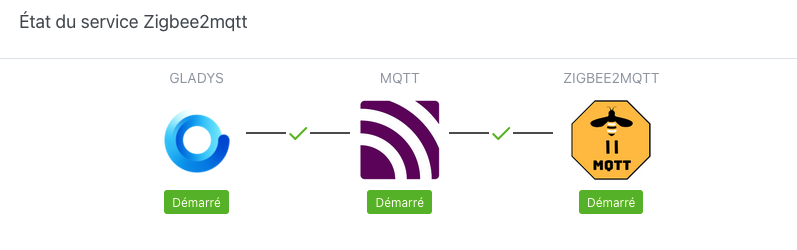
On the Configuration page (http://192.168.1.9/dashboard/integration/device/zigbee2mqtt/setup), you should normally have this image (with red crosses if there’s an issue)
I’ll resolve your post, since everything works