Totally agree with you (aside from the click, exactly the same thing)
As for the rest, I made a request to meet my need and I was told it’s not possible or you have to do it differently; because that’s frustrating I made other proposals around that might work as a workaround until @_Will_71 suggested a solution that works (thanks again  ). So yes, my thinking did evolve depending on the answers given and what I understood along the way with the answers (who said there’s a Macron supporter in the room?
  « Only the Sith are so absolute. »
  )
)
Besides, that’s the purpose of a forum… and sometimes you have to persevere; otherwise I wouldn’t have managed to connect Gladys to my IPX800V5 via Node-RED and control my roller shutters (VR) based on the sun’s position. I found how to do it and shared my experience through mini-tutorials  whereas initially I had made requests to @pierre-gilles (or on the forum in the feature requests, I don’t quite remember) and the answer at the time was that it wasn’t possible. During discussions (because I hadn’t understood that the MQTT syntax isn’t standard) with @pierre-gilles among others, I understood how Gladys worked and thus how to do it via Node-RED. Same for the sun position: I had requested that; I was told it wasn’t possible for now, I worked around it with Node-RED and now I can control the roller shutters in Gladys taking into account the sun’s position!
My approach is « I want to do something; if I can do it through the door then fine, but let’s try to see if I can do it through the window » and if I succeed I share it with others!
I don’t understand your remark there: internally it’s not the same logic. On one side we have
OR in the scene which detects if ONE detector is OPEN
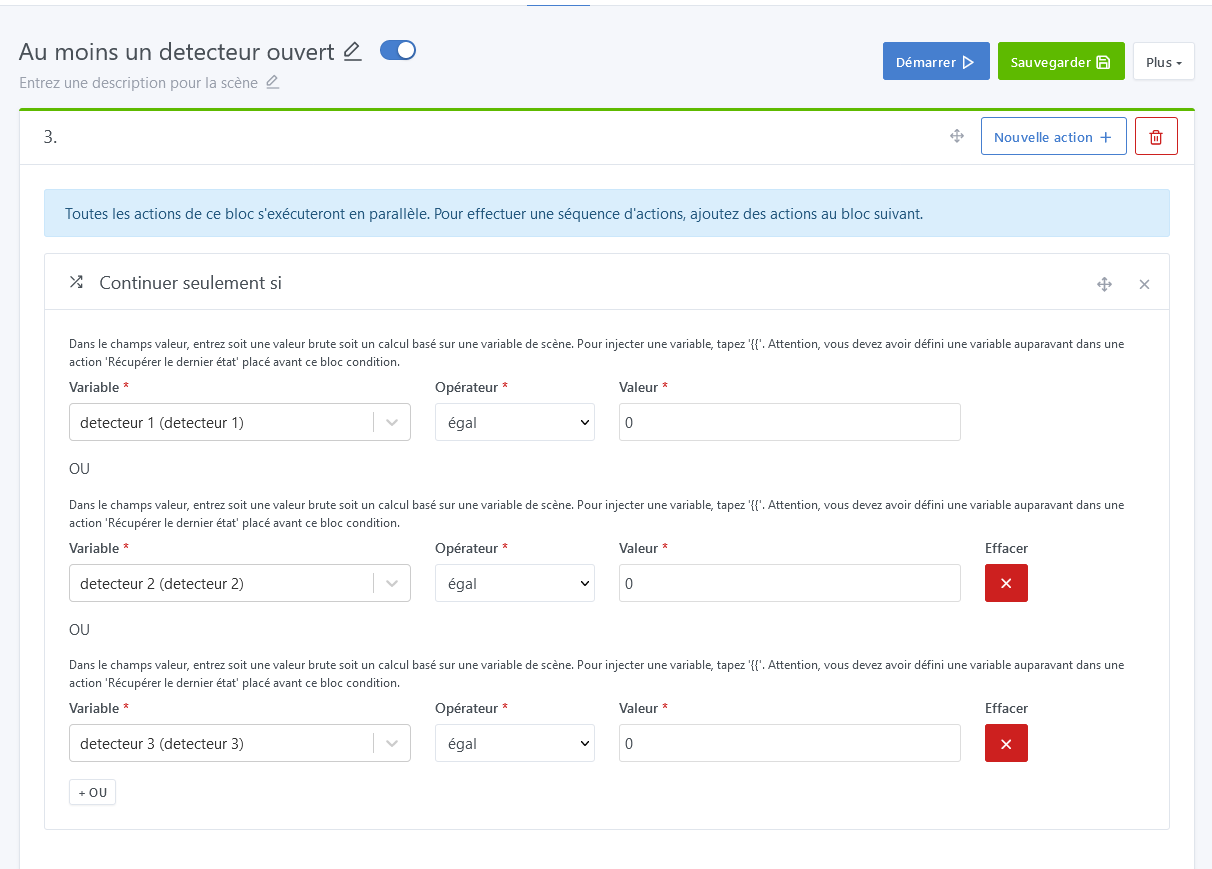
and on the other an AND in my 2nd scene which detects if ALL my sensors are CLOSED; that changes the internal processing logic — it’s not just adding text
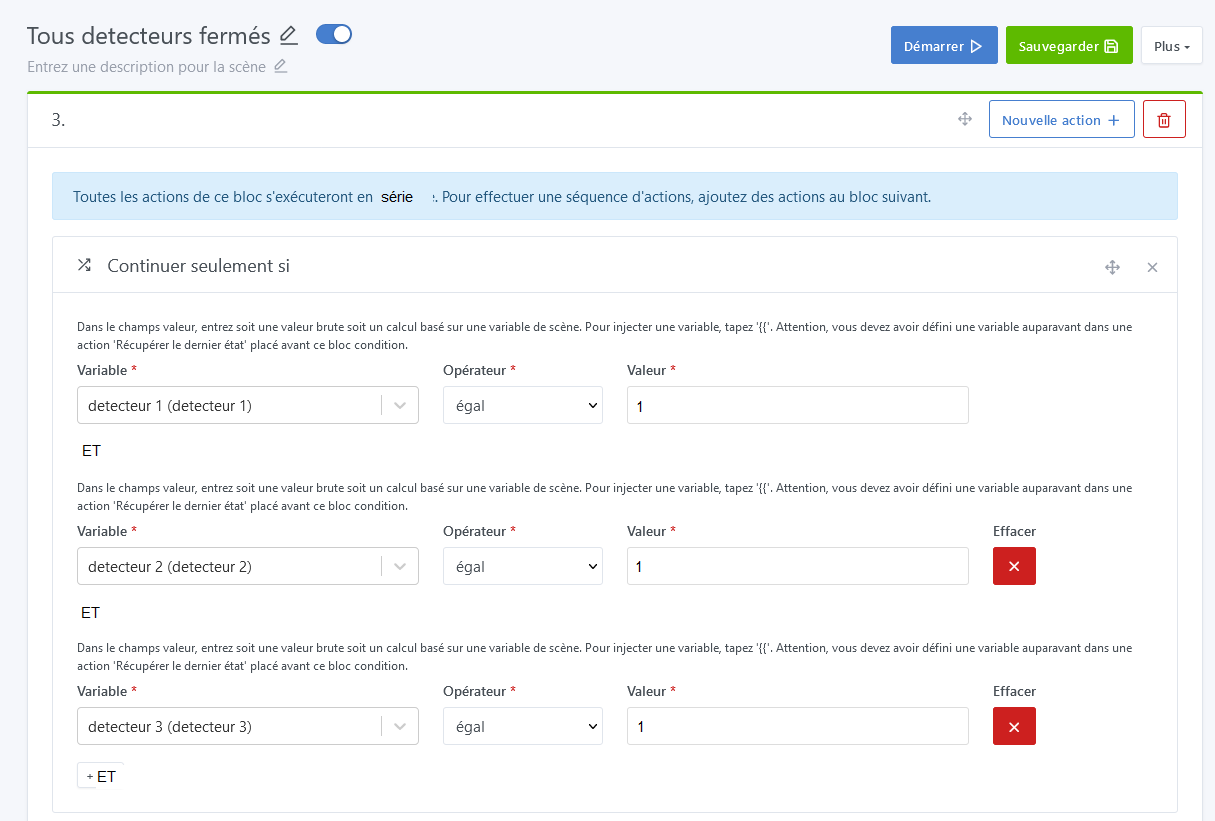
To change how the blocks are interpreted you’d need the choice with a toggle to switch from an « OR » logic to an « AND » logic
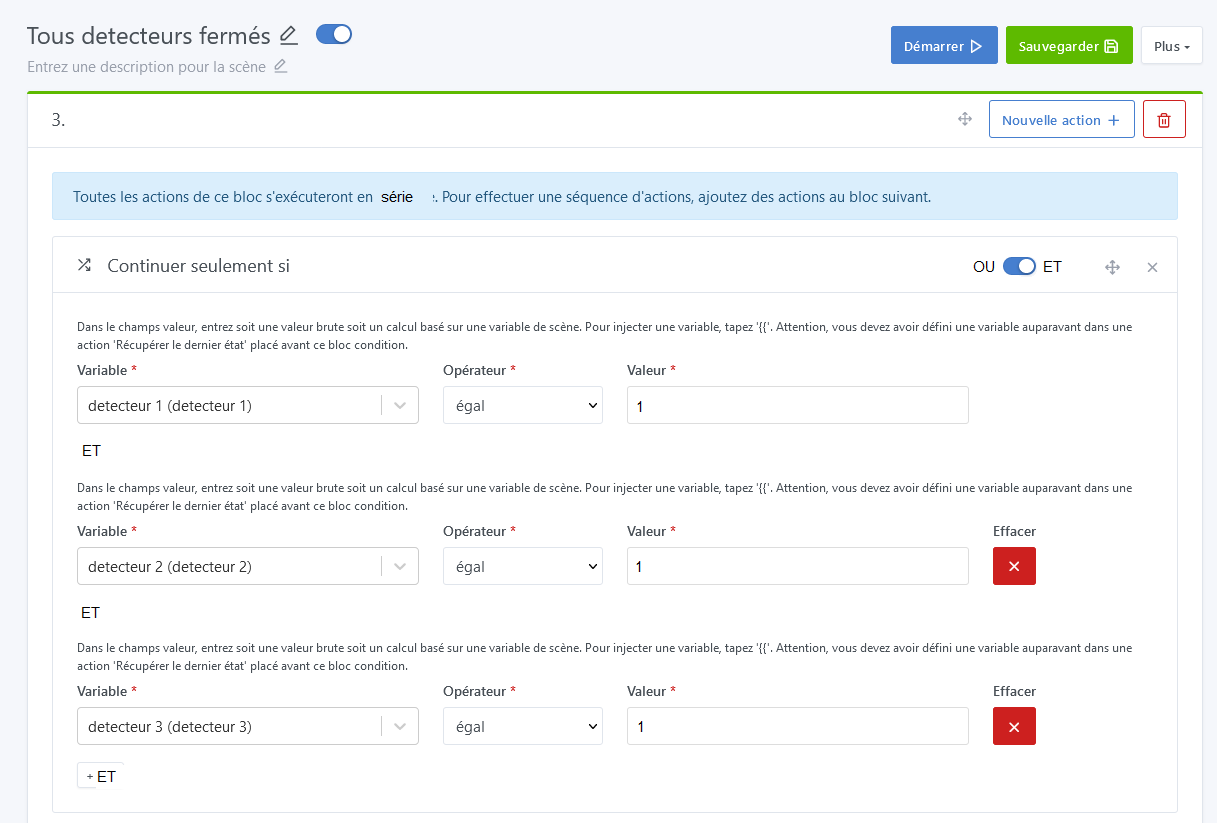
in the 1st case OR in algorithm
FOR EACH BLOCK
IF CONDITION MET THEN EXIT-SCENE
UNTIL NUMBER-OF-BLOCKS
in the 2nd AND in algorithm
TESTED-BLOCKS=0
FOR EACH BLOCK
IF CONDITION MET INCREMENT TESTED-BLOCKS
UNTIL NUMBER-OF-BLOCKS
IF TESTED-BLOCKS <> NUMBER-OF-BLOCKS THEN EXIT-SCENE
To test I asked ChatGPT
« write me with comments with in the second loop the possibility between a serial or parallel processing according to a toggle called SceneSerieParallele in the UI the following program » and I put the code from the GitHub
Gladys/server/lib/scene at master · GladysAssistant/Gladys · GitHub (at least by searching the GitHub code it seems to me that’s where it happens)
It returned this (thanks ChatGPT ) I’m stunned! After, not sure that it would be usable as-is nor feasible in Gladys (true that there’s related database structure) but it allows me to discover and understand the code (this language is not my cup of tea  ) and, honestly, seeing what ChatGPT manages to do for me who grew up watching black-and-white TV and had to get off my butt to choose between channel 1 and 2 is striking even if it was part of my dreams (« Forbidden Planet »!)
const Promise = require(‹ bluebird ›);
const { actionsFunc } = require(‹ ./scene.actions ›);
const { EVENTS, WEBSOCKET_MESSAGE_TYPES } = require(‹ ../../utils/constants ›);
const { AbortScene } = require(‹ ../../utils/coreErrors ›);
const logger = require(‹ ../../utils/logger ›);/**
- @description Execute one action.
- @param {object} self - Reference to the SceneManager.
- @param {object} action - An Action from the db.
- @param {object} scope - The scope passed to all actions.
- @param {number} [columnIndex] - The X index of the action in the array of actions.
- @param {number} [rowIndex] - The Y index of the action in the array of actions.
- @returns {Promise} Resolve if the action was executed with success.
- @example
- executeAction(this, action, {});
*/
async function executeAction(self, action, scope, columnIndex, rowIndex) {
// Check if the action type is supported
if (!actionsFunc[action.type]) {
throw new Error(Action type "${action.type}" does not exist.);
}// Send a message to inform the UI that the action is being executed
if (columnIndex !== undefined && rowIndex !== undefined) {
self.event.emit(EVENTS.WEBSOCKET.SEND_ALL, {
type: WEBSOCKET_MESSAGE_TYPES.SCENE.EXECUTING_ACTION,
payload: { columnIndex, rowIndex },
});
}
try {
// Execute the action
await actionsFunc[action.type](self, action, scope, columnIndex, rowIndex);
} catch (e) {
if (e instanceof AbortScene) {
throw e;
} else {
logger.warn(e);
}
}// Send a message to inform the UI that the action has finished being executed
if (columnIndex !== undefined && rowIndex !== undefined) {
self.event.emit(EVENTS.WEBSOCKET.SEND_ALL, {
type: WEBSOCKET_MESSAGE_TYPES.SCENE.FINISHED_EXECUTING_ACTION,
payload: { columnIndex, rowIndex },
});
}return null;
}/**
- @description Execute an array of array of action.
- @param {object} self - Reference to the SceneManager.
- @param {object} actions - An array of array of actions from the db.
- @param {object} scope - The scope passed to all actions.
- @param {boolean} isParallel - Whether to execute actions in parallel or series based on the UI toggle.
- @returns {Promise} Resolve if the action was executed with success.
- @example
- executeActions(this, actions, {}, true);
*/
async function executeActions(self, actions, scope, isParallel = true) {
// First level of the array should be executed in series
await Promise.mapSeries(actions, async (parallelActions, columnIndex) => {
// Then, the second level is executed based on the value of isParallel
if (isParallel) {
// Execute actions in parallel
await Promise.map(parallelActions, async (action, rowIndex) => {
await executeAction(self, action, scope, columnIndex, rowIndex);
});
} else {
// Execute actions in series
for (const [rowIndex, action] of parallelActions.entries()) {
await executeAction(self, action, scope, columnIndex, rowIndex);
}
}
});
return null;
}module.exports = {
executeAction,
executeActions,
};
A bit long but if some people learn something from reading this post that’s good, it’s always that much gained!