Good evening everyone,
As promised, here’s a short feedback regarding the integration of the SLZB-MR1.
I received it today and I’ve just finished integrating it 
My config before upgrade :
1 * Gladys virtual machine on a Proxmox server
1 * MQTT virtual machine on a Proxmox server
1 * Zigbee2mqtt virtual machine version 1.42.0 on a Proxmox server
1 * ZBDongle-P dongle with CC2652P radio plugged directly into the Proxmox server
My config after upgrade :
1 * Gladys virtual machine on a Proxmox server
1 * MQTT virtual machine on a Proxmox server
1 * Zigbee2mqtt virtual machine on a Proxmox server
1 * SLZB-MR1 dongle with CC2652P7 radio for Zigbee connected over the network
Small points of attention :
-
Not having a PoE switch, I had to power the SLZB-MR1 via its USB-C port which I plugged into one of the Proxmox server’s USB ports.
I’ll see later if I can do the power differently but for the moment this suits me
Note: The USB cable is not included in the box -
Gladys is currently not compatible with network connection but only in USB mode.
So you simply need to plug the USB like your old dongle and check the USB Connection box instead of Ethernet Connection:

Migration
For my part, having an external Zigbee2Mqtt and MQTT, I first configured the network part of the SLZB-MR1 and then performed the SLZB OS update as recommended in the Domo-Blog article, which I thank for the write-up
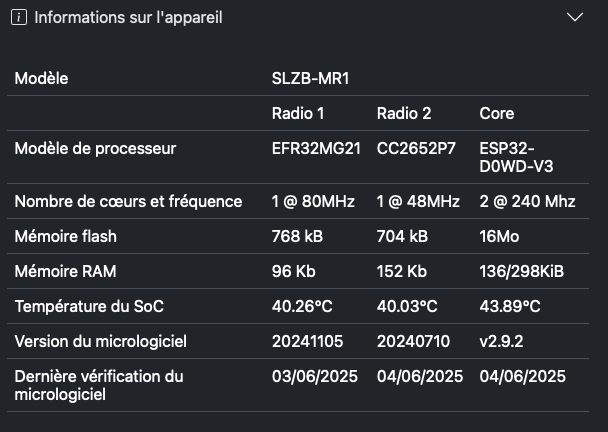
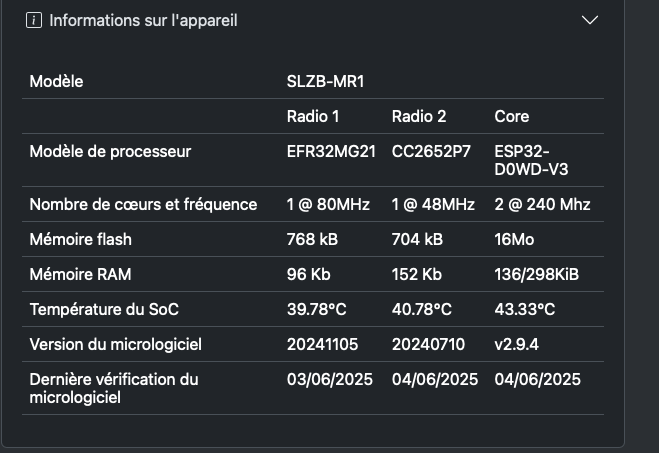
So on my side it looks like this:

I will look into whether it’s worth changing the Core version to v2.8.7 as well as the CC2652P7 version, but there seem to be issues with the latest CC2652P7 versions. (zigbee coordinator 20250325 update on slzb-06 broke my entire network · Issue #27560 · Koenkk/zigbee2mqtt · GitHub).
By the way, if anyone has info on stable versions, I’m interested
Regarding the migration, I simply had to unplug the ZBDongle-P from my Proxmox server and remove the USB configuration from the virtual machine.
I then modified the configuration.yaml file to include the following:
serial:
# Location of SLZB-MR1
  port: tcp://xx.xx.xx.xx:7638
  baudrate: 460800
  adapter: zstack
# Disable the green LED?
  disable_led: false
# Set the output power to 20 maximum
advanced:
  transmit_power: 20
You can see it directly in the web interface:

Of course replace xx.xx.xx.xx with the IP of your controller.
I then restarted my Zigbee2Mqtt docker and checked that I had no errors in docker.
I encountered no issues; otherwise I invite you to check the Domo-Blog article which indicates steps to take in case of problems.
Once Zigbee2Mqtt was accessible I saw a module reappear by itself.
For some modules, I had to wake them up to see them appear online again.
I saw quite a few modules reappear when I cut and restored power to mains-powered modules.
I would surely have been more patient, the modules would certainly have come back online without my actions, but I was impatient 
Tips
I was able to set up a login/password on the web interface
Bug
So far only one small bug encountered: the web interface login/password is requested fairly often. 
We’ll see if the problem is resolved by upgrading to 2.8.7
If you have any questions, don’t hesitate