Hello @Priour_Joseph! Well, forgetting the password is an eternal problem ^^ I am 100% agree with you, it’s horrible to have to go into the logs to see this password reset URL, but we don’t really have a choice in fact…
Sending an email would require the user to configure an SMTP server, which is not very user-friendly either… We also thought about Telegram, but again this means you have already configured Telegram on your Gladys
If you have any ideas for methods we could use to reset the instance password, I’m interested!
What if we go through an intermediary? The push application on a server you manage, this application sends an email directly via the SMTP server configured on your side.
Of course, for purists, we ask them if they want this in the logs.
I thought about it, it could work for Gladys Plus users (who are authenticated), but for others it doesn’t work too well, it would mean that I have to leave an endpoint open on the internet that allows sending emails
It’s not great in terms of security because then anyone on the internet could use it to create a spam factory!
Why not a more « simple » system like the one used by Windows 10 when creating an account, i.e., asking for the answers to three secret questions. When the user requests a password reset, they are asked the answers to the three questions, and if the answers are correct, a new password creation form is offered (and you can also ask for three new questions, for example)?
I’m not a big fan of security questions like that, as your Gladys instance might be exposed to the internet (I don’t recommend it, but some people do it, which is normal), and this is something that can be easily socially engineered. (finding your car brand on Instagram, your cat’s name on Facebook, etc.)
It might work for Windows because it only secures local access, I imagine? For an online service, less so.
Otherwise, another idea I had would be to create a web or mobile utility that allows you to retrieve the URL by broadcasting it over the local network, simple and effective! (In fact, the utility could be in the front end itself!)
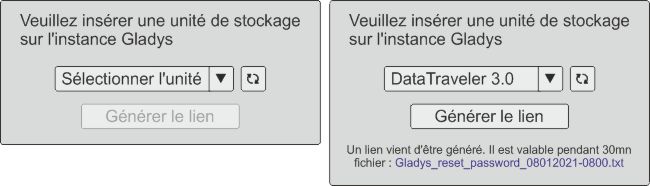
When requesting to insert a storage unit, we check that the user is local.
And also if the user has an internet connection problem (box) or prevents data from Gladys from leaving, they can retrieve the link.
Then they put the key on a local computer and go to the link. The link is only valid for 30 minutes, after which they will have to repeat the procedure.
I think this is achievable on any Raspberry instance, Syno…
Actually, on second thought, it doesn’t work. That would mean we permanently expose the list of available USB ports on the machine, which is not reasonable.
For now, the only solution that works for me is Telegram, but the user must have it configured.
Can’t we dedicate a USB port and thus expose only that one
At startup, USB port 1 is imposed, reserved for example
The user can change it later in the settings.
Thus, only 1 port is exposed
I’m not a Docker expert, but couldn’t we ask the user to restart the instance with a special variable like ACTION=RESET_ADMIN_PASSWORD that would display the reset procedure on first login?



 VonOx ^^ Simple and effective like the philosophy of Gladys V4 ^^