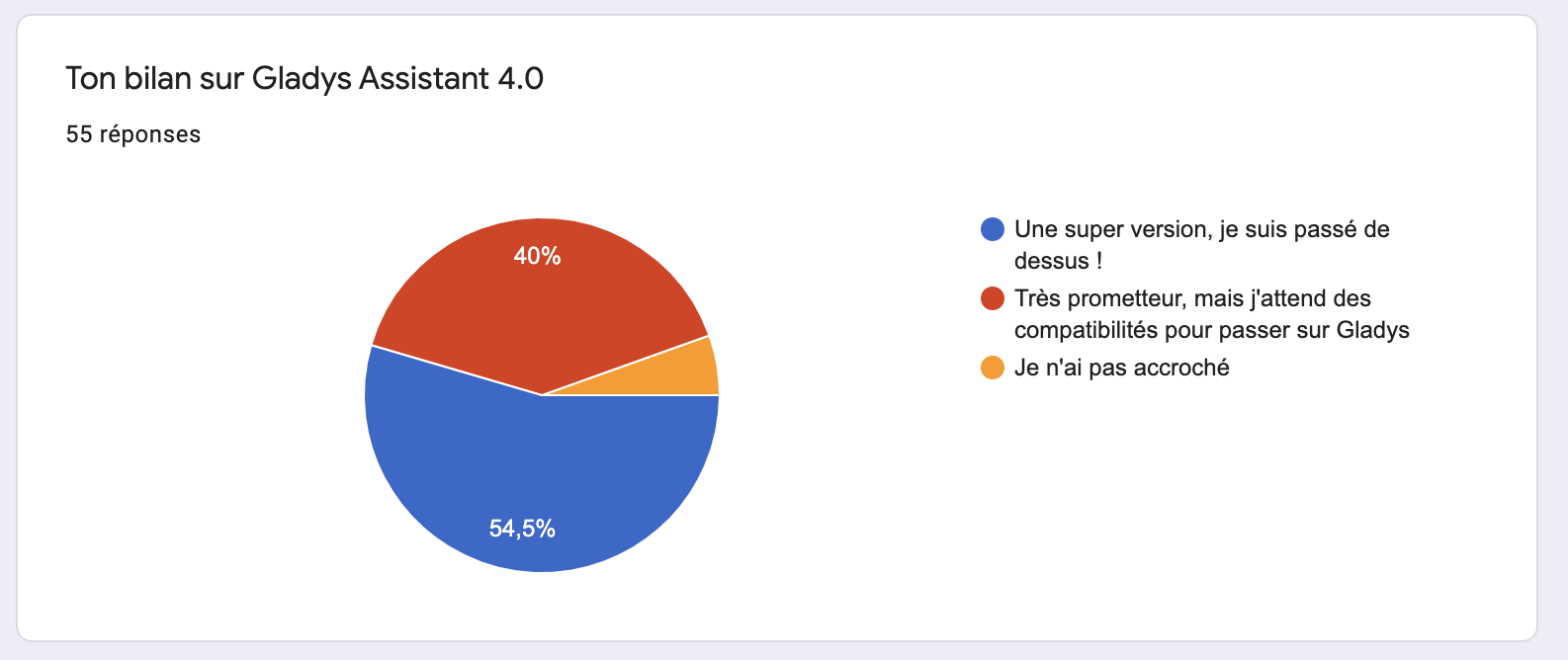
[POLL] Your feedback on Gladys Assistant 4.0!

Hello everyone,

Now that v4 is out, I need your feedback to know what you liked/didn’t like about this first version of Gladys v4.

Having feedback is very important because it’s what allows us to improve Gladys :slight_smile:

The survey is available here:

Thanks to everyone who will respond :folded_hands:

You can install the Gladys Docker image with Zigbee2mqtt integrated if you wish :slight_smile:

Indeed, but it’s a lot of work and @Reno is working on it :slight_smile:

Hello,
No major changes compared to the beta, I think.

  • In the Integrations section, we still cannot access the relevant documentation pages.
  • In scene creation, the icon box could perhaps be enlarged to avoid scrolling so much.
  • Bluetooth integration: 4 devices are detected, but no information is given
  • I am waiting for the evolution of Zwave to put my heating modules there

The pros

  • In the help, it opens in a new tab
  • The more detailed weather box
  • The Bluetooth
  • It’s encouraging to see the arrival of members

A big bravo to the developers
Thank you

Thanks for your feedback @gaetanb76!

Glad to hear it’s the same product :slight_smile: We work in an iterative/continuous deployment model in v4, as soon as a feature is ready: it goes to production. On average, we deploy a version per week that aggregates the features developed the previous week. There is as much difference between v4-beta.18 and v4.0.0 as between v4.0.0 and v4.0.1. The launch is just a marketing step to talk about the software and attract new users/developers!

Thanks for all your feedback, for the feedback related to integrations (I’m thinking of Bluetooth), have you talked about your problems on the integration topic on the forum?

For Z-Wave, we are still looking for a developer to help us with this integration!

Hello,

First of all, congratulations on all the work already done!

For my part, on v4 it’s the dashboard that is holding me back, it’s identical to v3.
For me, the frontend should be separated from the backend. All settings should be accessible via another page.
Thus, we could create different frontends that adapt (what we want to see appear) to the target screen on one or more pages. Each command could be offered as a widget with different sizes, information… Each user would only see what is necessary for them.

But maybe this is planned for later… there are still many other important things to do

Now I’m waiting to receive my PI4 to run the tests and I will start reprogramming my modules to put them in MQTT, (they currently work in http)

Keep up the good work

Hello everyone!

I wanted to give you a little feedback on this survey.

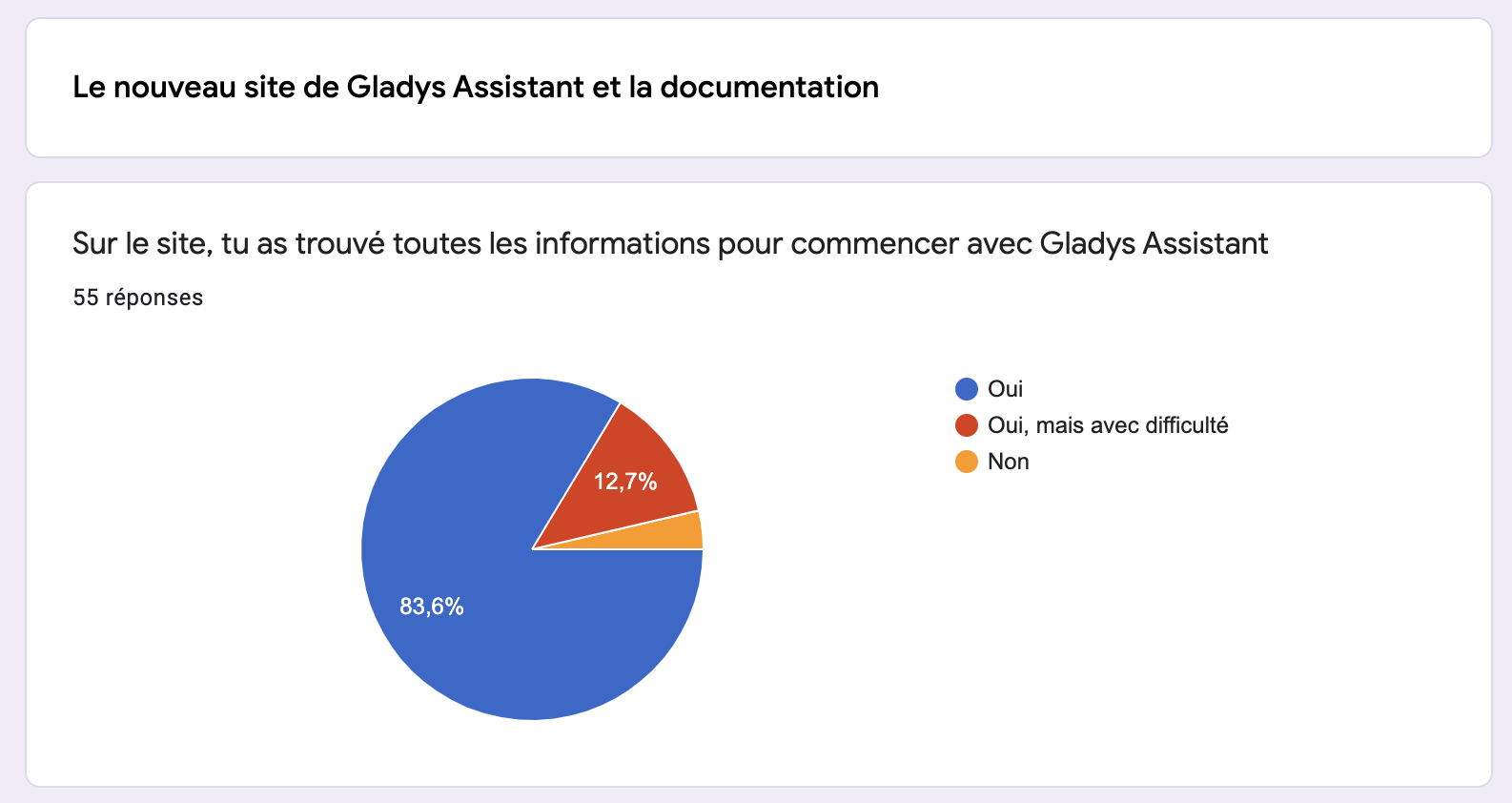
Regarding the Gladys website and the documentation, the responses are rather positive!

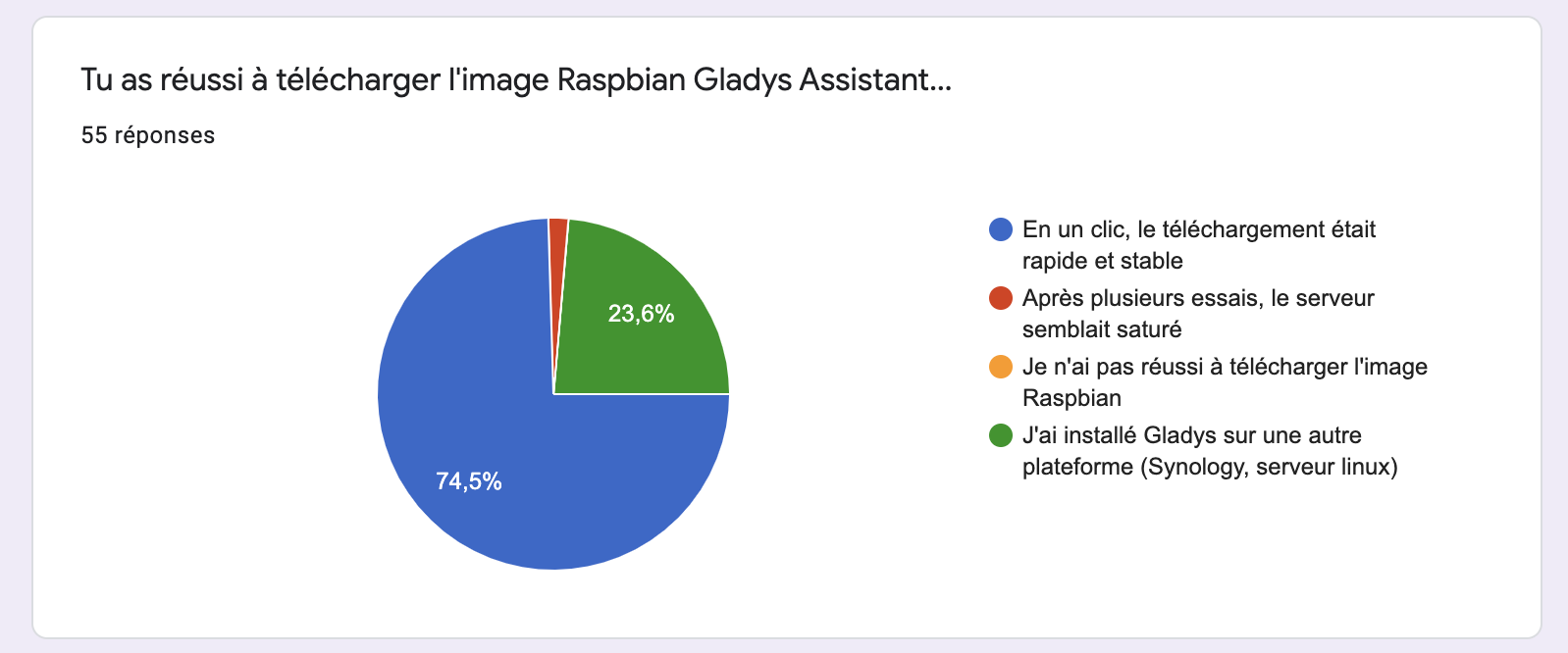
Regarding the download, no issues reported (RAS), you all managed to download the Raspbian Gladys image / or you went through another type of installation (Synology for example)

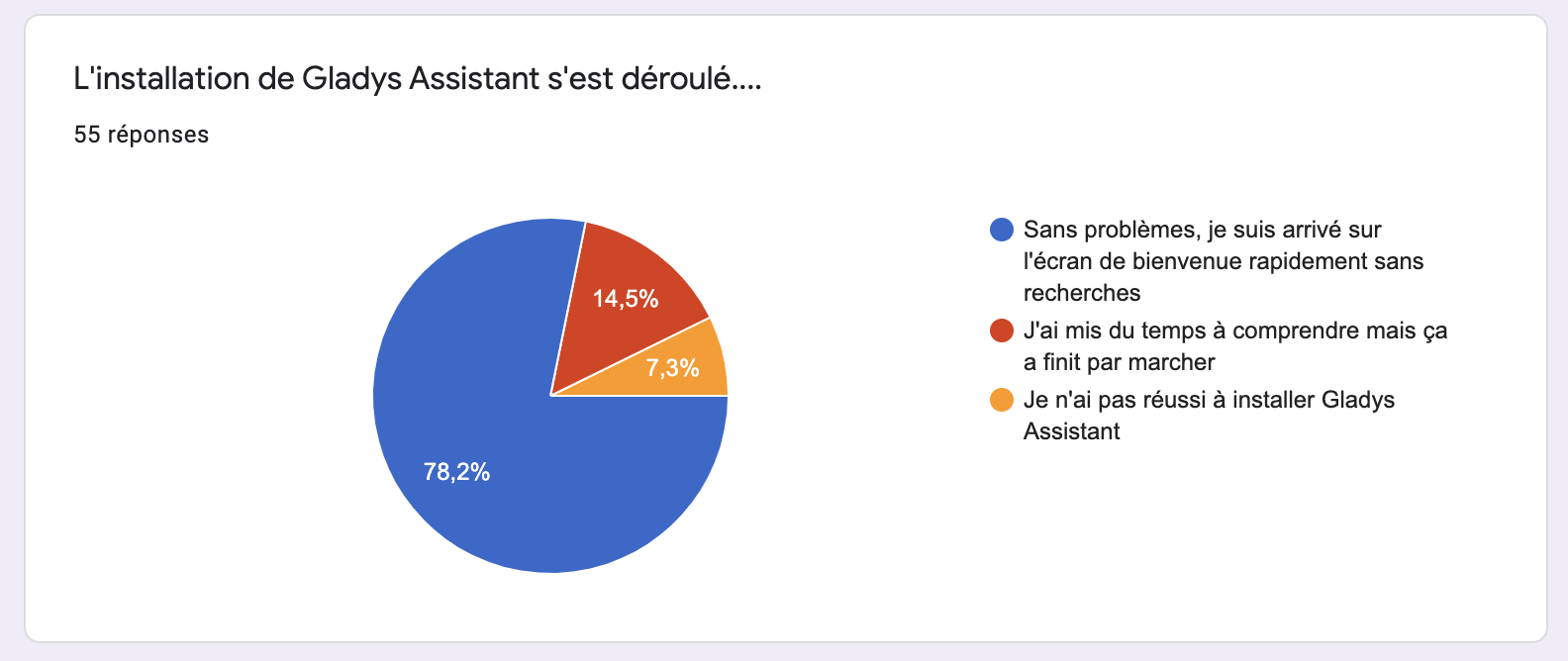
For most of you, you managed to install Gladys without any issues.

15% had difficulties, and based on the responses, it’s mainly installations on Synology NAS. We clearly need a dedicated Synology tutorial :smiley: @VonOx

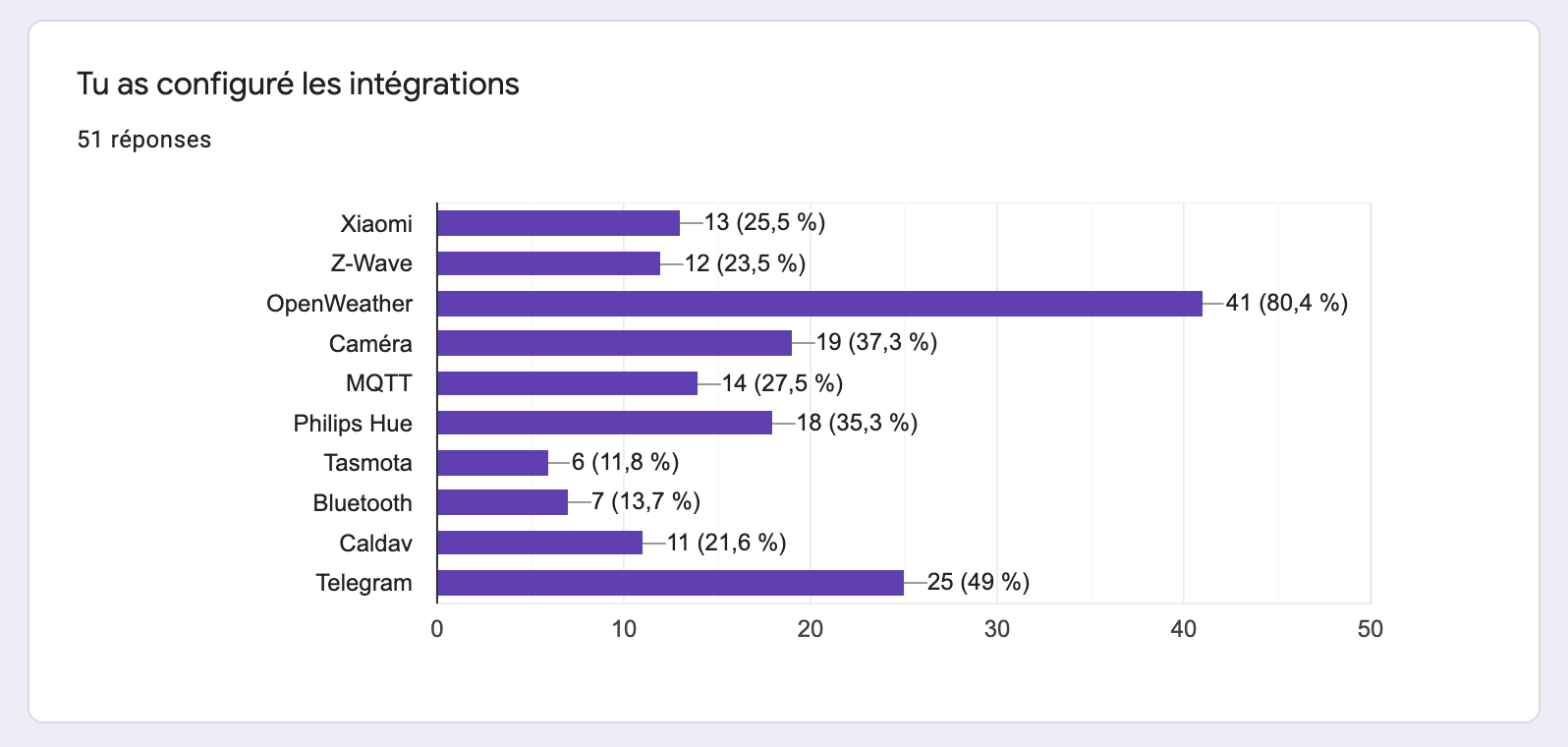
Regarding the configured integrations, the big winner is OpenWeather followed by Telegram: that’s normal, these are the two integrations that do not require hardware and allowed those without home automation to test Gladys and form an opinion on the stability of the product.

Speaking of stability, in the responses to « What problems did you encounter during installation? », there were a few responses that made me happy:

« An ultra-stable product », that was the bet of this v4, and it’s nice to read that it was felt.

The overall assessment is really positive, and of course the main frustration is the lack of compatibility:

Which is normal because we just launched v4. Integrations are developed progressively (at a beautiful cruising speed!), so we will see many new integrations in the coming months.

Thank you to everyone who responded to the survey, if some developers want full access to the survey results to read the precise feedback (@AlexTrovato @VonOx?), I can provide the access :slight_smile:

I’m fine with it if there are any details about the Synology. I need to set up a DSM VM because I don’t have a Synology compatible with Docker.

@VonOx Apart from saying that documentation is missing, the only concrete thing I’ve seen regarding the Synology installation is:

I am on Docker on a Synology and the Docker part with the environment variables is not very clear

Basically, a complete tutorial on configuring Gladys on a Synology NAS would be needed ^^

Ok! We should check on the forum if there are any users with a Synology compatible with Docker so you can have them test the tutorial before we publish it :slight_smile:

I can help if there are any Synology & Docker specifics and documentation to test! :slight_smile:

Hi @pierre-gilles, @VonOx, and @peb

January cleanup, I’m « digging up » this topic

Regarding the installation on Syno, a dedicated installation page would indeed be welcome. There are some subtleties about the paths for mounting volumes that do not simplify things for those who are not always in the loop. Moreover, the docker admin interface does not allow entering all the parameters (notably the mounting of /dev and /var/run/docker.socket)

In short, I took advantage of the Christmas holidays to prepare a page to fill in and move the schmilblik forward. It would probably deserve some screenshots to make it pretty, but it should already work as is.

Now, I just need to figure out how to make a pull request on the wiki and I’ll push it to you.

Well, I’m giving up with my VM (I spent 1 hour yesterday to get something working :sweat_smile:)

However, the Synology Docker UI is a mess and as you said, you can’t bind what you want. In short, SSH is mandatory

Awesome! Can’t wait to see it :slight_smile:

Hello everyone
I’m just starting out and having connection issues, so I decided to reset my password and this message appeared

« Recover your password
Success! You should see a password reset link in the Gladys logs.
Need help? Join us on Gladys Community. »

Not cool to start with!
Because to access the logs is not beginner level! Email is more suitable especially since it is requested at login.
Otherwise, I like the interface, it is sober and fast and the idea that everything will be done for beginners made me join Gladys +
Because I struggled a lot with Home Assistant and this is my way of contributing to the common effort.
See you later

This is partly why installing from a Synology can be difficult (plus the fact that the paths via the IHM are not the same as in the command line :-D)

Well, I didn’t have time to look at how to do the PR. I will definitely do this by the end of the week.

Hard to help without knowing how you created the container

that’s on the pi, I’m talking about the syno (since that’s what’s not working)

Yes, but the command needs to be adjusted

I was able to get a working instance

sudo docker run -d \
--log-opt max-size=10m \
--restart=unless-stopped \
--privileged \
--network=host \
--name gladys \
-e NODE_ENV=production \
-e SERVER_PORT=5080 \
-e TZ=Europe/Paris \
-e SQLITE_FILE_PATH=/var/lib/gladysassistant/gladys-production.db \
-v /var/run/docker.sock:/var/run/docker.sock \
-v /volume1/docker/gladysassistant:/var/lib/gladysassistant \
-v /dev:/dev \
gladysassistant/gladys:v4

That’s it
provided that you have created the shared folder « docker/gladysassistant »

I just made a PR to suggest a dedicated page in the documentation
It’s my first PR, so don’t hesitate to contact me directly to tell me if something is wrong
I did it quickly because I see the recurring questions.

I just quickly checked, thanks for your contribution.

Can you add the page in English?
And since it’s documentation, remove the personification (rephrase the « for my part » passages)

For the docker command, change the tag to gladys:v4