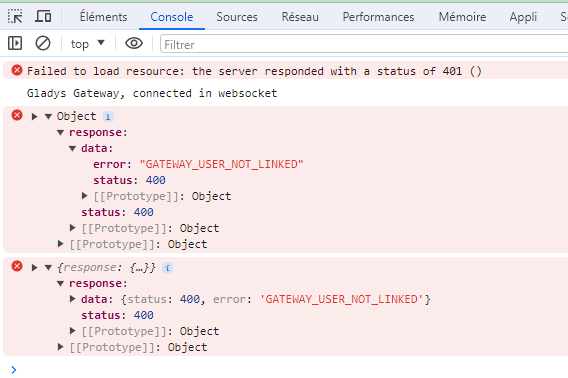
Issue with Gladys Plus account management

Hello and above all Happy New Year :partying_face:

So, since I’m a little bit crazy, yesterday I finally decided to move my main Gladys to the mini PC I bought a few months ago.

So I followed @Tlse-vins’ tutorial Installer Gladys sur un mini PC, wanting to have a desktop for the future, which worked very well overall. Just a lot of errors during the 3 installation attempts. Nothing serious apparently, because everything works. I was able to enable SSH and everything else fine.
Gladys installation and retrieval via Gladys Plus were perfect.

At 7:30 PM, time to leave to party, I shut down my old Gladys after checking the new one was running well => perfect, automatic MQTT connection, tested controlling a few devices and tested a scene.

We leave and I try to connect via Gladys Plus on the road
=> 1st step email + password OK,
=> 2nd step 2FA code OK
=> 3rd step it did ask me who is connecting by offering 3 accounts (while I have 4 registered): Vincent, Thomas or Sophie, so I select Thomas => Error; then Sophie => Error, finally Vincent => Error …

So I left the page and tried again. Again the first 2 steps go well but no 3rd step, I end up directly connected to the account of … Vincent …


At this point I don’t understand how it works at all. No matter how much I log out of all accounts, it makes no difference, I never get the 3rd step and I remain connected to Vincent’s account.
So I tried to revoke all sessions via Settings/Sessions (a menu I never went to) and there I discover traces of many connections including a lot of ‹ unknown ›. So I start clicking on the trash to revoke, I end up with only one connection (Firefox-Linux-Linux64) which seems to be the one open on the new mini PC, I think perfect… but upon refreshing the page, many others appear:

I realize the display is limited and you have to refresh to make the others appear. So I click that trash around a hundred times :hot_face: :hot_face: and from time to time it’s impossible to revoke the sessions. After a while I end up with this list of 20 that I cannot revoke. I therefore suppose there are others but that the display limit is 20 …

Error during revocation attempt:

The accounts registered for local are the following:


Why didn’t ‹ Kévin › appear in the choice list of the 3rd step? If it’s this users list that’s being taken into account? It also doesn’t seem linked to the login email since you have to log in with my email address and my password, right?

My list of remote users via the local account is:
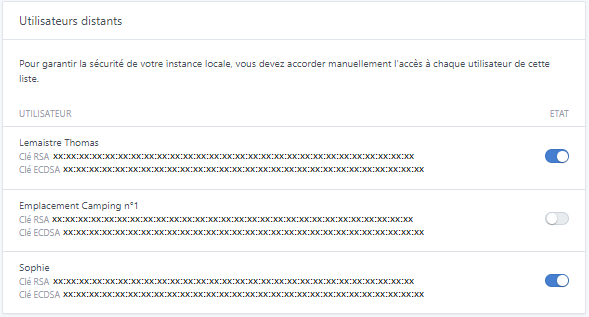

via Gladys Plus access:
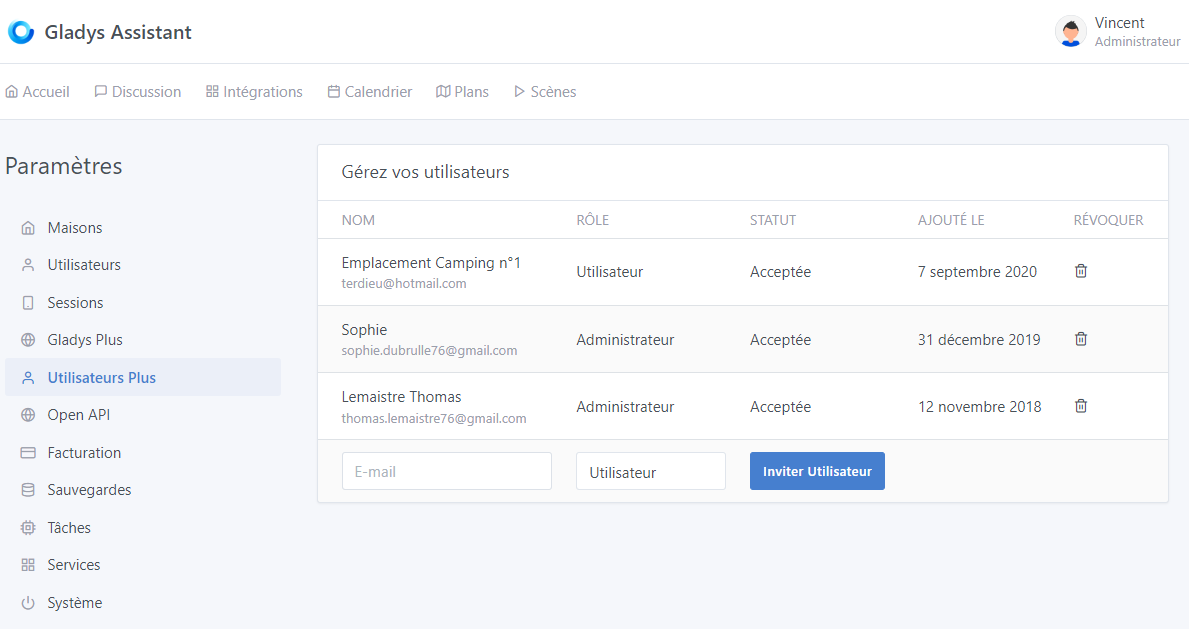
So I would have thought that this list prevails?

By the way how is the link made with the local account? By the email address? But I don’t have a Vincent here, how can I end up on his local account? And if that user also has a Gladys Plus account for his home? How does that work?
I tried to connect with another account that I had registered a long time ago (Emplacement Camping n°1) and for which I no longer had the password, and when resetting the password, it logically asks me for a 2FA code … But I don’t have one for this account? I tried with mine, but it doesn’t work:

So I run tests again with my 2nd Gladys Plus account which I also use for tests. The 3rd step I was talking about is this one:


I can clearly see my 2 local accounts (this is my test account for the Netatmo EN and FR dev hence the 2 ‹ Tony ›) and I have the same error as before on either account:


By refreshing the page and confirming with the 1st account it works. If I log out and then log back in, I no longer go through the 3rd step and am directly reconnected to the previous one.
If I invite that same account which already has a Gladys Plus instance, the invitation link sends me to:

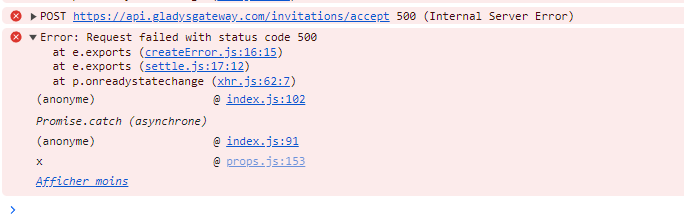
There you go… @pierre-gilles, if you have any idea how to get me out of this and how to improve the system… It would help me a lot because I no longer have access to my instance.

Hi — was your Vincent account for me to use for testing?
If that’s the case, I logged in 2 or 3 times.
I couldn’t find the date of your email.
That doesn’t solve your login problem.

I didn’t have that issue.

Oh no no, sorry, the Vincent account is my little brother’s who lives with us ^^

Thanks anyway for your interest and for checking!!

Thanks for your feedback @Terdious, I’m not sure where to start because there are really tons of questions :smiley:

To be concise:

  • The list of sessions displayed is the list of all logins that occurred locally. The unknown ones are probably because you make thousands of logins via your Node-RED in API mode, I imagine, and you don’t pass the user-agent so it’s empty… This view wasn’t designed for people who use the login as a workaround to have an API, so indeed it’s not made for someone who has thousands of sessions.
  • For selecting the local user, actually I have no way of knowing which local user corresponds to a Gladys Plus user, so I ask the user to choose (we’re family, in a circle of trust). As for the error you had during the selection, hard to know what happened. Maybe your instance was unavailable.
  • For the login with your terdieu@.. account, I confirm that you did configure two-factor authentication (2FA) when you created your account (I checked), I can reset it if needed :slight_smile:

Ok so everything works fine.

Yes that’s normal, you’re inviting an email that already has an account. It’s really a far-fetched use case :sweat_smile:

I agree you shouldn’t have been able to invite a user who is already a customer with another account, but well it’s really a unique situation.

Is that still the case?

Thanks for taking the time for the comprehensive reply!

Indeed, API connection via Node-RED and via Insomnia for my device modifications ^^ Do you think of any way to avoid this case? On my side, can I do anything?
However, we agree that it’s not normal to have « named » sessions impossible to delete with the error

We should still be able to clean that up, right? Especially since I end up in a state with 20 logs of buggy sessions and I can’t clean the rest. Can I make a small PR to add a « Delete all sessions » button and try to resolve this « ghost sessions » problem?

Yes I can understand the « (we’re family, in a circle of trust) » at Gladys’ launch, but as you know I’m not the first to raise the issue. With home automation today we go further than that, it goes further than that (besides, one of the latest « Alarm » integrations demonstrates it). It avoids giving someone a physical badge to our gate at all times, for example, and allows total and time-limited control of our accesses!! The ability to enable/disable an access is already in place and crucial. A cleaning lady, family but not that close, a distant friend, someone doing a favor to come feed the cat… you know what I mean ^^ Especially since the system you put in place is already largely usable for that!! And Gladys is even used in at least one hotel ^^ But well, not related to Gladys Plus, just to say that the « family » side… not necessarily ^^ What can you do, you put a great tool in people’s hands ^^
But we’ll talk about it in a dedicated feature request thread ^^

Yes so why that error in the first place? After refreshing the page it’s good indeed ^^

Sorry but for this one… « far-fetched »… I don’t understand. We agree the goal is for Gladys to be known and used… It’s enough that two people in the same family, for example, use Gladys Plus and that one helps the other during vacation and we can encounter this issue. Which is my case, my little brother for example. Ok today it’s certainly premature, but why don’t you imagine that one person might need access to two Gladys Plus? In any case I really hope that will be the case.
We agree, to date no requests in that sense ^^ Even if for my part I already need it ^^

Okay sorry my memory is playing tricks on me ^^ I’d like that then please and could you also create one for Sophie? If you can do the same I thank you very much in advance!

Listen, last night I restarted everything (tablets / PC / phones / Gladys / Gladys-Pro) and I was able to reconnect. I suppose a session had remained on it… which makes me wonder: Is it possible to be logged in simultaneously with different accounts?

Anyway, I’m sorry for all these questions…

In your case, to clean:

DELETE FROM t_session;

But it will come back if you do lots of logins..

1 Like

Thank you very much ^^ I hadn’t thought of that ^^

I solved the problem, I added the route /api/v1/access_token to perform a refresh token in Node-RED and in Insomnia.

Thank you very much!! So… sorry but before doing anything I’d rather ask you, what’s the procedure to recover the new one? Do I invite again or will it offer it to me at the next login? Thanks in advance ^^

My question is about:

Okay, so it’s not possible to connect via Gladys Plus to my local instance with my address ‹ thomas…@… › and my partner at the same time with ‹ sophie…@… › ? If that’s the case, then it’s the same — even with 2 subscriptions, you can’t connect 2 Gladys Plus accounts (and that wouldn’t make sense anyway ^^) …
Sorry for questions that may seem stupid … but in this case, I’m going to change everything and especially for the pro side who would need to connect via Gladys Plus to the same instance but with a different account ^^

Yes yes I agree ^^ But glad that it resonates with you for the future (whether it’s distant or not ^^)

1 Like