Bonjour,
Je vous vois présenter ici comment récupérer le tarif d’électricité avec node-red via le fichier : https://www.data.gouv.fr/fr/datasets/r/c13d05e5-9e55-4d03-bf7e-042a2ade7e49 et ensuite le transférer dans un topic MQTT pour l’utiliser dans Gladys 
Ce fichier est trouvable ici : https://www.data.gouv.fr/fr/datasets/historique-des-tarifs-reglementes-de-vente-delectricite-pour-les-consommateurs-residentiels/
Ce tutoriel est compatible avec l’option « Base » uniquement car c’est l’option associée à mon contrat 
Mais je penses qu’il est assez facile de le mettre en place pour l’option « Heures pleines Heures creuses ».
Le résultat final :

Voici le flux Node-Red :
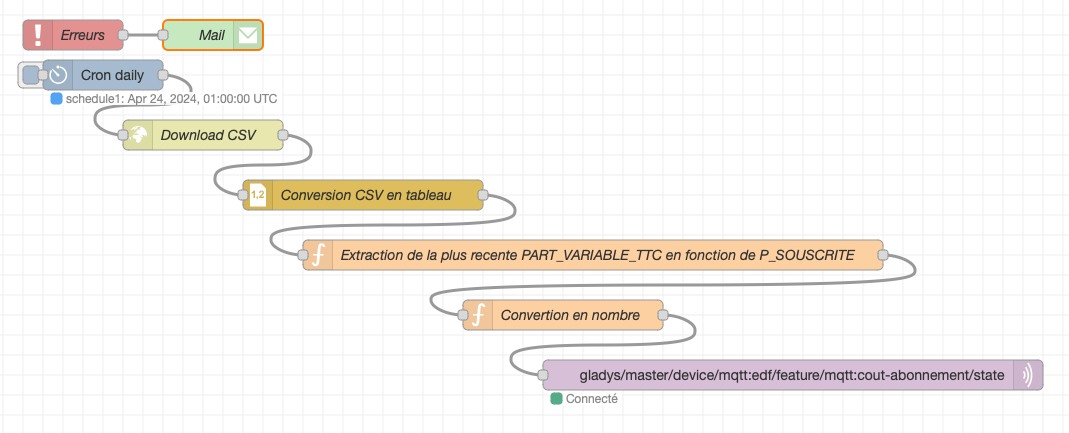
Voici le flux au format JSON pour l’importer sur votre Node-Red :
(La valeur est récupérée toutes les nuits à 3h00)
[
    {
        "id": "d6333988d9cfb817",
        "type": "tab",
        "label": "Flux - Coût EDF",
        "disabled": false,
        "info": "",
        "env": []
    },
    {
        "id": "d79ac3d249808c33",
        "type": "mqtt out",
        "z": "d6333988d9cfb817",
        "name": "",
        "topic": "gladys/master/device/mqtt:edf/feature/mqtt:cout-abonnement/state",
        "qos": "2",
        "retain": "true",
        "respTopic": "",
        "contentType": "",
        "userProps": "",
        "correl": "",
        "expiry": "",
        "broker": "0ee77e0f90aa9681",
        "x": 830,
        "y": 400,
        "wires": []
    },
    {
        "id": "1852e9b329fd3f44",
        "type": "http request",
        "z": "d6333988d9cfb817",
        "name": "Download CSV",
        "method": "GET",
        "ret": "txt",
        "paytoqs": "ignore",
        "url": "https://www.data.gouv.fr/fr/datasets/r/c13d05e5-9e55-4d03-bf7e-042a2ade7e49",
        "tls": "",
        "persist": false,
        "proxy": "",
        "insecureHTTPParser": false,
        "authType": "",
        "senderr": false,
        "headers": [],
        "x": 240,
        "y": 160,
        "wires": [
            [
                "24804ed33b7a2cd6"
            ]
        ]
    },
    {
        "id": "24804ed33b7a2cd6",
        "type": "csv",
        "z": "d6333988d9cfb817",
        "name": "Conversion CSV en tableau",
        "sep": ";",
        "hdrin": true,
        "hdrout": "none",
        "multi": "mult",
        "ret": "\\n",
        "temp": "DATE_DEBUT;DATE_FIN;P_SOUSCRITE;PART_FIXE_HT;PART_FIXE_TTC;PART_VARIABLE_HT;PART_VARIABLE_TTC",
        "skip": "0",
        "strings": false,
        "include_empty_strings": false,
        "include_null_values": false,
        "x": 400,
        "y": 220,
        "wires": [
            [
                "8576856348eb0e34"
            ]
        ]
    },
    {
        "id": "8576856348eb0e34",
        "type": "function",
        "z": "d6333988d9cfb817",
        "name": "Extraction de la plus recente PART_VARIABLE_TTC en fonction de P_SOUSCRITE",
        "func": "// Filtrer les données pour P_SOUSCRITE = 6 et DATE_FIN absente ou vide\nmsg.payload = msg.payload.filter(item => item.P_SOUSCRITE === \"6\" && (!item.DATE_FIN || item.DATE_FIN.trim() === \"\"));\n\n// Remplacer les virgules par des points dans les valeurs de PART_VARIABLE_TTC\nmsg.payload = msg.payload.map(item => {\n    // Remplacer les virgules par des points dans la valeur de PART_VARIABLE_TTC\n    item.PART_VARIABLE_TTC = item.PART_VARIABLE_TTC.replace(/,/g, '.');\n    // Convertir PART_VARIABLE_TTC en nombre\n    item.PART_VARIABLE_TTC = parseFloat(item.PART_VARIABLE_TTC);\n    return item.PART_VARIABLE_TTC;\n});\nreturn msg;\n\n",
        "outputs": 1,
        "timeout": "",
        "noerr": 0,
        "initialize": "",
        "finalize": "",
        "libs": [],
        "x": 630,
        "y": 280,
        "wires": [
            [
                "644a3870177af55a"
            ]
        ]
    },
    {
        "id": "644a3870177af55a",
        "type": "function",
        "z": "d6333988d9cfb817",
        "name": "Convertion en nombre",
        "func": "msg.payload = parseFloat(msg.payload);\nreturn msg;",
        "outputs": 1,
        "timeout": 0,
        "noerr": 0,
        "initialize": "",
        "finalize": "",
        "libs": [],
        "x": 600,
        "y": 340,
        "wires": [
            [
                "d79ac3d249808c33"
            ]
        ]
    },
    {
        "id": "1943b35881c8a2fa",
        "type": "cronplus",
        "z": "d6333988d9cfb817",
        "name": "Cron daily",
        "outputField": "payload",
        "timeZone": "",
        "storeName": "",
        "commandResponseMsgOutput": "output1",
        "defaultLocation": "",
        "defaultLocationType": "default",
        "outputs": 1,
        "options": [
            {
                "name": "schedule1",
                "topic": "topic1",
                "payloadType": "default",
                "payload": "",
                "expressionType": "cron",
                "expression": "0 0 01 * * *",
                "location": "",
                "offset": "0",
                "solarType": "all",
                "solarEvents": "sunrise,sunset"
            }
        ],
        "x": 140,
        "y": 100,
        "wires": [
            [
                "1852e9b329fd3f44"
            ]
        ]
    },
    {
        "id": "670838a9edef0758",
        "type": "catch",
        "z": "d6333988d9cfb817",
        "name": "Erreurs",
        "scope": null,
        "uncaught": false,
        "x": 110,
        "y": 60,
        "wires": [
            [
                "c097dad994334b5e"
            ]
        ]
    },
    {
        "id": "c097dad994334b5e",
        "type": "e-mail",
        "z": "d6333988d9cfb817",
        "server": "monsmtp.a.remplacer",
        "port": "465",
        "authtype": "BASIC",
        "saslformat": false,
        "token": "oauth2Response.access_token",
        "secure": true,
        "tls": true,
        "name": "aremplacer@monmail.fr",
        "dname": "Mail",
        "x": 250,
        "y": 60,
        "wires": []
    },
    {
        "id": "0ee77e0f90aa9681",
        "type": "mqtt-broker",
        "name": "Gladys",
        "broker": "mqtt://192.168.x.x",
        "port": "1883",
        "clientid": "",
        "autoConnect": true,
        "usetls": false,
        "protocolVersion": "4",
        "keepalive": "60",
        "cleansession": true,
        "autoUnsubscribe": true,
        "birthTopic": "",
        "birthQos": "0",
        "birthRetain": "false",
        "birthPayload": "",
        "birthMsg": {},
        "closeTopic": "",
        "closeQos": "0",
        "closeRetain": "false",
        "closePayload": "",
        "closeMsg": {},
        "willTopic": "",
        "willQos": "0",
        "willRetain": "false",
        "willPayload": "",
        "willMsg": {},
        "userProps": "",
        "sessionExpiry": ""
    }
]
Bien penser en modifier la valeur de P_SOUSCRITE dans la fonction « Extraction de la plus recente PART_VARIABLE_TTC en fonction de P_SOUSCRITE »
Et également l’adresse IP de votre broker MQTT
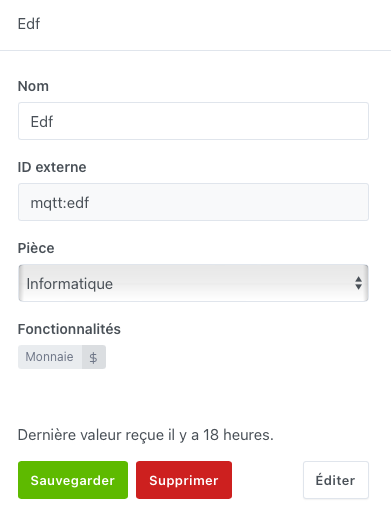
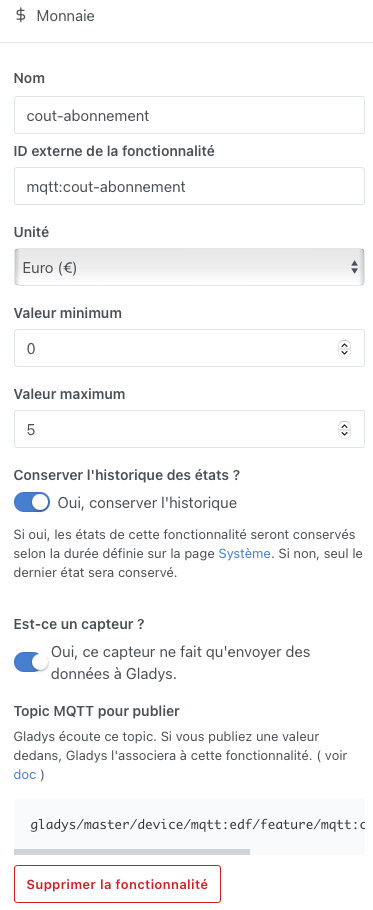
Voici l’appareil MQTT avec la fonctionnalité :
Si vous avez des questions/remarques, n’hésitez pas à m’en faire part
Changelog à venir :
- Aucun (A vos commentaires )
Edit 23/04/2024 :
- Ajout des copies d’écrans pour l’appareil MQTT
- Ajout d’un catch all pour la gestion des erreurs et être informé par e-mail