[V4] Zigbee2mqtt Integration

Hello everyone and sorry for the silence but I’m making progress…

I was going to give you an update last night but I couldn’t.

I will give you a debrief tonight with a new test image that will include the latest changes from Gladys (master), including scenes and a service update.

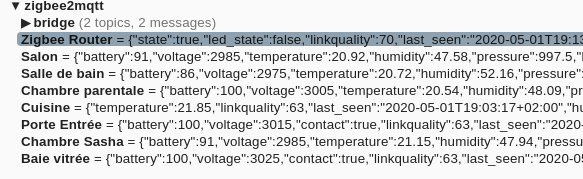
Same, I have all this waiting for me :sweat_smile:

By the way @Reno, do you plan to display the network? (something like for Z-Wave)

Sorry, I won’t be able to provide you with an image with the service tonight.
I spent the evening trying to build it but I have test errors, linter errors on files that haven’t moved for several months…?? I suspect evolutions of the Linter and others on the master branch of Gladys, which I pulled via a rebase.
Can Git experts confirm?
So the delivery will be a bit delayed.

On the other hand, I’ll give you a little overview of the evolutions of this version and the rest to do.
Implemented evolutions:

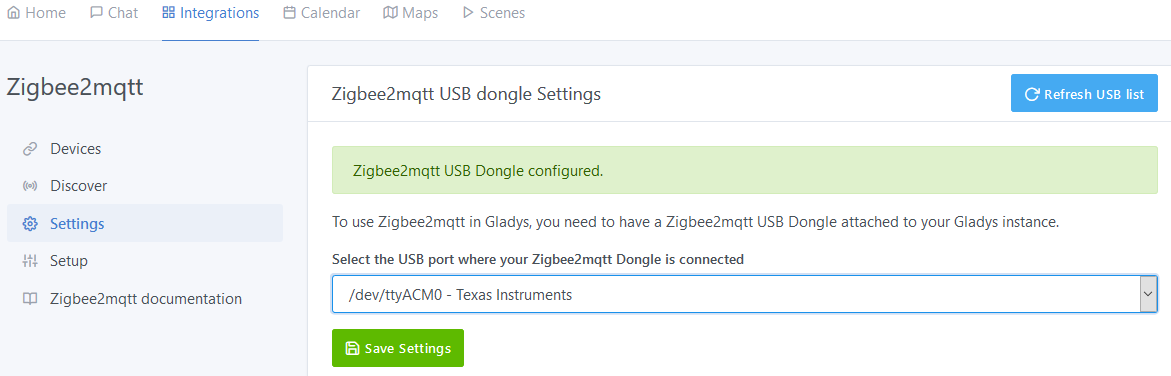
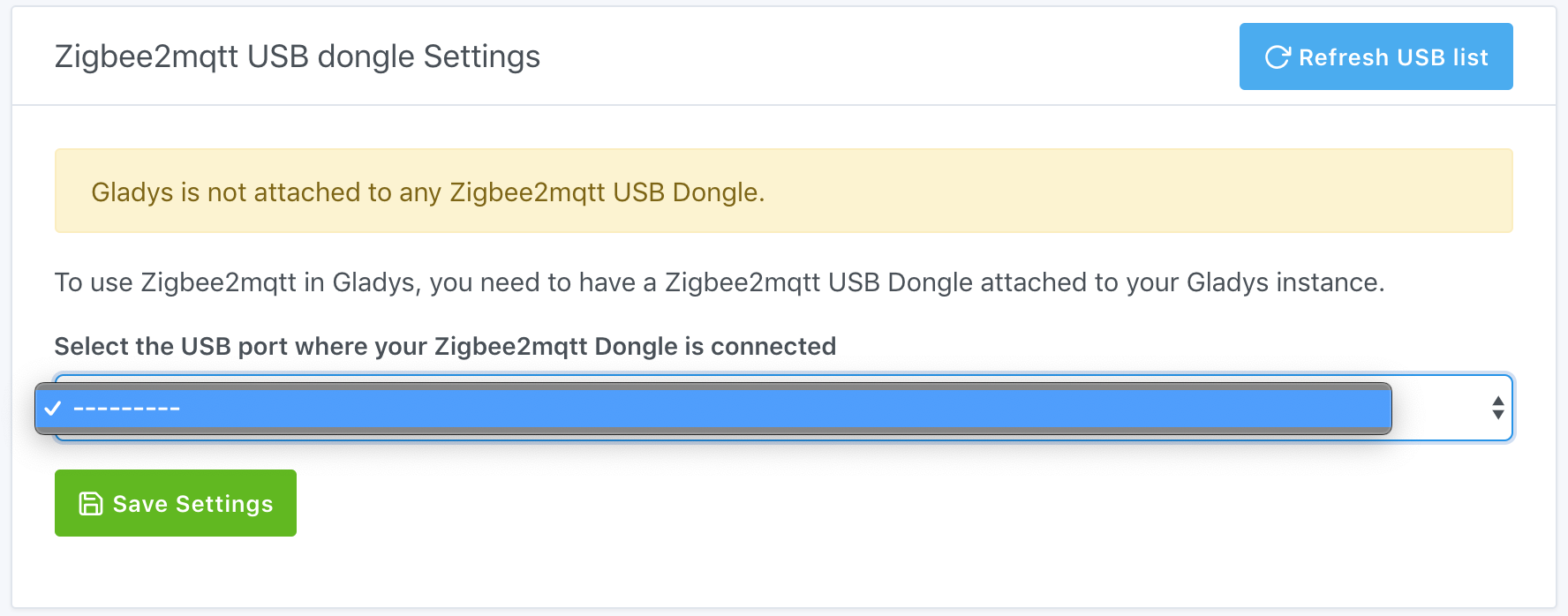
  • A Settings tab that allows you to define on which USB port the Zigbee2mqtt dongle is attached

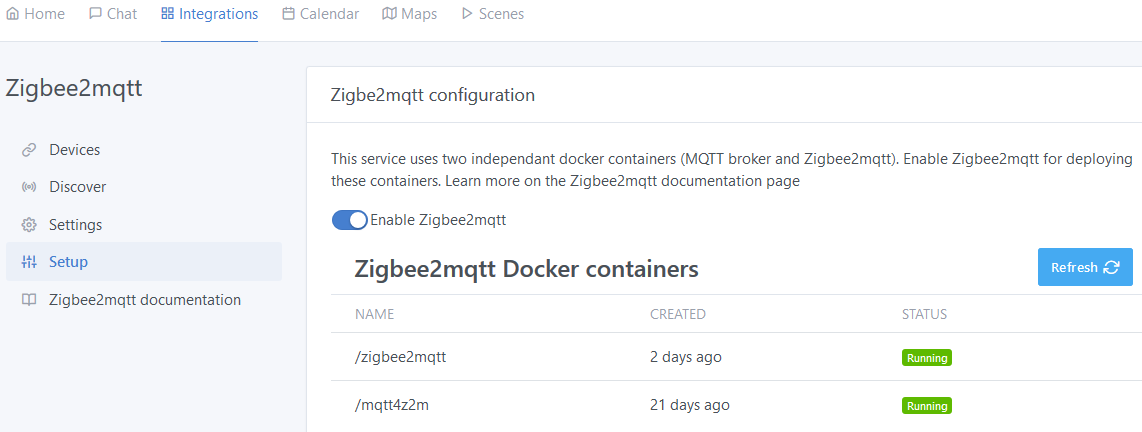
  • A Setup tab with Enable button of the service that allows to start and stop the external Docker containers necessary for the service. A table allows to display the state of the containers.

  • The service uses its own MQTT configuration independent of the main MQTT service of Gladys.

Today the service can only start and stop the containers, which means that they still need to be created manually at the beginning, following the Zigbee2Mqtt Tutorial. (There is just a small modification to make on the name of the mqtt container which must necessarily be called ‹ mqtt4z2m ›)

The next step in development concerns the automatic creation of containers from Gladys in order to hide the creation steps from the user.

Then, I plan to add a ‹ Pairing › tab to manage the pairing of devices that I find quite laborious with Zigbee and which requires today to look at the logs of the Zigbee2Mqtt container. We could thus have a view of the state of the pairing directly under Gladys.

I think it is feasible to display the network if we can easily retrieve the existing Zwave. On the other hand, I don’t quite see the point of having such a view.

Why use its own MQTT configuration?
I think it’s complicated for the user.

Additionally, I am currently working on a way to dynamically install a broker on the Docker where Gladys is installed.

I had trouble expressing myself, it was late. :wink:

The service launches 2 containers: 1 MQTT broker and zigbee2mqtt.
Both containers have always been associated with the service but had to be managed manually (see my tutorial).
Now it’s transparent for the user and everything is managed from Gladys. The user doesn’t have to go into the broker configuration. It is defined in the code and specific to Zigbee2mqtt.

For Mqtt, until now, we defined the mqtt broker in the mqtt service of Gladys. I had therefore suggested to @pierre-gilles to add a way to add multiple brokers in the mqtt service. He preferred that we make the broker specific to Zigbee2mqtt and independent.
This is what I did.
If you want to manage an independent broker via docker dynamically from Gladys, you can then retrieve my code and improve it (I am not a node developer :confused:).

I hope I was clearer.

@Reno well, I must say, hats off!! Super job, I can’t wait to use all my devices, because like @julienL, a large part of my equipment is Xiaomi working on Zigbee :wink: :blush:

Thanks again for all the time spent enabling people like me to enjoy a simple and effective experience!! :+1:

I didn’t really understand the independent MQTT story either, the topics being different anyway, I don’t really see why (for my part) I would launch an additional container for that.

As a result, I get the impression from the screenshots that I am forced to let the service manage the containers in question (I may be wrong, I haven’t tested yet)

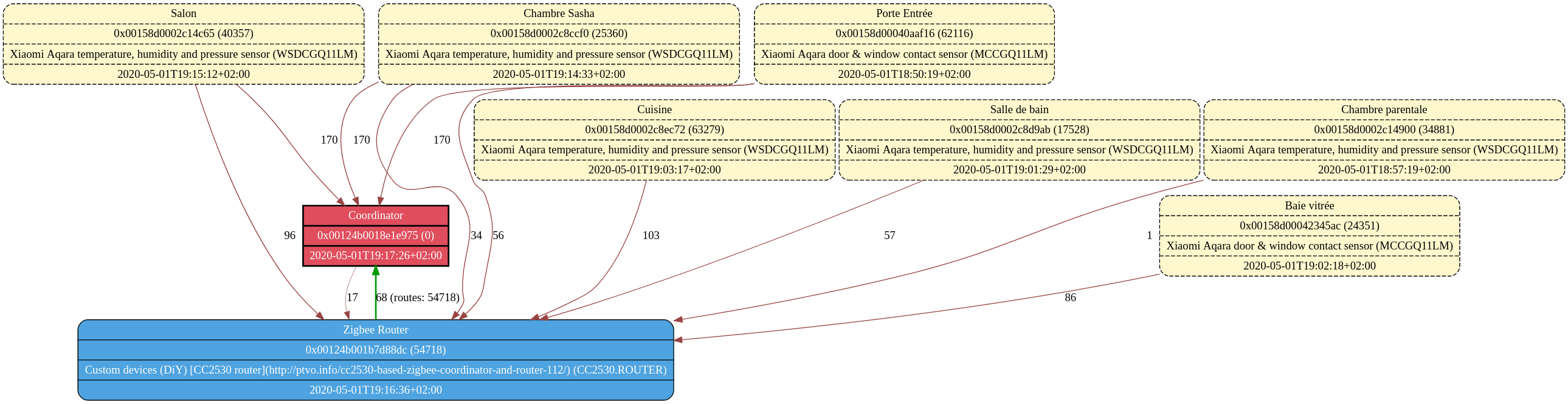
On a complex network, it’s easier to see who is communicating with whom (Device / Router / Coordinator). The one provided by default is not great, too much information in my opinion. The need is to have the routes, the type of node and the signal quality.

It is in graphviz format:

node[shape=record];
  "0x00124b0018e1e975" [style="bold, filled", fillcolor="#e04e5d", fontcolor="#ffffff", label="{Coordinator|0x00124b0018e1e975 (0)|2020-05-01T19:17:26+02:00}"];
  "0x00124b0018e1e975" -> "0x00124b001b7d88dc" [penwidth=0.5, weight=0, color="#994444", label="17"];
  "0x00158d0002c14c65" [style="rounded, dashed, filled", fillcolor="#fff8ce", fontcolor="#000000", label="{Salon|0x00158d0002c14c65 (40357)|Xiaomi Aqara temperature, humidity and pressure sensor (WSDCGQ11LM)|2020-05-01T19:15:12+02:00}"];
  "0x00158d0002c14c65" -> "0x00124b0018e1e975" [penwidth=1, weight=0, color="#994444", label="170"];
  "0x00158d0002c14c65" -> "0x00124b001b7d88dc" [penwidth=1, weight=0, color="#994444", label="96"];
  "0x00158d0002c8ec72" [style="rounded, dashed, filled", fillcolor="#fff8ce", fontcolor="#000000", label="{Cuisine|0x00158d0002c8ec72 (63279)|Xiaomi Aqara temperature, humidity and pressure sensor (WSDCGQ11LM)|2020-05-01T19:03:17+02:00}"];
  "0x00158d0002c8ec72" -> "0x00124b001b7d88dc" [penwidth=1, weight=0, color="#994444", label="103"];
  "0x00158d00040aaf16" [style="rounded, dashed, filled", fillcolor="#fff8ce", fontcolor="#000000", label="{Porte Entrée|0x00158d00040aaf16 (62116)|Xiaomi Aqara door & window contact sensor (MCCGQ11LM)|2020-05-01T18:50:19+02:00}"];
  "0x00158d00040aaf16" -> "0x00124b0018e1e975" [penwidth=1, weight=0, color="#994444", label="170"];
  "0x00158d00040aaf16" -> "0x00124b001b7d88dc" [penwidth=1, weight=0, color="#994444", label="56"];
  "0x00124b001b7d88dc" [style="rounded, filled", fillcolor="#4ea3e0", fontcolor="#ffffff", label="{Zigbee Router|0x00124b001b7d88dc (54718)|Custom devices (DiY) [CC2530 router](http://ptvo.info/cc2530-based-zigbee-coordinator-and-router-112/) (CC2530.ROUTER)|2020-05-01T19:16:36+02:00}"];
  "0x00124b001b7d88dc" -> "0x00124b0018e1e975" [penwidth=2, weight=1, color="#009900", label="68 (routes: 54718)"];
  "0x00158d0002c8d9ab" [style="rounded, dashed, filled", fillcolor="#fff8ce", fontcolor="#000000", label="{Salle de bain|0x00158d0002c8d9ab (17528)|Xiaomi Aqara temperature, humidity and pressure sensor (WSDCGQ11LM)|2020-05-01T19:01:29+02:00}"];
  "0x00158d0002c8d9ab" -> "0x00124b001b7d88dc" [penwidth=1, weight=0, color="#994444", label="57"];
  "0x00158d0002c14900" [style="rounded, dashed, filled", fillcolor="#fff8ce", fontcolor="#000000", label="{Chambre parentale|0x00158d0002c14900 (34881)|Xiaomi Aqara temperature, humidity and pressure sensor (WSDCGQ11LM)|2020-05-01T18:57:19+02:00}"];
  "0x00158d0002c14900" -> "0x00124b001b7d88dc" [penwidth=1, weight=0, color="#994444", label="1"];
  "0x00158d0002c8ccf0" [style="rounded, dashed, filled", fillcolor="#fff8ce", fontcolor="#000000", label="{Chambre Sasha|0x00158d0002c8ccf0 (25360)|Xiaomi Aqara temperature, humidity and pressure sensor (WSDCGQ11LM)|2020-05-01T19:14:33+02:00}"];
  "0x00158d0002c8ccf0" -> "0x00124b0018e1e975" [penwidth=1, weight=0, color="#994444", label="170"];
  "0x00158d0002c8ccf0" -> "0x00124b001b7d88dc" [penwidth=1, weight=0, color="#994444", label="34"];
  "0x00158d00042345ac" [style="rounded, dashed, filled", fillcolor="#fff8ce", fontcolor="#000000", label="{Baie vitrée|0x00158d00042345ac (24351)|Xiaomi Aqara door & window contact sensor (MCCGQ11LM)|2020-05-01T19:02:18+02:00}"];
  "0x00158d00042345ac" -> "0x00124b001b7d88dc" [penwidth=1, weight=0, color="#994444", label="86"];
}

In any case, the topology map is not a priority :wink:

MQTT can be used by different services and the MQTT service in Gladys only allows configuring a single broker. I think its first use was to connect Gladys to an Owntracks broker.

I had proposed adding a button to add multiple brokers in the MQTT service, but @pierre-gilles prefers independent instances, even hidden, as is now the case in the Zigbee2mqtt service.

The interest I also see is that we should be able to have multi-instances Zigbee2mqtt, by deploying the zigbee2mqtt container on another machine and pointing it to the broker of the service. This would make it easy to manage multiple dongles.

We had a discussion on these topics a bit further up in the thread:

Indeed, when we get there, it will be great! :champagne:
Especially since I have plenty of other service ideas: Meross outlets (WiFi not compatible with Tasmota), Roborock vacuum cleaner, 4G router SMS management for sending alerts and remote control, etc.

For the embedded multi-broker MQTT, one dedicated per service, I’m not convinced. That we can configure a URL for Zigbee, another for another service, I can understand, but from there to create an embedded broker per service, I have a harder time seeing the point. From my point of view, it’s a bit like having a database per service. Then we’ll have port conflicts, knowing that the default MQTT port is 1883 and MQQTS 8883… well, that’s just my opinion.

I’m interested in that :stuck_out_tongue:

This is the current trend with containerization. We separate the services, so if we no longer need them, we delete all associated containers and there are no more traces.
I had a discussion with @pierre-gilles who wanted to go in this direction because in addition, an MQTT broker mosquitto takes up very little space.

It would be good to quickly define the choice for Gladys before going further in the development.
Let’s wait for the feedback from @pierre-gilles.

It would be cool to have a Roborock…
But when I see the time I spend developing Zigbee2mqtt, it’s not happening anytime soon. :frowning_face:

At the time, the MQTT service did not launch its own broker, but from what I’ve seen, @AlexTrovato seems to be setting up the automatic launch of the MQTT broker in Gladys.

The number one priority in Gladys 4 is the user experience.

I originally proposed to put 2 brokers so that there are no « weird states » like:

  • I connect a local MQTT broker to the MQTT integration
  • I configure Zigbee2mqtt
  • I change something in the configuration of the MQTT broker of the MQTT integration for another service
  • Has the Zigbee2mqtt container been restarted with the information of the new MQTT broker? Has the user been notified?

If you can make an integration that works well without any weird bugs with the same broker, then perfect, you can use the same broker :slight_smile:

I just want to avoid mystical bugs because here we are coupling 2 services that both have remote states that need to be synchronized.

Of course, @AlexTrovato, you can tell me that the Tasmota service does the same thing. For me, it’s different, the Zigbee2mqtt service is a separate container from Gladys, and we need to synchronize all this beautiful world!

With the arrival of the automatic configuration of the MQTT broker, I am okay to use the same broker, if all cases are well managed.

Good evening everyone,

It’s here, you can now test the latest Gladys-Zigbee2Mqtt image!
This one allows you to test the scenes but does not allow you to choose French as the language. In any case, the texts associated with the service have not yet been translated.

To launch the image on your RPi, I have updated the Zigbee2mqtt Tutorial on Github:

In short,

  • Retrieve the scripts (ending with .sh) on your RPi.

wget https://raw.githubusercontent.com/R6n0/Tuto_Zigbee2mqtt_avec_Gladys/master/*.sh

Replace * with the names of the 4 files, one at a time, the wildcard does not work on http.

  • Make them executable:

chmod +x *.sh

  • Run the main script that calls the others:

./gladys-zigbee2mqtt_run.sh

If you were already using the old image, you may get an error at startup because docker tries to create the network for the containers and it already exists.
This error is not a problem. It’s just a warning and everything should still work

I was quite surprised, when I went to my Docker Hub account, to see that the image had been downloaded more than 50k times… I can’t believe it. They must have a bug in their counting, right?
Or maybe, it’s the success of Gladys… :wink:

Happy testing and I look forward to your feedback…

Thanks for your involvement @Reno! Great work :slight_smile:

I really can’t wait to see this land in Gladys Beta.

What’s missing from the integration for it to land in the beta?

It’s not really the preco for zigbee2mqtt, for that there are the routers

Hello,

I wanted to test the latest image but I’m having an issue when selecting the USB port of the dongle, no port appears in the list (even after several refreshes)!

However, it did appear in the logs of the zigbee2mqtt_run.sh script execution.

Logs
$ ./zigbee2mqtt_run.sh
Searching for the CC2531 dongle interface
/dev/ttyACM0 - CC2531
Configuring Zigbee2mqtt
Starting the Zigbee2mqtt container
73d2e9b6ebb2b4fb7ef534a7ffcb5dbb91262cfa3a7c02a243a0bb8c5a3ea081
zigbee2mqtt

Any idea where this could be coming from?

Also, I noticed a small typo in the tutorial, the description of the manual method does not reflect the latest changes. In particular, the Docker MQTT container is launched with the name mqtt-broker instead of mqtt4z2m, which can cause some issues :upside_down_face:

For me, it would just be missing the creation of containers via Gladys if they don’t exist.
I’m working on it and it shouldn’t be a big job.
Moreover, I just discovered this morning, the PR from @AlexTrovato on local mqtt via a container where he does the same thing as me.
I’m looking at it in detail to make everything consistent.
I also need to add some self-tests that I haven’t done (not used to it…).

Then, we can merge and we’ll open PRs for each improvement. I can’t wait…

Yes, we do this when we want to mesh everything in Zigbee, so wirelessly.
With Gladys, I see the advantage of using the local network (wired) to distribute data between the zigbee2mqtt services, it will be more reliable. In wireless Zigbee mesh network mode, if a Zigbee dongle fails and acts as a router, we lose an entire part of the network that goes through this router to access the server. In our case, only the devices associated with the dongle are cut off, everything else still goes back to Gladys.
And in addition, it allows connecting Zigbee networks that are far apart (garden shed, pool house, for example).

Yes, I’ve been struggling with this since this weekend…

For development, I run Gladys directly on RPi, without Docker.
When I added USB management, I reused what was done in the Z-wave service, but since I also have a Z-wave dongle, I realized that the display used did not allow easy distinction between the Z2M dongle and the Z-wave dongle.
In the display, I added the manufacturer info that comes from the USB device in Linux.

When you go under Docker, the container retrieves the ‹ path › of the dongle (/dev/ttyACM0 for example) but loses all other information, which causes the display problem you are encountering.
To avoid this, I added the option -v /run/udev:/run/udev when launching the Gladys container.
You need to make sure you have this option in Gladys_run.sh.

Could you also tell me which distribution you are running? I have only tested with Raspbian Buster.