Zigbee2mqtt - Debug

@VonOx
2 new devices, smoke detector and light (white only - no color).

Still in the same place.

Do you know how to ask zigbee2mqtt to publish this message on the topic zigbee2mqtt/bridge/devices?
Does it do this automatically? Regularly? Only on demand?
Do I need to publish on zigbee2mqtt/bridge/devices/get?

At restart or at pairing, I didn’t find a topic to trigger (I didn’t look much either :sweat_smile:)

@AlexTrovato shouldn’t the motion sensor be categorized as a motion-sensor?

Because in my database on my production environment I have this as an external_id:
zigbee2mqtt:SonoffMotionSensor:motion-sensor:binary:occupancy

And you generated:
zigbee2mqtt:SonoffMotionSensor:presence-sensor:binary:occupancy

I fixed this small point,
I also added the model on the device (which I forgot).

Could you check if, by publishing on the topic zigbee2mqtt/bridge/devices/get, we receive the devices? Please, thanks :slight_smile:

I just published my code and opened a PR: Zigbee2mqtt device parser by atrovato · Pull Request #1302 · GladysAssistant/Gladys · GitHub

2 commits:

  • the 1st: massive deletion
  • the 2nd: the features parser

I dug a bit, you were right

You have to publish on zigbee2mqtt/bridge/config/devices/get
So the output seems a bit different to me as there is no expose

[
  {
    "dateCode": "20210120",
    "friendly_name": "Coordinator",
    "ieeeAddr": "0x00124b0021b95104",
    "lastSeen": 1632076894191,
    "networkAddress": 0,
    "softwareBuildID": "zStack3x0",
    "type": "Coordinator"
  },
  {
    "dateCode": "20161129",
    "description": "Aqara temperature, humidity and pressure sensor",
    "friendly_name": "Living Room",
    "hardwareVersion": 30,
    "ieeeAddr": "0x00158d0002c14c65",
    "lastSeen": 1632074655454,
    "manufacturerID": 4151,
    "manufacturerName": "LUMI",
    "model": "WSDCGQ11LM",
    "modelID": "lumi.weather",
    "networkAddress": 44358,
    "powerSource": "Battery",
    "softwareBuildID": "3000-0001",
    "type": "EndDevice",
    "vendor": "Xiaomi"
  },
  {
    "dateCode": "20161129",
    "description": "Aqara temperature, humidity and pressure sensor",
    "friendly_name": "Kitchen",
    "hardwareVersion": 30,
    "ieeeAddr": "0x00158d0002c8ec72",
    "lastSeen": 1632075870772,
    "manufacturerID": 4151,
    "manufacturerName": "LUMI",
    "model": "WSDCGQ11LM",
    "modelID": "lumi.weather",
    "networkAddress": 62473,
    "powerSource": "Battery",
    "softwareBuildID": "3000-0001",
    "type": "EndDevice",
    "vendor": "Xiaomi"
  },
  {
    "dateCode": "20161128",
    "description": "Aqara door & window contact sensor",
    "friendly_name": "Front Door",
    "hardwareVersion": 2,
    "ieeeAddr": "0x00158d00040aaf16",
    "lastSeen": 1632074438590,
    "manufacturerID": 4151,
    "manufacturerName": "LUMI",
    "model": "MCCGQ11LM",
    "modelID": "lumi.sensor_magnet.aq2",
    "networkAddress": 50183,
    "powerSource": "Battery",
    "softwareBuildID": "3000-0001",
    "type": "EndDevice",
    "vendor": "Xiaomi"
  },
  {
    "dateCode": "20191205",
    "description": "Aqara temperature, humidity and pressure sensor",
    "friendly_name": "Terrace",
    "hardwareVersion": 30,
    "ieeeAddr": "0x00158d00019d4b8d",
    "lastSeen": 1632076573912,
    "manufacturerID": 4151,
    "manufacturerName": "LUMI",
    "model": "WSDCGQ11LM",
    "modelID": "lumi.weather",
    "networkAddress": 63305,
    "powerSource": "Battery",
    "softwareBuildID": "3000-0001",
    "type": "EndDevice",
    "vendor": "Xiaomi"
  },
  {
    "dateCode": "20191205",
    "description": "Aqara temperature, humidity and pressure sensor",
    "friendly_name": "Cellar",
    "hardwareVersion": 30,
    "ieeeAddr": "0x00158d00019d5d8f",
    "lastSeen": 1632075965884,
    "manufacturerID": 4151,
    "manufacturerName": "LUMI",
    "model": "WSDCGQ11LM",
    "modelID": "lumi.weather",
    "networkAddress": 59611,
    "powerSource": "Battery",
    "softwareBuildID": "3000-0001",
    "type": "EndDevice",
    "vendor": "Xiaomi"
  },
  {
    "dateCode": "2018-09-26",
    "description": "[CC2530 router](http://ptvo.info/cc2530-based-zigbee-coordinator-and-router-112/)",
    "friendly_name": "Zigbee Router",
    "hardwareVersion": 1,
    "ieeeAddr": "0x00124b001b7d88dc",
    "lastSeen": 1632076854369,
    "manufacturerID": 4447,
    "manufacturerName": "LUMI",
    "model": "CC2530.ROUTER",
    "modelID": "lumi.router",
    "networkAddress": 19738,
    "powerSource": "Mains (single phase)",
    "type": "Router",
    "vendor": "Custom devices (DiY)"
  },
  {
    "dateCode": "20191107",
    "description": "Motion sensor",
    "friendly_name": "SonoffMotionSensor",
    "hardwareVersion": 1,
    "ieeeAddr": "0x00124b0022662206",
    "lastSeen": 1632076844855,
    "manufacturerID": 0,
    "manufacturerName": "eWeLink",
    "model": "SNZB-03",
    "modelID": "MS01",
    "networkAddress": 42785,
    "powerSource": "Battery",
    "type": "EndDevice",
    "vendor": "SONOFF"
  },
  {
    "description": "Aqara temperature, humidity and pressure sensor",
    "friendly_name": "Bathroom",
    "ieeeAddr": "0x00158d0002c8d9ab",
    "lastSeen": 1632076248169,
    "manufacturerID": 4151,
    "manufacturerName": "LUMI",
    "model": "WSDCGQ11LM",
    "modelID": "lumi.weather",
    "networkAddress": 11766,
    "powerSource": "Battery",
    "type": "EndDevice",
    "vendor": "Xiaomi"
  },
  {
    "dateCode": "20161129",
    "description": "Aqara temperature, humidity and pressure sensor",
    "friendly_name": "Sasha's Room",
    "hardwareVersion": 30,
    "ieeeAddr": "0x00158d0002c8ccf0",
    "lastSeen": 1632076636957,
    "manufacturerID": 4151,
    "manufacturerName": "LUMI",
    "model": "WSDCGQ11LM",
    "modelID": "lumi.weather",
    "networkAddress": 41426,
    "powerSource": "Battery",
    "softwareBuildID": "3000-0001",
    "type": "EndDevice",
    "vendor": "Xiaomi"
  },
  {
    "dateCode": "20191205",
    "description": "Aqara temperature, humidity and pressure sensor",
    "friendly_name": "Vitaly's Room",
    "hardwareVersion": 30,
    "ieeeAddr": "0x00158d00056e4c14",
    "lastSeen": 1632075899856,
    "manufacturerID": 4151,
    "manufacturerName": "LUMI",
    "model": "WSDCGQ11LM",
    "modelID": "lumi.weather",
    "networkAddress": 62488,
    "powerSource": "Battery",
    "softwareBuildID": "3000-0001",
    "type": "EndDevice",
    "vendor": "Xiaomi"
  },
  {
    "dateCode": "20161128",
    "description": "Aqara door & window contact sensor",
    "friendly_name": "Bay Window",
    "hardwareVersion": 2,
    "ieeeAddr": "0x00158d00042345ac",
    "lastSeen": 1632076793212,
    "manufacturerID": 4151,
    "manufacturerName": "LUMI",
    "model": "MCCGQ11LM",
    "modelID": "lumi.sensor_magnet.aq2",
    "networkAddress": 11099,
    "powerSource": "Battery",
    "softwareBuildID": "3000-0001",
    "type": "EndDevice",
    "vendor": "Xiaomi"
  },
  {
    "dateCode": "20161129",
    "description": "Aqara temperature, humidity and pressure sensor",
    "friendly_name": "Parental Bedroom",
    "hardwareVersion": 30,
    "ieeeAddr": "0x00158d0002c14900",
    "lastSeen": 1632076746684,
    "manufacturerID": 4151,
    "manufacturerName": "LUMI",
    "model": "WSDCGQ11LM",
    "modelID": "lumi.weather",
    "networkAddress": 40682,
    "powerSource": "Battery",
    "softwareBuildID": "3000-0001",
    "type": "EndDevice",
    "vendor": "Xiaomi"
  },
  {
    "dateCode": "2019.8.29",
    "description": "Smoke detector",
    "friendly_name": "HeimanDetector",
    "hardwareVersion": 16,
    "ieeeAddr": "0x847127fffe13b000",
    "lastSeen": 1632075004118,
    "manufacturerID": 4619,
    "manufacturerName": "HEIMAN",
    "model": "HS3SA",
    "modelID": "SmokeSensor-EF-3.0",
    "networkAddress": 53867,
    "powerSource": "Battery",
    "type": "EndDevice",
    "vendor": "HEIMAN"
  },
  {
    "dateCode": "20170908",
    "description": "Hue white ambiance E26/E27",
    "friendly_name": "BuffetCeilingLight",
    "hardwareVersion": 1,
    "ieeeAddr": "0x0017880104ffb3dc",
    "lastSeen": 1631740182941,
    "manufacturerID": 4107,
    "manufacturerName": "Philips",
    "model": "8718696548738",
    "modelID": "LTW010",
    "networkAddress": 61796,
    "powerSource": "Mains (single phase)",
    "softwareBuildID": "1.29.0_r21169",
    "type": "Router",
    "vendor": "Philips"
  }
]

On zigbee2mqtt/bridge/devices/get there is nothing

Well, I was able to do something to move the subject forward.
Apart from the « scan Â» button that has disappeared on the « discovery Â» page, I did not modify the website.
The devices should have the features recognized/processed by Gladys.

I’ll let you play with the special image, pending your feedback atrovato/gladys:zigbee2mqtt

https://hub.docker.com/layers/170364891/atrovato/gladys/zigbee2mqtt/images/sha256-2c0594108b5ed7b2614ab8a714d6d6a468299497c1cccbb12d28b64b99eb4028?context=repo

Thanks.

Don’t hesitate to give me feedback (the lqi will be added later).
Otherwise, don’t hesitate to notify those interested who could also test this version.
(I don’t want to put pressure on you :stuck_out_tongue: )

Thank you.

Hi! I hadn’t come across this forum before hitting the issue of the unsupported device :stuck_out_tongue:
I’ll test your image with my equipment, mainly from IKEA.

EDIT: Already with the two lamps that are not recognized by the official Gladys, no more addition issues! :slight_smile:

Have you checked that there were no issues with the devices that were working before?

Thanks @AlexTrovato for your work, it’s working great on my side :slight_smile:

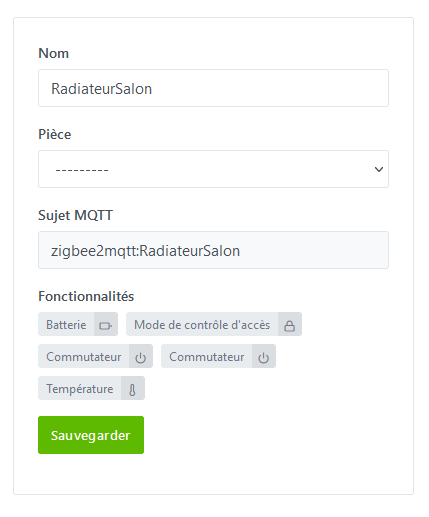
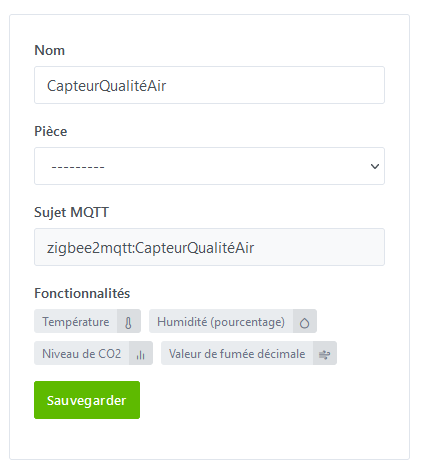
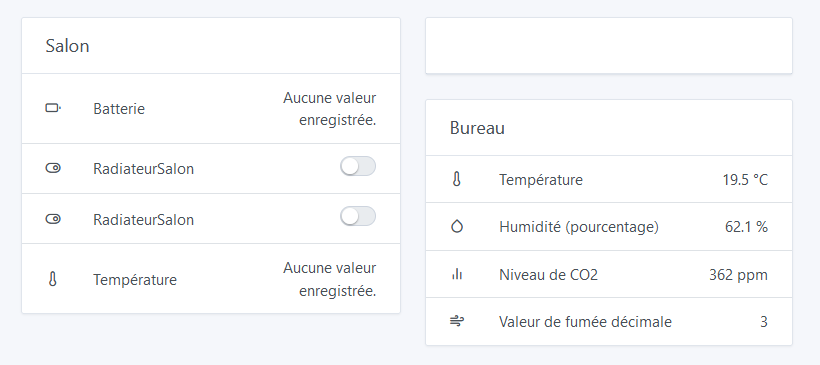
I had two unsupported devices, which are now correctly detected (with some improvements for the connected head) :


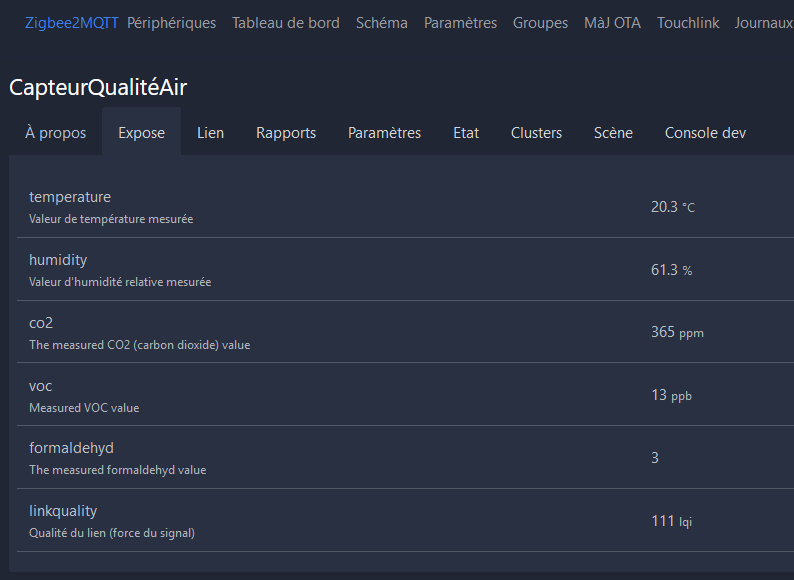
What is the « smoke value Â»? No units?

I don’t know what the unit of measurement is here..

I deleted the devices added by the official image because the equipment was detected as « different Â» by your version and suggested to add them again. Behavior-wise, everything is fine. I haven’t looked into the scenes yet, but the tweak I tried to do yesterday didn’t work. I’ll check this afternoon, it doesn’t seem related to Z2M anyway.

Do you use the same database?

Oops, I made a mistake? :stuck_out_tongue_winking_eye:
My install is new and just in test for now. I had, what, 2 devices :wink: So I just stopped the original Docker and ran this one on the same base ^^’ That way, no need to reconfigure the integrations, everything is already functional with my custom config.

What I do otherwise is to copy the /var/lib/gladysassistant folder and use the clone for testing. This way, your main database remains clean.

Example:

$ sudo cp -r /var/lib/gladysassistant /var/lib/gladysassistant-atrovato

$ docker run -d \
--log-opt max-size=10m \
--restart=always \
--privileged \
--network=host \
--name gladys-dev-atrovato \
-e NODE_ENV=development \
-e SERVE_FRONT=true \
-e SERVER_PORT=80 \
-e TZ=Europe/Paris \
-e SQLITE_FILE_PATH=/var/lib/gladysassistant-atrovato/gladys-dev.db \
-v /var/run/docker.sock:/var/run/docker.sock \
-v /var/lib/gladysassistant-atrovato:/var/lib/gladysassistant-atrovato \
-v /dev:/dev \
atrovato/gladys:zigbee2mqtt

Did you have to recreate the devices then?

If that’s the case for everyone, I’ll take the opportunity to change the « external_id Â» and optimize the reading/decoding of the values.

I confirm that it also displayed all the equipment already in Gladys but with different features.

I didn’t go as far as trying to add them again, sorry :sweat_smile:

Do I understand that older devices still work with the new version? (that backward compatibility is preserved)

Sorry, I don’t have the hardware, I’m a bit in the dark here.

This is important, I don’t think we want to push an update that instantly breaks all Zigbee2mqtt integrations for everyone (and requires manual user intervention), the stability of v4 is important.